sketchucation logo sketchucation
    • 登入
    Oops, your profile's looking a bit empty! To help us tailor your experience, please fill in key details like your SketchUp version, skill level, operating system, and more. Update and save your info on your profile page today!
    🔌 Smart Spline | Fluid way to handle splines for furniture design and complex structures. Download

    [Plugin][$] RoundCorner - v3.4a - 31 Mar 24


    已排程 已置頂 已鎖定 已移動 Plugins
    1.5k 貼文 473 Posters 3.4m 瀏覽 472 Watching
    正在載入更多貼文
    • 從舊到新
    • 從新到舊
    • 最多點贊
    回覆
    • 在新貼文中回覆
    登入後回覆
    此主題已被刪除。只有擁有主題管理權限的使用者可以查看。
    • fredo6F 離線
      fredo6
      最後由 編輯

      @uwesketch said:

      Hi

      Rounding an edge excluding the corners generates the arc as connected segments, not a curve/arc.
      is it possible that along edges an arc/curve is generated?
      That would help a lot in technical drawings where I need to know the radius of the rounding arc.
      The corners are generated perfectly.

      This is actually not so easy, because Arc / Curve is a transient property (think of an Arc when deformed by non-uniform scaling).
      There are plugins to retrieve the center of an arc, as far I as remember.

      Fredo

      1 條回覆 最後回覆 回覆 引用 0
      • S 離線
        SEANHOLMES
        最後由 編輯

        I am having this new error can anyone help me out its not allowing me to continue use of this product.
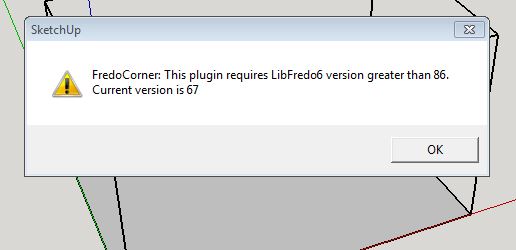

        not working

        1 條回覆 最後回覆 回覆 引用 0
        • TIGT 離線
          TIG Moderator
          最後由 編輯

          Why not follow the instructions in the message and get the newest version of LibFredo ?
          It's available from the PluginStore, just like the related extensions which use that Lib...
          Your version is very out of date !

          After installing the Lib restart SketchUp to ensure everything gets synced...

          TIG

          1 條回覆 最後回覆 回覆 引用 0
          • J 離線
            josegara
            最後由 編輯

            You are god my friend. A brutal tool

            1 條回覆 最後回覆 回覆 引用 0
            • J 離線
              josegara
              最後由 編輯

              Sketchup owes you

              1 條回覆 最後回覆 回覆 引用 0
              • I 離線
                ITman496
                最後由 編輯

                Hello, I've been a loyal user of this tool for a very long time, great work!

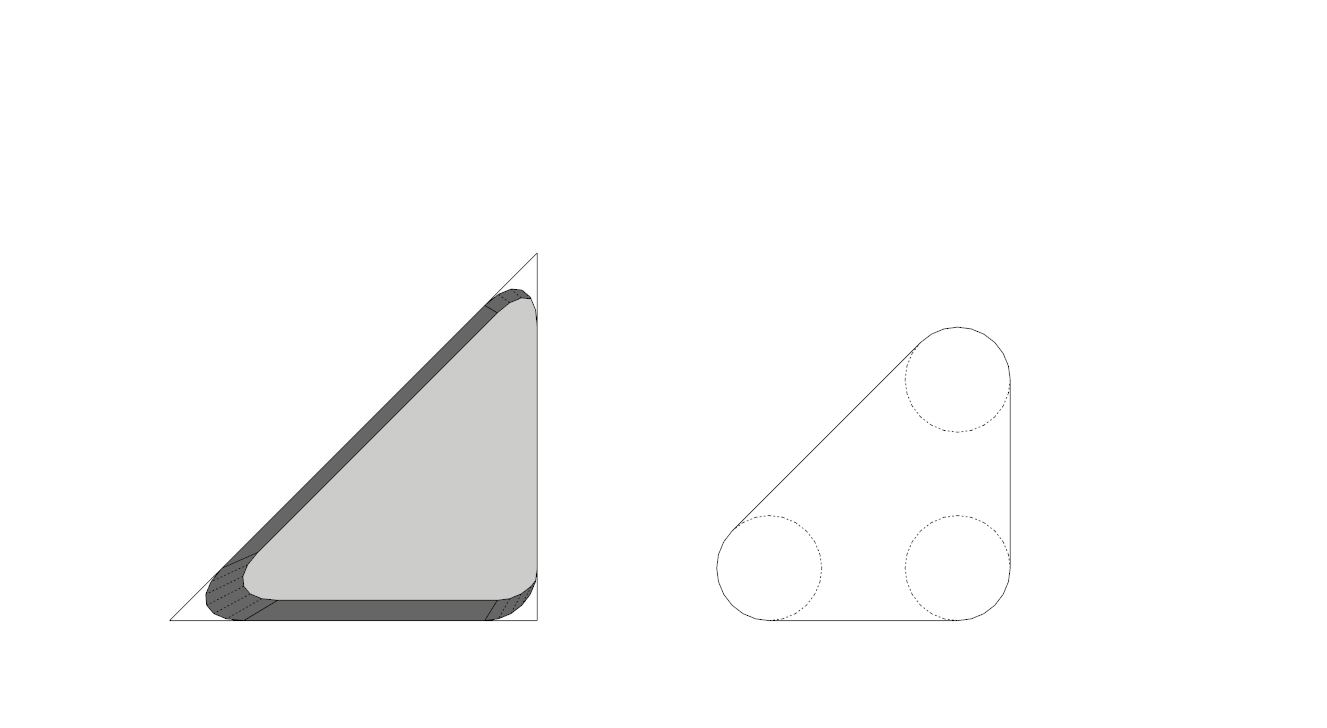
                I've been trying for a long time to get it to sort of.. maintain a radius when rounding a corner. For example, I'm trying to set up a part and calculate pocket cuts of a CNC machine's endmill, when it can't accurately do an interior corner because of the size of the endmill. When I round with say a 1/8" radius, it seems to do a non-circular rounding when doing anything other then 90 degrees. Is there a solution for this? Doing it manually sucks 😃

                Here is a picture for an example. I want the right's inner bends, but the plugin instead gives me what's on the left.
                roundcorner.JPG

                1 條回覆 最後回覆 回覆 引用 0
                • Dave RD 離線
                  Dave R
                  最後由 編輯

                  I've never noticed that but you're right.

                  @itman496 said:

                  Is there a solution for this? Doing it manually sucks 😃

                  At least for now you could use TIG's 2D Fillet from his 2D Tools set.

                  Etaoin Shrdlu

                  %

                  (THERE'S NO PLACE LIKE)

                  G28 X0.0 Y0.0 Z0.0

                  M30

                  %

                  1 條回覆 最後回覆 回覆 引用 0
                  • fredo6F 離線
                    fredo6
                    最後由 編輯

                    ITman496 made a very relevant observation.

                    Indeed this concerns borders where the edge angle is different from 90 degrees.

                    In RoundCorner and FredoCorner, the offset is measured perpendicularly to the borders, along their faces.
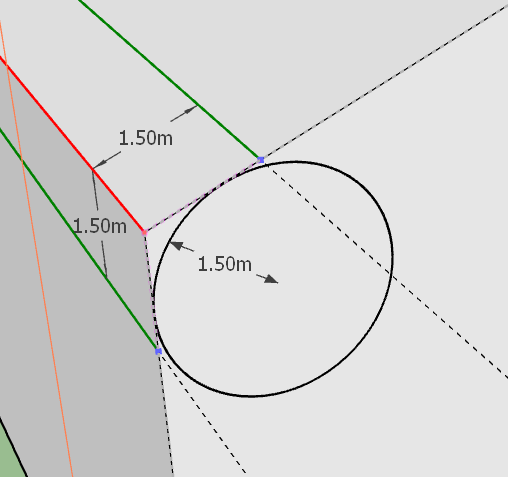
                    Corner - Radius 1.png

                    As a result, the rounding is not a circle, but it is scaled to be tangent at faces. All pictures below generated with an ofset of 1.5 m and a Circle profile.
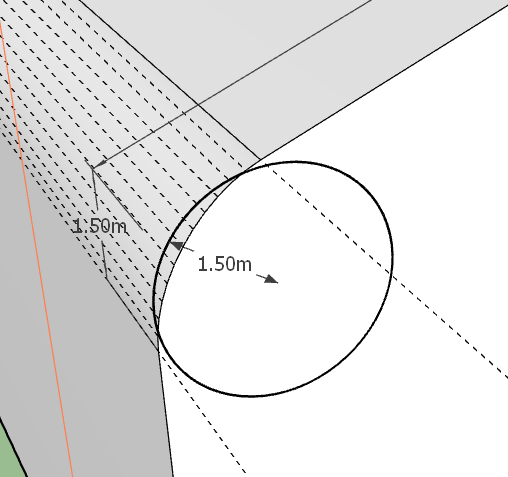
                    Corner - Radius Off.png

                    However, there is another possibility, which is to make the rounding so that it matches a circle with a radius equal to the offset value
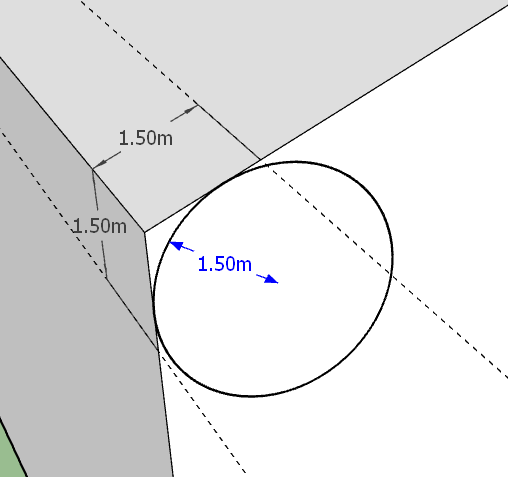
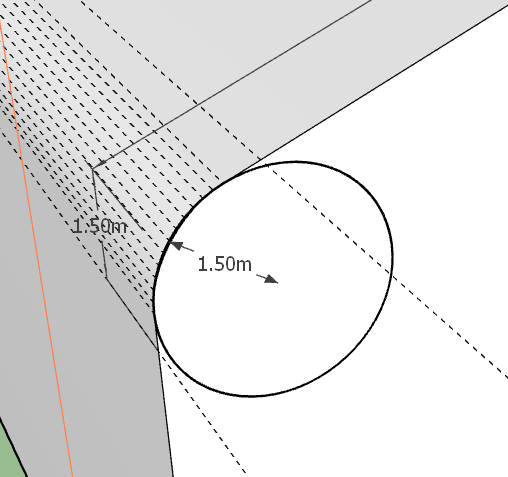
                    Corner - Radius 0.png

                    Corner - Radius - On.png

                    This is a matter of choice indeed, so it has to be an option, which I am implementing in FredoCorner.

                    Below are the same solid rounded with the two options
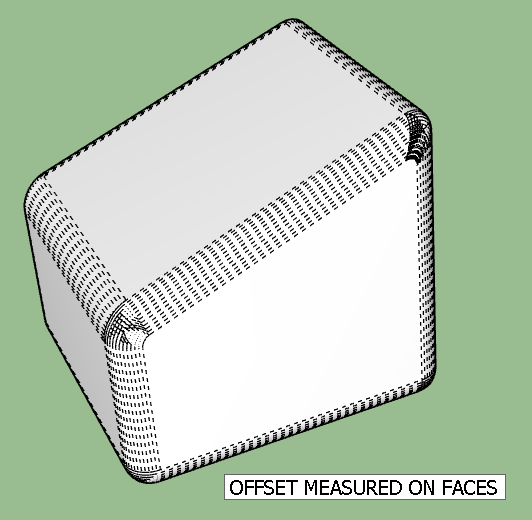
                    Corner Radius - All - Face.png

                    Corner Radius - All - Radius.png

                    As far as I remember, I discarded the radius mode because it gives border rounding which are visually non uniform. But, the option is valid geometrically, especially if it is to generate the shape for 3D Printing.

                    Fredo

                    1 條回覆 最後回覆 回覆 引用 0
                    • Dave RD 離線
                      Dave R
                      最後由 編輯

                      Thank you for that explanation, Fredo. I'm happy to know it'll be a feature in FredoCorner.

                      Etaoin Shrdlu

                      %

                      (THERE'S NO PLACE LIKE)

                      G28 X0.0 Y0.0 Z0.0

                      M30

                      %

                      1 條回覆 最後回覆 回覆 引用 0
                      • fredo6F 離線
                        fredo6
                        最後由 編輯

                        Dave,

                        It should be possible in FredoCorner (but more complex in RoundCorner).

                        Again, the result is visually different
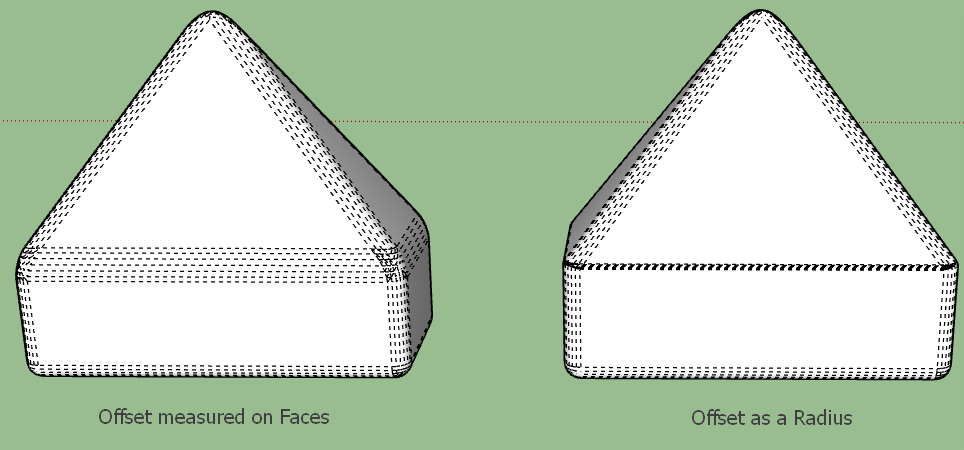
                        Corner Radius Pyramid.png

                        1 條回覆 最後回覆 回覆 引用 0
                        • I 離線
                          ITman496
                          最後由 編輯

                          Thank you so much Fredo! My years of suffering are over!

                          I can't wait for the update to fredocorner!

                          And Dave, I will try 2D tools. Thank you!

                          1 條回覆 最後回覆 回覆 引用 0
                          • fredo6F 離線
                            fredo6
                            最後由 編輯

                            @itman496 said:

                            Thank you so much Fredo! My years of suffering are over!

                            I can't wait for the update to fredocorner!

                            I'll publish it later today.

                            here is the video

                            1 條回覆 最後回覆 回覆 引用 0
                            • Dave RD 離線
                              Dave R
                              最後由 編輯

                              Wow! Very good.Thank you!

                              Etaoin Shrdlu

                              %

                              (THERE'S NO PLACE LIKE)

                              G28 X0.0 Y0.0 Z0.0

                              M30

                              %

                              1 條回覆 最後回覆 回覆 引用 0
                              • fredo6F 離線
                                fredo6
                                最後由 編輯

                                NEW RELEASE: RoundCorner v3.3a - 18 Dec 18

                                Requirement: LibFredo6 v8.7a or above

                                RoundCorner 3.3a is a maintenance release.


                                Home Page of RoundCorner for information and Download.

                                Main post of this thread.

                                1 條回覆 最後回覆 回覆 引用 0
                                • O 離線
                                  oyercab
                                  最後由 編輯

                                  Hello,
                                  About two weeks ago I received an error message about RoundCorner when starting Sketchup 2018 Pro. I didn't save the message, and don't know exactly what it said, but RoundCorner was no longer available. I'm on macOS High Sierra (can't upgrade any higher). I updated Fredo6 to the latest version, restarted Sketchup, and then updated RoundCorner and restarted. The toolbar appears, but is completely unresponsive. I also tried installing FredoCorner. Its toolbar has never appeared, but I can put the icons in my main toolbar. It is also unresponsive.

                                  In the "Fredo6 Collection" under Tools both RoundCorner and FredoCorner are showing, along with their menus, but I can't do anything with them. I've been using RoundCorner for years, and can barely function without it (many thanks, Fredo). Please, somebody help!
                                  (I did install through Extension Manager in Sketchup).

                                  Thank you, and hope everybody had a Merry Christmas.

                                  1 條回覆 最後回覆 回覆 引用 0
                                  • fredo6F 離線
                                    fredo6
                                    最後由 編輯

                                    @oyercab

                                    You seem to use Sketchup 8. Can you confirm?

                                    Can you open the Ruby Console, and check for error message when you launch RoundCorner.

                                    Thanks

                                    Fredo

                                    1 條回覆 最後回覆 回覆 引用 0
                                    • O 離線
                                      oyercab
                                      最後由 編輯

                                      @fredo6 said:

                                      @oyercab

                                      You seem to use Sketchup 8. Can you confirm?

                                      Can you open the Ruby Console, and check for error message when you launch RoundCorner.

                                      Thanks

                                      Fredo

                                      Hello Fredo, I use SU2018 Pro. I did open Ruby Console, and the LibFredo6 plugin seems to be the problem. I installed the latest version through Extension Manager and followed instructions carefully, closing and re-starting Sketchup before installing RoundCorner. I then closed and re-started before installing FredoCorner. As I said, the toolbars and icons are there, but they don't do anything.

                                      This problem started suddenly, after I had been away from the computer for a week. When I launched SketchUp, the error message about RoundCorner was on the screen, and its toolbar had disappeared. I'm going to try deleting and re-installing LibFredo6 again, but have already done that several times. Can I post the Ruby Console info here if I have no luck?

                                      1 條回覆 最後回覆 回覆 引用 0
                                      • fredo6F 離線
                                        fredo6
                                        最後由 編輯

                                        @oyercab said:

                                        @fredo6 said:

                                        I did open Ruby Console, and the LibFredo6 plugin seems to be the problem.

                                        Could you copy - paste the errors you see in the Ruby console.

                                        1 條回覆 最後回覆 回覆 引用 0
                                        • O 離線
                                          oyercab
                                          最後由 編輯

                                          Error: #<Errno::ENOENT: No such file or directory @ rb_sysopen - /Users/21imac/Library/Application Support/.LIBFREDO6_DATA_Dir/LibFredo6_all_defaults.dat>
                                          /users/21imac/library/application support/sketchup 2018/sketchup/plugins/fredo6_!libfredo6/lib6registry.rbe:144:in initialize' /users/21imac/library/application support/sketchup 2018/sketchup/plugins/fredo6_!libfredo6/lib6registry.rbe:144:in open'
                                          /users/21imac/library/application support/sketchup 2018/sketchup/plugins/fredo6_!libfredo6/lib6registry.rbe:144:in write_to_file' /users/21imac/library/application support/sketchup 2018/sketchup/plugins/fredo6_!libfredo6/lib6registry.rbe:127:in store'
                                          /users/21imac/library/application support/sketchup 2018/sketchup/plugins/fredo6_!libfredo6/lib6plugin.rbe:1278:in usage_use' /users/21imac/library/application support/sketchup 2018/sketchup/plugins/fredo6_!libfredo6/lib6plugin.rbe:1266:in command_invoke'
                                          /users/21imac/library/application support/sketchup 2018/sketchup/plugins/fredo6_!libfredo6/lib6plugin.rbe:1249:in block (2 levels) in build_config_commands' /users/21imac/library/application support/sketchup 2018/sketchup/plugins/fredo6_!libfredo6/lib6traductor.rbe:1348:in call'
                                          /users/21imac/library/application support/sketchup 2018/sketchup/plugins/fredo6_!libfredo6/lib6traductor.rbe:1348:in block in add_command' SketchUp:1:in call'

                                          1 條回覆 最後回覆 回覆 引用 0
                                          • fredo6F 離線
                                            fredo6
                                            最後由 編輯

                                            It seems you may have some restriction (security-based) to create subdirectories in /Users/21imac/Library/Application Support/.LIBFREDO6_DATA_Dir.

                                            Possibly, this has to do with the mode of your finder, which may require "View Hidden files".

                                            Can you check.

                                            Worse case, create the directory manually: /Users/21imac/Library/Application Support/.LIBFREDO6_DATA_Dir.

                                            Please note that there is a 'dot' before LIBFREDO6_DATA_Dir. On Mac, I think this to make the directory hidden.


                                            1 條回覆 最後回覆 回覆 引用 0
                                            • 1
                                            • 2
                                            • 67
                                            • 68
                                            • 69
                                            • 70
                                            • 71
                                            • 72
                                            • 73
                                            • 74
                                            • 69 / 74
                                            • 第一個貼文
                                              最後的貼文
                                            Buy SketchPlus
                                            Buy SUbD
                                            Buy WrapR
                                            Buy eBook
                                            Buy Modelur
                                            Buy Vertex Tools
                                            Buy SketchCuisine
                                            Buy FormFonts

                                            Advertisement