sketchucation logo sketchucation
    • 登入
    Oops, your profile's looking a bit empty! To help us tailor your experience, please fill in key details like your SketchUp version, skill level, operating system, and more. Update and save your info on your profile page today!
    🔌 Smart Spline | Fluid way to handle splines for furniture design and complex structures. Download

    [Plugin][$] RoundCorner - v3.4a - 31 Mar 24


    已排程 已置頂 已鎖定 已移動 Plugins
    1.5k 貼文 473 Posters 3.4m 瀏覽 472 Watching
    正在載入更多貼文
    • 從舊到新
    • 從新到舊
    • 最多點贊
    回覆
    • 在新貼文中回覆
    登入後回覆
    此主題已被刪除。只有擁有主題管理權限的使用者可以查看。
    • kimi kimiK 離線
      kimi kimi
      最後由 編輯

      @fredo6 said:

      @kimi kimi said:

      Hi Fredo, hi everyone,
      I made an update to my Round Corner plugin this morning, and now I can't see the toolbar with all the options when I activate the command. Is this a problem only on my computer, or does someone else have it too?
      As you can see on screenshot, the command is active, there is text in bottom left and right, but I don't see the toolbar. I tried erasing it, erasing and reinstalling Fredo6 library, but still same result.

      Could you open the RUBY console and advise on any error message you would observe.

      Thanks

      Fredo

      Thanks for your response,
      I'm not sure what to look for in Ruby Console, so I just copied text from it.
      I suppose this might point to something.
      Error: #<NoMethodError: undefined method `view_line_width=' for G6:Module>


      round corner ruby console.txt

      1 條回覆 最後回覆 回覆 引用 0
      • fredo6F 離線
        fredo6
        最後由 編輯

        @kimi kimi

        Simple. You need to upgrade LibFredo6 to the latest version (v7.7c).

        Fredo

        1 條回覆 最後回覆 回覆 引用 0
        • C 離線
          CREAIMMO
          最後由 編輯

          Bonjour,

          Merci pour Roundcorner, c'est un plugin sympa.

          Est ce qu'il serait possible dans une futur mise a jour de prévoir des chanfreins avec 2 cotes différentes

          que x soit different de Y

          actuellement si je donne une valeur de chanfrein de 1mm il va faire 1 mm de chque coté de l'arrete principale

          sauf que j'aimerai que l'on puisse choisir 1mm en y et 0,5mm en x exemple

          Cordialement
          creaimmo

          1 條回覆 最後回覆 回覆 引用 0
          • fredo6F 離線
            fredo6
            最後由 編輯

            @creaimmo said:

            Est ce qu'il serait possible dans une futur mise a jour de prévoir des chanfreins avec 2 cotes différentes

            Asymmetric rounding is indeed an interesting features, requested by very few users however. With the current approach of RoundCorner, would be a little bit difficult. So It will have to wait for a full refresh.

            Fredo

            1 條回覆 最後回覆 回覆 引用 0
            • C 離線
              countercharge
              最後由 編輯

              Hi, sorry for the noob question but I've installed this plugin and even after reading the documentation I can't figure out how to use it. I don't see any way to bring up the interface after selecting the edge I want to round.. nothing in the toolbar, nothing in the menu. The plugin is enabled but I'm totally at a loss as to how to use it.

              edit: nevermind, the interface showed up

              1 條回覆 最後回覆 回覆 引用 0
              • fredo6F 離線
                fredo6
                最後由 編輯

                @countercharge said:

                edit: nevermind, the interface showed up

                Did you identify what was the problem (in case this happens to other users)?

                Fredo

                1 條回覆 最後回覆 回覆 引用 0
                • C 離線
                  countercharge
                  最後由 編輯

                  @fredo6 said:

                  @countercharge said:

                  edit: nevermind, the interface showed up

                  Did you identify what was the problem (in case this happens to other users)?

                  Fredo

                  I did not, but I think it appeared when I closed and re-opened sketchup. I assumed it would load once the plugin was loaded and enabled.

                  Loving it so far but I can't figure out how to round edges that are on the inside/interior of an object. If I try to do that, it covers the opening. I'm sure that's somewhere in this long thread.. any idea what page to look at?

                  1 條回覆 最後回覆 回覆 引用 0
                  • fredo6F 離線
                    fredo6
                    最後由 編輯

                    @countercharge said:

                    Loving it so far but I can't figure out how to round edges that are on the inside/interior of an object. If I try to do that, it covers the opening. I'm sure that's somewhere in this long thread.. any idea what page to look at?

                    Just erase the cover face(s). The rounding is underneath.

                    Fredo

                    1 條回覆 最後回覆 回覆 引用 0
                    • fredo6F 離線
                      fredo6
                      最後由 編輯

                      NEW RELEASE: RoundCorner v3.2e - 25 Oct 17

                      RoundCorner 3.2e is a maintenance release. It fixes a weird issue on French platforms, preventing the plugin to launch (in relation with decimal separator differences)..


                      Home Page of RoundCorner for information and Download.

                      Main post of this thread.

                      1 條回覆 最後回覆 回覆 引用 0
                      • J 離線
                        jtri
                        最後由 編輯

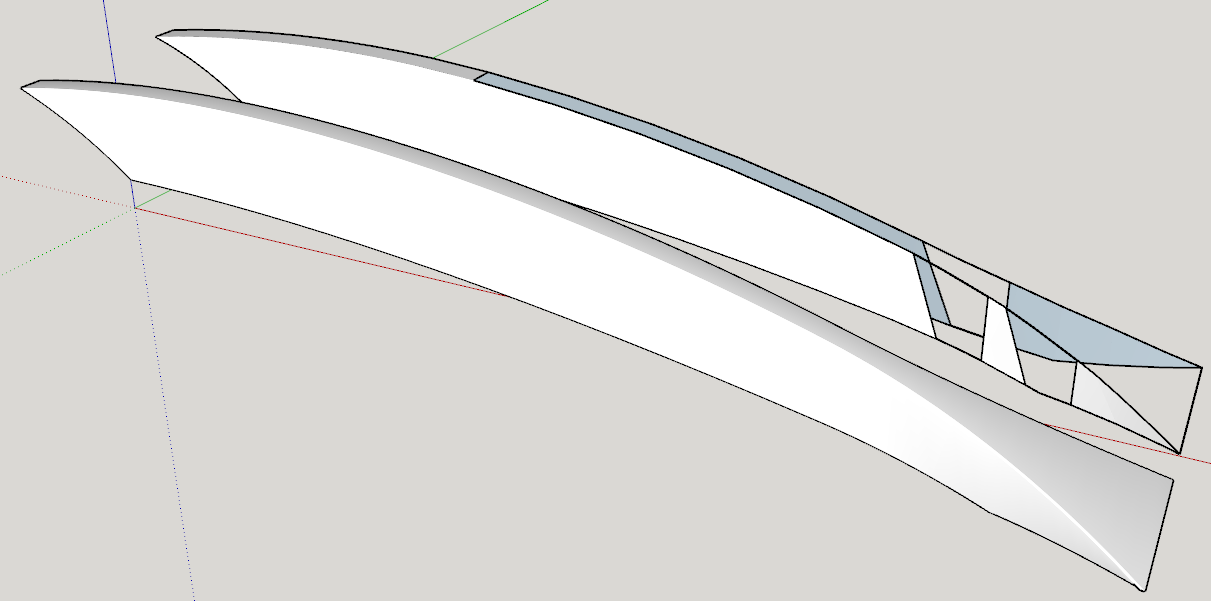
                        I am working on knife and when I use the round over tool I loose faces. A copy of the handle is at 1000x as I wanted to show that scaling up does not fix the issue I have. My model is at the origin original size and it has a volume.
                        I have used this wonderful tool many times before but I seem to have developed this model in a way that is not compatible with the round over tool.
                        I used Cuviloft to skin if that is a factor. Also I welded all the perimeter lines hoping that might help, it did fix some issues.
                        Thanks
                        Jeff


                        Test.skp

                        1 條回覆 最後回覆 回覆 引用 0
                        • Dave RD 離線
                          Dave R
                          最後由 編輯

                          Even scaled up, the tiny radius on the round overs creates some bad geometry. Make a reasonable radius and it works. I used 10 in.
                          Screenshot - 11_11_2017 , 4_31_13 PM.png

                          Etaoin Shrdlu

                          %

                          (THERE'S NO PLACE LIKE)

                          G28 X0.0 Y0.0 Z0.0

                          M30

                          %

                          1 條回覆 最後回覆 回覆 引用 0
                          • J 離線
                            jtri
                            最後由 編輯

                            Dave
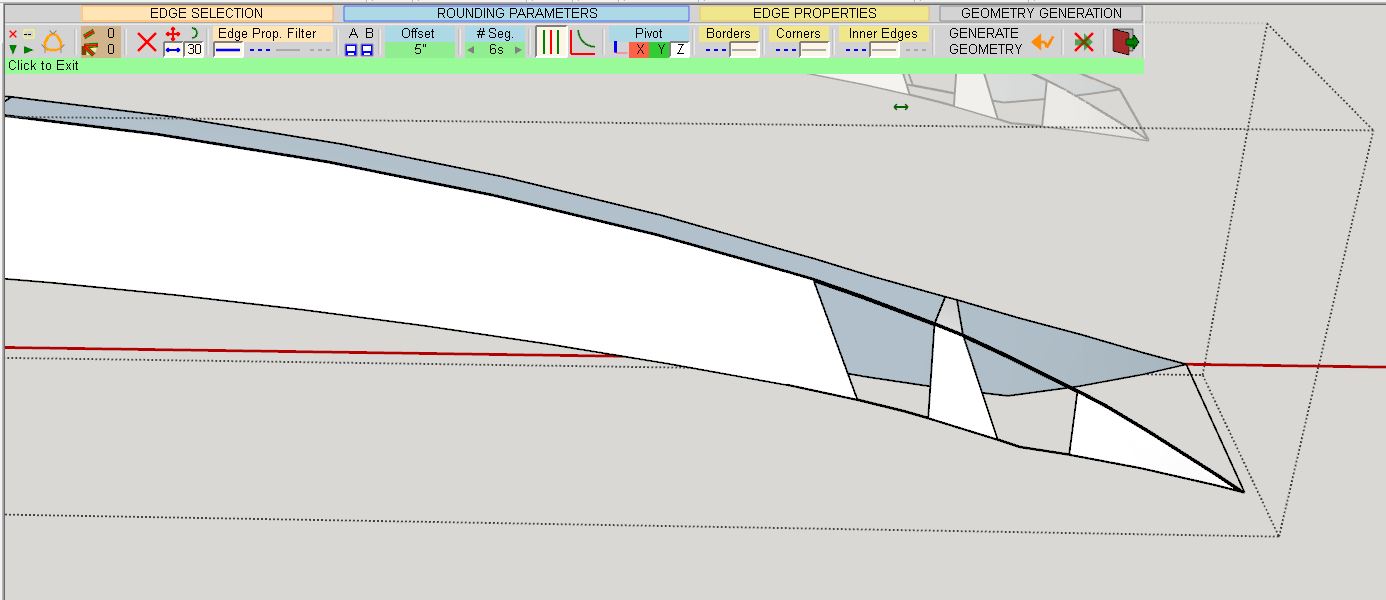
                            Thanks for you quick reply but I am unable to duplicate your results. Maybe the screen shot can help
                            Thanks
                            Jeff

                            Capture.JPG

                            1 條回覆 最後回覆 回覆 引用 0
                            • fredo6F 離線
                              fredo6
                              最後由 編輯

                              It all depends on your geometry.

                              As it has been generated by Curviloft, I imagine it is triangulated. Just turn on Hidden Geometry to verify it.

                              In that case, I am afraid that RoundCorner will have difficulty to perfrom its task, whatever the scale is. Sorry for that. Another algorithm is needed to handle those cases.

                              Fredo

                              1 條回覆 最後回覆 回覆 引用 0
                              • Dave RD 離線
                                Dave R
                                最後由 編輯

                                Did you try with a larger radius? I used 10 in., not 5 in.

                                Edit to add: I redrew the shape rather than trying to reconstruct yours. I didn't use Curviloft so I didn't have the triangulation.

                                Etaoin Shrdlu

                                %

                                (THERE'S NO PLACE LIKE)

                                G28 X0.0 Y0.0 Z0.0

                                M30

                                %

                                1 條回覆 最後回覆 回覆 引用 0
                                • J 離線
                                  jtri
                                  最後由 編輯

                                  Thanks so much for the help!

                                  1 條回覆 最後回覆 回覆 引用 0
                                  • R 離線
                                    riuslyp
                                    最後由 編輯

                                    I had some trouble in using this plugin. The object I had rounded seemed like useless afterwards, I could not move nor color it, or anything else since my SU 2013 would crash if I do that. Before rounding, I have set the offset etc to the appropriate value. Could someone advice me what to do? I have also installed the newest LibFred

                                    1 條回覆 最後回覆 回覆 引用 0
                                    • Dave RD 離線
                                      Dave R
                                      最後由 編輯

                                      @riuslyp said:

                                      I had some trouble in using this plugin. The object I had rounded seemed like useless afterwards, I could not move nor color it, or anything else since my SU 2013 would crash if I do that. Before rounding, I have set the offset etc to the appropriate value. Could someone advice me what to do? I have also installed the newest LibFred

                                      Can you share an example?

                                      What is your graphics card? Are it's drivers up to date?

                                      Etaoin Shrdlu

                                      %

                                      (THERE'S NO PLACE LIKE)

                                      G28 X0.0 Y0.0 Z0.0

                                      M30

                                      %

                                      1 條回覆 最後回覆 回覆 引用 0
                                      • R 離線
                                        riuslyp
                                        最後由 編輯

                                        @dave r said:

                                        @riuslyp said:

                                        I had some trouble in using this plugin. The object I had rounded seemed like useless afterwards, I could not move nor color it, or anything else since my SU 2013 would crash if I do that. Before rounding, I have set the offset etc to the appropriate value. Could someone advice me what to do? I have also installed the newest LibFred

                                        Can you share an example?

                                        What is your graphics card? Are it's drivers up to date?

                                        I use AMD A8-7410 APU with AMD Radeon R5 Graphics, 2200 Mhz, 4 Core(s), and yes, my graphic card is up to date.
                                        I was just trying to round a cube and I wanted to move it, but my SU then suddenly crashed. I had also tried to uncheck the 'hardware accelerator' but for no use.

                                        1 條回覆 最後回覆 回覆 引用 0
                                        • fredo6F 離線
                                          fredo6
                                          最後由 編輯

                                          Are you really running SU2013 (as your profile indicates)?

                                          Fredo

                                          1 條回覆 最後回覆 回覆 引用 0
                                          • V 離線
                                            VancoD
                                            最後由 編輯

                                            Thanks for the plug-in Fredo. It seems to do a fine job.

                                            My issue is not in getting the tool to work - my issue is what is happening you my shape after the round-over.

                                            What I'm working on is not a complex shape - it's essentially a rectangle 15x100x455 mm. The top face has a radius of 254mm into it. It's a long box with a grove in it 😄

                                            My issue is that after I round all my edges the "entities" in SketchUp are basically lost. I now have an amorphous rectangle shape and I've lost all the "dimensional attributes" to all the elements/faces - I cannot submit this to a manufacturer for production with the dimensional data visible as I'd like to.

                                            I am arguably very new to SketchUp - have I missed something obvious here - perhaps some sort of layering or overlay where I can apply the round-over and still have all the "square" reference data in place?

                                            EDIT:
                                            Well - I can use the dimensions tool to indicate the dimensions, and that's technically "good enough" for my need. But I'm still curious to know if there's a way to keep that entity data in place.....


                                            1 條回覆 最後回覆 回覆 引用 0
                                            • 1
                                            • 2
                                            • 68
                                            • 69
                                            • 70
                                            • 71
                                            • 72
                                            • 73
                                            • 74
                                            • 70 / 74
                                            • 第一個貼文
                                              最後的貼文
                                            Buy SketchPlus
                                            Buy SUbD
                                            Buy WrapR
                                            Buy eBook
                                            Buy Modelur
                                            Buy Vertex Tools
                                            Buy SketchCuisine
                                            Buy FormFonts

                                            Advertisement


