sketchucation logo sketchucation
    • 登入
    Oops, your profile's looking a bit empty! To help us tailor your experience, please fill in key details like your SketchUp version, skill level, operating system, and more. Update and save your info on your profile page today!
    🔌 Smart Spline | Fluid way to handle splines for furniture design and complex structures. Download

    [Plugin][$] RoundCorner - v3.4a - 31 Mar 24


    已排程 已置頂 已鎖定 已移動 Plugins
    1.5k 貼文 473 Posters 3.4m 瀏覽 472 Watching
    正在載入更多貼文
    • 從舊到新
    • 從新到舊
    • 最多點贊
    回覆
    • 在新貼文中回覆
    登入後回覆
    此主題已被刪除。只有擁有主題管理權限的使用者可以查看。
    • fredo6F 離線
      fredo6
      最後由 編輯

      @decker said:

      Contiued from previous post - Difficulties with installation of LibFredo6 3.3a and RoundCorner2.1a

      After removing empty directories I get this message upon SKU start up -

      Error Loading File ZLoader__RoundCorner.rb
      uninitialized constant Traductor::Plugin

      Help Please.... 😢

      It could come from your Unzip program that may not respect the reconstruction of hierarchy for folders. On PC, it is advised to use WinZip, but on Mac, I don't know.

      Open the zip file, Select_all, click on Extract, select the Skechup Plugins folder, then answer YES to any request for overwriting.
      Do this for LibFredo6 3.3a.zip and for RoundCorner 2.1a.zip.

      Check that the folder hierarchy is correctly reconstructed

      At the top level, with the Sketchup Plugins folder, you should have only these files and folders:
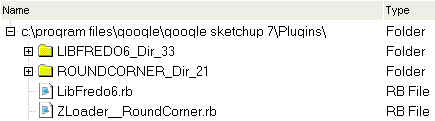
      RDC Top level.jpg

      Within the folder ROUNDCORNER_Dir_21, you should have:
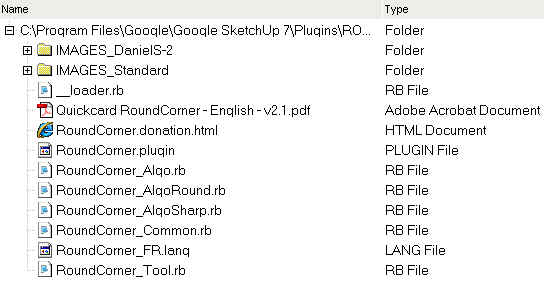
      RDC within.jpg

      Within the folder LIBFREDO6_Dir_33, you should have:
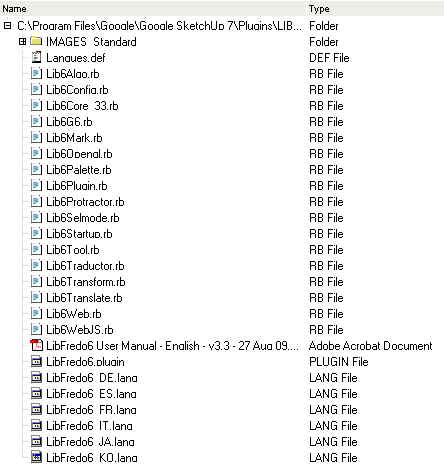
      RDC within LibFredo.jpg

      Don't bother for the rest. Do not delete, rename or move files manually.

      Fredo

      1 條回覆 最後回覆 回覆 引用 0
      • J 離線
        Jim
        最後由 編輯

        Fredo - this is off-topic, but I have been wanting to show files and folders as you have shown in the in the previous post. How do you do it?

        Hi

        1 條回覆 最後回覆 回覆 引用 0
        • fredo6F 離線
          fredo6
          最後由 編輯

          @jim said:

          Fredo - this is off-topic, but I have been wanting to show files and folders as you have shown in the in the previous post. How do you do it?

          I use a very handy shareware, called STG FolderPrint Plus.
          More info at http://www.stgsys.com/fpp.asp

          1 條回覆 最後回覆 回覆 引用 0
          • D 離線
            Decker
            最後由 編輯

            Are there any MAC users out there that can help describe the proper directory build for this plugin??? thank you

            1 條回覆 最後回覆 回覆 引用 0
            • D 離線
              Decker
              最後由 編輯

              Seems like I have it working here are my directories
              SKU plugins - LIBFREDO_DIR_33
              LibFredo6.rb
              ROUNDCORNER_Dir_21
              Zloader RoundCorner.rb
              removed extra directories
              Thanks for your help

              1 條回覆 最後回覆 回覆 引用 0
              • B 離線
                B2Pi
                最後由 編輯

                Is it possible to do a 'half-round' in order to round the intersection of two mitered components? Thanks so much

                1 條回覆 最後回覆 回覆 引用 0
                • fredo6F 離線
                  fredo6
                  最後由 編輯

                  @b2pi said:

                  Is it possible to do a 'half-round' in order to round the intersection of two mitered components? Thanks so much

                  Could you illustrate so that it is fully clear.

                  Fred

                  1 條回覆 最後回覆 回覆 引用 0
                  • S 離線
                    Sergio Morera
                    最後由 編輯

                    What an excellent pluging it works like a charm on SU 7. Thank you for all the wonderful work you have done in this forum, it is really inspiring.

                    1 條回覆 最後回覆 回覆 引用 0
                    • P 離線
                      Pegasus442
                      最後由 編輯

                      can anyone help me get this plugin, im looking for a download link for the upgrade for sketchup and the actual plugin buti cant find either of them.

                      1 條回覆 最後回覆 回覆 引用 0
                      • massimoM 離線
                        massimo Moderator
                        最後由 編輯

                        Look at the bottom of the very first post of this thread. You have also to install the latest version of LibFredo. Read the first post carefully.

                        1 條回覆 最後回覆 回覆 引用 0
                        • J 離線
                          Jebimasta
                          最後由 編輯

                          😮 this plugin is incredible, Rendering will look so much better now, I don't even think I could have done this manually because of the odd corners, all sorts of angles going on 😛
                          Thanks a LOT, perhaps a small donation towards your efforts via paypal or something? 😄

                          1 條回覆 最後回覆 回覆 引用 0
                          • thomthomT 離線
                            thomthom
                            最後由 編輯

                            @jebimasta said:

                            Thanks a LOT, perhaps a small donation towards your efforts via paypal or something? 😄

                            Tools->Fredo Collection->RoundCorner->Donation... 😉

                            Thomas Thomassen — SketchUp Monkey & Coding addict
                            List of my plugins and link to the CookieWare fund

                            1 條回覆 最後回覆 回覆 引用 0
                            • edenuxE 離線
                              edenux
                              最後由 編輯

                              I'm using windows 7, and i have problem when i put files into sketchup7/plugins directory. Can someone help me? Error says: " Error Loading File ZLoader__FredoScale.rb
                              No such file to load -- LibFredo6.rbError Loading File ZLoader__RoundCorner.rb
                              No such file to load -- LibFredo6.rb"

                              Want to see more? Visit my facebook page: https://www.facebook.com/Edvisualisation

                              1 條回覆 最後回覆 回覆 引用 0
                              • fredo6F 離線
                                fredo6
                                最後由 編輯

                                @edenux said:

                                I'm using windows 7, and i have problem when i put files into sketchup7/plugins directory. Can someone help me? Error says: " Error Loading File ZLoader__FredoScale.rb
                                No such file to load -- LibFredo6.rbError Loading File ZLoader__RoundCorner.rb
                                No such file to load -- LibFredo6.rb"

                                Can you compare first the footprint of files and folder on your PC and in the documentation to check if the installation by unzipping was done correctly, reconstructing the folder hierarchy.
                                Also, did you install LibFredo6 (v3.4 now)?

                                Fredo

                                1 條回覆 最後回覆 回覆 引用 0
                                • jwlyon1J 離線
                                  jwlyon1
                                  最後由 編輯

                                  Just added this to my mac and works like a charm!! 😎

                                  Hmm... I've got a ton of plugins, so showing the folder structure wouldn't really help but...
                                  I installed it like so:
                                  /library/application suppor/google sketchup 7/sketchup/plugins/

                                  • Libfredo6_Dir_34 (folder)
                                  • Libredo6.rb
                                  • ROUNDCORNER_Dir_21 (folder)
                                  • ZLoader__RoundCorner.rb

                                  (Note: I had to delete an older Libfredo6_Dir. I also had to delete and older ROUNDCORNER_Dir, but it worked fine with this older directory in place)

                                  What a great thing... awesome.

                                  Macbook Pro/ iMac
                                  OSX 10.7.2 Sketchup 8
                                  rogue-z is here!

                                  1 條回覆 最後回覆 回覆 引用 0
                                  • A 離線
                                    Arnold Layne
                                    最後由 編輯

                                    amazing..thanks

                                    1 條回覆 最後回覆 回覆 引用 0
                                    • S 離線
                                      SteveZissou1
                                      最後由 編輯

                                      i'm sorry if this is a foolish question, but i would really like to try the roundcorner ruby, but my screen says:
                                      "You do not have the required permissions to view the files attached to this post."
                                      what do i have to do to get permission?
                                      thanks
                                      brian

                                      1 條回覆 最後回覆 回覆 引用 0
                                      • jwlyon1J 離線
                                        jwlyon1
                                        最後由 編輯

                                        I think all you have to do is register and login to the forum... Since you've done that try downloading again!

                                        Macbook Pro/ iMac
                                        OSX 10.7.2 Sketchup 8
                                        rogue-z is here!

                                        1 條回覆 最後回覆 回覆 引用 0
                                        • boofredlayB 離線
                                          boofredlay
                                          最後由 編輯

                                          Justin is correct Brian, you have to register. But the best part... it's FREE 😄

                                          http://www.coroflot.com/boofredlay

                                          1 條回覆 最後回覆 回覆 引用 0
                                          • mitcorbM 離線
                                            mitcorb
                                            最後由 編輯

                                            If Brian is able to post in the forum, doesn't that mean he is registered?
                                            And if he is registered, could this be the Board Cookies Login problem?
                                            At the Forum Index Page navigate to the bottom to the button "Delete All Board Cookies", select Yes, then select Return to the Forum Index.
                                            Also, there is a red oval on the right side of the page at the top regarding this.

                                            If this is not the problem, never mind.

                                            I take the slow, deliberate approach in my aimless wandering.

                                            1 條回覆 最後回覆 回覆 引用 0
                                            • 1
                                            • 2
                                            • 3
                                            • 4
                                            • 5
                                            • 6
                                            • 7
                                            • 8
                                            • 73
                                            • 74
                                            • 6 / 74
                                            • 第一個貼文
                                              最後的貼文
                                            Buy SketchPlus
                                            Buy SUbD
                                            Buy WrapR
                                            Buy eBook
                                            Buy Modelur
                                            Buy Vertex Tools
                                            Buy SketchCuisine
                                            Buy FormFonts

                                            Advertisement