[Plugin] Multi face offset
-
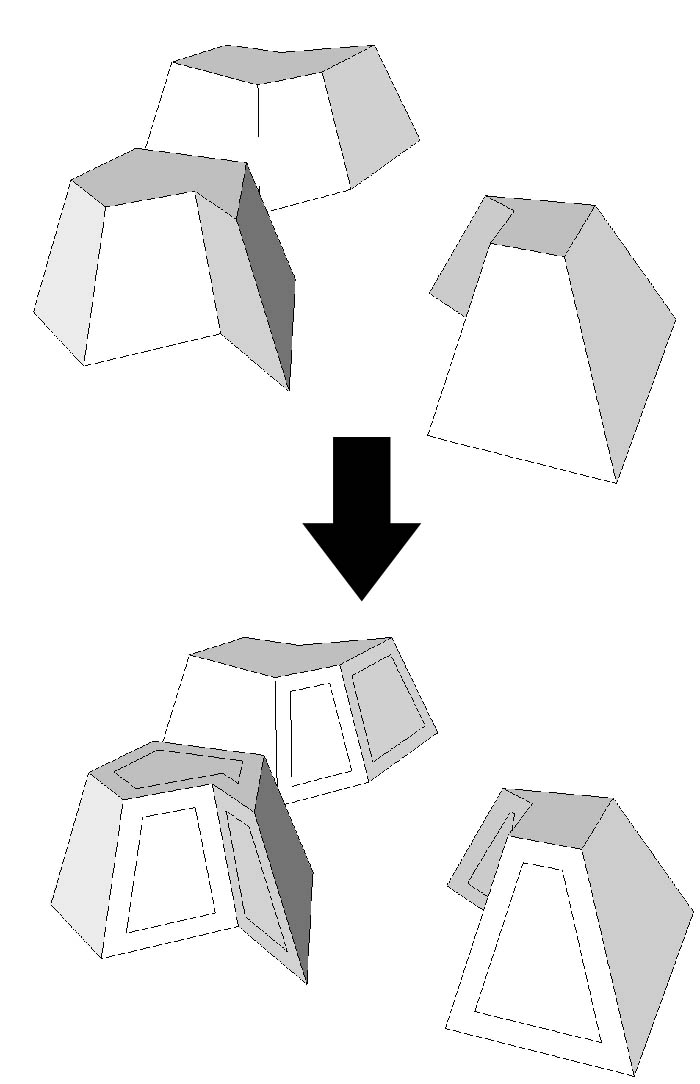
As per this request: http://forums.sketchucation.com/viewtopic.php?f=180&t=20193version 3 now up.
You'll need offset.rb, courtesy of RickW.
How it works:
- select the faces you want to offset
- Plugins->Multi face Offset
- Put in the distance
- ...and away you go
Stuff id like to change but probably wont:
-condense it in to one script with a choice of units. Added, sort of. See thoms post.
-
Why all the different versions?
.to_lhttp://code.google.com/intl/nb/apis/sketchup/docs/ourdoc/numeric.html#to_l should take care of the units for you. -
thats a rather handy tip, thanks.
-
Btw,
.to_lmight give different result from what you expect - depending on that object you convert.If you have a number -
30.to_l<- that means 30 inches.
If you have a String -"30".to_l<- that means 30 model units, so if your model units are mm - then you'll get mm.And then with a string, users can override the model units. If the model units are mm and a user type
"30m"you'll still get the correct length. -
Isn't windowizer already make the same ?
-
Windowizer generates window components. This is just plain offset.
-
Remus, please, post some image in the first post so that we can have some clue what it does (and I can rip it for TDC, too)

-
@thomthom said:
Windowizer generates window components. This is just plain offset.
A "window component" is a pure abstraction. With glass inset =0 it makes the same plain offset+ additional options (i.e. materials assignment, edit and eraze in the future)
-
Does the faces have to be on the same plane?
-
No, the faces can be on any plane. It wont work on curvy things, though.
As for windowizer doing the same thing, it probably can, and i think Fred06's offset on surface could do it as well, i just fancied writing it for a bit of practice.
-
Thanks, but does not work.
Using sketchup 6 and 7, windowsxp SP3 in Spanish
If you have a solution, thank you -
Could you open the ruby console (window->ruby console), run the script and post whatever comes up in the console?
-
Error: #<NoMethodError: undefined method
offset' for #<Sketchup::Face:0x5aad818>> C:/Archivos de programa/Google/Google SketchUp 6/Plugins/multi face offset.rb:23:inmulti_face_offset'
C:/Archivos de programa/Google/Google SketchUp 6/Plugins/multi face offset.rb:21:ineach' C:/Archivos de programa/Google/Google SketchUp 6/Plugins/multi face offset.rb:21:inmulti_face_offset'
C:/Archivos de programa/Google/Google SketchUp 6/Plugins/multi face offset.rb:34
C:/Archivos de programa/Google/Google SketchUp 6/Plugins/multi face offset.rb:33:in `call' -
most unusual, i'll have a look in to it and see if i can find out whats going on.
-
Remus - do you have RickW's [free from Smustard] 'offset.rb' and elcorto doesn't ?
-
Thanks Tig, I had no offset.rb.
Now works fine -
I havent got it, but im guessing its included in some other script. Thanks for the pointer by the way, i'll add it to the 1st post.
-
It's the simple things that are often the most complicated !
[¡Se trata de las cosas simples que a menudo son las más complicadas!] -
And seems Protrude by Jim Foltz makes the same and more!

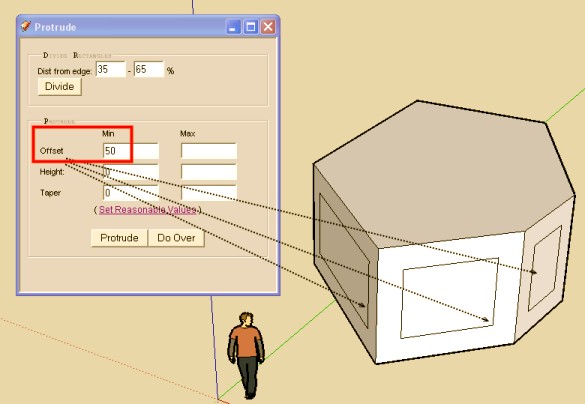
-
A veritable Smörgåsbord of repeated functionality





Hello! It looks like you're interested in this conversation, but you don't have an account yet.
Getting fed up of having to scroll through the same posts each visit? When you register for an account, you'll always come back to exactly where you were before, and choose to be notified of new replies (either via email, or push notification). You'll also be able to save bookmarks and upvote posts to show your appreciation to other community members.
With your input, this post could be even better 💗
Register Login


Advertisement