sketchucation logo sketchucation
    • Login
    Oops, your profile's looking a bit empty! To help us tailor your experience, please fill in key details like your SketchUp version, skill level, operating system, and more. Update and save your info on your profile page today!
    ⚠️ Update | Sketchucation Tools 5.0.8 released with licensing improvements and bugfixes Download

    [Plugin] Sculpt Tools (help)

    Scheduled Pinned Locked Moved Plugins
    207 Posts 48 Posters 103.1k Views 48 Watching
    Loading More Posts
    • Oldest to Newest
    • Newest to Oldest
    • Most Votes
    Reply
    • Reply as topic
    Log in to reply
    This topic has been deleted. Only users with topic management privileges can see it.
    • KrassK
      Krass
      last edited by Krass

      sorry for my "froggy" english, I didn't use a translator (french to english)

      Didier BurD 1 Reply Last reply
      Reply Quote 0
      • Didier BurD
        Didier Bur @Krass
        last edited by

        @Krass

        Hi,
        I use SculptTools to adjust the shape of AI-generated medieval characters. The problem is that the UV coordinates are lost as soon as the shape is modified. Preserving these coordinates would be a significant improvement.
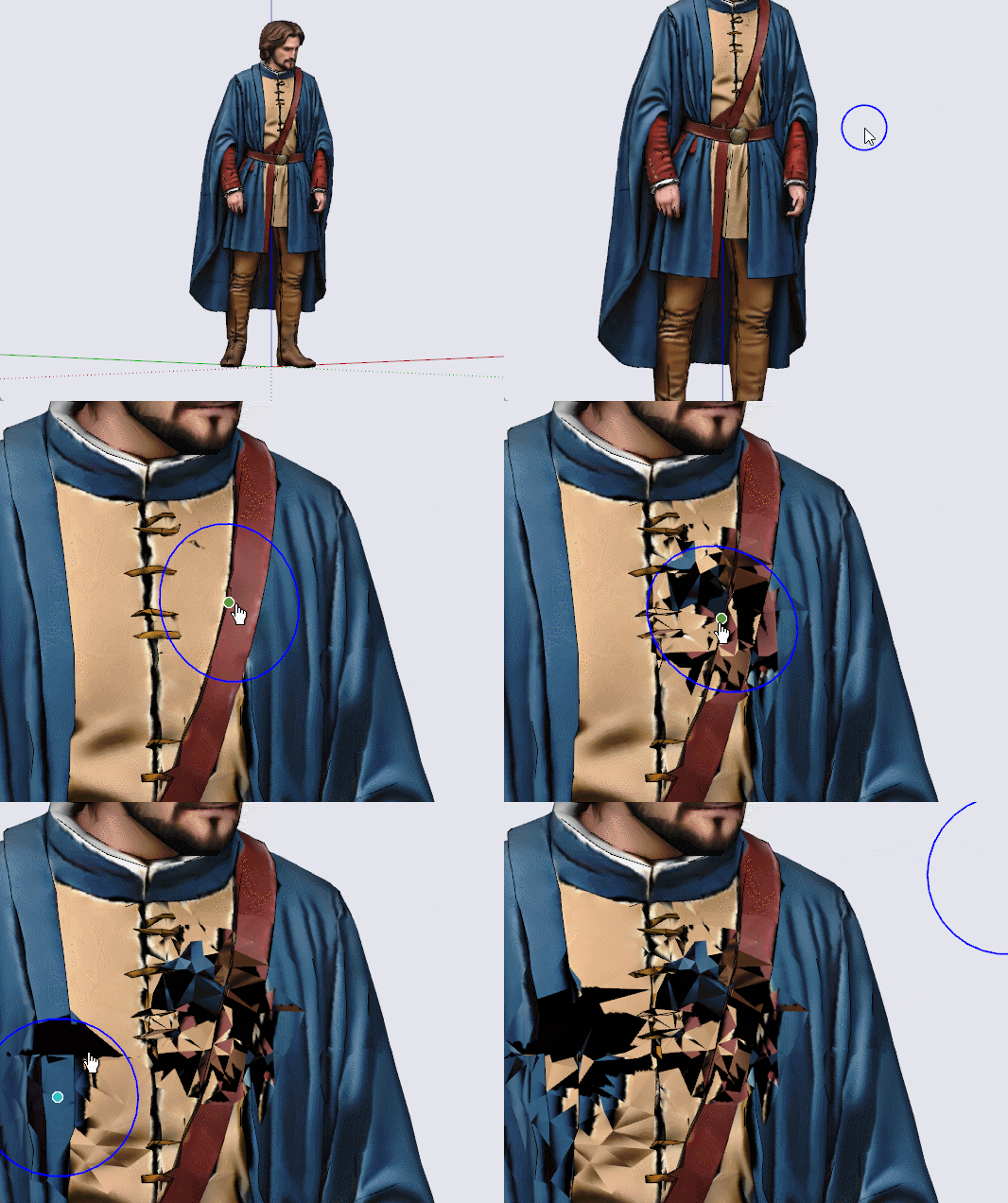
        Geoffroy.gif

        DB

        1 Reply Last reply
        Reply Quote 1
        • KrassK
          Krass
          last edited by Krass

          Hello, that usual, I think the best way tu recover your mapping after modifying geometry is to select only the ugly faces and project your material with Fredo6 thrupaint

          1 Reply Last reply
          Reply Quote 0
          • KrassK
            Krass
            last edited by Krass

            but I think you won't be able to do this with AI generted UV

            1 Reply Last reply
            Reply Quote 0
            • KrassK
              Krass
              last edited by

              One solution is to repair the damaged areas—like applying patches—using new material created from a screenshot of the figure taken before the modifications, and then applying it in "projected" mode using Thrupaint.

              KrassK 1 Reply Last reply
              Reply Quote 0
              • KrassK
                Krass @Krass
                last edited by

                1 Reply Last reply
                Reply Quote 0
                • KrassK
                  Krass
                  last edited by

                  This post is deleted!
                  1 Reply Last reply
                  Reply Quote 0
                  • KrassK
                    Krass
                    last edited by Krass

                    no ! the best solution is to use SketchUV plugin!
                    SketchUp_ZBpNK5VUlK.mp4

                    Didier BurD 1 Reply Last reply
                    Reply Quote 0
                    • TIGT
                      TIG Moderator
                      last edited by

                      If it's a single 'image' can you make its textured material 'projected', and then save it to another face of the same orientation. Can you then adjust the original surface - after which you use the eyedropper to select the projected texture from the temporary face, and reapply that onto the modified original surface ? hereby keeping the UVs ?

                      TIG

                      1 Reply Last reply
                      Reply Quote 0
                      • KrassK
                        Krass
                        last edited by

                        That may be, but I don't see a faster, more effective, and free solution than the one I showed in the video above (the second one).

                        1 Reply Last reply
                        Reply Quote 0
                        • TIGT
                          TIG Moderator
                          last edited by

                          Your video arrived as I was posting - just consider it an alternative approach...

                          TIG

                          1 Reply Last reply
                          Reply Quote 0
                          • Didier BurD
                            Didier Bur @Krass
                            last edited by Didier Bur

                            @Krass
                            Waoow ! Excellent !
                            Thanks for the trick (SketchUV)

                            DB

                            1 Reply Last reply
                            Reply Quote 0

                            Hello! It looks like you're interested in this conversation, but you don't have an account yet.

                            Getting fed up of having to scroll through the same posts each visit? When you register for an account, you'll always come back to exactly where you were before, and choose to be notified of new replies (either via email, or push notification). You'll also be able to save bookmarks and upvote posts to show your appreciation to other community members.

                            With your input, this post could be even better 💗

                            Register Login
                            • 1
                            • 2
                            • 6
                            • 7
                            • 8
                            • 9
                            • 10
                            • 11
                            • 8 / 11
                            • First post
                              Last post
                            Buy SketchPlus
                            Buy SUbD
                            Buy WrapR
                            Buy eBook
                            Buy Modelur
                            Buy Vertex Tools
                            Buy SketchCuisine
                            Buy FormFonts

                            Advertisement
