[Plugin] Sculpt Tools (help)
-
Thanks a lot, a lot for this plugin ! !
Would it be possible to increase the strength and radius using keyboard shortcuts, rather than having to open the settings window?
It’s not very convenient when using it frequently.
Perhaps this feature is already available?
Thanks. -
You are reading and asking on a 13 year old thread...
I think this tool is no longer under development.
there might be other newer similar tools around ? -
Thanks,
if somone knows about a better free tool like this.... Anyway its very good and works on SU 2024. iS it open source so that we can modify it? -
The tool is actually 17 years since it was written. It stuck at v1.0 and never advanced. The author did add a 'copyright' notice into the start of the main code RB files. There is an email address for him there too. I suspect that he is no longer interested in it. If you were to 'tweak' some files purely for your own use [without publishing them with his permission] I'd think that's probably OK... But please note that the Ruby coding is the files is 'archaic' and might not work on newer SketchUp versions - and it's poorly formed without modules/classes etc and uses the now much frowned upon $ global variables... So use [and edit] with caution...
-
I got help modifying the .rb code and achieved what I wanted: the ability to adjust brush strength and radius using keyboard shortcuts. A pop-up appears when I click, displaying the current value. However, I do need to adjust the radius "step" size depending on whether I'm working on a large scale—like for terrain—or doing fine detail work, such as on a face.
Combined with the Mesh Tools plugin, I now have a free kit that’s on par with Artisan (or close to it!). -
yes, I think the good way would be to propose him the modified version, if he agrees, let him publish this or let us do it. For now, yes we are two users of this custom Sculpt tools.
-
sorry for my "froggy" english, I didn't use a translator (french to english)
-
Hi,
I use SculptTools to adjust the shape of AI-generated medieval characters. The problem is that the UV coordinates are lost as soon as the shape is modified. Preserving these coordinates would be a significant improvement.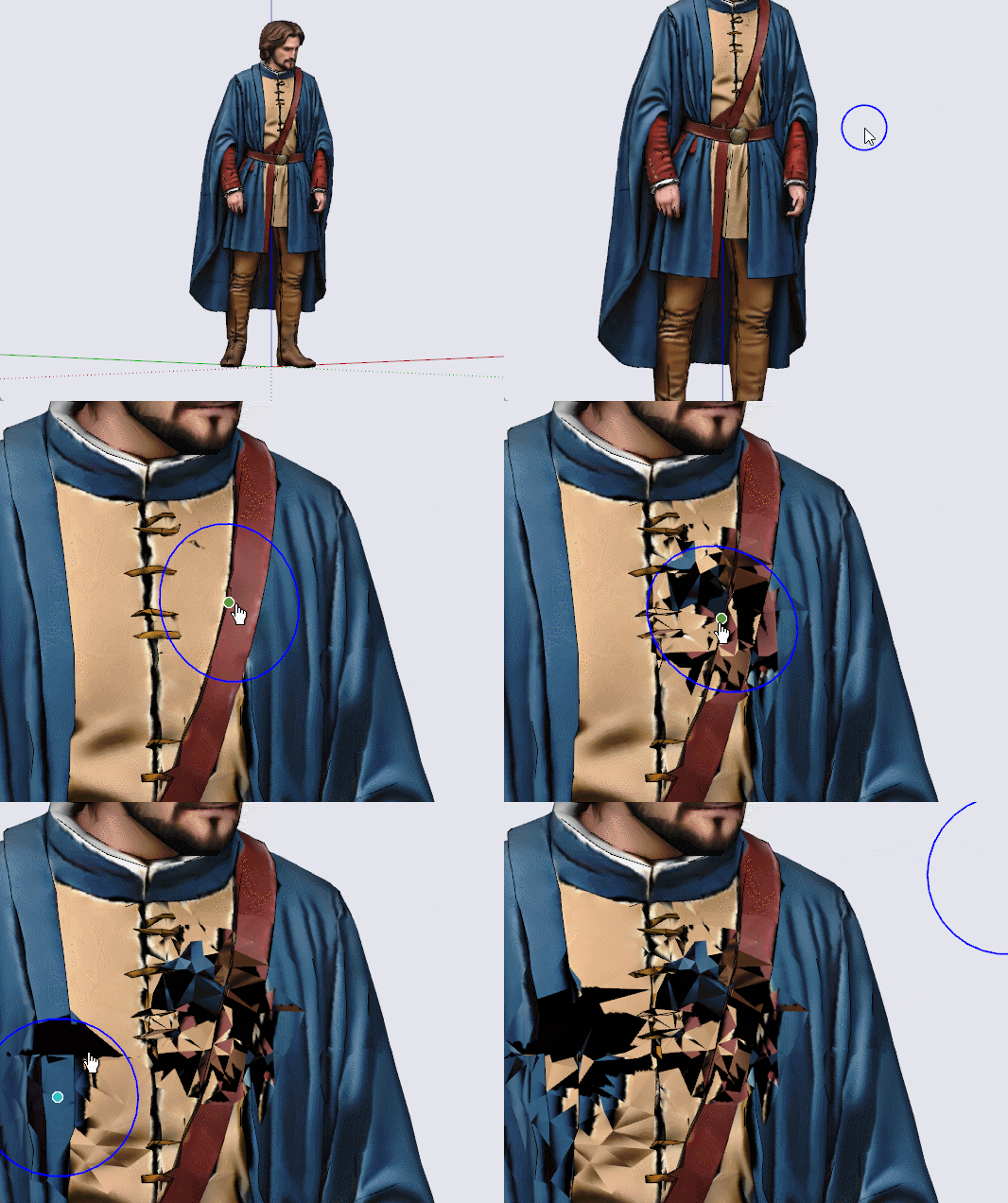
-
Hello, that usual, I think the best way tu recover your mapping after modifying geometry is to select only the ugly faces and project your material with Fredo6 thrupaint
-
but I think you won't be able to do this with AI generted UV
-
One solution is to repair the damaged areas—like applying patches—using new material created from a screenshot of the figure taken before the modifications, and then applying it in "projected" mode using Thrupaint.
-
-
This post is deleted! -
no ! the best solution is to use SketchUV plugin!
SketchUp_ZBpNK5VUlK.mp4 -
If it's a single 'image' can you make its textured material 'projected', and then save it to another face of the same orientation. Can you then adjust the original surface - after which you use the eyedropper to select the projected texture from the temporary face, and reapply that onto the modified original surface ? hereby keeping the UVs ?
-
That may be, but I don't see a faster, more effective, and free solution than the one I showed in the video above (the second one).
-
Your video arrived as I was posting - just consider it an alternative approach...
-
@Krass
Waoow ! Excellent !
Thanks for the trick (SketchUV)




Hello! It looks like you're interested in this conversation, but you don't have an account yet.
Getting fed up of having to scroll through the same posts each visit? When you register for an account, you'll always come back to exactly where you were before, and choose to be notified of new replies (either via email, or push notification). You'll also be able to save bookmarks and upvote posts to show your appreciation to other community members.
With your input, this post could be even better 💗
Register Login


Advertisement