[Plugin] Point Merger tools v1.2 UPDATED@ 23/06/09
-
DOWNLOAD FILES:
Point Merger Tools v 1.2
%(#800000)[download, unzip, and move the contents of the folder to your plugins folder.
When you open SketchUp, they can be found in 'Point Merger' in the Plugins menu, or in the 'Merge Points' Toolbar.]
———————————————————————————————————————————————
Merge PointsVERSION 1.2 (23/06/09)
Added proper undo function, a cursor, toolbar, it now uses the VCB for input, and other small changes were made.Version: 1.1
~ Very small changes, now the current radius of the tool appears in the inputbox. Radius still isn't saved when tool is unselected.Use:
This plugin is called 'Merge Points', and does exactly that. You first press enter/ return, and select the radius the tool will affect. Then you click where you want to merge points. It will take any points close enough, and move them to the position you clicked on.
This can get rid of those pesky areas with messed-up geometry, as-well as lowering the poly-count of a model manually (If you really wanted to).Things I want to change/ add:
• Visualization while using the tool.
———————————————————————————————————————————————
Merge Points to SelectionVERSION: 1.2 (23/06/09)
~ Added ability to find edges and endpoints of selected faces, a proper 'undo' function, a toolbar, and slight changes.Version: 1.1
~ Added the ability to chose between moving points to closest position on selected lines, or closest endpoint of selected lines.Use:
This plugin is called 'Merge Points to Selection'. You select the lines you want the points to move to, or faces the lines are part of, and select the radius the tool will affect. Then you click OK. It will take any points close enough, and move them to the closest position on any any of the lines that were selected.
This can get rid of those pesky areas with messed-up geometry, and also for connecting things to lines, or connecting meshes together.Things I want to change/ add:
• Visualization while using the tool.
———————————————————————————————————————————————
known issue: Sometimes when the points are merged, as i've seen sometimes when using other tools, sketchup doesn't realize they are in the same position exactly. When/ if this happens, it's best to use 'Fix Problems', and possibly 'Intersect'. -
A good idea!i agree with jims idea and i think we could saw the circle when we do it.
-
To keep 'max_weld_distance' set during a session call it @@max_weld_distance, on activate set it to 1" at the start if it's not set in the form
@@max_weld_distance=1.to_l if not @@max_weld_distanceand in the inputbox use
defaults = [@@max_weld_distance]to use it...
-
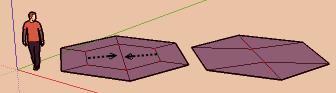
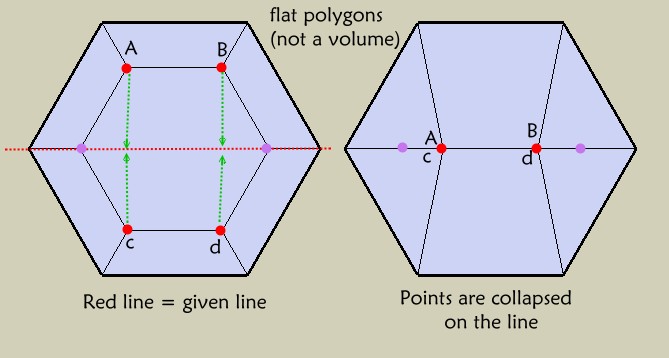
Does it possible to make the same but collapse points on an axe (X,Y,Z) or on a straight line given?
-
BTM:
I have not tried the ruby yet, but I have some questions.
Is there an upper and lower limit to the selection radius?
From the description, this could be used as a seam stitcher, maybe? In other words, you construct a line or curve, or loop along which you can snap nearby vertices to it? -
BTM
I have tried you script and find it useful. However, is it necessary to pick a distance? Why not, pick point A, a point B, and have point A move to point B.
Thanks for all your work
Ken -
@unknownuser said:
BTM
I have tried you script and find it useful. However, is it necessary to pick a distance? Why not, pick point A, a point B, and have point A move to point B.
Thanks for all your work
Ken
Well, as I see it, I'd usually use the move tool to move a single point to another single point. This script was made for those areas with a bunch of points, that are mostly unnecessary, and you just want to make them all into a single point.@mitcorb said:
…you construct a line or curve, or loop along which you can snap nearby vertices to it?
Not yet, sorry. maybe I'll add it as a feature eventually.
@unknownuser said:
Does it possible to make the same but collapse points on an axe (X,Y,Z) or on a straight line given?
Pilou, je ne sais pas exactement ce que tu veux dire, mais je pense que tu demande si c’est possible de changer la code, pour qu’il puisse attacher des points proches à une ligne sélectionner. Sinon, peux-tu expliquer plus?@tig said:
To keep 'max_weld_distance' set during a session call it @@max_weld_distance, on activate set it to 1" at the start if it's not set in the form
@@max_weld_distance=1.to_l if not @@max_weld_distanceand in the inputbox use
defaults = [@@max_weld_distance]to use it...
I've tried some similar things, but I always seem to get the error that @@max_weld_distance is an 'uninitialized class variable'.@jim said:
…make it highlight each point within the weld distance so you know what is about to happen when you click.
I'll try. Visualization isn't something I'm all that good with yet.
 -
Initially set
@@max_weld_distance=1.to_l if not @@max_weld_distanceinside the class BUT not inside a sub-definition...
-
is that more clear?
-
Is there a practical application for that type of functionality? Seems faster to juist draw it.
Chris
-
@mitcorb said:
BTM:
I have not tried the ruby yet, but I have some questions.
Is there an upper and lower limit to the selection radius?
From the description, this could be used as a seam stitcher, maybe? In other words, you construct a line or curve, or loop along which you can snap nearby vertices to it?Today, I've made another script to do this… well, I think it does this.
http://www.screencast.com/t/zIfDNh5jG
You select a number of edges, and click the tool. It asks you for a radius, like in the other one. You select it, and any points within that distance from a selected line, are moved to the closest point on any of the lines selected. In the next release, most likely tonight, both of the scripts will be included in a submenu.
-
@unknownuser said:
Is there a practical application for that type of functionality?
Very practical for flatten or deform (for any reason) an existing volume (or part of volume) on any orientation!
Normal way when that is collapsed on a plan 3D
Funny when that is collapsed on a line -
OK, I have 2 issues, one with each script, that are holding me back from posting the next version.

-
With the current 'Merge Points' script, the transformation isn't always 'perfect'. since SketchUp only allows vertices to be transformed by vectors, and not able to be given a specific point to move to, the points don't always end up exactly in the same place. Sometimes they are off by an amount SketchUp barely even recognizes. This causes them to not be attached, and thus are annoying. This doesn't always happen, but it does happen on occasion. Does Anyone know of a way to get the transformation to be perfect every time?
-
The next script moves points to the closest position on the lines of the selected edges. The annoying part is that lines are infinite. I could probably figure out how to get it working properly, with the edges and not lines by using if functions, but it wouldn't be ready by tonight.
-
-
#1 - yeah, the easiest way to do it is using the transform by vector method. But there is also
Entities.transform_entitiesmethod which lets you apply a single transformation object to multiple objects simultaneously....but in your case you would only tansform a single entity at a time. Then, since you are using a transformation object, you can transform something to a given 3d point. So your code that looks like this:dist = pos.distance @mouse_point if dist <= @max_weld_distance vec = p.position.vector_to @mouse_point @entities.transform_entities(vec,p) end endcould look like this:
dist = pos.distance @mouse_point
	if dist <= @max_weld_distance
	t = Geom;;Transformation.new(@mouse_point)
	@entities.transform_entities(t,p)
	end
end
I have not tested that for syntax and I don't know if it will fix your #1 problem, but I think it might.
Chris
-
...I figured out how to solve problem 2!!!
As for problem 1, Chris, the transform_entities works pretty much the same way whether you give it a transformation or a vector; the script you have down there moves the points by the vector @mouse_point, so they end up in a completely different spot. That's why I used vector_to. The only problem, is that SketchUp sees things like 3.999m as 4 meters ( Well, according to the VCB, it doesn't show up as ~4.00m, but as if it were just 4.00m), and I think it's inaccuracies like this that can mess it up sometimes.

-
I might not have the accuracy issue fixed, but I've updated the first post, now Merge Points to Lines is available, and Merge Points has been slightly updated.
-
i still have no clue as to what this script is supposed to do. thus the following.
i know this is probably asking too much of guys who make their creative work available for free to all of us. however, i think it is in their own interest that their creations be understood and put to use to the full.
thus i respectfully suggest that all scripts should be accompanied with some kind of demonstration about what they are supposed to do: a guide, a tutorial or a short video (perhaps the easiest to do).
-
OK, a video has been added for Merge Points.

-
BTM:
Wow! Congratulations. Excellent video.
A humble thank you.
mitcorbedit: this appears to be able to close those tiny triangles-- is that correct?
-
Seems another very cool plug!









Advertisement