[Plugin] Point Merger tools v1.2 UPDATED@ 23/06/09
-
Nope, I take it back. I forgot that is worse than just that. You have to double click on the "btm_Point_Merger_Files" to get taken to the actual root of the zip file. But it still has extra files floating around in it.
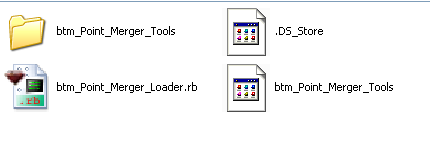
So you have to ignore the top level, double click on the "btm_Point_Merger_Files" folder, then delete the Mac system files and then copy and paste the rest into the plugins folder.

Chris
-
Okay, is there any way for me to make zip files with my mac, that work properly on Windows too?
-
That is a good question. Does your zip file maker have any settings you can change? If you find anything to tweak, upload a test version here and we'll let you know if it is any smoother.
Chris
-
… I use the built-in "compress" feature under the right click menu to compress files on my mac. I've been looking through System Preferences, and in quite a few other places, but can't find where to change any settings
 .
. -
thanks for the plugin...

i will have a try on it... -
@unknownuser said:
… I use the built-in "compress" feature under the right click menu to compress files on my mac. I've been looking through System Preferences, and in quite a few other places, but can't find where to change any settings
.fwiw, those extra files are all over the place on your mac but are kept hidden.. they're finder settings and resource forks which are basically used for remembering icon positioning and such (and maybe something to do with why osxSU doesn't have toolbar freakouts).. for instance, you could send me a folder with a bunch of pictures arranged in a certain order and i could see them in that order.. a windows user would see them alphabetically/numerically etc..
the standard compressor will include these files but there are others you can get (for free) that won't include them (pretty much all of the mac archive apps have this option)
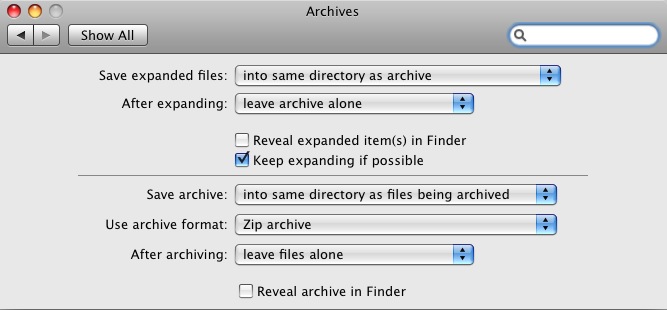
[also] if you want to have easier access to the archive utility's preferences by placing them in the system prefs, do this..
go:
Macintosh HD/System/Library/CoreServicesin there you'll see the Archive Utility.app.. you can either launch the app and change it's prefs as you would a normal app -or- unlock a hidden feature by right clicking the icon and choosing 'show package contents'.. go into the contents folder then into the resources folder and you'll see a file called 'Archives.prefPane'.. doubleclick that and you'll be given the option to add it to the standard system preferences..
there's not many options and nothing to keep the mac only files out but you might like some of the choices..
-
Hi everyone,
The plugin seems like a very nice tool, but it is quite hard to control, or maybe I am not familiar with it yet.
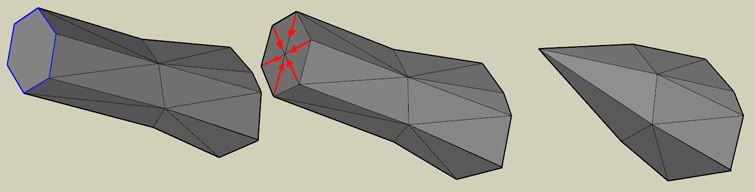
Anyway, I tried to merge some vertices but could not make it happen the way I want.
Does anyone know if the Point Merger is able to do something like the attachment below?
Thanks!
_KN
-
thanks!Point Merger tools v1.2 UPDATED@ 23/06/09





Advertisement