[Plugin] Point Merger tools v1.2 UPDATED@ 23/06/09
-
Oh yes one more thing. Would be great if you can add a CTLR modifier to make the new mesh smooth. Oh I am just been greedy now. Great job
 !
! -
@chango70 said:
- I noticed that when I press undo after a point Merge operation it does not undo the entire procedure, rather breaks it down to individual line moves.
I've got this working properly now, and it will be fixed in the next release for the tools.
@chango70 said:
- I cannot get it to work if the geometry is inside a group.
I'll try to get that fixed too, but maybe not for the next release.
@chango70 said:
Would be great if you can add a CTLR modifier to make the new mesh smooth.
…I probably won't add this, but if I do decided to, it won't be anytime soon.
Also as a side note, I'm planning on adding a toolbar for them, and am trying to figure out how to add a subfolder and a loader script. I've got the toolbar working, but not with a subfolder or loader, and having the files just sitting in the plugins folder is a bit annoying.
-


-
-
@cadfather said:
:roll:
[attachment=1:cjv1mmue]<!-- ia1 -->pmerge_16.png<!-- ia1 -->[/attachment:cjv1mmue][attachment=0:cjv1mmue]<!-- ia0 -->pmerge_24.png<!-- ia0 -->[/attachment:cjv1mmue]
You da man!
-
@unknownuser said:
@chris fullmer said:
Hi John, I think you just need to copy those 2 .rb files into your plugins folder. They don't need to be in the subfolder - unless I'm missing something. I'll edit that out if its wrong.
Chris, you're right, they both go into the plugins folder.
@chris fullmer said:
@BTM - The reason that the class variables are not working correctly (meaning they are not keeping their value during the entire SU session) is because you are declaring the variable in your activate method. So everytime the activate the tool gets activated, it resets the
@@max_weld_distancevariable back to0.0.to_l.I know that the variable needs to be outside of a method, but with things like
@@max_weld_distance=1.to_l if not @@max_weld_distance
it would call it an uninitialized variable, and give an error message.@chris fullmer said:
So what you want to do is declare that variable inside the class, outside of the methods. Like this:
class MergePoints @@max_weld_distance=0.0.to_l It does work! I've been trying if functions, (so that if @@max_wld_distance doesn't have a value, it gets set to 0.0.to_l), but I kept getting error messages, and I guess that an if function isn't necessary.
 Hey wow that would be great!
-
@unknownuser said:
@chango70 said:
- I noticed that when I press undo after a point Merge operation it does not undo the entire procedure, rather breaks it down to individual line moves.
I've got this working properly now, and it will be fixed in the next release for the tools.
@chango70 said:
- I cannot get it to work if the geometry is inside a group.
I'll try to get that fixed too, but maybe not for the next release.
@chango70 said:
Would be great if you can add a CTLR modifier to make the new mesh smooth.
…I probably won't add this, but if I do decided to, it won't be anytime soon.
Also as a side note, I'm planning on adding a toolbar for them, and am trying to figure out how to add a subfolder and a loader script. I've got the toolbar working, but not with a subfolder or loader, and having the files just sitting in the plugins folder is a bit annoying.
Fantastic! I can't wait for the new version. Great work!

-
..haven't tried the script yet so didn't notice there's two... coming soon....
-


…these are the icons it has right now, I'll wait to see how yours turn out -
i think these are very good BTM - no need of others..
-
…I also have these ones though…


…I'll go with your icons for 'Merge Points', but now for Merge Points to Selection (I changed the name, because it works when selecting faces now aswell), I don't know which one to pick
Oh, by the way, they work in groups and components now too. I should have put @model.active_entities instead of @model.entities

…I've also included a cursor for 'Merge Points'. It's ugly though, so I'm changing it, and I don't know what the new one should look like.

-
looking good..
-
Keep up the good work! I am repeatedly impressed with your scripting. You've picked up quickly, and seem to keep going. Now you've got toolbars and cursors. Well done!
Chris
-
Thanks for considering my suggestions. I think these two scripts could prove to be "can't do withouts" for people working with terrans/TINs.
John
-
V 1.2 is now Up, and includes proper undo, a toolbar, and some other improvements, like the use of the VCB for 'Merge Points', and 'Merge Points to Selection', renamed because it now gets the points/ edges of selected faces now too.
-
just to show my respect : thanx BTM
-
Great! BTM, thank you.
Can you make it capable for snaping points such als construction points and lines? -
BTM, is there a way to have the unzip process work smoother? When I extracted the files I only had two folders in my Plugins menu. I had to grab the two rb files and move them into the main Plugins folder. I believe JClements had the same problem Here
Or maybe I did it wrong.Oh, and the toolbar... I noticed it was checked as on but was not on my screen anywhere. I could not use it and ultimately removed the files from my plugins folder.
And upon loading SU after installing the script my toolbars wacked out again. Rearranged all over the screen.
Please Google, fix the toolbar prob... oh forget it. They are not listening anymore.
-
@unknownuser said:
BTM, is there a way to have the unzip process work smoother? When I extracted the files I only had two folders in my Plugins menu. I had to grab the two rb files and move them into the main Plugins folder. I believe JClements had the same problem Here
Or maybe I did it wrong.Oh, and the toolbar... I noticed it was checked as on but was not on my screen anywhere. I could not use it and ultimately removed the files from my plugins folder.
And upon loading SU after installing the script my toolbars wacked out again. Rearranged all over the screen.
Please Google, fix the toolbar prob... oh forget it. They are not listening anymore.
That's strange
 … First, the unzipped file should be a folder called btm_Point_Merger_Files, and it should contain
 btm_Point_Merger_Loader.rband a folder called btm_Point_Merger_Tools. These should both go in the plugins folder. I know that it works fine with Archive Utility on my mac, and the files in btm_Point_Merger_Files should look like this:
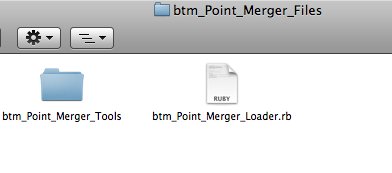
As for your toolbar problem, I have no idea why it would be doing that
 . It is possible that another ruby might have broken it, but from what you've described, I doubt it. All I can think of is that the files might not be in the right place, or are duplicated, or that another plugin is breaking it somehow. Other than that, my knowledge is very limited.
 -
Macs like to add extra files to everything they do. So when PCs get Mac files, they always come attached with unnecessary files. So your zip files has all this inside it when opened on a PC
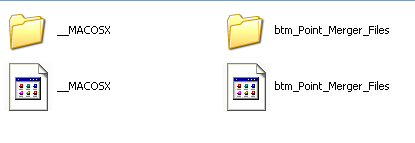
So its just a matter of deleting the Mac system files, then its like a regular plugin install.
Chris








Advertisement