Displacement Shapes
-
-
-
@thomthom said:
I wrote the UV tool during slow day at the office.

This is me going through The Complete V-Ray Guide. Some of the examples had some extreme displacement, which gave me an idea I wanted to try out.Looks cool Thomas. I started going through the Complete guide myself. What a book! Sometime in 2011 I'll let you know how it is when I finish it.
-
I hadn't expected it to be that big. Somehow, the word "Guide" gave me a metnal image of a pocket-sized book. This thing is a behemoth! Hopefully this'll teach me a thing or two about V-Ray. ...but where to begin?
-
I seem to have a little glitch with my vray, I have recently installed vray on my new machine and everything works great but it does not render displacement, it shows it in material preview window but not in render.
I checked the same model on an older machine and it renders the displacement fine, is there someplace I need to check to enable displacement?[edit] Figured it out, I'm having a blonde moment.
-
@solo said:
[edit] Figured it out, I'm having a blonde moment.
Care to share what you'd done in your blonde moment?
-
The model size on the new machine was too big so the dispacement value over the texture was reduced to a point that it was not noticable.
-
@solo said:
The model size on the new machine was too big so the dispacement value over the texture was reduced to a point that it was not noticable.
Ouch... Have to admit that it also have happened for me...

Recently it happened when I tried using your Vray Grass displace model...

Didn't realize it was like 30cm grass...Aaahhh well... Good to know that I'm not the only occasional "blonde" around...
-
LOL, I have many blonde moments these days, must be age.
Thomthom, I used your displacement map from your first post and tried it with Vue:

I then exported the displaced mesh and opened it in SU.

-
The one I used isn't the one I posted here. I used an 32bit image, as 8bit images will have a non-linear gamma correction applied it.
How did you create the mesh? Terrain generated from bitmap?
-
Yes.
-
I bet it would be possible to make a whole mountain scene with a displacement map

-
Another quick test.
Image made in paintshop:

Then the displacement/terrain from image:

And lastly the mesh from terraim/displacement opened in SU.

-
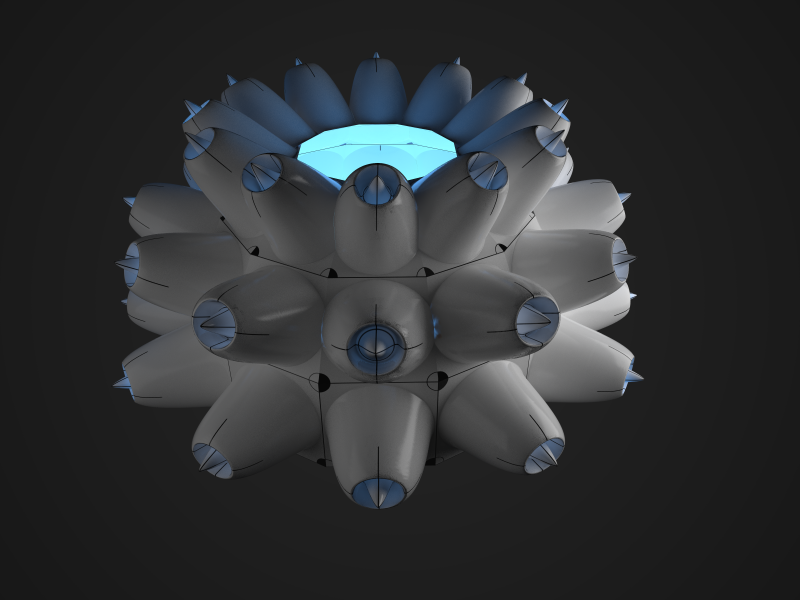
More 'boobies'. Tried out Two-Sided material. Though, I had expected it to be more translucent. Need to revisit this one. Other tests on plain geometry gave the results I expected, this one didn't. Wonder if it's due to the displacement.
-
I used your map again this time with Vray, and an American flag as a diffuse map.
It UV mapped it perfectly....hmmm.

-
excellent thread.
-
@solo said:
I used your map again this time with Vray, and an American flag as a diffuse map.
It UV mapped it perfectly....hmmm.
Your image seens jagged... like if there was a small displacement map applied on top of the original displacement map. Look how much more "smooth" are the "turbine" images from TomTom.
-
I believe jaggin is result of ldr displacement map.
-
Hey! That's great!
 Thom, could you tell me, how do you create displacement maps? Is it kind of software, that converts 3D object into the map?
Thanks.
Coulteri -
A displacement map is just a greyscale image (the sort of thing you can make in photoshop.) You then need a program which can use the displacement map, in thom's case, vray.






Hello! It looks like you're interested in this conversation, but you don't have an account yet.
Getting fed up of having to scroll through the same posts each visit? When you register for an account, you'll always come back to exactly where you were before, and choose to be notified of new replies (either via email, or push notification). You'll also be able to save bookmarks and upvote posts to show your appreciation to other community members.
With your input, this post could be even better 💗
Register Login


Advertisement