sketchucation logo sketchucation
    • 登入
    Oops, your profile's looking a bit empty! To help us tailor your experience, please fill in key details like your SketchUp version, skill level, operating system, and more. Update and save your info on your profile page today!
    🔌 Smart Spline | Fluid way to handle splines for furniture design and complex structures. Download

    [Plugin][$] FredoScale - v3.6a - 01 Apr 24


    已排程 已置頂 已鎖定 已移動 Plugins
    1.1k 貼文 345 Posters 2.4m 瀏覽 342 Watching
    正在載入更多貼文
    • 從舊到新
    • 從新到舊
    • 最多點贊
    回覆
    • 在新貼文中回覆
    登入後回覆
    此主題已被刪除。只有擁有主題管理權限的使用者可以查看。
    • fredo6F 離線
      fredo6
      最後由 編輯

      NEW RELEASE: FredoScale v3.0a - 14 Jan 17

      FredoScale 3.0a is a maintenance release providing corrections to previous versions, and should be installed for all SU Versions.

      See main post of this thread for Download.

      Fredo

      1 條回覆 最後回覆 回覆 引用 0
      • gudio83G 離線
        gudio83
        最後由 編輯

        Any idea how to resolve this bug?
        SU2017 x64, Win10


        2017-01-30.png

        1 條回覆 最後回覆 回覆 引用 0
        • Dave RD 離線
          Dave R
          最後由 編輯

          What bug? Your screen shot doesn't clearly indicate a problem.

          Etaoin Shrdlu

          %

          (THERE'S NO PLACE LIKE)

          G28 X0.0 Y0.0 Z0.0

          M30

          %

          1 條回覆 最後回覆 回覆 引用 0
          • gudio83G 離線
            gudio83
            最後由 編輯

            the menu bar is small and i can't resize it. I must scroll every time to see all options / results.
            This bug appear only on "Labels with areas". The same problem on my PC and my laptop.

            1 條回覆 最後回覆 回覆 引用 0
            • Dave RD 離線
              Dave R
              最後由 編輯

              So this has nothing to do with FredoScale.

              Etaoin Shrdlu

              %

              (THERE'S NO PLACE LIKE)

              G28 X0.0 Y0.0 Z0.0

              M30

              %

              1 條回覆 最後回覆 回覆 引用 0
              • fredo6F 離線
                fredo6
                最後由 編輯

                @gudio83 said:

                Any idea how to resolve this bug?
                SU2017 x64, Win10

                SU2017 has changed a few things in the dimensioning of web dialogs.

                Normally, you should be able to resize and adjust the size, which would be kept for the next use.

                I just have one doubt: not sure I released the fix in FredoTools 3.0a (i.e. the capability to resize the dialog box).

                1 條回覆 最後回覆 回覆 引用 0
                • E 離線
                  elfis
                  最後由 編輯

                  Hi

                  First of all that you for the best plugin in sketchup. Enginsh is not my native language so I record this short clip to explain my problem.
                  When I copy group of objects and start to stretching one of them I'm getting this conflict.
                  I know there is problem with components when they all not unique but why with groups ?
                  It was fine before format of windows with different versions of plugin.
                  For now i'm using Sketchup 2016 and latest plugin with libs.

                  Kind Regards
                  Patrick

                  ps. Sorry if this is noob question.

                  1 條回覆 最後回覆 回覆 引用 0
                  • fredo6F 離線
                    fredo6
                    最後由 編輯

                    In Sketchup, a group just copied behaves like Components...

                    ...unless you just edit (i.e. double click) the group you copied.

                    This is probably for optimization.

                    Fredo

                    1 條回覆 最後回覆 回覆 引用 0
                    • E 離線
                      elfis
                      最後由 編輯

                      @fredo6 said:

                      In Sketchup, a group just copied behaves like Components...

                      ...unless you just edit (i.e. double click) the group you copied.

                      This is probably for optimization.

                      Fredo

                      Hi, thanks for the answer . Before I have never have this problem, I found small fix on this "model" by removing group of objects inside this group.
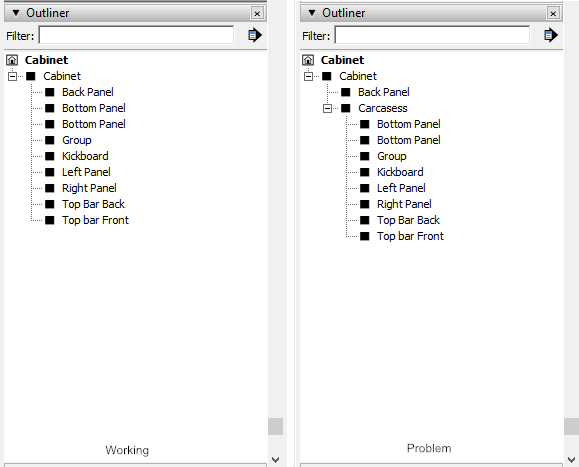

                      Group Tree

                      1 條回覆 最後回覆 回覆 引用 0
                      • array81A 離線
                        array81
                        最後由 編輯

                        I installed the last version but I have only the "box" tools, no "target" tools. Any ideas?

                        1 條回覆 最後回覆 回覆 引用 0
                        • Dave RD 離線
                          Dave R
                          最後由 編輯

                          @array81 said:

                          I installed the last version but I have only the "box" tools, no "target" tools. Any ideas?

                          They don't show even after you enabled them and restarted SketchUp?
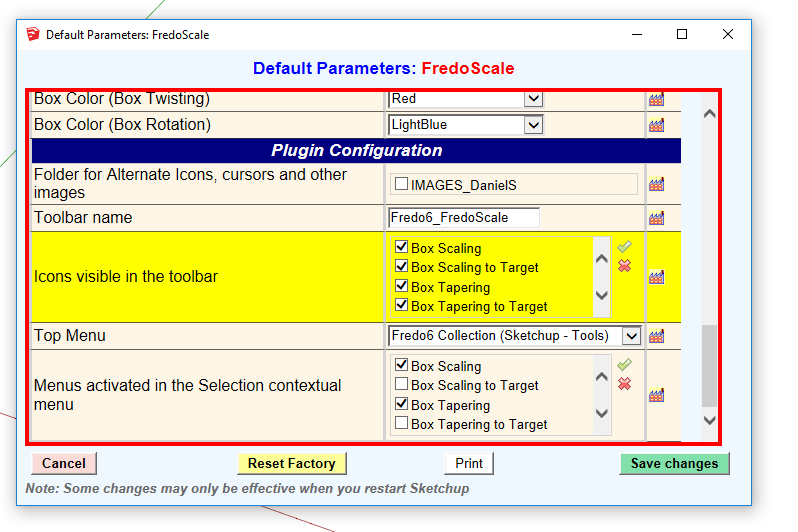
                          Screenshot - 3_18_2017 , 4_56_38 PM.png

                          Etaoin Shrdlu

                          %

                          (THERE'S NO PLACE LIKE)

                          G28 X0.0 Y0.0 Z0.0

                          M30

                          %

                          1 條回覆 最後回覆 回覆 引用 0
                          • G 離線
                            georgeoakblaster
                            最後由 編輯

                            Hi,

                            Is there a way to get the dimension tags to update after you resize using the 'box stretching' feature? At the moment I re-add them manually to get them to update to the correct measurement.

                            Thanks for this great plugin Fredo.

                            1 條回覆 最後回覆 回覆 引用 0
                            • Dave RD 離線
                              Dave R
                              最後由 編輯

                              @georgeoakblaster said:

                              Hi,

                              Is there a way to get the dimension tags to update after you resize using the 'box stretching' feature? At the moment I re-add them manually to get them to update to the correct measurement.

                              Thanks for this great plugin Fredo.

                              Like this?
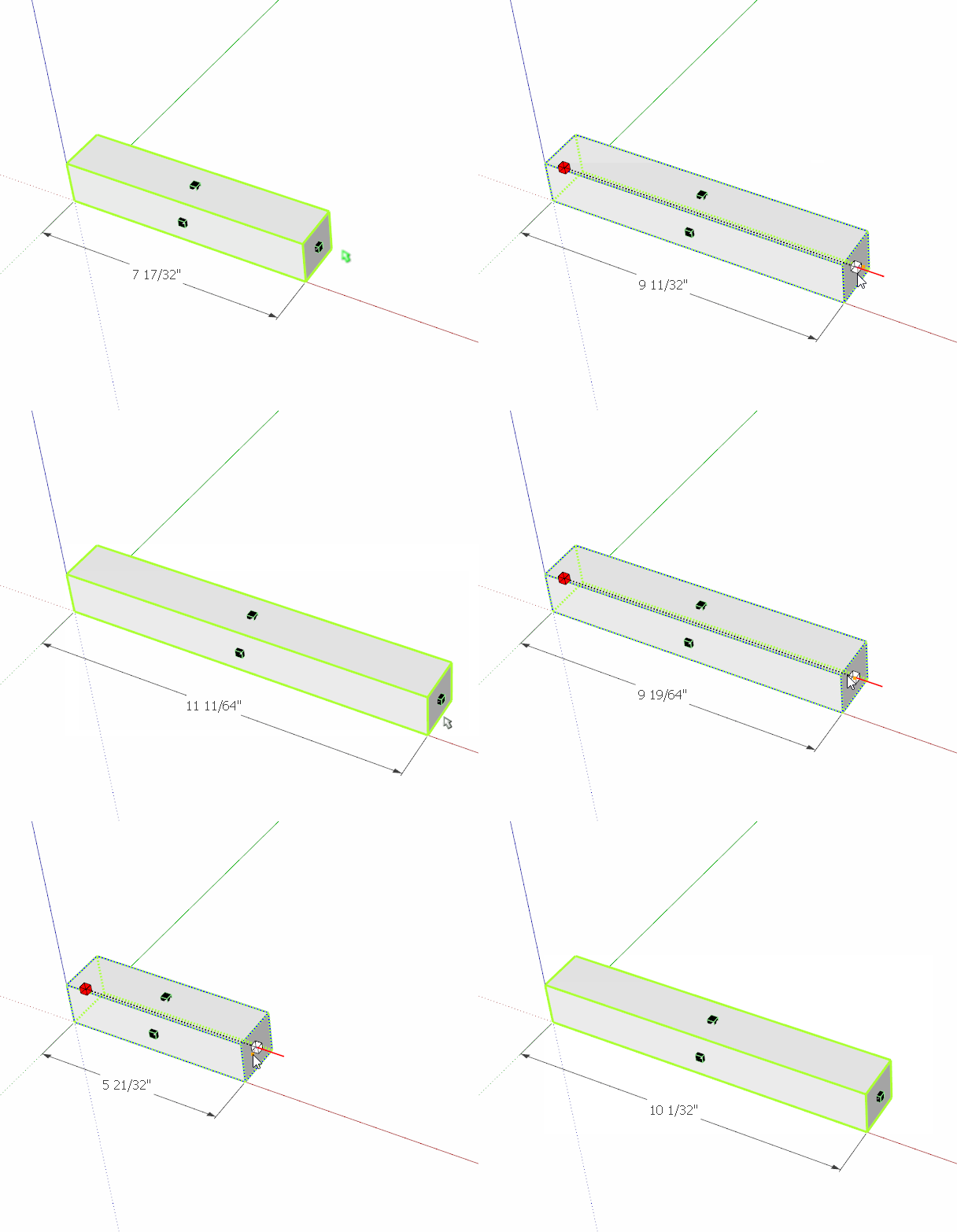
                              stretch.gif

                              Etaoin Shrdlu

                              %

                              (THERE'S NO PLACE LIKE)

                              G28 X0.0 Y0.0 Z0.0

                              M30

                              %

                              1 條回覆 最後回覆 回覆 引用 0
                              • G 離線
                                georgeoakblaster
                                最後由 編輯

                                Thanks,

                                I should have mentioned this is when using 'enter new dimensions' which is on the right click dialogue box.

                                George

                                1 條回覆 最後回覆 回覆 引用 0
                                • Dave RD 離線
                                  Dave R
                                  最後由 編輯

                                  Maybe you could post a screen shot of what you are trying to describe because it isn't clear.

                                  The New Dimension window is intended to allow you to type in the new dimension.

                                  What is the "dimension tag" you refer to?

                                  Etaoin Shrdlu

                                  %

                                  (THERE'S NO PLACE LIKE)

                                  G28 X0.0 Y0.0 Z0.0

                                  M30

                                  %

                                  1 條回覆 最後回覆 回覆 引用 0
                                  • K 離線
                                    kevsterman
                                    最後由 編輯

                                    Hey guys. I've recently discovered radial bend and its just brilliant. Its really helping me with some illustrations I'm doing. I was wondering if there's a way for the materials to bend as well as the model. So far the materials either stay the same or go a bit skew-whiff, they don't bend in the same directions as the face they're on. Any way of doing this?

                                    "Avoid keeping more than 3 items on your desk that you can't fit into your mouth."

                                    1 條回覆 最後回覆 回覆 引用 0
                                    • fredo6F 離線
                                      fredo6
                                      最後由 編輯

                                      @kevsterman said:

                                      Hey guys. I've recently discovered radial bend and its just brilliant. Its really helping me with some illustrations I'm doing. I was wondering if there's a way for the materials to bend as well as the model. So far the materials either stay the same or go a bit skew-whiff, they don't bend in the same directions as the face they're on. Any way of doing this?

                                      Unfortunately, Radial Bend creates a lot of new faces and triangulation due to slicing. So, reconstructing the original texturing would be kind of big headache!
                                      In general, texturing should be done on final shapes.

                                      Fredo

                                      1 條回覆 最後回覆 回覆 引用 0
                                      • K 離線
                                        kevsterman
                                        最後由 編輯

                                        Ok thanks Fredo. That's good to know 👍

                                        "Avoid keeping more than 3 items on your desk that you can't fit into your mouth."

                                        1 條回覆 最後回覆 回覆 引用 0
                                        • K 離線
                                          kevsterman
                                          最後由 編輯

                                          Hi guys. I have another question regarding radial bend. As you can see from the image all of the lines denoting brickwork haven't bended as I was expecting. I'm not sure why. Is it a parameter problem or maybe something to do with the model? Its probably something really easy I'm missing 😕

                                          Screenshot 2017-08-10 13.03.15.png

                                          "Avoid keeping more than 3 items on your desk that you can't fit into your mouth."

                                          1 條回覆 最後回覆 回覆 引用 0
                                          • robertWanR 離線
                                            robertWan
                                            最後由 編輯

                                            Why? 😞
                                            https://youtu.be/FgNyfpZPVfA

                                            Robert

                                            1 條回覆 最後回覆 回覆 引用 0
                                            • 1
                                            • 2
                                            • 5
                                            • 6
                                            • 7
                                            • 8
                                            • 9
                                            • 56
                                            • 57
                                            • 7 / 57
                                            • 第一個貼文
                                              最後的貼文
                                            Buy SketchPlus
                                            Buy SUbD
                                            Buy WrapR
                                            Buy eBook
                                            Buy Modelur
                                            Buy Vertex Tools
                                            Buy SketchCuisine
                                            Buy FormFonts

                                            Advertisement