sketchucation logo sketchucation
    • 登入
    Oops, your profile's looking a bit empty! To help us tailor your experience, please fill in key details like your SketchUp version, skill level, operating system, and more. Update and save your info on your profile page today!
    🔌 Smart Spline | Fluid way to handle splines for furniture design and complex structures. Download

    [Plugin][$] FredoScale - v3.6a - 01 Apr 24


    已排程 已置頂 已鎖定 已移動 Plugins
    1.1k 貼文 345 Posters 2.4m 瀏覽 342 Watching
    正在載入更多貼文
    • 從舊到新
    • 從新到舊
    • 最多點贊
    回覆
    • 在新貼文中回覆
    登入後回覆
    此主題已被刪除。只有擁有主題管理權限的使用者可以查看。
    • I 離線
      Icchan
      最後由 編輯

      Hello there!

      First I want to thank Fredo6 for the awesome plugin, but I've hit a problem with scale to target tool.
      I'm trying to scale a small filled arch (1m by 10m) along the flat to hit an edge near it. Once I doubleclick the correct corner to activate the target scaling, I can't select any point for origin.
      The funniest thing is, that if I scale the arch bigger by other methods, I'm able to select some points to use as origin.
      Is there some sort of minimum size requirement for the scale to target tool? What am I doing wrong here?
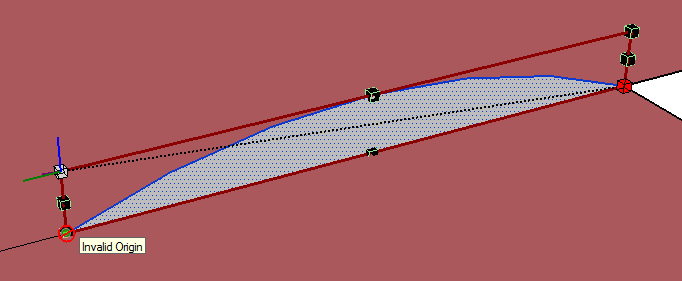

      Tool error.png

      1 條回覆 最後回覆 回覆 引用 0
      • thomthomT 離線
        thomthom
        最後由 編輯

        SketchUp doesn't handle very small units very well. 1mm is getting very close to the minimum.
        SU's tolerance is 1/1000"

        Thomas Thomassen — SketchUp Monkey & Coding addict
        List of my plugins and link to the CookieWare fund

        1 條回覆 最後回覆 回覆 引用 0
        • I 離線
          Icchan
          最後由 編輯

          The arch is 1 meter by 10 meters, not 1 millimeter by 10 millimeters.
          And I don't think it's the scale that matters, nor that it's 2D. I started a blank sketchup and recreated the same arch at the same size, 1m by 10m and the scale tool refused to use any point as origin except points in a direct line above the selected handle.
          Then I copied and scaled the same arch by a factor of 10, so it was now 10 by 100 and the scale tool behaved exactly the same.

          Then I made a rectangle of the same size and the scale too still didn't work, so I extruded it to a box and tried to pick the corner handles for the scale tool, but again the scale tool didn't work.

          However, if I shrink the same arch/rectangle/box so that it's ratio of edges is more close 1 by 4 example, the tool allows me to pick some points below the selected handle, but not all the way down.

          As I see it, it should not matter for the scale tool where I choose the origin and target points, since all it needs is the distance and direction between to translate it to a scale factor for the selected entity.

          I've attached an image that better shows the problem I'm experiencing. The yellow area highlighted is the zone where the tool refuses to work. Every point outside this zone is operable. The rectangle is about 35 by 22 meters in size. The invalid zone border is about 4 meters.
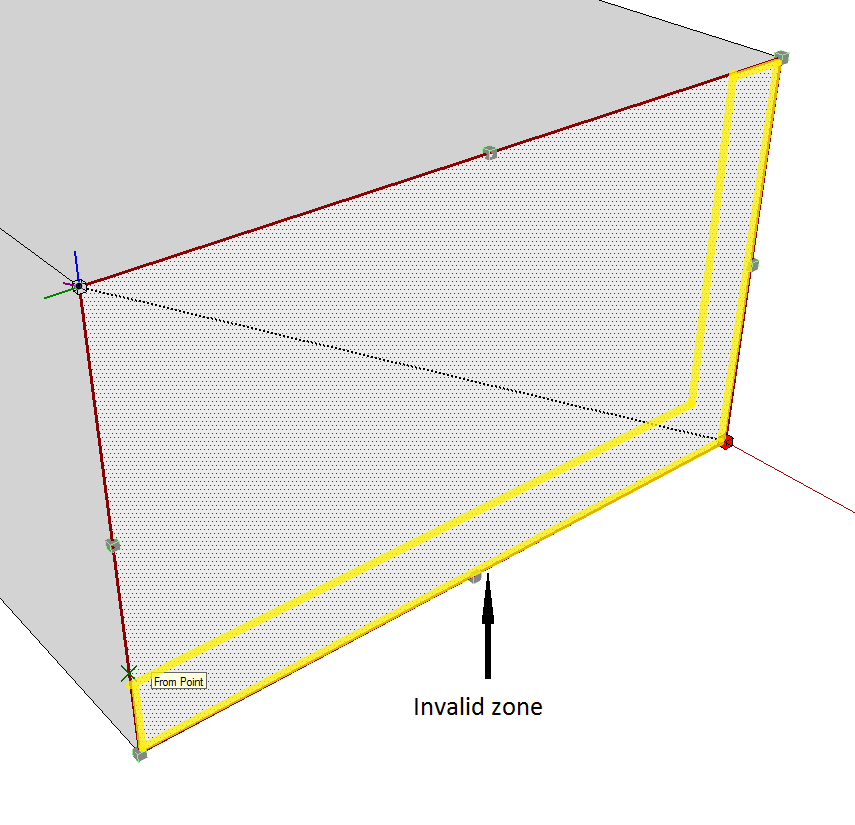

          tool error - invalid zone.png

          1 條回覆 最後回覆 回覆 引用 0
          • fredo6F 離線
            fredo6
            最後由 編輯

            Scale to Target imposes to have the origin in a valid area. For some reasons, I have put the a tolerance of about 10% due to problems I have found, which I don't remember very well).

            In your cases, why do you want to use the Scale to Target mode, not the regular mode?

            Fredo

            1 條回覆 最後回覆 回覆 引用 0
            • I 離線
              Icchan
              最後由 編輯

              Well, I need the corner of the bottom edge of the shape (the arch, in my case) to touch a line.

              Of course I could measure the ratio by hand, but it won't give accurate enough results so that the corner is exactly on the line. That's why I was hoping this tool would do it for me. When I tried the scale tool in normal mode, it does not snap correctly to the other edge, even if I put a guide point or an endpoint there. The little yellow box does snap to an endpoint, but it doesn't correlate with behavior of the scale tool, ie. it ignores the snap target completely and scales in freeform.


              tool error - the problem.png

              1 條回覆 最後回覆 回覆 引用 0
              • jeff hammondJ 離線
                jeff hammond
                最後由 編輯

                @icchan said:

                Well, I need the corner of the bottom edge of the shape (the arch, in my case) to touch a line.

                if that's an arc (as in, SU will say it's an arc in entity info), then just use the move tool

                don't select the arc first.. just place the move tool cursor on the end of the arc, click and move it to the end..
                if it's an arc, it will scale accordingly.

                [actually, that should work with polylines or welded lines as well]

                [edit] yeah, forget the bit about it needing to be an arc.. 😄

                dotdotdot

                1 條回覆 最後回覆 回覆 引用 0
                • I 離線
                  Icchan
                  最後由 編輯

                  Thanks for the tip, it does work as I needed with arcs, but the problem remains for rectangles or other non-regular shapes.

                  1 條回覆 最後回覆 回覆 引用 0
                  • jeff hammondJ 離線
                    jeff hammond
                    最後由 編輯

                    @icchan said:

                    Thanks for the tip, it does work as I needed with arcs, but the problem remains for rectangles or other non-regular shapes.

                    You can do it with rectangles and odd shapes as well but it requires a little setup. There's another way to do this with a rectangle too.
                    I'm on a phone right now but when I get back to the hotel tonight, I'll post a little tutorial.

                    dotdotdot

                    1 條回覆 最後回覆 回覆 引用 0
                    • jeff hammondJ 離線
                      jeff hammond
                      最後由 編輯

                      if you weld the segments into a polyline, the scaling with the move tool will work..
                      with the rectangle, you weld 3 sides and leave the bottom untouched.. after scaling, select the 3 welded lines and explode if you wish..

                      i also included an alternate method using guide lines to create an intersection which the scale tool will snap to..
                      [i use jim's cline tool for the diagonal]
                      http://sketchuptips.blogspot.com/2008/02/plugin-construction-line-tool.html

                      [flash=800,475:m8lhsjxs]http://www.youtube.com/v/4Zx7dt58v7w?fs=1&hl=en_US&rel=0&hd=1&color1=0x2b405b&color2=0x6b8ab6[/flash:m8lhsjxs]

                      dotdotdot

                      1 條回覆 最後回覆 回覆 引用 0
                      • I 離線
                        Icchan
                        最後由 編輯

                        Wow... I was at most expecting an explanation for the tool behavior, was not definitely expecting a detailed tutorial! Excellent job, I hope others with similar problems will find this also. Thanks!

                        1 條回覆 最後回覆 回覆 引用 0
                        • bmikeB 離線
                          bmike
                          最後由 編輯

                          Getting this error now when I open SketchUp.
                          I thought I updated a bunch of Plugins... apparently something went wrong.
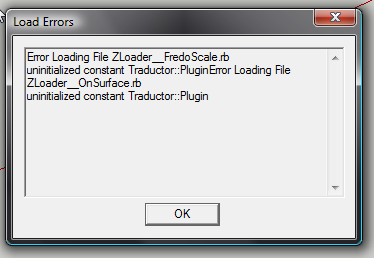

                          skuperror.png

                          mike beganyi design + consulting llc

                          1 條回覆 最後回覆 回覆 引用 0
                          • C 離線
                            ckho1985
                            最後由 編輯

                            @bmike said:

                            Getting this error now when I open SketchUp.
                            I thought I updated a bunch of Plugins... apparently something went wrong.

                            I think it is not compatible with sketchup 8 yet. Is there a FredoScale for Skup8?
                            please update.... I looooooove this tool

                            1 條回覆 最後回覆 回覆 引用 0
                            • thomthomT 離線
                              thomthom
                              最後由 編輯

                              It's working with SU8.
                              Have you ensure you have installed the files correctly?

                              Thomas Thomassen — SketchUp Monkey & Coding addict
                              List of my plugins and link to the CookieWare fund

                              1 條回覆 最後回覆 回覆 引用 0
                              • C 離線
                                ckho1985
                                最後由 編輯

                                I got it working now. it is WORKING with skup8. its confirmed. i just miss-copied a folder previously, thats all. (stuipd me 😳 )

                                1 條回覆 最後回覆 回覆 引用 0
                                • bmikeB 離線
                                  bmike
                                  最後由 編輯

                                  fixed. cleaned up my plugins folder and went back / downloaded / reinstalled all relevant files.
                                  loading now, and toolbars popped up.
                                  will test later when i get into a model.

                                  mike beganyi design + consulting llc

                                  1 條回覆 最後回覆 回覆 引用 0
                                  • D 離線
                                    DIEGO-RODRIGUEZ
                                    最後由 編輯

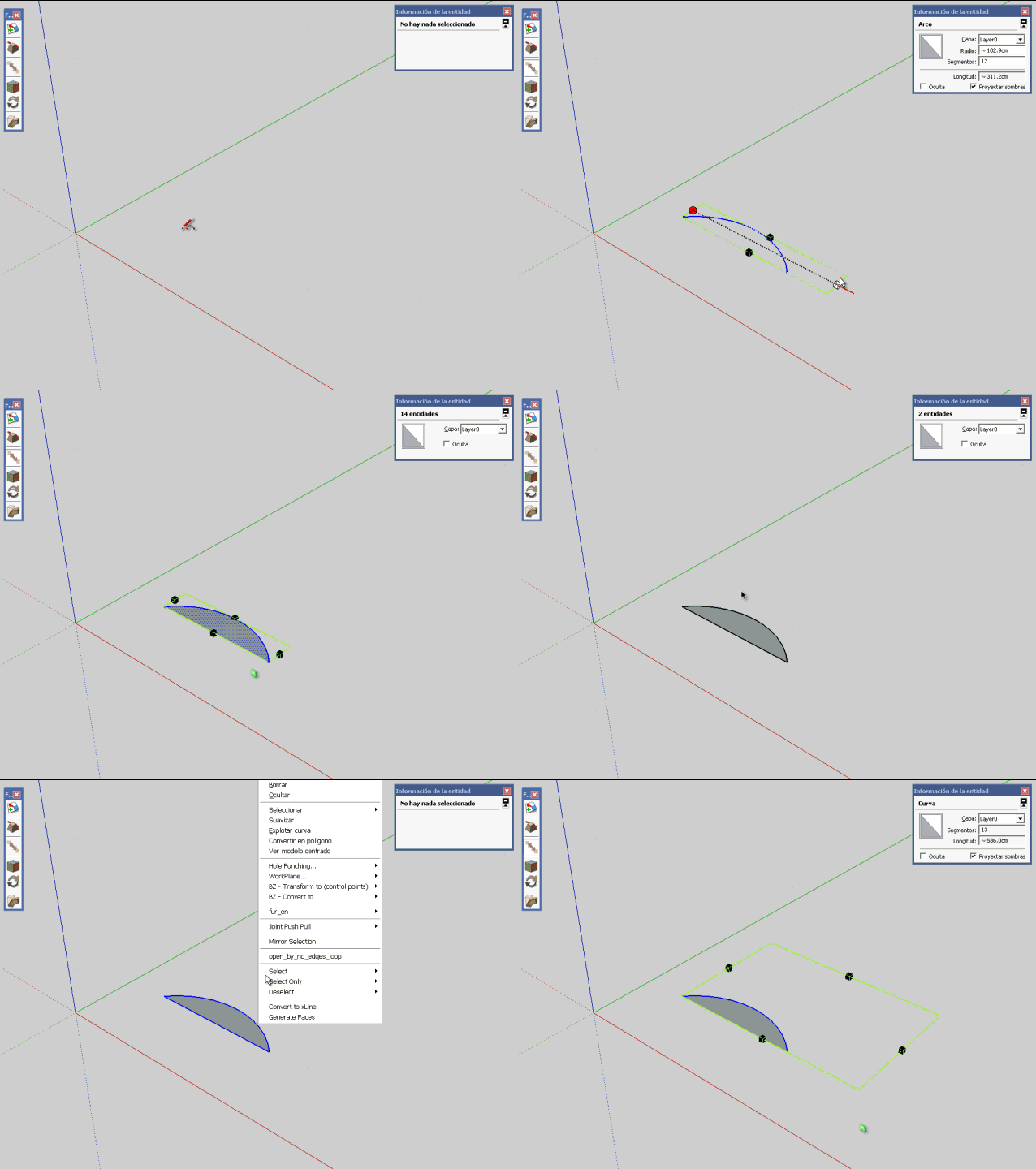
                                    stretching with orientation of scaling box

                                    small error.
                                    does not work "stretching with orientation of scaling box", with arcs and polylines
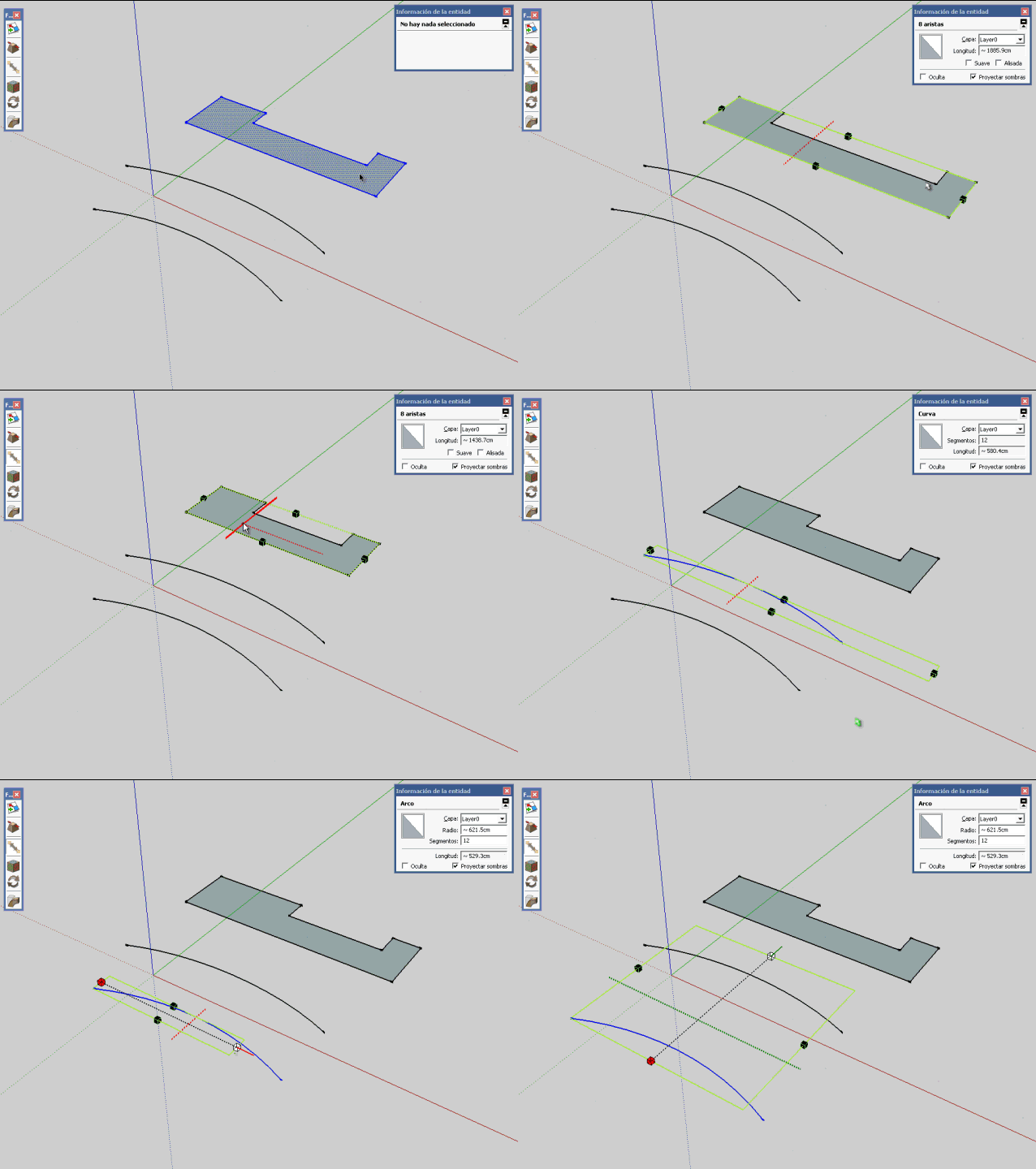
                                    Untitled.gif

                                    possible, correct this error?

                                    1 條回覆 最後回覆 回覆 引用 0
                                    • TIGT 離線
                                      TIG Moderator
                                      最後由 編輯

                                      You could temporarily add another line between the arc's ends to form a face then scale the lot then erase the temporary line on completion...

                                      TIG

                                      1 條回覆 最後回覆 回覆 引用 0
                                      • D 離線
                                        DIEGO-RODRIGUEZ
                                        最後由 編輯

                                        hi tig. Yes, I thought the same, but does not work

                                        Untitled1.gif

                                        1 條回覆 最後回覆 回覆 引用 0
                                        • thomthomT 離線
                                          thomthom
                                          最後由 編輯

                                          Arcs and Curves applies constraints on transformations unless they are exploded.

                                          Thomas Thomassen — SketchUp Monkey & Coding addict
                                          List of my plugins and link to the CookieWare fund

                                          1 條回覆 最後回覆 回覆 引用 0
                                          • TIGT 離線
                                            TIG Moderator
                                            最後由 編輯

                                            So Explode them, Scale and then re-Weld into Curves ?

                                            TIG

                                            1 條回覆 最後回覆 回覆 引用 0
                                            • 1
                                            • 2
                                            • 11
                                            • 12
                                            • 13
                                            • 14
                                            • 15
                                            • 56
                                            • 57
                                            • 13 / 57
                                            • 第一個貼文
                                              最後的貼文
                                            Buy SketchPlus
                                            Buy SUbD
                                            Buy WrapR
                                            Buy eBook
                                            Buy Modelur
                                            Buy Vertex Tools
                                            Buy SketchCuisine
                                            Buy FormFonts

                                            Advertisement





