sketchucation logo sketchucation
    • Login
    Oops, your profile's looking a bit empty! To help us tailor your experience, please fill in key details like your SketchUp version, skill level, operating system, and more. Update and save your info on your profile page today!
    ⚠️ Update | Sketchucation Tools 5.0.8 released with licensing improvements and bugfixes Download

    [Plugin][$] FredoScale - v3.7c - 19 Aug 26


    Scheduled Pinned Locked Moved Plugins
    1.2k Posts 347 Posters 3.3m Views 345 Watching
    Loading More Posts
    • Oldest to Newest
    • Newest to Oldest
    • Most Votes
    Reply
    • Reply as topic
    Log in to reply
    This topic has been deleted. Only users with topic management privileges can see it.
    • I
      Icchan
      last edited by

      Thanks for the tip, it does work as I needed with arcs, but the problem remains for rectangles or other non-regular shapes.

      1 Reply Last reply
      Reply Quote 0
      • jeff hammondJ
        jeff hammond
        last edited by

        @icchan said:

        Thanks for the tip, it does work as I needed with arcs, but the problem remains for rectangles or other non-regular shapes.

        You can do it with rectangles and odd shapes as well but it requires a little setup. There's another way to do this with a rectangle too.
        I'm on a phone right now but when I get back to the hotel tonight, I'll post a little tutorial.

        dotdotdot

        1 Reply Last reply
        Reply Quote 0
        • jeff hammondJ
          jeff hammond
          last edited by

          if you weld the segments into a polyline, the scaling with the move tool will work..
          with the rectangle, you weld 3 sides and leave the bottom untouched.. after scaling, select the 3 welded lines and explode if you wish..

          i also included an alternate method using guide lines to create an intersection which the scale tool will snap to..
          [i use jim's cline tool for the diagonal]
          http://sketchuptips.blogspot.com/2008/02/plugin-construction-line-tool.html

          [flash=800,475:m8lhsjxs]http://www.youtube.com/v/4Zx7dt58v7w?fs=1&hl=en_US&rel=0&hd=1&color1=0x2b405b&color2=0x6b8ab6[/flash:m8lhsjxs]

          dotdotdot

          1 Reply Last reply
          Reply Quote 0
          • I
            Icchan
            last edited by

            Wow... I was at most expecting an explanation for the tool behavior, was not definitely expecting a detailed tutorial! Excellent job, I hope others with similar problems will find this also. Thanks!

            1 Reply Last reply
            Reply Quote 0
            • bmikeB
              bmike
              last edited by

              Getting this error now when I open SketchUp.
              I thought I updated a bunch of Plugins... apparently something went wrong.


              skuperror.png

              mike beganyi design + consulting llc

              1 Reply Last reply
              Reply Quote 0
              • C
                ckho1985
                last edited by

                @bmike said:

                Getting this error now when I open SketchUp.
                I thought I updated a bunch of Plugins... apparently something went wrong.

                I think it is not compatible with sketchup 8 yet. Is there a FredoScale for Skup8?
                please update.... I looooooove this tool

                1 Reply Last reply
                Reply Quote 0
                • thomthomT
                  thomthom
                  last edited by

                  It's working with SU8.
                  Have you ensure you have installed the files correctly?

                  Thomas Thomassen β€” SketchUp Monkey & Coding addict
                  List of my plugins and link to the CookieWare fund

                  1 Reply Last reply
                  Reply Quote 0
                  • C
                    ckho1985
                    last edited by

                    I got it working now. it is WORKING with skup8. its confirmed. i just miss-copied a folder previously, thats all. (stuipd me 😳 )

                    1 Reply Last reply
                    Reply Quote 0
                    • bmikeB
                      bmike
                      last edited by

                      fixed. cleaned up my plugins folder and went back / downloaded / reinstalled all relevant files.
                      loading now, and toolbars popped up.
                      will test later when i get into a model.

                      mike beganyi design + consulting llc

                      1 Reply Last reply
                      Reply Quote 0
                      • D
                        DIEGO-RODRIGUEZ
                        last edited by

                        stretching with orientation of scaling box

                        small error.
                        does not work "stretching with orientation of scaling box", with arcs and polylines
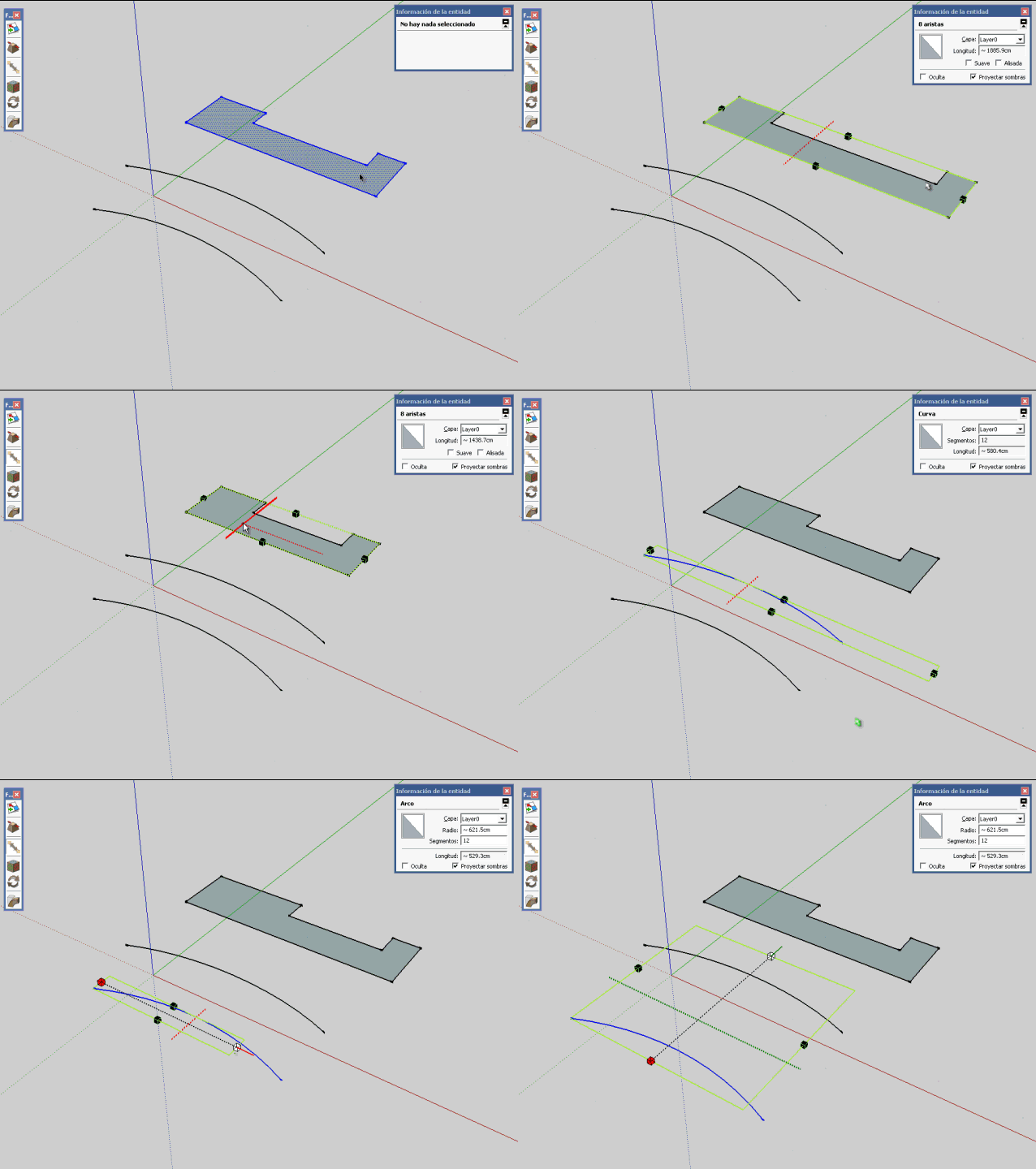
                        Untitled.gif

                        possible, correct this error?

                        1 Reply Last reply
                        Reply Quote 0
                        • TIGT
                          TIG Moderator
                          last edited by

                          You could temporarily add another line between the arc's ends to form a face then scale the lot then erase the temporary line on completion...

                          TIG

                          1 Reply Last reply
                          Reply Quote 0
                          • D
                            DIEGO-RODRIGUEZ
                            last edited by

                            hi tig. Yes, I thought the same, but does not work
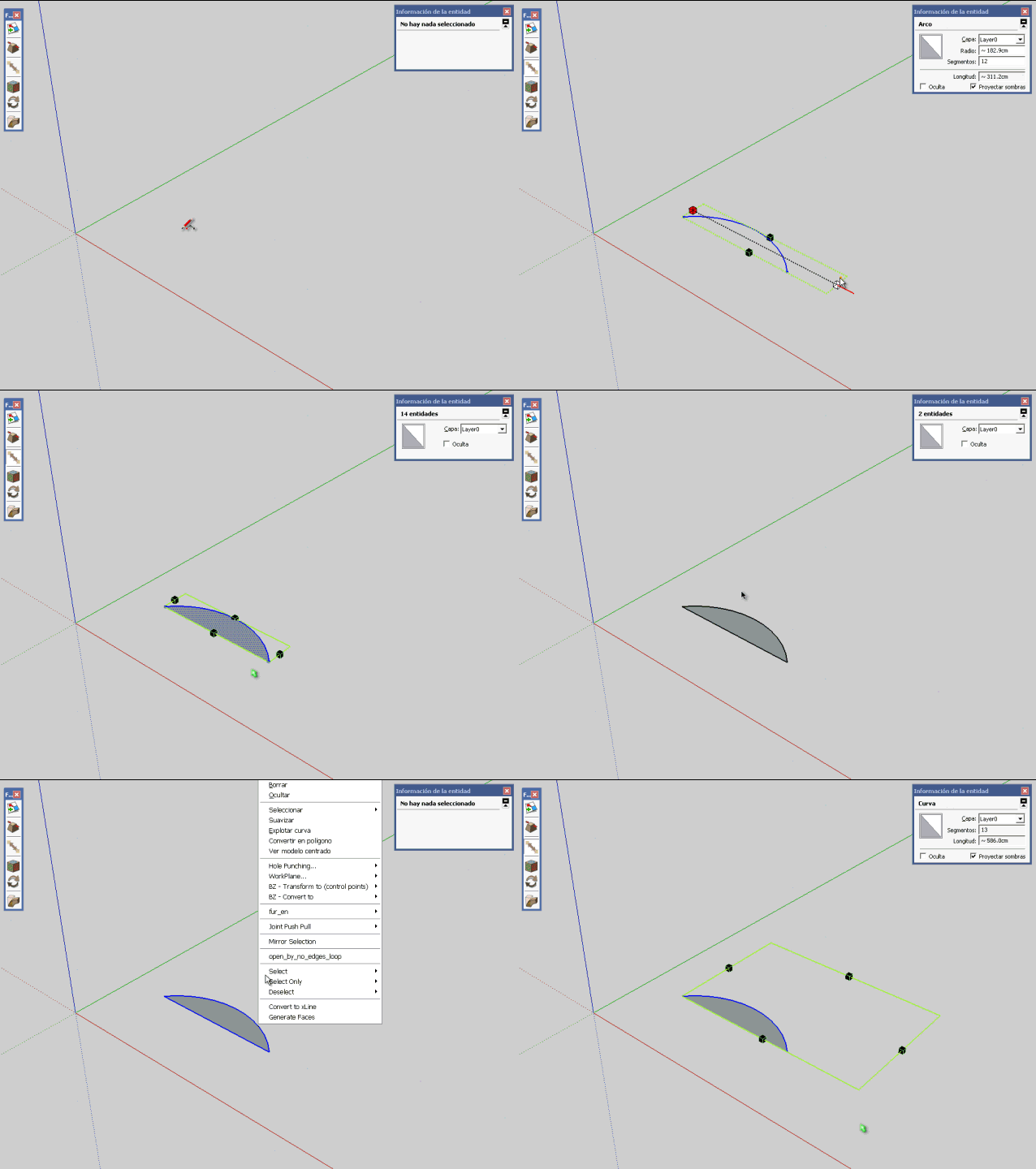

                            Untitled1.gif

                            1 Reply Last reply
                            Reply Quote 0
                            • thomthomT
                              thomthom
                              last edited by

                              Arcs and Curves applies constraints on transformations unless they are exploded.

                              Thomas Thomassen β€” SketchUp Monkey & Coding addict
                              List of my plugins and link to the CookieWare fund

                              1 Reply Last reply
                              Reply Quote 0
                              • TIGT
                                TIG Moderator
                                last edited by

                                So Explode them, Scale and then re-Weld into Curves ?

                                TIG

                                1 Reply Last reply
                                Reply Quote 0
                                • D
                                  DIEGO-RODRIGUEZ
                                  last edited by

                                  @thomthom said:

                                  Arcs and Curves applies constraints on transformations unless they are exploded.

                                  yes?
                                  is strange that all fredoscale tools work well with arc and polylines.
                                  no need to exploit the arcs and polylines

                                  1 Reply Last reply
                                  Reply Quote 0
                                  • fredo6F
                                    fredo6
                                    last edited by

                                    @diego-rodriguez said:

                                    stretching with orientation of scaling box

                                    small error.
                                    does not work "stretching with orientation of scaling box", with arcs and polylines

                                    [attachment=0:lcmr75ft]<!-- ia0 -->Untitled.gif<!-- ia0 -->[/attachment:lcmr75ft]

                                    possible, correct this error?

                                    Diego,

                                    As mentioned in the Doc, FredoScale does not stretch the SU curves. That's just a design choice, because SU does not stretch curves and I would have had to explode the curve, strech the edges and then reconstruct the curves (thios would have been destructive and probably not possible for an interactive visual deformation). It stretches normally if the curve if exploded.

                                    Fredo

                                    1 Reply Last reply
                                    Reply Quote 0
                                    • D
                                      DIEGO-RODRIGUEZ
                                      last edited by

                                      thank you all for the explanation

                                      1 Reply Last reply
                                      Reply Quote 0
                                      • fredo6F
                                        fredo6
                                        last edited by

                                        @diego-rodriguez said:

                                        thank you all for the explanation

                                        Stretch is no more than using the Move tool on the vertices of segment. You can do it manually and FredoScale just automates this process.

                                        As you can notice, all SU Curves move as a whole whatever vertex or edge you select.

                                        Fredo

                                        1 Reply Last reply
                                        Reply Quote 0
                                        • D
                                          DIEGO-RODRIGUEZ
                                          last edited by

                                          if, extends what do you say.
                                          although my initial question was related to can deform curves, non symmetrical.
                                          But this work can be done manually. only if this work is automatic is more practical

                                          thank you very much again

                                          1 Reply Last reply
                                          Reply Quote 0
                                          • P
                                            pianosmalos
                                            last edited by

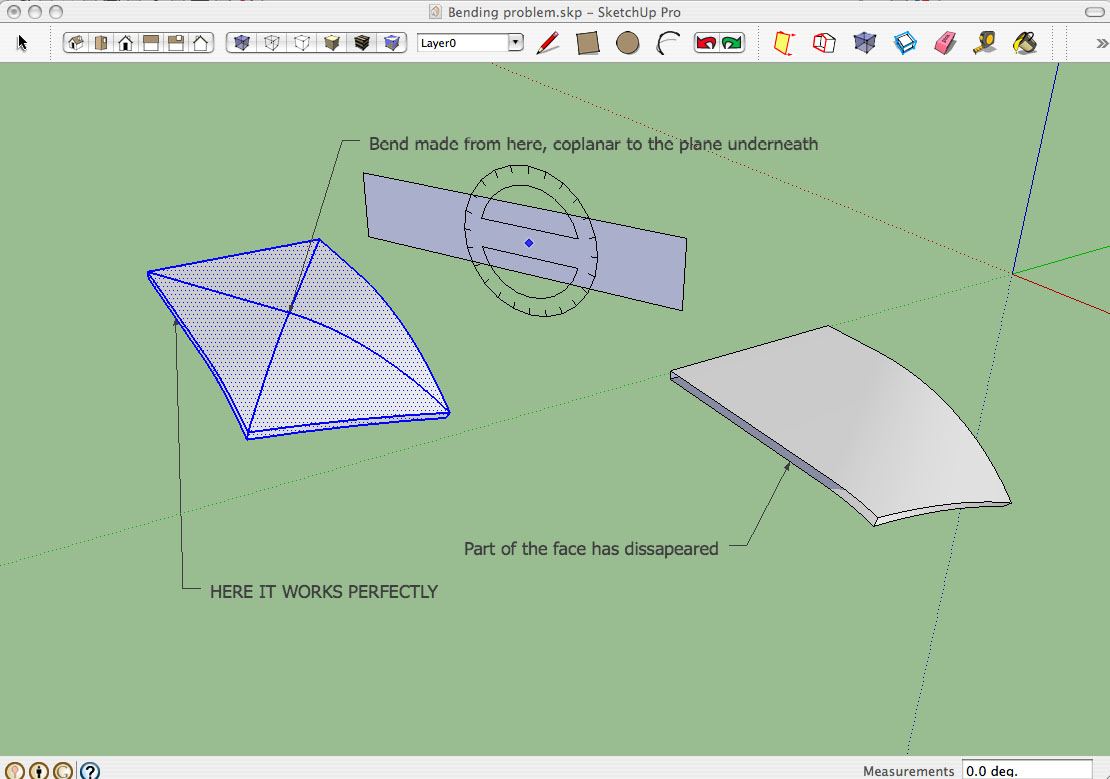
                                            Hi Fredo. As others, I am absolutely amazed about how powerful your tools is. However I found this problem (see attached pic) anytime I try to do a bend which is not coplanar to an existing component face.

                                            In this basic case, I tried a bend using the plane behind the object as a bending plane, whereas I applied the origin onto a random point on the middle of the object's top surface. It always fails, no matter what the object is.

                                            But I also realized that, if I apply the origin on a real point within the component (intersection point, point from an edge of the object), the tool works perfectly.

                                            I post it here, in case you think this is a bug or just the way it works.

                                            Thanks a lot, thumbs up for your great work! πŸ‘ πŸ‘ πŸ‘


                                            Bend Failure.jpg

                                            1 Reply Last reply
                                            Reply Quote 0

                                            Hello! It looks like you're interested in this conversation, but you don't have an account yet.

                                            Getting fed up of having to scroll through the same posts each visit? When you register for an account, you'll always come back to exactly where you were before, and choose to be notified of new replies (either via email, or push notification). You'll also be able to save bookmarks and upvote posts to show your appreciation to other community members.

                                            With your input, this post could be even better πŸ’—

                                            Register Login
                                            • 1
                                            • 2
                                            • 24
                                            • 25
                                            • 26
                                            • 27
                                            • 28
                                            • 58
                                            • 59
                                            • 26 / 59
                                            • First post
                                              Last post
                                            Buy SketchPlus
                                            Buy SUbD
                                            Buy WrapR
                                            Buy eBook
                                            Buy Modelur
                                            Buy Vertex Tools
                                            Buy SketchCuisine
                                            Buy FormFonts

                                            Advertisement