[Plugin][$] FredoScale - v3.6a - 01 Apr 24




-
Bonjour, j'ai aujourd'hui essayé l'outil fredoscale et merci beaucoup pour votre incroyable travail.
J'ai cependant un petit problème. J'ai utilisé "boxtapering" pour modifier un ensemble de composant ce qui a marché à merveille. Néanmoin, une fois les pièces modifiés, leurs taille devient imprecise et les pièces ne sont plus reconnues par le plugin "opencutlist" et donc impossible de générer une liste de débit. Je ne sais pas si c'est un problème solutionnable je pose ici le problème.
Merci encore !Hello, I tried the fredoscale tool today and thank you very much for your incredible work.
However, I have a small problem. I used "boxtapering" to modify a set of components which worked wonderfully. However, once the parts are modified, their size becomes imprecise and the parts are no longer recognized by the "opencutlist" plugin and therefore impossible to generate a cutting list. I do not know if this is a solvable problem, I am asking the problem here.
Thanks again! -
Good morning,
I am a daily user of this plugin.
I just installed SKP 2024 and FredoScale - v3.6a on my new machine. The license is active but when I click on the tool nothing happens.
Can you help me?
ThanksBonjour,
je suis une utilisatrice quotidienne de ce plugin.
Je viens d'installer SKP 2024 et FredoScale - v3.6a sur ma nouvelle machine. La licence est active mais quand je clique sur l'outil rien ne se passe.
Est-ce que vous pouvez m'aider ? -
Please run the Window > Libfredo Settings > Fredo6 Plugins Information for Sketchucation Support menu command in SketchUp and copy/paste the output into your reply.
-
@Rich-O-Brien
Thanks for your support !Fredo6 Plugins Information on 2025-03-04 09:59:17 +0100
- Platform: x64-mswin64_140 - Ruby: 3.2.2
- Sketchup: 24.0.594
- LibFredo6: v15.1a
- LibFredo6 Binary loaded
- Sketchucation ExtensionStore: 4.4.1
- SCFLicense: v6.4a - 74
- Fredo6 Plugins
FredoScale v3.6a - licensed FULL
- SCFLicense directory present
Signature File: 2025-02-24 16:52:48 +0100
FredoScale: 2025-03-04 09:56:38 +0100
-
@Mae50 That looks good.
Can you explain in more detail what is happening?
If you open the Ruby Console via Extensions > Developer > Ruby Console and click on a toolbar icons you see errors in the console?
If your SketchUp install does not have the correct privileges you can repair the SketchUp installation by downloading the installer and right clicking and choosing Run as Admin
When prompted choose Repair.
-
When I click on a tool Ruby Console says :
Fredo6 Plugins Information on 2025-03-04 09:59:17 +0100
- Platform: x64-mswin64_140 - Ruby: 3.2.2
- Sketchup: 24.0.594
- LibFredo6: v15.1a
- LibFredo6 Binary loaded
- Sketchucation ExtensionStore: 4.4.1
- SCFLicense: v6.4a - 74
- Fredo6 Plugins
FredoScale v3.6a - licensed FULL
- SCFLicense directory present
Signature File: 2025-02-24 16:52:48 +0100
FredoScale: 2025-03-04 09:56:38 +0100
Error: #<Errno::EACCES: Permission denied @ rb_sysopen - C:/Users/julie/AppData/Local/LIBFREDO6_DATA_Dir/LibFredo6_all_defaults.dat>
c:/users/julie/appdata/roaming/sketchup/sketchup 2024/sketchup/plugins/fredo6_!libfredo6/lib6registry.rbe:167:ininitialize' c:/users/julie/appdata/roaming/sketchup/sketchup 2024/sketchup/plugins/fredo6_!libfredo6/lib6registry.rbe:167:inopen'
c:/users/julie/appdata/roaming/sketchup/sketchup 2024/sketchup/plugins/fredo6_!libfredo6/lib6registry.rbe:167:inwrite_to_file' c:/users/julie/appdata/roaming/sketchup/sketchup 2024/sketchup/plugins/fredo6_!libfredo6/lib6registry.rbe:150:instore'
c:/users/julie/appdata/roaming/sketchup/sketchup 2024/sketchup/plugins/fredo6_!libfredo6/lib6plugin.rbe:1474:inusage_use' c:/users/julie/appdata/roaming/sketchup/sketchup 2024/sketchup/plugins/fredo6_!libfredo6/lib6plugin.rbe:1462:incommand_invoke'
c:/users/julie/appdata/roaming/sketchup/sketchup 2024/sketchup/plugins/fredo6_!libfredo6/lib6plugin.rbe:1443:inblock (2 levels) in build_config_commands' c:/users/julie/appdata/roaming/sketchup/sketchup 2024/sketchup/plugins/fredo6_!libfredo6/lib6traductor.rbe:1490:inblock in add_command'
-
Yes, that looks like your SketchUp install is missing the correct permissions. Following my instructions to Repair should rectify it.
Or go to C:/Users/julie/AppData/Local/LIBFREDO6_DATA_Dir and delete the LibFredo6_all_defaults.dat file and start SketchUp
I'd recommend the top option to ensure you don't encounter other issues related to permissions.
-
Thanks I do the first option, but it's not ok .
Console Ruby :
Error: #<Errno::EACCES: Permission denied @ rb_sysopen - C:/Users/julie/AppData/Local/LIBFREDO6_DATA_Dir/LibFredo6_all_defaults.dat>
c:/users/julie/appdata/roaming/sketchup/sketchup 2024/sketchup/plugins/fredo6_!libfredo6/lib6registry.rbe:167:ininitialize' c:/users/julie/appdata/roaming/sketchup/sketchup 2024/sketchup/plugins/fredo6_!libfredo6/lib6registry.rbe:167:inopen'
c:/users/julie/appdata/roaming/sketchup/sketchup 2024/sketchup/plugins/fredo6_!libfredo6/lib6registry.rbe:167:inwrite_to_file' c:/users/julie/appdata/roaming/sketchup/sketchup 2024/sketchup/plugins/fredo6_!libfredo6/lib6registry.rbe:150:instore'
c:/users/julie/appdata/roaming/sketchup/sketchup 2024/sketchup/plugins/fredo6_!libfredo6/lib6plugin.rbe:1474:inusage_use' c:/users/julie/appdata/roaming/sketchup/sketchup 2024/sketchup/plugins/fredo6_!libfredo6/lib6plugin.rbe:1462:incommand_invoke'
c:/users/julie/appdata/roaming/sketchup/sketchup 2024/sketchup/plugins/fredo6_!libfredo6/lib6plugin.rbe:1443:inblock (2 levels) in build_config_commands' c:/users/julie/appdata/roaming/sketchup/sketchup 2024/sketchup/plugins/fredo6_!libfredo6/lib6traductor.rbe:1490:inblock in add_command' -
I just try the second option
Or go to C:/Users/julie/AppData/Local/LIBFREDO6_DATA_Dir and delete the LibFredo6_all_defaults.dat file and start SketchUp
and it's ok.
Thank you very very much for your support -
Hi!
I think I found bug.
Sometimes, when I rotate my element i change dimensons there is a error with area of my component.
Look at this video: 2025-03-11 16 06 21.mp4
Someone can help me?
Thanks!
Marcin.
-
I would need to have the model to understand, especially because the video is unclear about what exactly you do to the cube with the rotation.
Also, can you turn on 'Show Hidden geometry', just in case there are hidden elements in the group.
-
Box Stretching options has a bug - it does correctly only the first level of components nesting, starting with the second level, it doesn't make unique on the first run (it messes up all your components in the model.!), and if you hit Ctrl+Z (only ONCE.!) it reverses the modification, and after that they remain unique and you can modify...
Very disturbing.!
Curic Stretch works flawlessly, but it is not so handy and fast to use, so is the last option. I use it only when what I want to modify is much too heavy (loaded with many faces and edges... usually organic shapes, but also cabinets with more then 3 drawers because it freezes calculating) because it can handle much more amount of geometry, in these situations, Fredo Scale does only half the job and you end up seeing that only a few pieces have been modified. -
[@fredo6 thanks for your answer and thank you for what you do for Sketchup

I include my model.
One object (on the left) is original, second object (on the right) is after rotate by Sketchup official rotate function.
The bug doesn't show always in first time - try rotate left object, when its good (without bug) - use "undo" and try again.
Thanks for you help!
Regards,
Marcin -
What is the relation with FredoScale then?
Note that I tried to rotate both objects, with Undo and try again. I did not find any issue
-
@fredo6 Hi!
The problem with area of the object is only when I use a FredoScale.
Below I include a longer video with problem.
Thanks!
-
I cannot reproduce the issue with the Stretch tool followed by a SU Rotate.
Do you have it on any object or just this one ?
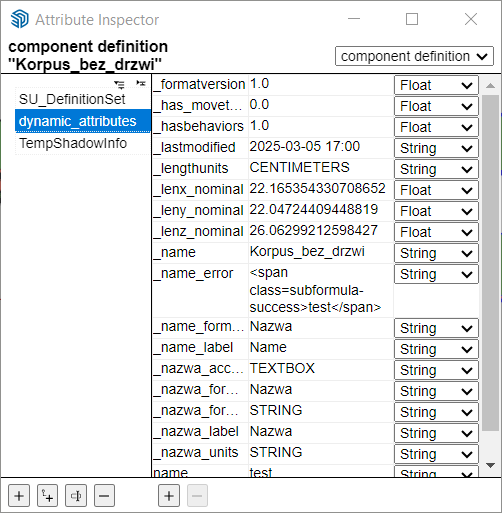
By the way, it looks like you component is a Dynamic component, or at least was a dynamic component.
-
Bundle of 8 plugins are compatible with SketchUp 2025?
I'm interested in the Fredo scale, RoundCorner, and others. -
@noseno002 yes. They all work with SketchUp 2025.
-
I'm using this plugin for ears, but this has always been the case. It's not a big problem—when the cursor highlights the edge like in your video, just press it, and the bounding box will align.
@NetJaro said in [Plugin][$] FredoScale - v3.6a - 01 Apr 24:
@fredo6 Hi!
The problem with area of the object is only when I use a FredoScale.
Below I include a longer video with problem.
Thanks!
-
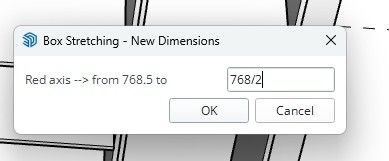
I have problem, divide do not work on sketchup 2025 I'm alone with this ?
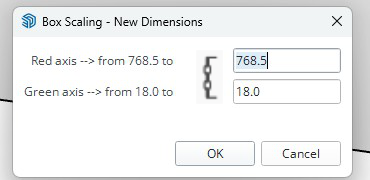
Are you planning to make any changes, upgrades, or new features?- A new UI, like the Flip tool
- Displaying the size of the selected object when the tool is active
- Upgrading the stretch target
- Holding proportions when scaling





Advertisement