[Plugin Library] LibFredo6 - v16.3b - 21 Oct 26



-
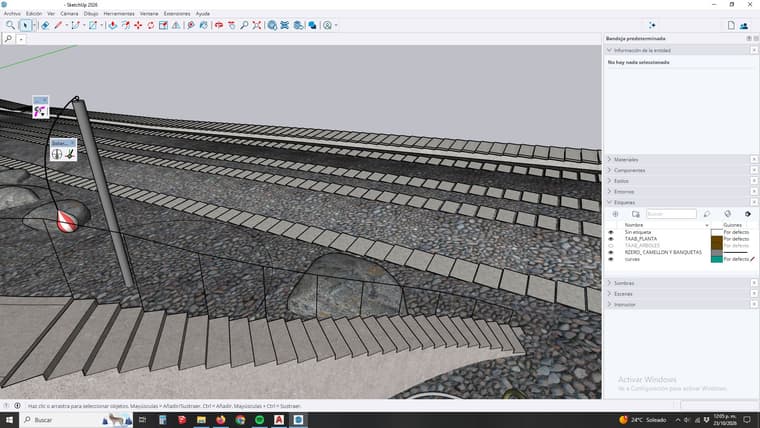
Hi! I can't install the plugin, it allways stays like this (see image), can somebody help me? thank you! !
-
I can't install the plugin, it allways stays like this (see image)
What plugin are you trying to install? I can't see anything related to a problem with an extension in your screenshot. I do see you are using tags incorrectly but that doesn't have anything to do with installing extensions.
-
As Dave says, your posts in the LibFredo6 thread says nothing about that ?
It does nothing on its own, but supports most of Fredo6's extensions.
If you are having problems with one of his extensions please post in its thread, and explain what the problem is with at least some clues so we can try and help you.
Also - as Dave points out - you have your active Tag [previously called 'layers'] set up wrongly - named 'Etiquetas' in your language. All geometry -i.e. edges and faces - should be made/associated with 'Untagged' - i.e. 'Sin etiqueta' - you can then assign different Tags to selected groups and component-instances, using the Entity Info panel ['Información de la entidad'] - later it can be used to control their visibility whilst modelling and editing... -
Hello Fredo6,
I am using SketchUp 2026 on macOS with TopoShaper 2.7b and LibFredo6 15.9c.
TopoShaper fails when analysing the initial selection. The Ruby Console reports:
NameError: undefined local variable or method 'accept_current_selection'
I tried to download LibFredo6 16.3b from the official SketchUcation page, but the download reports a database connection error. The file page also shows a size of 0.00 MB, and clicking Download leads to a “File does not exist” message for LibFredo6.rbz.
Could you please check the download link and advise whether LibFredo6 16.3b fixes this selection error on SketchUp 2026 for Mac?
Thank you.
-
Hello Fredo6,
I am using SketchUp 2026 on macOS with TopoShaper 2.7b and LibFredo6 15.9c.
TopoShaper fails when analysing the initial selection. The Ruby Console reports:
NameError: undefined local variable or method 'accept_current_selection'
I tried to download LibFredo6 16.3b from the official SketchUcation page, but the download reports a database connection error. The file page also shows a size of 0.00 MB, and clicking Download leads to a “File does not exist” message for LibFredo6.rbz.
Could you please check the download link and advise whether LibFredo6 16.3b fixes this selection error on SketchUp 2026 for Mac?
Thank you.
-
The installation did not work for me. I received an error message when I tried to use the add command. Any ideas?
-
-
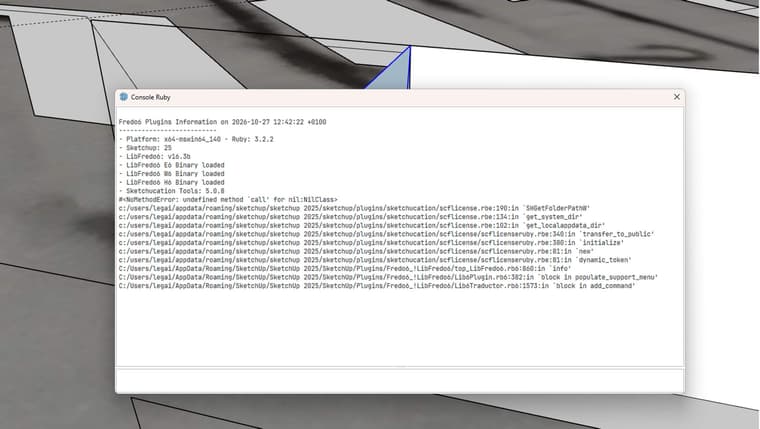
Ruby error message :
Fredo6 Plugins Information on 2026-10-27 12:42:22 +0100
- Platform: x64-mswin64_140 - Ruby: 3.2.2
- Sketchup: 25.0.571
- LibFredo6: v16.3b
- LibFredo6 E6 Binary loaded
- LibFredo6 W6 Binary loaded
- LibFredo6 H6 Binary loaded
- Sketchucation Tools: 5.0.8
#<NoMethodError: undefined methodcall' for nil:NilClass> c:/users/legai/appdata/roaming/sketchup/sketchup 2025/sketchup/plugins/sketchucation/scflicense.rbe:190:inSHGetFolderPathW'
c:/users/legai/appdata/roaming/sketchup/sketchup 2025/sketchup/plugins/sketchucation/scflicense.rbe:134:inget_system_dir' c:/users/legai/appdata/roaming/sketchup/sketchup 2025/sketchup/plugins/sketchucation/scflicense.rbe:102:inget_localappdata_dir'
c:/users/legai/appdata/roaming/sketchup/sketchup 2025/sketchup/plugins/sketchucation/scflicense/scflicenseruby.rbe:340:intransfer_to_public' c:/users/legai/appdata/roaming/sketchup/sketchup 2025/sketchup/plugins/sketchucation/scflicense/scflicenseruby.rbe:380:ininitialize'
c:/users/legai/appdata/roaming/sketchup/sketchup 2025/sketchup/plugins/sketchucation/scflicense/scflicenseruby.rbe:81:innew' c:/users/legai/appdata/roaming/sketchup/sketchup 2025/sketchup/plugins/sketchucation/scflicense/scflicenseruby.rbe:81:indynamic_token'
C:/Users/legai/AppData/Roaming/SketchUp/SketchUp 2025/SketchUp/Plugins/Fredo6_!LibFredo6/top_LibFredo6.rb6:860:ininfo' C:/Users/legai/AppData/Roaming/SketchUp/SketchUp 2025/SketchUp/Plugins/Fredo6_!LibFredo6/Lib6Plugin.rb6:382:inblock in populate_support_menu'
C:/Users/legai/AppData/Roaming/SketchUp/SketchUp 2025/SketchUp/Plugins/Fredo6_!LibFredo6/Lib6Traductor.rb6:1573:in `block in add_command'
-
-
Somethings is wrong is the installation of Sketchucation Tools.
Could you- go to the Plugin directory: c:/users/legai/appdata/roaming/sketchup/sketchup 2025/sketchup/plugins
- Delete the folder Sketchucation
- Reinstall Sketchucation tools from the Sketchucation site
Please advise if this does not work.
-
Thanks, it's working now.
First, I deleted it, then I modified the signature authorisation in the warehouse extension. It was a signature issue.
In SketchUp:
Extensions → Extension Manager
Click the ️ Extension Manager Settings icon.
You'll find “Extension Loading Policy” / “Extension Loading Preferences.”
Select:
“Approve Unidentified Extensions”
Restart SketchUp.




Hello! It looks like you're interested in this conversation, but you don't have an account yet.
Getting fed up of having to scroll through the same posts each visit? When you register for an account, you'll always come back to exactly where you were before, and choose to be notified of new replies (either via email, or push notification). You'll also be able to save bookmarks and upvote posts to show your appreciation to other community members.
With your input, this post could be even better 💗
Register Login


Advertisement