sketchucation logo sketchucation
    • 로그인
    Oops, your profile's looking a bit empty! To help us tailor your experience, please fill in key details like your SketchUp version, skill level, operating system, and more. Update and save your info on your profile page today!
    🚨 Skimp | 25% Off until March 30 Buy Now

    [Plugin Library] LibFredo6 - v15.9a - 25 Mar 26


    예약됨 고정됨 잠김 이동됨 Plugins
    2.2k 게시물 577 작성자 4.3m 조회수 579 Watching
    게시물 더 불러오는 중
    • 오래된 순
    • 최신 순
    • 가장 많은 투표
    답글
    • 토픽으로 답글
    로그인 후 답글 작성
    이 토픽은 삭제되었습니다. 토픽 관리 권한이 있는 사용자만 볼 수 있습니다.
    • 5 오프라인
      5ketchupUser55
      마지막 수정자:

      When trying to download, I click download button and then I see just a dark green square with Download button with yellow background, which does nothing.

      I went all these registration steps to download this plugin, disabled plugins in my browser and what I see?

      This site designer needs some professional medical help, because behind all of these bells and whistles basic functionality is lost.

      I do hope You still remember that this site should allow people to share their plugins?

      1 답글 마지막 답글 답글 인용 0
      • TIGT 오프라인
        TIG Moderator
        마지막 수정자:

        The logical place to get your up to date Plugin RBZs is from the PluginsStore... http://sketchucation.com/pluginstore
        It is linked in the tools' thread...
        It has excellent search and filtering capabilities and contains 99% of all Plugins available on SCF...

        TIG

        1 답글 마지막 답글 답글 인용 0
        • T 오프라인
          tmt0009
          마지막 수정자:

          Hello,

          I have LibFredo6 - v6.3a on my mac now. I'm trying to get Curviloft so that I can use it but can' figure out how to actually use the plugin. I install it like I installed the LibFredo app but it won't appear anywhere other than the extensions window and I can't find the toolbar. What am I missing?

          1 답글 마지막 답글 답글 인용 0
          • N 오프라인
            nwarner33
            마지막 수정자:

            Hi there, is there a trick to getting your plugins to work with sketchup 2015? Or has that not happened yet?
            Thanks for all you do.
            Nic

            1 답글 마지막 답글 답글 인용 0
            • fredo6F 오프라인
              fredo6
              마지막 수정자:

              @nwarner33 said:

              Hi there, is there a trick to getting your plugins to work with sketchup 2015? Or has that not happened yet?
              Thanks for all you do.
              Nic

              All my plugins work with SU15

              Fred

              1 답글 마지막 답글 답글 인용 0
              • fredo6F 오프라인
                fredo6
                마지막 수정자:

                NEW RELEASE: LibFredo6 v6.4a - 17 Nov 14

                LibFredo6 6.4a is a release mainly for AngleInspector 1.0, part of FredoTools 2.4a.

                It also fixes some bugs and adjustments that have an impact on DrawAlong and MoveAlong. So it is advised to upgrade

                See main post of this thread for Download of LibFredo6.

                Fredo

                1 답글 마지막 답글 답글 인용 0
                • OxerO 오프라인
                  Oxer
                  마지막 수정자:

                  New Spanish Language file v6.4a

                  Spanish Language

                  "The result is the end what is important is the process" by Oxer
                  http://www.oxervision.blogspot.com/

                  1 답글 마지막 답글 답글 인용 0
                  • fredo6F 오프라인
                    fredo6
                    마지막 수정자:

                    Oxer,

                    Thanks very much. This will go in next update

                    Fredo

                    1 답글 마지막 답글 답글 인용 0
                    • M 오프라인
                      mjvanderploeg
                      마지막 수정자:

                      Dear all,

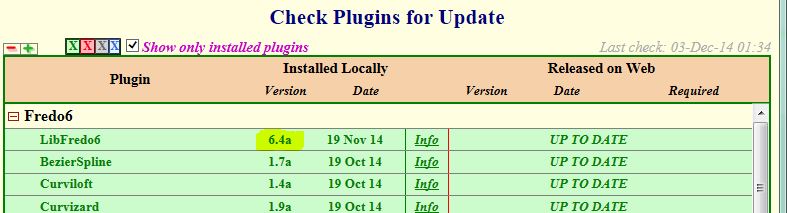
                      got a problem using libfredo6 with fredo tools and round corner. Error message is that libfredo6 is not 6.3 or higher, while the latest 6.4 is installed. See attached files. Can you help?
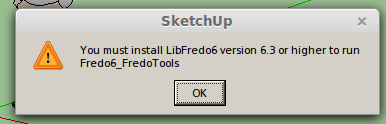
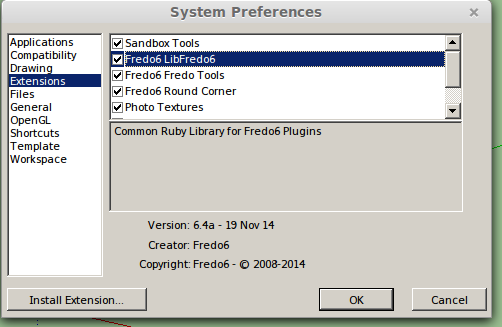
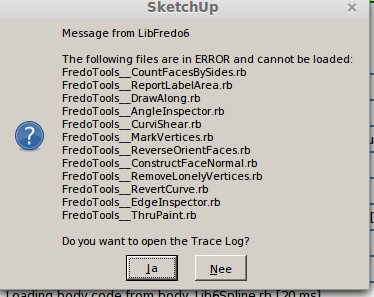
                      error message 1


                      installed libfredo6 version


                      error message 2


                      log file

                      1 답글 마지막 답글 답글 인용 0
                      • fredo6F 오프라인
                        fredo6
                        마지막 수정자:

                        Actually the message should say "you must install LibFredo6 6.4". So it's not a problem of version.

                        The issue seems to come from a wrong installation of FredoTools.

                        Did you install both LibFredo6 and FredoTools in the same directory?

                        I suggest you have a look at the footprint and possibly cleanup and reinstall FredoTools (ideally from the PluginStore).

                        Fredo

                        1 답글 마지막 답글 답글 인용 0
                        • M 오프라인
                          mjvanderploeg
                          마지막 수정자:

                          @fredo6 said:

                          Actually the message should say "you must install LibFredo6 6.4". So it's not a problem of version.

                          The issue seems to come from a wrong installation of FredoTools.

                          Did you install both LibFredo6 and FredoTools in the same directory?

                          I suggest you have a look at the footprint and possibly cleanup and reinstall FredoTools (ideally from the PluginStore).

                          Fredo

                          Fredo,

                          Thanks for your quick reply. A few things I forgot to mention. I'm running Sketchup 2013 in LinuxMint 17, using wine.

                          This is the contents of the Plugin folder:

                          drwxr-xr-x 3 margriet margriet 4096 nov 24 21:23 Fredo6_FredoTools
                          -rw-r--r-- 1 margriet margriet 1633 okt 18 00:28 Fredo6_FredoTools.rb
                          drwxr-xr-x 4 margriet margriet 4096 nov 24 21:23 Fredo6_!LibFredo6
                          -rw-r--r-- 1 margriet margriet 12896 okt 18 00:17 Fredo6_!LibFredo6.rb
                          drwxr-xr-x 4 margriet margriet 4096 nov 24 21:24 Fredo6_RoundCorner
                          -rw-r--r-- 1 margriet margriet 1633 okt 18 15:57 Fredo6_RoundCorner.rb
                          drwxr-xr-x 4 margriet margriet 4096 nov 22 09:32 su_advancedcameratools
                          -rw-r--r-- 1 margriet margriet 1715 aug 6 2013 su_advancedcameratools.rb
                          drwxr-xr-x 8 margriet margriet 4096 nov 22 09:32 su_dynamiccomponents
                          -rw-r--r-- 1 margriet margriet 1717 aug 6 2013 su_dynamiccomponents.rb
                          drwxr-xr-x 3 margriet margriet 4096 nov 22 09:33 su_sandbox
                          -rw-r--r-- 1 margriet margriet 1663 aug 6 2013 su_sandbox.rb
                          drwxr-xr-x 2 margriet margriet 4096 nov 22 09:33 su_webtextures
                          -rw-r--r-- 1 margriet margriet 1299 aug 6 2013 su_webtextures.rb

                          So all plugins are in the same folder.

                          The Fredotools are indeed the latest version from the plugin store

                          -rw-r--r-- 1 margriet margriet 305756 nov 24 20:08 FredoTools_v2.4a.rbz

                          As the sketchucation tools do not work on my machine, I manually downloaded your plugins from the store and installed them via the Window -> preferences -> extensions menu.

                          1 답글 마지막 답글 답글 인용 0
                          • fredo6F 오프라인
                            fredo6
                            마지막 수정자:

                            I think this may be due to Linux, where the ! charcater is actually not the considered going before alphanumeric characters. This means that FredoTools seems to be loaded before LibFredo6.

                            The only thing I see would be to simply remove the file Fredo6_FredoTools.rb(which is actually not useful). LibFredo6 will load it.

                            Fredo

                            1 답글 마지막 답글 답글 인용 0
                            • Spirou4DS 오프라인
                              Spirou4D
                              마지막 수정자:

                              No my dear, your last release isn't 6.4a!!!! There are a mistake.
                              Take alook on your lib, please.

                              1 답글 마지막 답글 답글 인용 0
                              • BoxB 오프라인
                                Box
                                마지막 수정자:

                                Looks it to me.


                                lib.JPG

                                1 답글 마지막 답글 답글 인용 0
                                • J 오프라인
                                  Justusson
                                  마지막 수정자:

                                  Hi,
                                  does anyone know why I'm getting dotted lines, when drawing with TOS, and not filled lines?
                                  (Both with arch, rectangle sometimes and so forth,..)

                                  These dotted lines, much like hidden lines don't affect the surface at all. They need to be filled in afterwards manually. They apply themselves to the curved surfaces, but don't do anything more than that.

                                  Hope anyone can help me,

                                  Best regards/
                                  Chris

                                  1 답글 마지막 답글 답글 인용 0
                                  • Dave RD 오프라인
                                    Dave R
                                    마지막 수정자:

                                    It sounds to me as if you have it set to draw construction lines instead of edges. You ought to spend some time looking at the info here. Especially look at the Quickcard PDF file available in the first post of the thread.

                                    Etaoin Shrdlu

                                    %

                                    (THERE'S NO PLACE LIKE)

                                    G28 X0.0 Y0.0 Z0.0

                                    M30

                                    %

                                    1 답글 마지막 답글 답글 인용 0
                                    • J 오프라인
                                      Justusson
                                      마지막 수정자:

                                      Excellent, thanks Dave R, just was I was looking for. Hadn't seen the Construction lines/ Plain Lines.
                                      Best /
                                      Christoffer

                                      1 답글 마지막 답글 답글 인용 0
                                      • S 오프라인
                                        sahli85
                                        마지막 수정자:

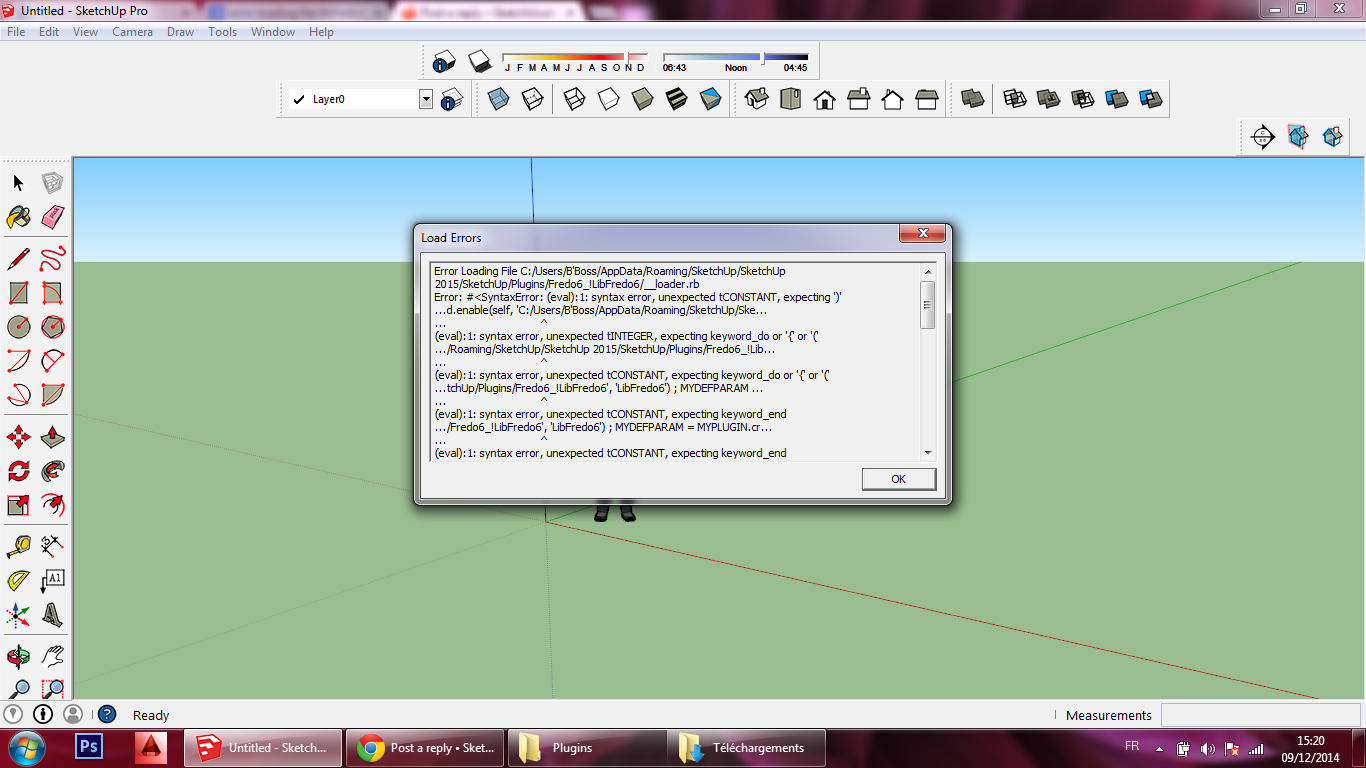
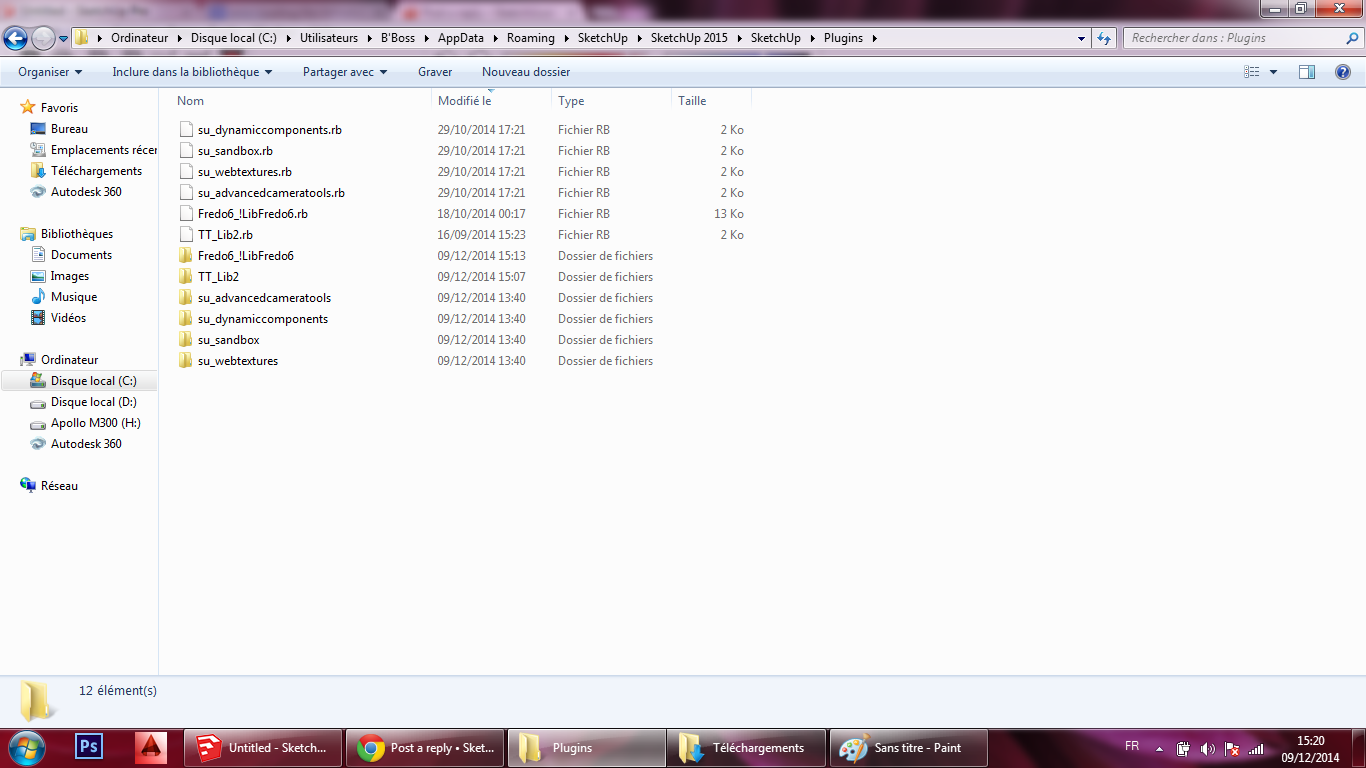
                                        libfredo6 don't work 😢


                                        r1.png


                                        r2.png

                                        1 답글 마지막 답글 답글 인용 0
                                        • TIGT 오프라인
                                          TIG Moderator
                                          마지막 수정자:

                                          Please check for proper installation...

                                          BUT...

                                          I'm not sure if this is relevant...
                                          When SketchUp v2014 came in it should have fixed the issues with Windows users having accented characters in their user names.
                                          Unfortunately, it was found that sometimes it still failed in some circumstances...
                                          One issue was with a single-quote ['] in user names ! [like "B'Boss"]...
                                          BUT I thought this had been addressed in later versions...

                                          Also some "FILE" values etc fail if the result is not forced into UTF-8 encoding in the script itself - this is system dependent...

                                          Any SUp guys care to comment ?
                                          thomthom ??

                                          TIG

                                          1 답글 마지막 답글 답글 인용 0
                                          • fredo6F 오프라인
                                            fredo6
                                            마지막 수정자:

                                            The prolem comes from the quote in the username, which clashes with string parsing.

                                            So not a non-ascii problem, but even worse, as I never thought quotes where allowed in usernames.

                                            Fredo

                                            1 답글 마지막 답글 답글 인용 0

                                            Hello! It looks like you're interested in this conversation, but you don't have an account yet.

                                            Getting fed up of having to scroll through the same posts each visit? When you register for an account, you'll always come back to exactly where you were before, and choose to be notified of new replies (either via email, or push notification). You'll also be able to save bookmarks and upvote posts to show your appreciation to other community members.

                                            With your input, this post could be even better 💗

                                            등록 로그인
                                            • 1
                                            • 2
                                            • 43
                                            • 44
                                            • 45
                                            • 46
                                            • 47
                                            • 110
                                            • 111
                                            • 45 / 111
                                            • 첫 게시물
                                              마지막 게시물
                                            Buy SketchPlus
                                            Buy SUbD
                                            Buy WrapR
                                            Buy eBook
                                            Buy Modelur
                                            Buy Vertex Tools
                                            Buy SketchCuisine
                                            Buy FormFonts

                                            Advertisement