[Plugin Library] LibFredo6 - v15.8e - 15 Feb 26



-
Yes, make sure you have the correct Plugins folder - as revealed by my code snippet.
Then change its permissions to FULL Read/Write... AND choose to apply the changes to the contents of that folder too...
It should work both Dave and I have MACs that do this without issues... -
@bobpineo said:
Hello Fredo,
Love your Plugins, thank you!
I keep getting this message..."libfredo6 will be updated at next startup of sketchup.I have tried reloading, deleting obsolete files etc etc.
Can you help me figure out what is going on?
Thanks
Best BPplus the following:(after I get the initial libfredo update warning.
C:/Program Files (x86)/SketchUp/SketchUp 2014/Tools/DBUR_UcsManager.rb:12:in
<top (required)>' Error: c:/program files (x86)/sketchup/sketchup 2014/tools/dm_artisan/artisan.rbs:273: invalid multibyte char (UTF-8) c:/program files (x86)/sketchup/sketchup 2014/tools/dm_artisan/artisan.rbs:273: invalid multibyte char (UTF-8) c:/program files (x86)/sketchup/sketchup 2014/tools/dm_artisan/artisan.rbs:273: syntax error, unexpected end-of-input, expecting keyword_end data="90¡M5lªÙ[:}¶ä^-Ú¢ßÓjt@+¡©tp}x±" #just garbage ^ C:/Program Files (x86)/SketchUp/SketchUp 2014/Tools/DM_artisan/artisan_load.rb:10:ineval'
C:/Program Files (x86)/SketchUp/SketchUp 2014/Tools/DM_artisan/artisan_load.rb:10:inload' C:/Program Files (x86)/SketchUp/SketchUp 2014/Tools/DM_artisan/artisan_load.rb:10:inmodule:Artisan'
C:/Program Files (x86)/SketchUp/SketchUp 2014/Tools/DM_artisan/artisan_load.rb:3:in<module:DM>' C:/Program Files (x86)/SketchUp/SketchUp 2014/Tools/DM_artisan/artisan_load.rb:1:in<top (required)>'
C:/Program Files (x86)/SketchUp/SketchUp 2014/Tools/extensions.rb:197:inrequire' C:/Program Files (x86)/SketchUp/SketchUp 2014/Tools/extensions.rb:197:inload'
C:/Program Files (x86)/SketchUp/SketchUp 2014/Tools/DM_artisan.rb:18:inregister_extension' C:/Program Files (x86)/SketchUp/SketchUp 2014/Tools/DM_artisan.rb:18:inmodule:Artisan'
C:/Program Files (x86)/SketchUp/SketchUp 2014/Tools/DM_artisan.rb:5:in<module:DM>' C:/Program Files (x86)/SketchUp/SketchUp 2014/Tools/DM_artisan.rb:4:in<top (required)>'I faced a similar issue while copying my plugins. Download the latest rbz from artisan’s official website. Install this extension, and these errors will be fixed.

-
@Bob Pineo
Somewhat belatedly I read your post...
Your error messages relate to .rb files loading from theToolsfolder.
Some of these, like Didier Bur's current UCSmanager, and the older version of Artisan are not compatible with v2014.
BUT you should have NO plugins files loading from theToolsfolder in v2014 except the three which ship with SketchUp itself:
sketchup.rb extensions.rb langhandler.rb
and a subfolder named 'RubyStdLib', which contains dozens of Ruby2 files...
[and there might also be a lone file named something like!_fix_ruby_startup2-1-2.rb- but that is only IF you have manually downloaded and installed it yourself - it allows you to open SKPs on remote drives and thereby launch SketchUp without breaking SketchUp.exe - a known bug in v2014M0 that will be fixed within the imminent v2014M1]
If you have incorrectly manually copied these additional plugins files into the Tools folder you must remove them [and their subfolders].
They all belong in your user's Plugins folder !
To find where that is, useSketchup.find_support_file('Plugins')in the Ruby Console, BUT remember that the Preferences > Extensions > Install... button and/or the SketchUcation AutoInstall tool will extract RBZ's files and add them into the correct Plugins folder for you = without any need to manually tinker with things and break SketchUp...Please do NOT copy plugins from earlier SketchUps unless there is no possible alternative.
Newer v2014-compatible versions for most common Plugins are available in the SCF PluginStore, Trimble's EWarehouse, Smustard.com, other Plugin's-Website etc.
Get those. -
NEW RELEASE: LibFredo6 v6.0a - 18 Jun 14
LibFredo6 6.0a is a release for:
- DrawAlong 1.1a,
- MoveAlong 1.2a,
which are published as part of FredTools 2.0a.
This updates provides fixes and evolutions for
- DrawAlong: inferences when drawing on a plane
- MoveAlong: Move with alignment
See main post of this thread for Download of LibFredo6.
Fredo
-
Disregard! All sorted
-
thax a lot
-
New Spanish Language File.
-
Still not working on Sketchup 2014. Here is the error, what am I doing wrong?
Error Loading File Fredo6_!LibFredo6.rb
Error: #<LoadError: cannot load such file -- LibTraductor.rb>
C:/Program Files (x86)/SketchUp/SketchUp 2014/Tools/RubyStdLib/rubygems/core_ext/kernel_require.rb:45:inrequire' C:/Program Files (x86)/SketchUp/SketchUp 2014/Tools/RubyStdLib/rubygems/core_ext/kernel_require.rb:45:inrequire'
C:/Users/Username/AppData/Roaming/SketchUp/SketchUp 2014/SketchUp/Plugins/Fredo6_!LibFredo6.rb:29:in `<top (required)>'Hm... Renamed Lib6Traductor to LibTraductor and it worked somehow o.O
-
NEW RELEASE: LibFredo6 v6.0b - 16 Jul 14
LibFredo6 6.0b is a release for the support of Section Planes in:
Section Planes can now be moved and be used as a reference for inferencing
See main post of this thread for Download of LibFredo6.
Fredo
-
Hey Fredo,
Thanks for the great work you do with these plugins.
But why do you make these pages so complicated to read? Everything looks like a link that you can click or something, and all kind of bullet lists don't help. I'm trying to look for the download link, which should be recognizable in the page, and I stumble all the time with words and titles and headers which are misleading. Couldn't you simplify it so it's easier to find things? It's missing a sort of hierarchy in the page in my opinion.
Cheers -
@papapa said:
Hey Fredo,
Thanks for the great work you do with these plugins.
But why do you make these pages so complicated to read? Everything looks like a link that you can click or something, and all kind of bullet lists don't help. I'm trying to look for the download link, which should be recognizable in the page, and I stumble all the time with words and titles and headers which are misleading. Couldn't you simplify it so it's easier to find things? It's missing a sort of hierarchy in the page in my opinion.
Cheers
Use the PluginStore ! -
@papapa said:
I'm trying to look for the download link, which should be recognizable in the page
Precisely, as TIG highlighted, you should use Sketchucation PluginStore, which is an addon script running within Sketchup. This is where you'll see the single "Install' button.
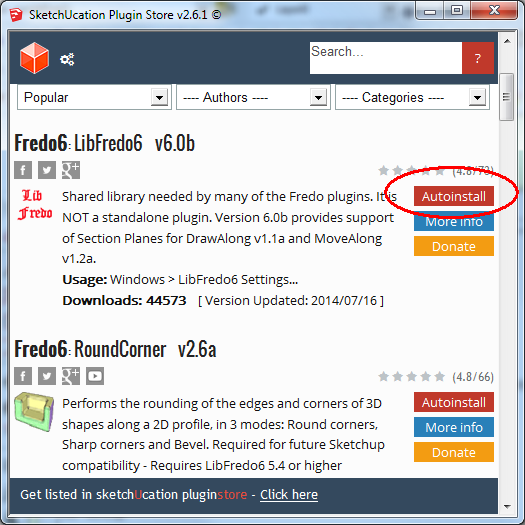
The web page in the forum is primarily informative about the Plugin. It is organized in sections hoping users would read some of them prior to use the plugin and thus avoid common problems.
Fredo
-
How do I install LibFredo 6 (new release.
I have try to install with the skechucation toolbar.. Autoinstall don't do anything. I have to install all by .RBZ (for me is the only way to install any plugins)Any suggestions?
-
@unknownuser said:
How do I install LibFredo 6 (new release.
I have try to install with the skechucation toolbar.. Autoinstall don't do anything. I have to install all by .RBZ (for me is the only way to install any plugins)Any suggestions?
Strange. SCF Plugin Store tools works on SU2013.
Did you install some of my plugins along with LibFredo6?Fredo
-
i have libfredo 6 57 says i need 58 or higher where do i get higher version??
-
It is at v6.0b, and it is currently available in the PluginStore - learn to use it. it'll make you life a lot easier...
-
thanks!!!!! From Iran
-
sketchup 2014 says it can't find Fredo Library folder after I install it.
-
It must not be installed correctly. How and where did you install it?
-
@dave r said:
It must not be installed correctly. How and where did you install it?
I used SU2014 extension warehouse. It allocates the folder under the correct path.. but SU doesn't see it. Why??
the folder is there, under appdata......plugins, with the default extensions, under the name of Fredo6_!LibFredo6 and Fredo6_!LibFredo6.rb
What should be wrong?








Advertisement