[Plugin Library] LibFredo6 - v15.8e - 15 Feb 26



-
Delete folder LIBFREDO6_DATA_Dir (http://f4.s.qip.ru/17QY0OfFG.png)- and she's after you run (start) Sketchup again shows!
How to make it never reappeared?
PS: LIBFREDO6_DATA_Dir/DefaultParameters/
-FredoScale.def
-RoundCorner.def
-ToolsOnSurface.def -
This folder is in f:\LIBFREDO6_DATA_Dir
In my settings, temporary files are placed in the f:\Temp
Because the folder Temp now on F, next to it is placed folder LIBFREDO6_DATA_Dir
Previously, nothing was created near the tempo, and would not want that to continue created, and therefore asked the question, as to do so would folder LIBFREDO6_DATA_Dir did not appear every time!
I like order!
If not corrected, then thanks for the help!PS: let them appear in a folder "Temp" and not near her!
-
I now understand.

MOST PC users have the user's Temp folder path setup I explained before [here are mine]:
C:\Users\TIG\AppData\Local\Temp
and the SCF tools makes a temp folder as:
C:\Users\TIG\AppData\Local\Temp\SCF
where it stores its temporary files...
It also makes a 'Local' folder that [unlike the Temp folder] is not auto-purged by some system-tools, named:
C:\Users\TIG\AppData\Local\SCF
These folders are standard locations for many apps' temporary or more permanent files.
TheAppDatauser's folder and its tree are usually 'hidden'...BUT for some reason YOU use
F:\Temp
So by inferenceF:is then taken by some tools to be your 'Local' folder?To see this:-
In the Ruby Console typeENV["TEMP"]which returns the the path used for the user's Temp folder, into which a tool might add its own temporary folder and files.
In my caseC:\Users\TIG\AppData\Local\Temp
BUT in your caseF:\TempThen
ENV["LOCALAPPDATA"]should return the path to the folder that holds an app's more permanent files...
In my caseC:\Users\TIG\AppData\Local
BUT probbaly or in your caseF:The LibFredo subfolders are made just the same way - as are several other apps'... it's the way the system is meant to be set up.
You must have somehow changed some system defaults to end up with a non-standard setup of local/temp folders...
So either live with the folder structure that YOU have setup... or you change it to a more standard one, where you'll never notice the temporary app's subfolders... -
I understand, thanks!
PS: temporary solution - hide these folders -
Martin: Install RBZ files from within SketchUp, Window > Preferences > Extensions > Install Extension
For more information on installing plugins check out this article:
http://www.thomthom.net/thoughts/2012/01/installing-plugins-for-google-sketchup/Sendt from my Xperia Z Tabled using Tapatalk
-
Hi,
I hope someone can help me.
I am trying to instal the RoundCorner plugin on my iMac (MountainLion OSX V.10.7.5). I am using the free version of SU, V 8.0.x. I have had no previous experience of using plugins.
I have downloaded both the LibFredo6...rbz and Fredo6_RoundCorner...rbz files from page 1 of this thread. When I double click on the either, nothing appears to happen other than SU launches. I am clearly misunderstanding something and I suspect it relates to the instruction on the first page of this thread "1) Click on the Zip archive on Sketchucation" because I don't understand what this means.
Puzzled of Hertford.
Regards, Martin Winlow.
(edit... Thanks thomthom but I managed to figure it out! For anyone else as dim as me, also having difficulty with this, here is my description of what you need to do to install this and apparently any other plugin...
1/ Download the .rbz file by clicking on the 'download' button or whatever the web page offers - in the case of LibFredo6 the relevant page is page one of this thread and you click on 'LibFredo6 - v5.0c - 06 Jul 13.rbz' with the little zip graphic at the start of that filename (under the big yellow 'Download' graphic). I guess this filename will change as the plugin version number progresses.
2/ Step one should have downloaded the 'LibFredo6 - v5.0c - 06 Jul 13.rbz' file into your macs 'Downloads' folder.
3/ Open SU and click on SketchUp in the menu bar, then Preferences and then Extensions and then click on Install Extension. Navigate your way into your Downloads directory and then find 'LibFredo6 - v5.0c - 06 Jul 13.rbz'. Double click on it (or click on it then click on the 'Open' button below) and you will get a warning window titled 'Do you trust this extension?'. If you do, click on 'Yes' and you will get a plugin installed completion message.
4/ If the extension you just installed is not ticked in the Preferences window then tick it. You may need to restart SU for it to take effect.
With the LibFredo6 plugin installed you will find an additional item in the menu bar Window item called 'LibFredo6 Settings'.
I also installed the RoundCorner plugin (which is why I started on this epic voyage of discovery) and with this plugin installed you will find an additional item in the menu bar item 'Tools' titled 'Fredo6 Collection', under which is the RoundCorner tool.
Phew!
MW
-
@thomthom said:
Martin: Install RBZ files from within SketchUp, Window > Preferences > Extensions > Install Extension
For more information on installing plugins check out this article:
http://www.thomthom.net/thoughts/2012/01/installing-plugins-for-google-sketchup/Sendt from my Xperia Z Tabled using Tapatalk
On Mac that would be SketchUp>Preferences>Extensions. Left of the File menu.
If you don't see an Install Extensions button there, you still have the first release of V8 and need to update to a later version of SU8.
-
thanks brother this update works on my new sketchup 2013
-
NEW RELEASE: LibFredo6 v5.1a - 22 Aug 13
LibFredo6 5.1 is a follow up technical release that implements naming conventions for files and folders to be compliant with EWH requirements.
For LibFredo6, the footprint is based on one file and one subfolder:

For my scripts, new naming conventions are also based on one file and one subfolder. I will progressively re-release the scripts with the new naming conventions. For instance, FredoScale v2.4 footprint is now :
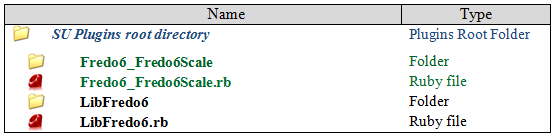
For convenience, LibFredo6 5.1 is compatible with the old and new naming conventions. So if you have CURVILOFT_Dir_12 folder, it will be loaded normally (until I publish the new version based on Fredo6_Curviloft and Fredo6_Curviloft).
It is also a good idea to clean up your plugin directory and remove the older versions.
In the menu Windows > LibFRedo6 Settings...> Purge Obsolete Files, you will find a dialog box allowing to remove all or some of these older versions.
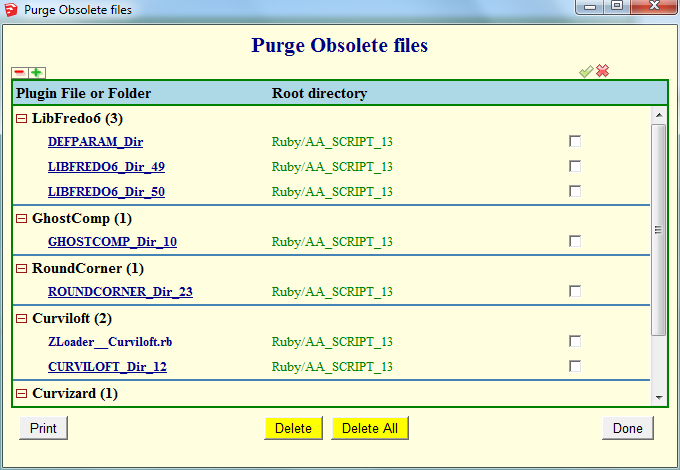
See main post of this thread for Download.
Fredo
-
SU 2013 Pro, Win 7 64 SP1
After latest update of the LibFredo and FredoScale I get this error when using "Check for Update":Error; #<NoMethodError; undefined method `>=' for nil;NilClass> C;/Program Files (x86)/SketchUp/SketchUp 2013/Plugins/LibFredo6/Lib6Upgrade.rb;428;in `prepare_plugin_table' C;/Program Files (x86)/SketchUp/SketchUp 2013/Plugins/LibFredo6/Lib6Traductor.rb;155;in `each_with_index' C;/Program Files (x86)/SketchUp/SketchUp 2013/Plugins/LibFredo6/Lib6Upgrade.rb;405;in `each' C;/Program Files (x86)/SketchUp/SketchUp 2013/Plugins/LibFredo6/Lib6Upgrade.rb;405;in `each_with_index' C;/Program Files (x86)/SketchUp/SketchUp 2013/Plugins/LibFredo6/Lib6Upgrade.rb;405;in `prepare_plugin_table' C;/Program Files (x86)/SketchUp/SketchUp 2013/Plugins/LibFredo6/Lib6Upgrade.rb;214;in `refresh_dialog_top' C;/Program Files (x86)/SketchUp/SketchUp 2013/Plugins/LibFredo6/Lib6Upgrade.rb;519;in `create_dialog_top' C;/Program Files (x86)/SketchUp/SketchUp 2013/Plugins/LibFredo6/Lib6Upgrade.rb;167;in `initialize' C;/Program Files (x86)/SketchUp/SketchUp 2013/Plugins/LibFredo6/Lib6Upgrade.rb;79;in `new' C;/Program Files (x86)/SketchUp/SketchUp 2013/Plugins/LibFredo6/Lib6Upgrade.rb;79;in `top_dialog' C;/Program Files (x86)/SketchUp/SketchUp 2013/Plugins/LibFredo6/Lib6PluginDialogs.rb;657;in `topdialog_callback' C;/Program Files (x86)/SketchUp/SketchUp 2013/Plugins/LibFredo6/Lib6WebWdlg.rb;501;in `call' C;/Program Files (x86)/SketchUp/SketchUp 2013/Plugins/LibFredo6/Lib6WebWdlg.rb;501;in `j_action' C;/Program Files (x86)/SketchUp/SketchUp 2013/Plugins/LibFredo6/Lib6WebWdlg.rb;436;in `j_callback' C;/Program Files (x86)/SketchUp/SketchUp 2013/Plugins/LibFredo6/Lib6WebWdlg.rb;426;in `j_dispatch' C;/Program Files (x86)/SketchUp/SketchUp 2013/Plugins/LibFredo6/Lib6WebWdlg.rb;418;in `each' C;/Program Files (x86)/SketchUp/SketchUp 2013/Plugins/LibFredo6/Lib6WebWdlg.rb;418;in `j_dispatch' C;/Program Files (x86)/SketchUp/SketchUp 2013/Plugins/LibFredo6/Lib6WebWdlg.rb;159;in `create_dialog' C;/Program Files (x86)/SketchUp/SketchUp 2013/Plugins/LibFredo6/Lib6Upgrade.rb;428;in `call' C;/Program Files (x86)/SketchUp/SketchUp 2013/Plugins/LibFredo6/Lib6Upgrade.rb;428 -
I do, too.
-
Upgrading thru the PluginStore doesn't give errors on my PC Win8
Nice work Fredo and thanks for sharing it here
-
@dedmin said:
SU 2013 Pro, Win 7 64 SP1
After latest update of the LibFredo and FredoScale I get this error when using "Check for Update":Thanks very much for signaling. Actually a mispelling in my file LibFredo6.plugin (version is 5.1.a and should be 5.1a).
I will republish
Fredo
-

-
NEW RELEASE: LibFredo6 v5.1b - 22 Aug 13
LibFredo6 5.1b fixes a bug in v5.1a which prevented the display of the Check For Update dialog box.
So you should re-install 5.1b if you had installed 5.1a. Sorry for inconvenience.
See main post of this thread for Download.
Fredo
-
fredo6
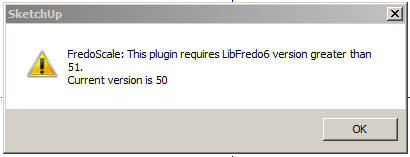
I have installed LibFredo6 - V5.1b by the store, by extracting and I get the below error box as I load Sketchup 13.
Thanks for you help.
Ken
-
Do you have both the latest version of the LibFredo.. and his updated Plugin installed ?
After that you do need to restart SketchUp to effect the changes...
?? -
I have the same problem that has ken, and install updates for fredoscale and libfredo
-
I have just installed both updates with no problems ??
Have you downloaded the two RBZ files and installed those or have you AutoInstalled them from the dialog in SUp itself ?
Both ways should work ?
Can you recheck your Plugins folder's Properties > Security > Edit is set to FULL for each user/group on the list ? -
@unknownuser said:
fredo6
I have installed LibFredo6 - V5.1b by the store, by extracting and I get the below error box as I load Sketchup 13.
Thanks for you help.
Ken
My mistake. In republishing, I have posted a version of 5.0 inadvertedly. (These EWH naming conventions with no version in the folder is a problem).
I republished version 5.1c on the Plugin Store and will soon update the main post on SCF.
Fredo









Advertisement