sketchucation logo sketchucation
    • 登入
    Oops, your profile's looking a bit empty! To help us tailor your experience, please fill in key details like your SketchUp version, skill level, operating system, and more. Update and save your info on your profile page today!
    🔌 Smart Spline | Fluid way to handle splines for furniture design and complex structures. Download

    [Plugin Library] LibFredo6 - v15.8e - 15 Feb 26


    已排程 已置頂 已鎖定 已移動 Plugins
    2.2k 貼文 573 Posters 4.2m 瀏覽 575 Watching
    正在載入更多貼文
    • 從舊到新
    • 從新到舊
    • 最多點贊
    回覆
    • 在新貼文中回覆
    登入後回覆
    此主題已被刪除。只有擁有主題管理權限的使用者可以查看。
    • fredo6F 離線
      fredo6
      最後由 編輯

      NEW RELEASE: LibFredo6 v4.6e - 03 Oct 12

      LibFredo6 4.6e is a minor release which essentially fixes a problem in the functionality "Check for Updates". The issues comes from the change in URL schema of the new SKetchucation web site.

      See main post of this thread for Download.

      Fredo

      PS: there was a wrong manipulation with version 4.6d. One file (LibFredo6.plugin) was misplaced. So update with a clean version of LibFredo6 4.6e

      1 條回覆 最後回覆 回覆 引用 0
      • TIGT 離線
        TIG Moderator
        最後由 編輯

        It's all fine now 😉

        Presumably the unused/older "LibFredo6.plugins" file that is now left behind in the Plugins folder can be removed from there without any issues...
        The similar/newer file within the subfolder is the one doing the work ...

        TIG

        1 條回覆 最後回覆 回覆 引用 0
        • fredo6F 離線
          fredo6
          最後由 編輯

          @tig said:

          It's all fine now 😉

          Presumably the unused/older "LibFredo6.plugins" file that is now left behind in the Plugins folder can be removed from there without any issues...
          The similar/newer file within the subfolder is the one doing the work ...

          Yes the LibFredo6.plugin file in the main Plugins directory is useless (and harmless). It can be safely removed.

          1 條回覆 最後回覆 回覆 引用 0
          • M 離線
            mwm5053
            最後由 編輯

            Just updated to 4.6e and noticed I have 4-joint push pull files and 4- LibTraductor files are they needed ? or should I be deleting them before an update.

            2011 iMac
            SU 2015 Pro, 2017 Make
            V2 Twilight
            macOS Sierra 10.12.5

            1 條回覆 最後回覆 回覆 引用 0
            • fredo6F 離線
              fredo6
              最後由 編輯

              @mwm5053 said:

              Just updated to 4.6e and noticed I have 4-joint push pull files and 4- LibTraductor files are they needed ? or should I be deleting them before an update.

              How can you have 4 files? In which directories? Isn't it folders instead.

              Fredo

              1 條回覆 最後回覆 回覆 引用 0
              • M 離線
                mwm5053
                最後由 編輯

                It's probably my mistake as I was dealing wit some computer problems and reinstalling apps and some of the plugins that I use, are they just copies of the same file?
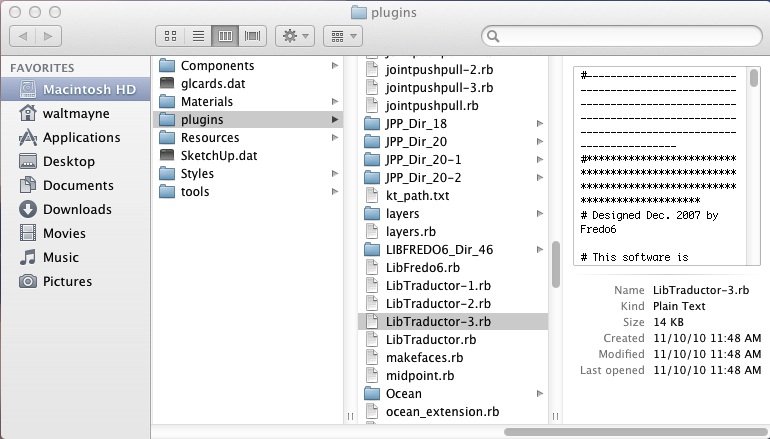

                plugins folder.jpg

                2011 iMac
                SU 2015 Pro, 2017 Make
                V2 Twilight
                macOS Sierra 10.12.5

                1 條回覆 最後回覆 回覆 引用 0
                • fredo6F 離線
                  fredo6
                  最後由 編輯

                  Strange. Normally files should be overwritten.

                  Anyway, I suggest you delete all files and folders that are indexed with a suffix and keep the ones with the valid names.

                  Fredo

                  1 條回覆 最後回覆 回覆 引用 0
                  • P 離線
                    pro saudi
                    最後由 編輯

                    thanks Fredo6 for these plugins ...
                    i found out that the update link has changed...(i get an error wen i update)

                    the old link is
                    http://sketchucation.com/viewtopic.php?f=180&t=3263

                    but the new link has to be
                    http://sketchucation.com/forums/viewtopic.php?f=180&t=3263

                    i hope that you can fix it as fast as Possible
                    (i am pretty sour that it is easy for you)

                    and thanks ... Again 😄

                    1 條回覆 最後回覆 回覆 引用 0
                    • fredo6F 離線
                      fredo6
                      最後由 編輯

                      @pro saudi said:

                      thanks Fredo6 for these plugins ...
                      i found out that the update link has changed...(i get an error wen i update)

                      the old link is
                      http://sketchucation.com/viewtopic.php?f=180&t=3263

                      but the new link has to be
                      http://sketchucation.com/forums/viewtopic.php?f=180&t=3263

                      i hope that you can fix it as fast as Possible
                      (i am pretty sour that it is easy for you)

                      and thanks ... Again 😄

                      Which links?
                      Did you install V4.6e ?

                      1 條回覆 最後回覆 回覆 引用 0
                      • P 離線
                        pro saudi
                        最後由 編輯

                        @unknownuser said:

                        Which links?
                        Did you install V4.6e ?

                        yeah now it works like charm ... thanks

                        1 條回覆 最後回覆 回覆 引用 0
                        • sbpronhS 離線
                          sbpronh
                          最後由 編輯

                          Hello,

                          De plugins are loading very well! Except for a few ones. I get one of the following errors:

                          PLUGIN: building_structure_tool.rb
                          FOLDER: H:/Privat/#ibDH/SketchUp/Plugins
                          ERROR: private method ´gsub! called for nil:NilClass

                          or from another plugin:

                          ERROR: undefined method ´+' for nil:NilClass

                          Can you tell me what is wrong?

                          Regards
                          Harry

                          1 條回覆 最後回覆 回覆 引用 0
                          • fredo6F 離線
                            fredo6
                            最後由 編輯

                            @sbpronh said:

                            Hello,

                            De plugins are loading very well! Except for a few ones. I get one of the following errors:

                            PLUGIN: building_structure_tool.rb
                            FOLDER: H:/Privat/#ibDH/SketchUp/Plugins
                            ERROR: private method ´gsub! called for nil:NilClass

                            or from another plugin:

                            ERROR: undefined method ´+' for nil:NilClass

                            Can you tell me what is wrong?

                            Regards
                            Harry

                            building_structure_tool is not a plugin of mine.
                            For the other one, you have at least to tell what plugin the error is coming from.

                            Fredo

                            1 條回覆 最後回覆 回覆 引用 0
                            • T 離線
                              tulacong
                              最後由 編輯

                              thank you ....oh zeeeeeeee

                              1 條回覆 最後回覆 回覆 引用 0
                              • C 離線
                                clownwhisper
                                最後由 編輯

                                This site is the most vague crap that I have ever seen. You click on links that would seem to take you to the plugin downloads and you go to message boards.

                                what a stupid pain in my ass....

                                Guess I wont by buying the pro version after all.

                                1 條回覆 最後回覆 回覆 引用 0
                                • Chris FullmerC 離線
                                  Chris Fullmer
                                  最後由 編輯

                                  Hi Clownwhisper, sorry its giving you such a headache. Care to elaborate a little more? What exact plugin are you trying to download?

                                  SketchUcation is (amongst other things) a forum, and does not have at this moment a true plugin library. So plugins are just added to forum threads like this one. For Fredo's plugins, he typically has a thread for each specific plugin, and then this thread is devoted to a standard library of files need to run all of his plugins.

                                  So, the first post in this thread has the zip file link, you should download that and extract it into your plugins folder. Then do the same for the specific plugin of his that you were trying to download.

                                  Anyhow, hope that helps. If not, help us out a little bit by saying which plugin you were trying to download. Thanks!

                                  Chris

                                  Lately you've been tan, suspicious for the winter.
                                  All my Plugins I've written

                                  1 條回覆 最後回覆 回覆 引用 0
                                  • S 離線
                                    schaferron1
                                    最後由 編輯

                                    will not load into Mac Sketchup pro 8. I have loaded it directly into the plugins folder. When I download this file to my desktop, there is no zip file. Just a folder with a folder and a file inside. I have tried putting the main folder in the plugins. Doesn't work. I have taken the sub file and the file out of the main file and put only those file/folder still does not load.

                                    ?????

                                    R

                                    1 條回覆 最後回覆 回覆 引用 0
                                    • Dave RD 離線
                                      Dave R
                                      最後由 編輯

                                      @schaferron1 said:

                                      will not load into Mac Sketchup pro 8.

                                      Yes. It will load into Mac SketchUp pro 8. 😒

                                      @schaferron1 said:

                                      I have loaded it directly into the plugins folder. When I download this file to my desktop, there is no zip file. Just a folder with a folder and a file inside. I have tried putting the main folder in the plugins. Doesn't work.

                                      That isn't the correct way to install it.

                                      @schaferron1 said:

                                      I have taken the sub file and the file out of the main file and put only those file/folder still does not load.

                                      Does the footprint match what is shown in the first post? Did you put the files into the correct Plugins folder? Did you install any of Fredo's other plugins?

                                      Etaoin Shrdlu

                                      %

                                      (THERE'S NO PLACE LIKE)

                                      G28 X0.0 Y0.0 Z0.0

                                      M30

                                      %

                                      1 條回覆 最後回覆 回覆 引用 0
                                      • T 離線
                                        Trogluddite
                                        最後由 編輯

                                        @Clownwhisper.
                                        Please try not to look a gift horse in the mouth. Almost all of the plugins here are provided by guys who take hours out of their free time to code amazing tools for us all to use FOR FREE. For the most part, they make every effort to make the plugins easy to download and install, given the limitations of the forum format (also provided for you FOR FREE).
                                        The small effort required to find the attachment links, and follow the installation instructions that these guys usually make clear is surely not much of a price to pay in order to enhance your software FOR FREE.
                                        (I have had many programs that cost big $$$$ in the past that were much more difficult to get working!)

                                        Upgrade to SU8? Well that is your choice - but please bear in mind that this site is not provided by the official developers of Sketchup, nor do the plugin writers have any ties to the developers. So you should not choose whether to upgrade based on the forum plugins - most of them will function just as well in the free version - that choice should be based on the standard stuff provided by the official developers (they are the ones who want your money, not the kind folks here).

                                        1 條回覆 最後回覆 回覆 引用 0
                                        • pbacotP 離線
                                          pbacot
                                          最後由 編輯

                                          Is there a way to turn off the update plugin. It keeps coming up, although I set it only to check every couple weeks.

                                          Peter

                                          MacOSX MojaveSketchUp Pro v19 Twilight v2 Thea v3 PowerCADD

                                          1 條回覆 最後回覆 回覆 引用 0
                                          • Dave RD 離線
                                            Dave R
                                            最後由 編輯

                                            Set it for something like 99 days.

                                            Etaoin Shrdlu

                                            %

                                            (THERE'S NO PLACE LIKE)

                                            G28 X0.0 Y0.0 Z0.0

                                            M30

                                            %

                                            1 條回覆 最後回覆 回覆 引用 0
                                            • 1
                                            • 2
                                            • 105
                                            • 106
                                            • 107
                                            • 108
                                            • 109
                                            • 110
                                            • 107 / 110
                                            • 第一個貼文
                                              最後的貼文
                                            Buy SketchPlus
                                            Buy SUbD
                                            Buy WrapR
                                            Buy eBook
                                            Buy Modelur
                                            Buy Vertex Tools
                                            Buy SketchCuisine
                                            Buy FormFonts

                                            Advertisement