sketchucation logo sketchucation
    • 登入
    Oops, your profile's looking a bit empty! To help us tailor your experience, please fill in key details like your SketchUp version, skill level, operating system, and more. Update and save your info on your profile page today!
    🔌 Smart Spline | Fluid way to handle splines for furniture design and complex structures. Download

    [Plugin Library] LibFredo6 - v15.8e - 15 Feb 26


    已排程 已置頂 已鎖定 已移動 Plugins
    2.2k 貼文 573 Posters 4.2m 瀏覽 575 Watching
    正在載入更多貼文
    • 從舊到新
    • 從新到舊
    • 最多點贊
    回覆
    • 在新貼文中回覆
    登入後回覆
    此主題已被刪除。只有擁有主題管理權限的使用者可以查看。
    • fredo6F 離線
      fredo6
      最後由 編輯

      @supercylon

      Just in case, can you type ENV["TEMP"] in the Ruby Console and tell me what you see.

      Thanks

      Fredo

      1 條回覆 最後回覆 回覆 引用 0
      • TIGT 離線
        TIG Moderator
        最後由 編輯

        Fredo
        I use
        tempdir=ENV["TEMP"] ### it's a PC == 'TEMP' or 'TMP' tempdir=ENV["TMPDIR"] if not tempdir ### it's a Mac
        😕

        TIG

        1 條回覆 最後回覆 回覆 引用 0
        • thomthomT 離線
          thomthom
          最後由 編輯

          This is what I use to detect temp path:

          TEMP_PATH = File.expand_path( ENV['TMPDIR'] || ENV['TMP'] || ENV['TEMP'] ).freeze

          Thomas Thomassen — SketchUp Monkey & Coding addict
          List of my plugins and link to the CookieWare fund

          1 條回覆 最後回覆 回覆 引用 0
          • fredo6F 離線
            fredo6
            最後由 編輯

            @tig said:

            Fredo
            I use
            tempdir=ENV["TEMP"] ### it's a PC == 'TEMP' or 'TMP' tempdir=ENV["TMPDIR"] if not tempdir ### it's a Mac
            😕

            TIG,

            Actually, my mistake. Yes indeed, I use TMPDIR for Mac environment (or /tmp which may be more secure)

            @supercylon
            Can you type ENV["TMPDIR"] in the Ruby console

            Fred

            1 條回覆 最後回覆 回覆 引用 0
            • S 離線
              supercylon
              最後由 編輯

              @unknownuser said:

              @supercylon

              Just in case, can you type ENV["TEMP"] in the Ruby Console and tell me what you see.

              Thanks

              Fredo

              Hello Fredo,

              Thanks for your assistance. I did what you asked and here is a screenshot of the result.

              ![Results of ENV["TEMP"] in Ruby Console](/uploads/imported_attachments/iUOu_Picture2.png "Results of ENV["TEMP"] in Ruby Console")

              Thanks Supercylon

              1 條回覆 最後回覆 回覆 引用 0
              • S 離線
                supercylon
                最後由 編輯

                @unknownuser said:

                @tig said:

                Fredo
                I use
                tempdir=ENV["TEMP"] ### it's a PC == 'TEMP' or 'TMP' tempdir=ENV["TMPDIR"] if not tempdir ### it's a Mac
                😕

                TIG,

                Actually, my mistake. Yes indeed, I use TMPDIR for Mac environment (or /tmp which may be more secure)

                @supercylon
                Can you type ENV["TMPDIR"] in the Ruby console

                Fred

                I didn't notice this message, here is the screen shot of the result of your second request.
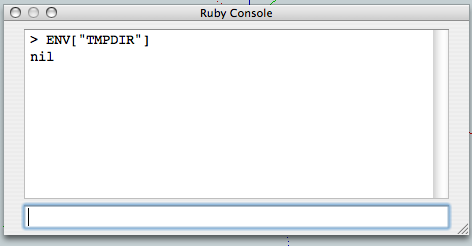
                Picture 3.png

                Thanks,
                Supercylon

                1 條回覆 最後回覆 回覆 引用 0
                • thomthomT 離線
                  thomthom
                  最後由 編輯

                  And ENV['TMP'] ?

                  Thomas Thomassen — SketchUp Monkey & Coding addict
                  List of my plugins and link to the CookieWare fund

                  1 條回覆 最後回覆 回覆 引用 0
                  • S 離線
                    supercylon
                    最後由 編輯

                    @unknownuser said:

                    @supercylon

                    Can you try withe attached file to see if your error disappear and SU starts OK.
                    [attachment=0:2f69w8lx]<!-- ia0 -->LibFredo6.rb<!-- ia0 -->[/attachment:2f69w8lx]

                    Thanks

                    Fredo

                    Fredo,

                    Thank you!Thank you! It works!

                    Supercylon

                    1 條回覆 最後回覆 回覆 引用 0
                    • fredo6F 離線
                      fredo6
                      最後由 編輯

                      @supercylon said:

                      Thank you!Thank you! It works!

                      Supercylon

                      I will release the change tomorrow as v4.3c

                      It is strange however that on your Mac, the TMPDIR Environment variable is not defined.

                      @TIG, Thomthom: I just use /tmp when TMPDIR is not defined.

                      Fredo

                      1 條回覆 最後回覆 回覆 引用 0
                      • fredo6F 離線
                        fredo6
                        最後由 編輯

                        @supercylon

                        Can you try withe attached file to see if your error disappear and SU starts OK.

                        EDIT: file removed. Now part of the release 4.3c, 31 Jan 12

                        Thanks

                        Fredo

                        1 條回覆 最後回覆 回覆 引用 0
                        • B 離線
                          baranya
                          最後由 編輯

                          Under Ubuntu makes SU to crach on startup

                          1 條回覆 最後回覆 回覆 引用 0
                          • fredo6F 離線
                            fredo6
                            最後由 編輯

                            @baranya said:

                            Under Ubuntu makes SU to crach on startup

                            It's difficult for me to diagnose on this platform which I don't have.
                            I think there are a few users running Sketchup on Linux flavors, and they may help you to troubleshoot.

                            Fredo

                            1 條回覆 最後回覆 回覆 引用 0
                            • Y 離線
                              yogaseeker
                              最後由 編輯

                              I ran into some trouble when I placed this plugin in the SU plugin folder. I thought this solution might help others.

                              "LibFredo6 4.3c - 31 Jan 12" is the name of the folder that I unzipped and I placed in my plugins folder. But that didn't work. You have to drag the contents of the "LibFredo6 4.3c - 31 Jan 12" folder (LIBFREDO6_Dir_43 and LibFredo6) out of that folder and put it in the plugins folder.

                              THanks so much for this wonderful plugin!!!

                              1 條回覆 最後回覆 回覆 引用 0
                              • M 離線
                                mingjae
                                最後由 編輯

                                Hello Mr.LibFredo..

                                I have a diifficulty to install curviloft using libfredo in my SU8,
                                it wont load and something wrong with the fredo, this is the picture :

                                http://img594.imageshack.us/img594/7065/99471562.jpg

                                I dont have lib tranductor.rb in Libfredo6 package neither on curviloft,
                                how to solve this Mr?
                                I also trying to copy the lib_tranductor.rb in my SU7 to SU8 plugins folder but it always crash after copying it... 😢

                                1 條回覆 最後回覆 回覆 引用 0
                                • fredo6F 離線
                                  fredo6
                                  最後由 編輯

                                  @mingjae said:

                                  I dont have lib tranductor.rb in Libfredo6 package neither on curviloft,
                                  how to solve this Mr?
                                  I also trying to copy the lib_tranductor.rb in my SU7 to SU8 plugins folder but it always crash after copying it... 😢

                                  I would suggest you redo a clean installation and make sure you overwrite all existing files.

                                  Just in case, can you type in the Ruby Console and report what you get:
                                  Sketchup.find_support_file('LibTraductor.rb', "Plugins")

                                  Fredo

                                  1 條回覆 最後回覆 回覆 引用 0
                                  • M 離線
                                    mingjae
                                    最後由 編輯

                                    @unknownuser said:

                                    @mingjae said:

                                    I dont have lib tranductor.rb in Libfredo6 package neither on curviloft,
                                    how to solve this Mr?
                                    I also trying to copy the lib_tranductor.rb in my SU7 to SU8 plugins folder but it always crash after copying it... 😢

                                    I would suggest you redo a clean installation and make sure you overwrite all existing files.

                                    Just in case, can you type in the Ruby Console and report what you get:
                                    Sketchup.find_support_file('LibTraductor.rb', "Plugins")

                                    Fredo

                                    Hi, thank for your reply

                                    my SU8 in plugin folder have not installed by LibFredo and curviloft before,
                                    so I just put all unzipped libfredo and curviloft in my plugins folder,
                                    after I redo to overwrite it, it result the same, it not load "lib traductor.rb

                                    and here is I copy paste after I enter it on ruby console:
                                    "Sketchup.find_support_file('LibTraductor.rb', "Plugins")
                                    C:/Program Files/Google/Plugins/LibTraductor.rb"

                                    edit: perhaps the lib traductor.rb crashes in the Google/Plugins folder?
                                    I copy the "Plugins" folder from my friend notebooks and place it there.
                                    I cut the lib traductor there and place it in SU8 plugins folder and the curviloft success to load...

                                    but, where can I get "lib traductor.rb", there's no in lib fredo zip and curviloft zipped file installer right?

                                    1 條回覆 最後回覆 回覆 引用 0
                                    • fredo6F 離線
                                      fredo6
                                      最後由 編輯

                                      @mingjae said:

                                      but, where can I get "lib traductor.rb", there's no in lib fredo zip and curviloft zipped file installer right?

                                      Actually you do not need LibTraductor.rb for Curviloft (it's only for backward compatibility that it is checked).

                                      Fredo

                                      1 條回覆 最後回覆 回覆 引用 0
                                      • M 離線
                                        mingjae
                                        最後由 編輯

                                        @unknownuser said:

                                        @mingjae said:

                                        but, where can I get "lib traductor.rb", there's no in lib fredo zip and curviloft zipped file installer right?

                                        Actually you do not need LibTraductor.rb for Curviloft (it's only for backward compatibility that it is checked).

                                        Fredo

                                        really?? 😳
                                        lol..i'm sorry, but thanks my SU8 now loading without any error notification..

                                        1 條回覆 最後回覆 回覆 引用 0
                                        • fredo6F 離線
                                          fredo6
                                          最後由 編輯

                                          @mingjae said:

                                          and here is I copy paste after I enter it on ruby console:
                                          "Sketchup.find_support_file('LibTraductor.rb', "Plugins")
                                          C:/Program Files/Google/Plugins/LibTraductor.rb"

                                          By the way, you seem to have a non-standard installation of SU8.

                                          Normally, Sketchup folders are located in C:/Program Files/Google/**Google SketchUp 8**.

                                          Fredo

                                          1 條回覆 最後回覆 回覆 引用 0
                                          • ElibjrE 離線
                                            Elibjr
                                            最後由 編輯

                                            Wow, Thank you very much. All of these plugins are truly a life saver. They bring Sketchup to a completely different level. I love them. And the more I use them the more I appreciate what they do. This had made Sketchup more than just a modeling toy to play with, these plugins (and others listed on the forum) allow the software to truly and indisputably become more of a productive too hands down! Thank you (and all of the other people who write rubies for this Software) again! WE should NEVER take ANY plugin listed here for granted! 😄

                                            1 條回覆 最後回覆 回覆 引用 0
                                            • 1
                                            • 2
                                            • 3
                                            • 4
                                            • 5
                                            • 109
                                            • 110
                                            • 1 / 110
                                            • 第一個貼文
                                              最後的貼文
                                            Buy SketchPlus
                                            Buy SUbD
                                            Buy WrapR
                                            Buy eBook
                                            Buy Modelur
                                            Buy Vertex Tools
                                            Buy SketchCuisine
                                            Buy FormFonts

                                            Advertisement