sketchucation logo sketchucation
    • 登入
    Oops, your profile's looking a bit empty! To help us tailor your experience, please fill in key details like your SketchUp version, skill level, operating system, and more. Update and save your info on your profile page today!
    🔌 Smart Spline | Fluid way to handle splines for furniture design and complex structures. Download

    [Plugin Library] LibFredo6 - v15.8e - 15 Feb 26


    已排程 已置頂 已鎖定 已移動 Plugins
    2.2k 貼文 573 Posters 4.2m 瀏覽 575 Watching
    正在載入更多貼文
    • 從舊到新
    • 從新到舊
    • 最多點贊
    回覆
    • 在新貼文中回覆
    登入後回覆
    此主題已被刪除。只有擁有主題管理權限的使用者可以查看。
    • A 離線
      antuan
      最後由 編輯

      Thomthom,
      Sorry for the delayed reply. No messages in the ruby console when trying to open the Default Parameters dialog box. Any one found this problem?
      Thanks

      1 條回覆 最後回覆 回覆 引用 0
      • fredo6F 離線
        fredo6
        最後由 編輯

        Antuan

        Can you open the Default Parameters dialog box for LibFredo6 and for my other plugins (if you have some installed)?

        Fredo

        1 條回覆 最後回覆 回覆 引用 0
        • A 離線
          antuan
          最後由 編輯

          Fredo,
          No, I can´t. I have installed FredoScale, ToolsOnSurface and Round Corner. None of them opens the Default parameter dialog.(e.g. Tools-Fredo6 Collection-ToolsOnFace-Default Parameters... does nothing, same for FredoScale or Round Corner) And the same for LibFredo6 library, through Window-LibFredo6 Settings-Default Paramenters... nothing happens. But as I said before other dialog boxes open normally (Check for update or Language Translation), and if I copy for example FredoScale.def from the still existing SU 7 files tree to the SU8 DEFPARAM-DIR directory I see that is detected because the changes take effect (i.e. change of the toolbar icons, etc.). The problem is about the dialog box itself, it doesn´t open no matter how I try. I am missing something? Any way, with older versions of same plugins everything works, both in SU 7 or 8.
          Thank you for your help.

          1 條回覆 最後回覆 回覆 引用 0
          • M 離線
            mfarooqi
            最後由 編輯

            beautifull man... 10+/10

            1 條回覆 最後回覆 回覆 引用 0
            • R 離線
              rjjvirusx
              最後由 編輯

              Perfect~Thank you~!

              1 條回覆 最後回覆 回覆 引用 0
              • G 離線
                Goonster
                最後由 編輯

                Downloaded and installed the latest version but it does not show up in SU. I copied both the LIBFREDO6_Dir_37 folder and the LibFredo6.rb into the plug ins folder as shown but it just won`t show. I thought the .rb file might need unblocking - which I did. But still no joy. I already have the Fredoscale plug in which works fine.
                Any ideas?

                I use Win7 Home Premium 64bit with SU8.

                1 條回覆 最後回覆 回覆 引用 0
                • fredo6F 離線
                  fredo6
                  最後由 編輯

                  @goonster said:

                  Downloaded and installed the latest version but it does not show up in SU. I copied both the LIBFREDO6_Dir_37 folder and the LibFredo6.rb into the plug ins folder as shown but it just won`t show. I thought the .rb file might need unblocking - which I did. But still no joy. I already have the Fredoscale plug in which works fine.
                  Any ideas?

                  I use Win7 Home Premium 64bit with SU8.

                  LibFredo6 is not really a plugin but a library.
                  Since you have FredoScale working fine, from what you say, it means you have a version of LibFredo6 installed.
                  Can you check the menu Windows > LibFredo6 Settings... > About

                  Fredo

                  1 條回覆 最後回覆 回覆 引用 0
                  • G 離線
                    Goonster
                    最後由 編輯

                    Sorted it. I downloaded LibFredo6 3.7b but forgot to download the actual plug in! Sorry. 😳

                    1 條回覆 最後回覆 回覆 引用 0
                    • halroachH 離線
                      halroach
                      最後由 編輯

                      Hi Fredo,

                      I have been getting the following errors when I try to check plugins for updates.
                      I click on the red ruby icon and nothing happens (the update window doesn't come up)
                      and I get the following in the ruby console:

                      C;/Program Files/Google/Google SketchUp 8/Plugins/ruby/singleton.rb;84; warning; already initialized constant FirstInstanceCall
                      C;/Documents and Settings/All Users/Application Data/ASGVIS/VfS/Ruby/VfSObservers.rb;307; warning; don't put space before argument parentheses
                      C;/Program Files/Google/Google SketchUp 8/Plugins/ruby/singleton.rb;84; warning; already initialized constant FirstInstanceCall
                      

                      The last thing I did, which may have caused this was install GhostComp 1.0 - but I have tried removing it and the error still comes up.
                      Any ideas?

                      edit: If I click on "check updates" through the menus, everything works... it's just through the ruby button that it gives errors.

                      Thanks!

                      edit2: Forgive me! I think I confused your update plugins ruby (which is part of libfredo) with a different ruby that has the same "ruby" icon which is called Autoloader.... so never mind! my bad!
                      everything is working fine!!

                      FlexTools - Super Quick Windows, Doors, Slats...

                      1 條回覆 最後回覆 回覆 引用 0
                      • A 離線
                        Ands43
                        最後由 編輯

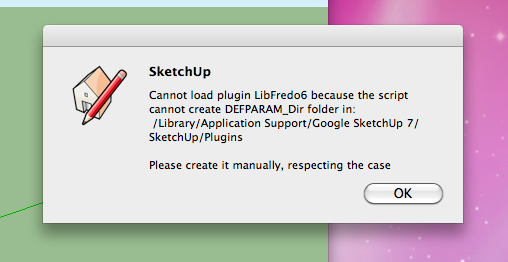
                        Apologies if this has been answered already, I'm getting this when I start sketchup. Is there a simple fix. Apple imac, SU7.

                        Screen shot 2011-06-06 at 14.55.19.png

                        1 條回覆 最後回覆 回覆 引用 0
                        • TIGT 離線
                          TIG Moderator
                          最後由 編輯

                          @tails said:

                          Apologies if this has been answered already, I'm getting this when I start sketchup. Is there a simple fix. Apple imac, SU7.

                          There must currently be some permissions set that prevent you making folders/files in that location - either fix the permissions so you can [advisable]... OR make the folder that is needed... as clearly spelled out in the message 😒

                          TIG

                          1 條回覆 最後回覆 回覆 引用 0
                          • D 離線
                            Daniel S
                            最後由 編輯

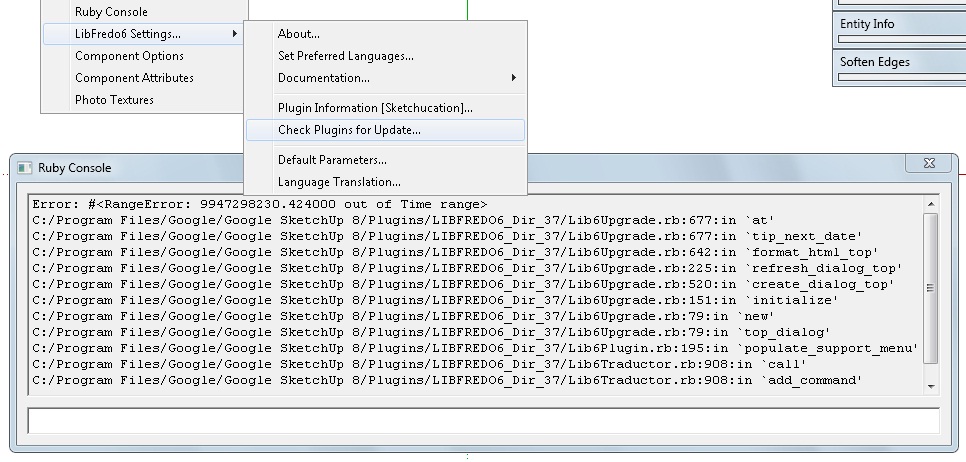
                            I have problems with the update option too... Every time that I want to go to "Check Plugins for Update" nothing happens. If I have the ruby console open it says:
                            error.jpg

                            Error; #<RangeError; 9947298230.424000 out of Time range>
                            C;/Program Files/Google/Google SketchUp 8/Plugins/LIBFREDO6_Dir_37/Lib6Upgrade.rb;677;in `at'
                            C;/Program Files/Google/Google SketchUp 8/Plugins/LIBFREDO6_Dir_37/Lib6Upgrade.rb;677;in `tip_next_date'
                            C;/Program Files/Google/Google SketchUp 8/Plugins/LIBFREDO6_Dir_37/Lib6Upgrade.rb;642;in `format_html_top'
                            C;/Program Files/Google/Google SketchUp 8/Plugins/LIBFREDO6_Dir_37/Lib6Upgrade.rb;225;in `refresh_dialog_top'
                            C;/Program Files/Google/Google SketchUp 8/Plugins/LIBFREDO6_Dir_37/Lib6Upgrade.rb;520;in `create_dialog_top'
                            C;/Program Files/Google/Google SketchUp 8/Plugins/LIBFREDO6_Dir_37/Lib6Upgrade.rb;151;in `initialize'
                            C;/Program Files/Google/Google SketchUp 8/Plugins/LIBFREDO6_Dir_37/Lib6Upgrade.rb;79;in `new'
                            C;/Program Files/Google/Google SketchUp 8/Plugins/LIBFREDO6_Dir_37/Lib6Upgrade.rb;79;in `top_dialog'
                            C;/Program Files/Google/Google SketchUp 8/Plugins/LIBFREDO6_Dir_37/Lib6Plugin.rb;195;in `populate_support_menu'
                            C;/Program Files/Google/Google SketchUp 8/Plugins/LIBFREDO6_Dir_37/Lib6Traductor.rb;908;in `call'
                            C;/Program Files/Google/Google SketchUp 8/Plugins/LIBFREDO6_Dir_37/Lib6Traductor.rb;908;in `add_command'


                            Any idea what´s happening?

                            Daniel S

                            1 條回覆 最後回覆 回覆 引用 0
                            • fredo6F 離線
                              fredo6
                              最後由 編輯

                              Daniel,

                              two questions

                              1. How many days did you set the "next check" in the dialog box

                              2. Can you type the following command in the Ruby Console: Upgrade.duration_next_check

                              Thanks

                              Fredo

                              1 條回覆 最後回覆 回覆 引用 0
                              • D 離線
                                Daniel S
                                最後由 編輯

                                @unknownuser said:

                                1. How many days did you set the "next check" in the dialog box

                                I put 999 the first time because I wanted to do a manual check. But then the update option stop working.
                                I try deleting and reinstalling Libfredo6 but the problem was still there.
                                Now In default parameters "Next Check in (days)" says 15. But I´m not able to check.

                                @unknownuser said:

                                1. Can you type the following command in the Ruby Console: Upgrade.duration_next_check

                                I tried and give different results. It says:

                                Upgrade.duration_next_check
                                Error; #<NameError; (eval);157; uninitialized constant Upgrade>
                                (eval);157
                                
                                
                                Upgrade.duration_next_check
                                Error; #<NameError; (eval);677; uninitialized constant Upgrade>
                                (eval);677
                                

                                or:

                                Upgrade.duration_next_check
                                Error; #<NameError; (eval);54; uninitialized constant Upgrade>
                                (eval);54
                                (eval);1; warning; Float 0.0 out of range
                                

                                Daniel S

                                1 條回覆 最後回覆 回覆 引用 0
                                • fredo6F 離線
                                  fredo6
                                  最後由 編輯

                                  Daniel,

                                  Sorry I meant Traductor::Upgrade.duration_next_check

                                  Fredo

                                  1 條回覆 最後回覆 回覆 引用 0
                                  • D 離線
                                    Daniel S
                                    最後由 編輯

                                    When I put:
                                    Traductor::Upgrade.duration_next_check
                                    it says:

                                    Traductor;;Upgrade.duration_next_check
                                    99999.0
                                    

                                    Daniel S

                                    1 條回覆 最後回覆 回覆 引用 0
                                    • fredo6F 離線
                                      fredo6
                                      最後由 編輯

                                      Daniel,

                                      This is where is the problem: 99999 is too big for a number of days.
                                      Can you change it in the default parameters or in the Upgrade dialog box
                                      I'll put a check in a next release

                                      Fredo

                                      1 條回覆 最後回覆 回覆 引用 0
                                      • D 離線
                                        Daniel S
                                        最後由 編輯

                                        @unknownuser said:

                                        This is where is the problem: 99999 is too big for a number of days.
                                        Can you change it in the default parameters or in the Upgrade dialog box
                                        I'll put a check in a next release
                                        Fredo

                                        I can´t change the 99999 because:

                                        • The Upgrade dialog box don´t open
                                        • In default Parameters I can change it but it doesn´t really change.
                                          In the attach video I show what happens.

                                        I tried reinstalling LibFredo6 but still no work.

                                        Daniel S


                                        cant change.zip

                                        1 條回覆 最後回覆 回覆 引用 0
                                        • COSEDIMARCOC 離線
                                          COSEDIMARCO
                                          最後由 編輯

                                          Updated version of the Italian Translation of Fredo6 Library

                                          Updated version of the Italian Translation

                                          [floatl:2wjeiugn]COSEDIMARCO - The Website[/floatl:2wjeiugn]

                                          1 條回覆 最後回覆 回覆 引用 0
                                          • TIGT 離線
                                            TIG Moderator
                                            最後由 編輯

                                            @daniel s said:

                                            @unknownuser said:

                                            This is where is the problem: 99999 is too big for a number of days.
                                            Can you change it in the default parameters or in the Upgrade dialog box
                                            I'll put a check in a next release
                                            Fredo

                                            I can´t change the 99999 because:

                                            • The Upgrade dialog box don´t open
                                            • In default Parameters I can change it but it doesn´t really change.
                                              In the attach video I show what happens.
                                              I tried reinstalling LibFredo6 but still no work.
                                              Daniel S

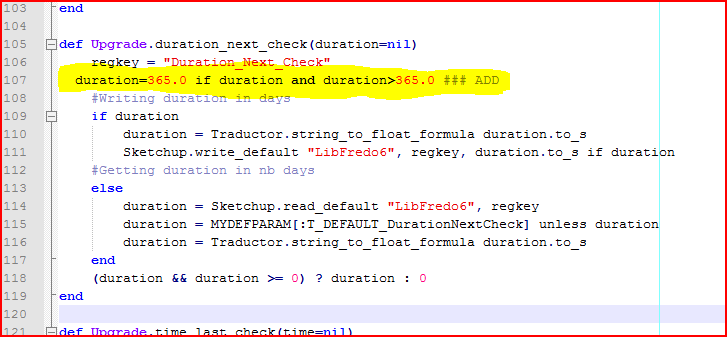
                                            If you feel up to adding one line of code into a rb file using a plain text-editor like Notepad[++].exe... find this file Capture1.PNG open it and add this line and save it Capture.PNG Then you can't wait more than a year [365 days]


                                            TIG

                                            1 條回覆 最後回覆 回覆 引用 0
                                            • 1
                                            • 2
                                            • 88
                                            • 89
                                            • 90
                                            • 91
                                            • 92
                                            • 109
                                            • 110
                                            • 90 / 110
                                            • 第一個貼文
                                              最後的貼文
                                            Buy SketchPlus
                                            Buy SUbD
                                            Buy WrapR
                                            Buy eBook
                                            Buy Modelur
                                            Buy Vertex Tools
                                            Buy SketchCuisine
                                            Buy FormFonts

                                            Advertisement