[Plugin] Material Tools
-
As a DIY quick-fix - change
if ents.respond_to?( :back_material )
to
if e.respond_to?( :back_material ) -
Sorted

Now I'll break something else
-
Go'n run with scissors or something...
-
I like find this plugin very useful, especially the possibility to transfer the instance material to the faces inside the group or component, but that results in the backfaces also being painted. But sometimes I just want all the instance material gone as I sometimes accidentally assign a material to a group or component and later I can't find it any more. This is especially annoying if the material is not used any more in the rest of the model but remains in the material browser and doesn't get purged. I tried removing all backface materials after transferring the instance material but that resulted in also losing all backface materials I assigned intentionally. Is there a way to simply remove all instance materials?
-
Hello sr thomthom.
I think I'm doing something wrong or is there a bug in the plugin.
1 - Remove From Selection.
Error: # undefined local variable or <NameError:ents' method for TT::Plugins::MaterialTools:Module> C: / Program Files / Google / Google SketchUp 8/Plugins/tt_material_tools.rb: 270: inremove_all_from_selection '
 / Program Files / Google / Google SketchUp 8/Plugins/tt_material_tools.rb: 256: in
 each ' C: / Program Files / Google / Google SketchUp 8/Plugins/tt_material_tools.rb: 256: inremove_all_from_selection '
/ Program Files / Google / Google SketchUp 8/Plugins/tt_material_tools.rb: 62
add
Groups only erases materials or components. If you edit a component or group and select faces and edges were deleted material.
If I select faces or edges that are not in a group or component, the materials are not deleted.
If I select a group / component, which contains within groups / components nested, the materials are not deleted.
if I apply a material to a group / component and other material to the face that contains this group, only delete the material applied inside to the faces in the group / component2 - Remove Specific Material
only works with colors. Textured materials does not work.
In addition, when shown the list of materials to remove, it only shows the name of the texture of the material, rather than the name of the materialis possible to solve this problem.
Thank you very much for your time -
Is this the latest version 2.2.0?
if so it looks to me like you have some code 'missing' in the script - you haven't opened the .rb script with a wordprocessor and then saved or edited it with say Notepad.exe ??
Line #270 is actually aboutif e.respond_to?( :back_material )while the offending error for 'ents' should occur earlier in line #260 where it first appears asparent.entities.each { |ents|or the next three lines #262/263/264 - so there's obviously something wrong here...
Try reinstalling the tool and come back... -
tig thanks for your reply.
But reinstalling the plugin and the library. The plugin still generates the same error.
I use sketchup in Spanish, has something to do this?Error: #<NameError: undefined local variable or method
ents' for TT::Plugins::MaterialTools:Module> C:/Archivos de programa/Google/Google SketchUp 8/Plugins/tt_material_tools.rb:270:inremove_all_from_selection'
C:/Archivos de programa/Google/Google SketchUp 8/Plugins/tt_material_tools.rb:256:ineach' C:/Archivos de programa/Google/Google SketchUp 8/Plugins/tt_material_tools.rb:256:inremove_all_from_selection'
C:/Archivos de programa/Google/Google SketchUp 8/Plugins/tt_material_tools.rb:62
C:/Archivos de programa/Google/Google SketchUp 8/Plugins/tt_material_tools.rb:270:in `call'
C:/Archivos de programa/Google/Google SketchUp 8/Plugins/tt_material_tools.rb:270 -
I think we must wait for thomthom himself to reply.
As far as I can see you can't get that error with a correctly installed script
-
I have an update for this in an unreleased version. I'll get it online soon.
-
many, thank you very much. is a very useful tool
-
Version 2.5.1
# 2.5.1 - 29.06.2011 # * Fixed typo bug in Remove From Selection. # # 2.5.0 - 15.12.2010 # * Paint roof. # # 2.4.0 - 15.12.2010 # * Ensure Unique Filenames. # # 2.3.0 - 31.10.2010 # * Remove All Textures. -
thom excellent update.
still not cleared yet assigned to groups of materials / components.
You can correct this?
-
@jorge2011 said:
thom excellent update.
still not cleared yet assigned to groups of materials / components.
You can correct this?? You're still getting errors?
-
no, no errors.
but does not remove the materials assigned to a group.
if you remove the materials assigned to faces and edges contained within the group.
see the fileand
Remove Specific Material
only works with colors. Textured materials does not work.
In addition, when shown the list of materials to remove, it only shows the name of the texture of the material, rather than the name of the materialis possible to solve this problem.
Thank you very much for your time -
Version 2.5.2
Fixed bug in Remove From Selection -
Thank you very much.
-
thank you very much for this plugins.
it's very useful for me to keep the file size as small as it could. -
-
Does the 'remove specific material work on textures?
-
I've got a problem when trying to remove a specific material. Have many many materials in my model and the list of materials in the plugin is not long enough for me to see all of them. Any solution?
-
The reason I am trying to use this plugin is for removing a material that has a TGA in it (which causes annoying errors when I first open the model). I am not able to find the TGA in the model, but am able to find the material it is in. When I try to right click on the material in the regular materials window, sketchup freezes for 10 seconds or so, and then I see the context menu for only a fraction of a second, and I am not able to actually delete the material. This happens a lot when I have a lot of materials in a model.
This is a sketchup bug that's been around for quite a long time! Any suggestions?
- 'List textures in console' doesn't seem to do anything other than opening the console box, but nothing happens.
(I'm using latest sketchup pro 8 with windows 7 64bit)
-
-
@unknownuser said:
- Does the 'remove specific material work on textures?
You mean removing texture from material?
The plugin would remove the material - entirely. Making no distinction if it is textured or not.@unknownuser said:
- I've got a problem when trying to remove a specific material. Have many many materials in my model and the list of materials in the plugin is not long enough for me to see all of them. Any solution?
That's a bug in SketchUp. Only way around it is to create a WebDialog instead - which I don't have the time for right now.
@unknownuser said:
- The reason I am trying to use this plugin is for removing a material that has a TGA in it (which causes annoying errors when I first open the model). I am not able to find the TGA in the model, but am able to find the material it is in. When I try to right click on the material in the regular materials window, sketchup freezes for 10 seconds or so, and then I see the context menu for only a fraction of a second, and I am not able to actually delete the material. This happens a lot when I have a lot of materials in a model.
Have you tried assigning a different texture to that material - if the purpose is to avoid the errors when you open the model? (What does the error say btw?)
@unknownuser said:
- 'List textures in console' doesn't seem to do anything other than opening the console box, but nothing happens.
Huh! I see that as well. Sure is a bug.
-
-
cool
-
I imagine the sketchup team is aware of the bug... I really wish I could just mark a bunch of selected materials in one go, and delete them...
-
That's a good idea! I just unchecked the texture in the material, purged, saved, and the error doesn't appear anymore.
The error I get looked like this:
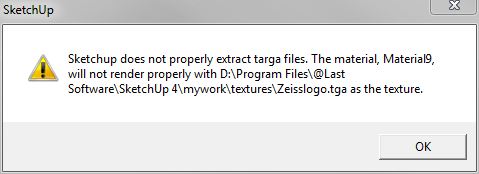
-
happy I could be of assistance
@thomthom said:
@unknownuser said:
- Does the 'remove specific material work on textures?
You mean removing texture from material?
The plugin would remove the material - entirely. Making no distinction if it is textured or not.@unknownuser said:
- I've got a problem when trying to remove a specific material. Have many many materials in my model and the list of materials in the plugin is not long enough for me to see all of them. Any solution?
That's a bug in SketchUp. Only way around it is to create a WebDialog instead - which I don't have the time for right now.
@unknownuser said:
- The reason I am trying to use this plugin is for removing a material that has a TGA in it (which causes annoying errors when I first open the model). I am not able to find the TGA in the model, but am able to find the material it is in. When I try to right click on the material in the regular materials window, sketchup freezes for 10 seconds or so, and then I see the context menu for only a fraction of a second, and I am not able to actually delete the material. This happens a lot when I have a lot of materials in a model.
Have you tried assigning a different texture to that material - if the purpose is to avoid the errors when you open the model? (What does the error say btw?)
@unknownuser said:
- 'List textures in console' doesn't seem to do anything other than opening the console box, but nothing happens.
Huh! I see that as well. Sure is a bug.
-







Advertisement