sketchucation logo sketchucation
    • 登入
    Oops, your profile's looking a bit empty! To help us tailor your experience, please fill in key details like your SketchUp version, skill level, operating system, and more. Update and save your info on your profile page today!
    🚨 Skimp | 25% Off until March 30 Buy Now

    The "Duh!" thread (aka the Doh! thread)

    已排程 已置頂 已鎖定 已移動 SketchUp Discussions
    sketchup
    696 貼文 135 Posters 331.9k 瀏覽 135 Watching
    正在載入更多貼文
    • 從舊到新
    • 從新到舊
    • 最多點贊
    回覆
    • 在新貼文中回覆
    登入後回覆
    此主題已被刪除。只有擁有主題管理權限的使用者可以查看。
    • pilouP 離線
      pilou
      最後由 編輯

      A tool EXTRUDE EDGES BY VECTOR BY tig don't make the same ? 😉

      http://forum.zbrush.fr/index.php?action=dlattach;topic=1622.0;attach=18111;image

      Frenchy Pilou
      Is beautiful that please without concept!
      My Little site :)

      1 條回覆 最後回覆 回覆 引用 0
      • R 離線
        rv1974
        最後由 編輯

        no, Curic works with multiple independent objects (groups, components) and\or its faces instantly.
        Does Tig's one extrude to a curved object?

        1 條回覆 最後回覆 回覆 引用 0
        • Dave RD 離線
          Dave R
          最後由 編輯

          @rv1974 said:

          Does Tig's one extrude to a curved object?

          Yes.

          Etaoin Shrdlu

          %

          (THERE'S NO PLACE LIKE)

          G28 X0.0 Y0.0 Z0.0

          M30

          %

          1 條回覆 最後回覆 回覆 引用 0
          • R 離線
            rv1974
            最後由 編輯

            Very good, but once again ability to process multiple objects regardless the context makes night and day difference.

            1 條回覆 最後回覆 回覆 引用 0
            • TIGT 離線
              TIG Moderator
              最後由 編輯

              @rv1974 said:

              no, Curic works with multiple independent objects (groups, components) and\or its faces instantly.
              Does Tig's one extrude to a curved object?
              My EE... tool extends selected edges and by connection their faces to any objects in the way of the vector-path, or a picked point on that path - whichever is appropriate. It doesn't process the contents of selected groups etc, so you must edit them and select the geometry to process.
              The objects to which it extrudes must include some faces [even if nested inside groups etc] - so curved surfaces are accommodated...

              TIG

              1 條回覆 最後回覆 回覆 引用 0
              • K 離線
                Khai
                最後由 編輯

                My biggest Doh!

                Struggling with microfaces on a component..

                Brain : this is a component!
                Me : I know
                Brain : no, this is a component, get it?
                Me : I know! Will you shuv up?
                Brain : idiot. Copy it, enlarge it 500% over there, and then work on it, they won't be microfaces anymore and life will be easy. Pillock.

                1 條回覆 最後回覆 回覆 引用 0
                • BoxB 離線
                  Box
                  最後由 編輯

                  Why on earth is Curic Extend in this thread!
                  If you want to post it put it in a thread of its own in the Plugins SubForum.

                  1 條回覆 最後回覆 回覆 引用 0
                  • Dave RD 離線
                    Dave R
                    最後由 編輯

                    @khai said:

                    My biggest Doh!

                    Struggling with microfaces on a component..

                    Brain : this is a component!
                    Me : I know
                    Brain : no, this is a component, get it?
                    Me : I know! Will you shuv up?
                    Brain : idiot. Copy it, enlarge it 500% over there, and then work on it, they won't be microfaces anymore and life will be easy. Pillock.

                    As demonstrated by Box:

                    https://sketchucation.com/forums/viewtopic.php?f=18&t=68150

                    Etaoin Shrdlu

                    %

                    (THERE'S NO PLACE LIKE)

                    G28 X0.0 Y0.0 Z0.0

                    M30

                    %

                    1 條回覆 最後回覆 回覆 引用 0
                    • david_hD 離線
                      david_h
                      最後由 編輯

                      Fellow Wizards:

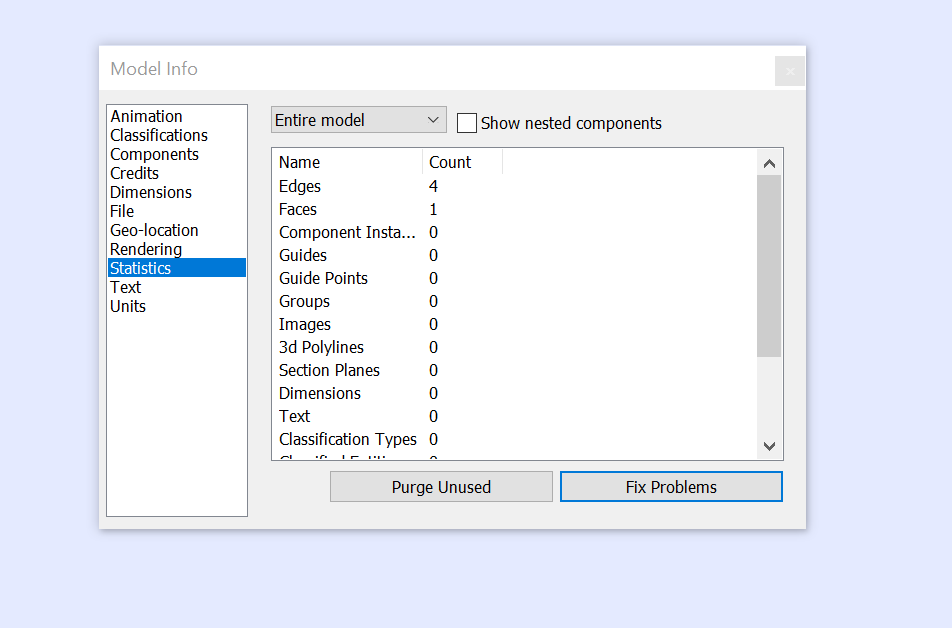
                      so in previous versions of SU there was a blue icon with a query (?) symbol or something that would give you all the statistics of a model and the ability to fix and purge throughout. What happened to that too in V 18? Entity Info doesn't quite do it for me.

                      thx,

                      D

                      If I make it look easy...It is probably easy

                      1 條回覆 最後回覆 回覆 引用 0
                      • Dave RD 離線
                        Dave R
                        最後由 編輯

                        @david_h said:

                        so in previous versions of SU there was a blue icon with a query (?) symbol or something that would give you all the statistics...

                        I suspect you mean the Query tool which creates something that looks like this:
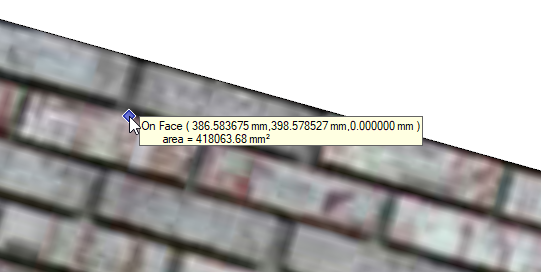
                        Screenshot - 3_25_2019 , 10_26_40 AM.png

                        That is part of the Utilities Tools available from the Extension Warehouse.

                        Etaoin Shrdlu

                        %

                        (THERE'S NO PLACE LIKE)

                        G28 X0.0 Y0.0 Z0.0

                        M30

                        %

                        1 條回覆 最後回覆 回覆 引用 0
                        • Dave RD 離線
                          Dave R
                          最後由 編輯

                          CleanUp3? TIG's Purge All?

                          Do you still have the older version of SketchUp installed so you could check to see what it is called?

                          Etaoin Shrdlu

                          %

                          (THERE'S NO PLACE LIKE)

                          G28 X0.0 Y0.0 Z0.0

                          M30

                          %

                          1 條回覆 最後回覆 回覆 引用 0
                          • david_hD 離線
                            david_h
                            最後由 編輯

                            Thanks Dave. No. . it was a statistics tool of some kind. I didn't use it much but I need it today to find out where some problems are and that it can fix them.

                            It had a menu that would come up that would show all the entities and an option to fix problems etc.

                            again, Thanks.

                            D

                            EDIT: This just in:

                            I think I found it!

                            thx again.

                            If I make it look easy...It is probably easy

                            1 條回覆 最後回覆 回覆 引用 0
                            • david_hD 離線
                              david_h
                              最後由 編輯

                              info.png

                              It was in the Window Menu. I just did't know to look for it there cuz it had it's own toolbar icon but it doesn't now.

                              So. . . .

                              never mind.jpg

                              If I make it look easy...It is probably easy

                              1 條回覆 最後回覆 回覆 引用 0
                              • pilouP 離線
                                pilou
                                最後由 編輯

                                A cool one never too late! 💚

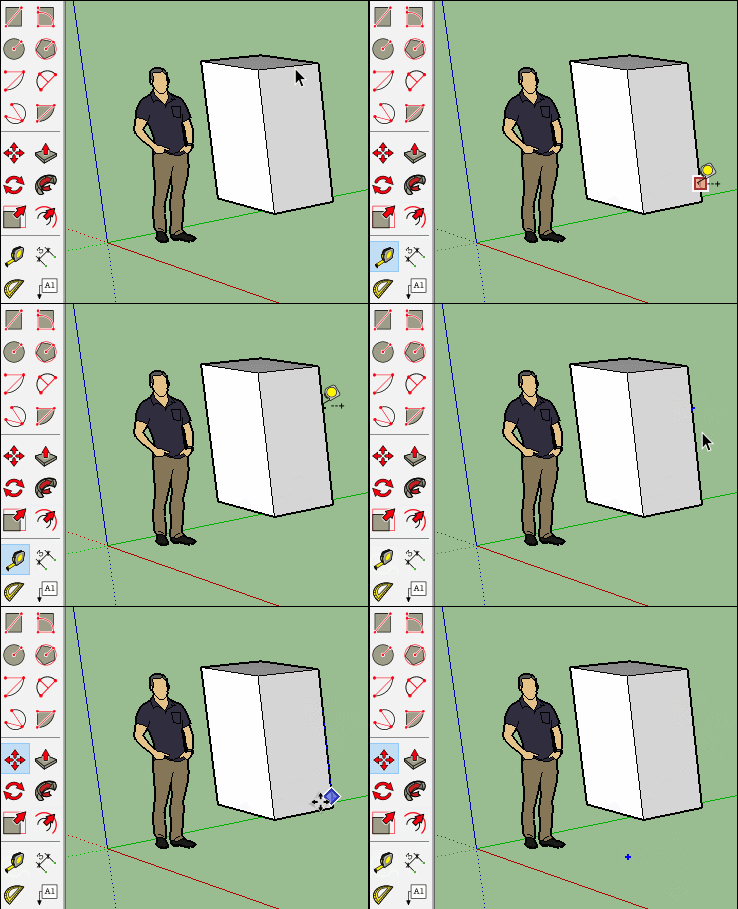
                                • Draw a box
                                • Draw a Line Guide in whatever direction wished
                                • Release the mouse and type any integer fraction N/D in the VCB with your 2 hands! 😄
                                  7/3 for example...
                                  (any time you want till the good position of the Guide line wished! 😎

                                I don't know why that works not with N*D or N+D or N-D ❓

                                doh_guide_line.jpg

                                Frenchy Pilou
                                Is beautiful that please without concept!
                                My Little site :)

                                1 條回覆 最後回覆 回覆 引用 0
                                • pilouP 離線
                                  pilou
                                  最後由 編輯

                                  With the same tool : how to draw an only one Guide Point in the Space without plugin! 😄

                                  Draw with the Tape tool any one Guide point on an Edge (not on an hot point)
                                  (on a middle edge you can't draw a guide point)

                                  Move this Guide Point in the space

                                  Et voilà 😄

                                  GIF_move_one_guid_point.gif

                                  Frenchy Pilou
                                  Is beautiful that please without concept!
                                  My Little site :)

                                  1 條回覆 最後回覆 回覆 引用 0
                                  • S 離線
                                    slbaumgartner
                                    最後由 編輯

                                    @pilou said:

                                    I don't know why that works not with N*D or N+D or N-D ❓
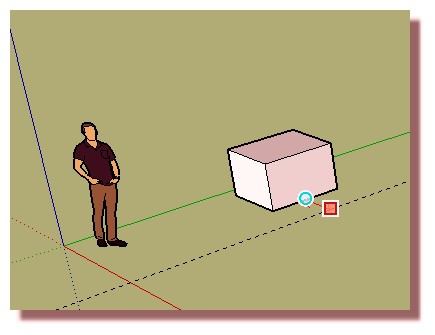
                                    It works with N/D as a side effect of supporting fractional inches. Though it's a common request, the measurement box doesn't support arithmetic and doesn't really understand division other than integer ratios.

                                    1 條回覆 最後回覆 回覆 引用 0
                                    • BepB 離線
                                      Bep
                                      最後由 編輯

                                      Don't make this mistake.

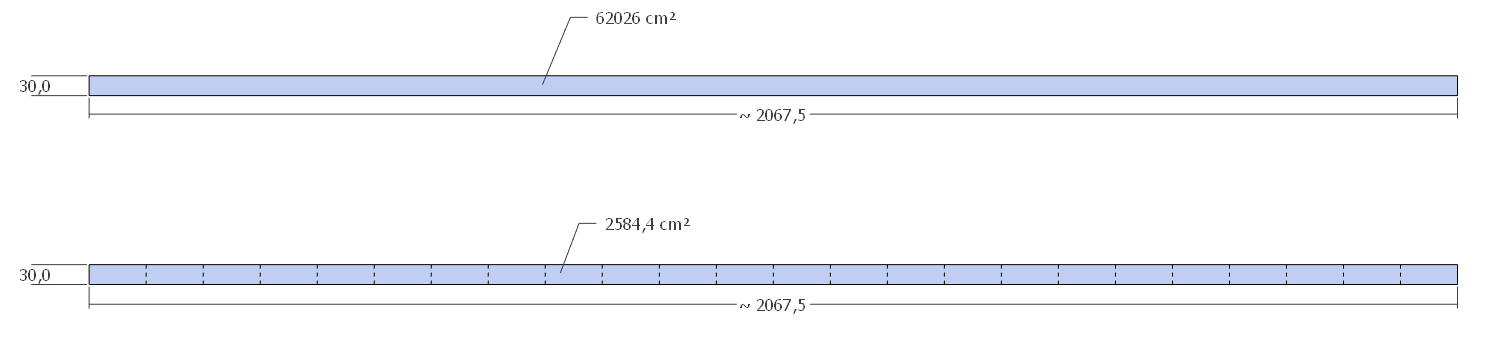
                                      I unfolded a cilinder/ring, and measured its area (cm²) with the tekst tool, with hidden lines turned off in view. (bottom strip of fig 1)
                                      The strip at the top drawn with the rectangle tool shows the correct area.
                                      although the face, when selected looks undivided, the square cm² turn out to be only for a part of the ring.(fig 2)

                                      I notest, that drawn with the rectangle tool, entity-info identify's the rectangle as a face, and the unfolded rectangle as a surface.

                                      fig 1
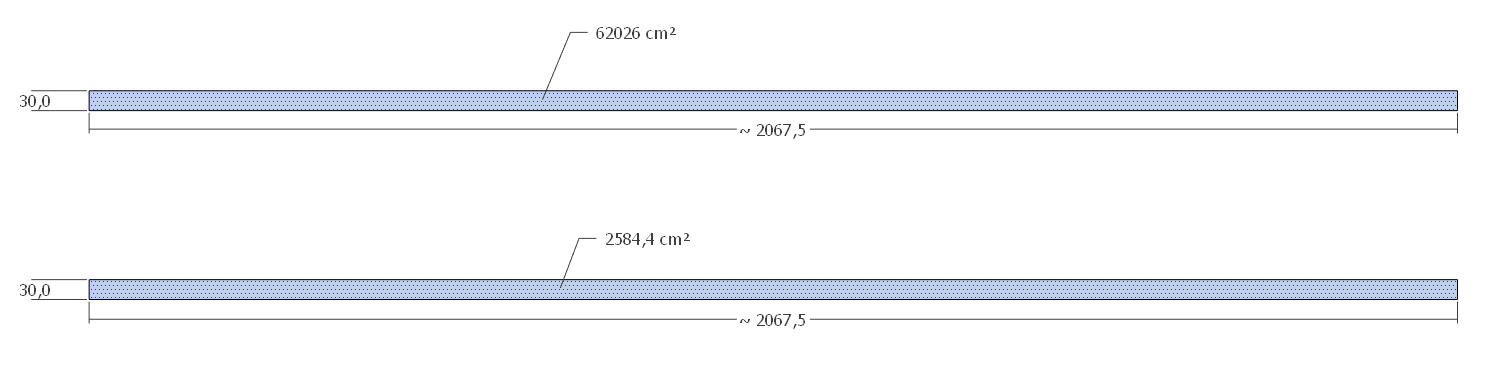
                                      hidden lines off
                                      fig 2
                                      hidden lines on

                                      test

                                      "History is written by the winners"

                                      1 條回覆 最後回覆 回覆 引用 0
                                      • david_hD 離線
                                        david_h
                                        最後由 編輯

                                        So I have a question. . .and this is coming from a "Top Sketchucator"

                                        (try and contain your laughter at least till I pose the question 💚 )

                                        i am trying to import a collection of materials from a previous version of SU and I can't get those to stay put in my materials pallet. Each time I open us SU I have to reload them.

                                        What am I doing wrong? Needless to say, I don't do this a lot. 😉

                                        If I make it look easy...It is probably easy

                                        1 條回覆 最後回覆 回覆 引用 0
                                        • Dave RD 離線
                                          Dave R
                                          最後由 編輯

                                          David, what operating system? What SketchUp version?

                                          Is this a collection of materials in a folder?

                                          Etaoin Shrdlu

                                          %

                                          (THERE'S NO PLACE LIKE)

                                          G28 X0.0 Y0.0 Z0.0

                                          M30

                                          %

                                          1 條回覆 最後回覆 回覆 引用 0
                                          • TIGT 離線
                                            TIG Moderator
                                            最後由 編輯

                                            From the 'palette' phrasing I guess you are on a MAC ?

                                            No matter, when you import a collection into a model those collection-materials are available in that model.
                                            When you open a new model [or an older one] those collection-materials are not there - why would they be ?

                                            If you want the material-collection to be available in all new models, then open an empty new model from your template, add the collection-materials, then save the model as a template - overwriting your usual template, OR making a new template, and setting that as your default-template.

                                            Now all new models will have those collection-materials associated with it ?
                                            You should also be able to associate the collection with existing models ?

                                            TIG

                                            1 條回覆 最後回覆 回覆 引用 0

                                            Hello! It looks like you're interested in this conversation, but you don't have an account yet.

                                            Getting fed up of having to scroll through the same posts each visit? When you register for an account, you'll always come back to exactly where you were before, and choose to be notified of new replies (either via email, or push notification). You'll also be able to save bookmarks and upvote posts to show your appreciation to other community members.

                                            With your input, this post could be even better 💗

                                            註冊 登入
                                            • 1
                                            • 2
                                            • 28
                                            • 29
                                            • 30
                                            • 31
                                            • 32
                                            • 33
                                            • 34
                                            • 35
                                            • 30 / 35
                                            • 第一個貼文
                                              最後的貼文
                                            Buy SketchPlus
                                            Buy SUbD
                                            Buy WrapR
                                            Buy eBook
                                            Buy Modelur
                                            Buy Vertex Tools
                                            Buy SketchCuisine
                                            Buy FormFonts

                                            Advertisement