sketchucation logo sketchucation
    • Login
    Oops, your profile's looking a bit empty! To help us tailor your experience, please fill in key details like your SketchUp version, skill level, operating system, and more. Update and save your info on your profile page today!
    ⚠️ Update | Sketchucation Tools 5.0.8 released with licensing improvements and bugfixes Download

    The "Duh!" thread (aka the Doh! thread)

    Scheduled Pinned Locked Moved SketchUp Discussions
    sketchup
    696 Posts 135 Posters 579.7k Views 135 Watching
    Loading More Posts
    • Oldest to Newest
    • Newest to Oldest
    • Most Votes
    Reply
    • Reply as topic
    Log in to reply
    This topic has been deleted. Only users with topic management privileges can see it.
    • R
      rv1974
      last edited by

      At last we have a fastest\easiest tool for ramps/stairs/roads!
      Check s4u Stair() in Plugin Store.
      Absolutely worth every penny.
      β˜€

      1 Reply Last reply
      Reply Quote 0
      • L
        L i am
        last edited by

        You probably missed this, too. If you want to place the same radius on other corners, double click near them.
        Thank you, thank you, thank you!

        1 Reply Last reply
        Reply Quote 0
        • david_hD
          david_h
          last edited by

          I know I should know this (being a top sketchukator and all--- πŸ’š Yeah, I am having a hard time containing my laughter too. . .)but as I said. .I know I should know this but I don't:

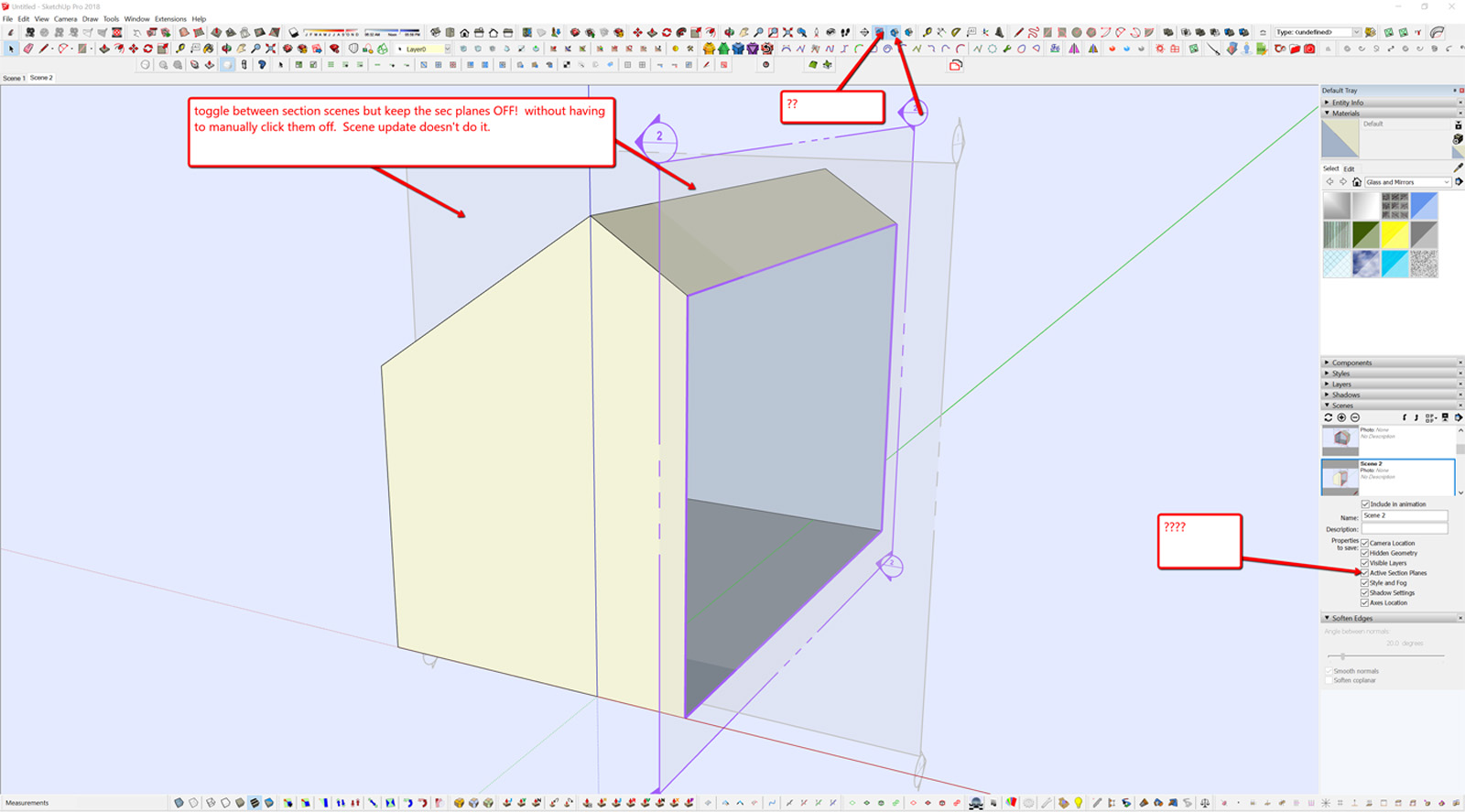
          as I go between scenes with sections how can I toggle between them and keep the section plane window off so I dont have to manually turn them off each time? I have always found the scene menu in SU very confusing and conveluted and I can't seem to get this to work as I want. Help please? Thanks.

          David_H
          scene_1.jpg

          If I make it look easy...It is probably easy

          1 Reply Last reply
          Reply Quote 0
          • Dave RD
            Dave R
            last edited by

            David, you can access them in the Outliner. Right click on the desired section cut in Outliner and activate it or deactivate as needed.

            Etaoin Shrdlu

            %

            (THERE'S NO PLACE LIKE)

            G28 X0.0 Y0.0 Z0.0

            M30

            %

            1 Reply Last reply
            Reply Quote 0
            • david_hD
              david_h
              last edited by

              Dave. . thanks for the response and please excuse the follow up. . . I guess I'm not following, or i didn't make my question clear and I don't use outliiner that much. . .is there a way to save the scene updates so that the windows just stay off? I don't see how Outline does that for me.

              Thx,

              D

              If I make it look easy...It is probably easy

              1 Reply Last reply
              Reply Quote 0
              • david_hD
                david_h
                last edited by

                Never mind. .. I think I got it. I just update after the outliner thing. Correct?

                Thx,

                D

                If I make it look easy...It is probably easy

                1 Reply Last reply
                Reply Quote 0
                • Dave RD
                  Dave R
                  last edited by

                  Oh. Sorry. I didn't get that part. The display of section planes is a style setting thing so edit the style to turn them off, update the style and update the scenes.

                  Actually, if you edit the style and then update the scene, you should get a warning that tells you the style has been edited and asking if you want to update the style or create a new one.

                  Etaoin Shrdlu

                  %

                  (THERE'S NO PLACE LIKE)

                  G28 X0.0 Y0.0 Z0.0

                  M30

                  %

                  1 Reply Last reply
                  Reply Quote 0
                  • david_hD
                    david_h
                    last edited by

                    Thank you! it's really quite amazing how much of the basic stuff you forget when you don't dealwith it that often.

                    D

                    If I make it look easy...It is probably easy

                    1 Reply Last reply
                    Reply Quote 0
                    • Dave RD
                      Dave R
                      last edited by

                      Yes it is amazing indeed.

                      And it shows how deep SketchUp can be.

                      Etaoin Shrdlu

                      %

                      (THERE'S NO PLACE LIKE)

                      G28 X0.0 Y0.0 Z0.0

                      M30

                      %

                      1 Reply Last reply
                      Reply Quote 0
                      • R
                        rv1974
                        last edited by

                        Curic Extend is amazing!
                        https://gumroad.com/curic
                        50% discount code:
                        10k followers

                        1 Reply Last reply
                        Reply Quote 0
                        • pilouP
                          pilou
                          last edited by

                          A tool EXTRUDE EDGES BY VECTOR BY tig don't make the same ? πŸ˜‰

                          http://forum.zbrush.fr/index.php?action=dlattach;topic=1622.0;attach=18111;image

                          Frenchy Pilou
                          Is beautiful that please without concept!
                          My Little site :)

                          1 Reply Last reply
                          Reply Quote 0
                          • R
                            rv1974
                            last edited by

                            no, Curic works with multiple independent objects (groups, components) and\or its faces instantly.
                            Does Tig's one extrude to a curved object?

                            1 Reply Last reply
                            Reply Quote 0
                            • Dave RD
                              Dave R
                              last edited by

                              @rv1974 said:

                              Does Tig's one extrude to a curved object?

                              Yes.

                              Etaoin Shrdlu

                              %

                              (THERE'S NO PLACE LIKE)

                              G28 X0.0 Y0.0 Z0.0

                              M30

                              %

                              1 Reply Last reply
                              Reply Quote 0
                              • R
                                rv1974
                                last edited by

                                Very good, but once again ability to process multiple objects regardless the context makes night and day difference.

                                1 Reply Last reply
                                Reply Quote 0
                                • TIGT
                                  TIG Moderator
                                  last edited by

                                  @rv1974 said:

                                  no, Curic works with multiple independent objects (groups, components) and\or its faces instantly.
                                  Does Tig's one extrude to a curved object?
                                  My EE... tool extends selected edges and by connection their faces to any objects in the way of the vector-path, or a picked point on that path - whichever is appropriate. It doesn't process the contents of selected groups etc, so you must edit them and select the geometry to process.
                                  The objects to which it extrudes must include some faces [even if nested inside groups etc] - so curved surfaces are accommodated...

                                  TIG

                                  1 Reply Last reply
                                  Reply Quote 0
                                  • K
                                    Khai
                                    last edited by

                                    My biggest Doh!

                                    Struggling with microfaces on a component..

                                    Brain : this is a component!
                                    Me : I know
                                    Brain : no, this is a component, get it?
                                    Me : I know! Will you shuv up?
                                    Brain : idiot. Copy it, enlarge it 500% over there, and then work on it, they won't be microfaces anymore and life will be easy. Pillock.

                                    1 Reply Last reply
                                    Reply Quote 0
                                    • BoxB
                                      Box
                                      last edited by

                                      Why on earth is Curic Extend in this thread!
                                      If you want to post it put it in a thread of its own in the Plugins SubForum.

                                      1 Reply Last reply
                                      Reply Quote 0
                                      • Dave RD
                                        Dave R
                                        last edited by

                                        @khai said:

                                        My biggest Doh!

                                        Struggling with microfaces on a component..

                                        Brain : this is a component!
                                        Me : I know
                                        Brain : no, this is a component, get it?
                                        Me : I know! Will you shuv up?
                                        Brain : idiot. Copy it, enlarge it 500% over there, and then work on it, they won't be microfaces anymore and life will be easy. Pillock.

                                        As demonstrated by Box:

                                        403 Forbidden

                                        favicon

                                        (sketchucation.com)

                                        Etaoin Shrdlu

                                        %

                                        (THERE'S NO PLACE LIKE)

                                        G28 X0.0 Y0.0 Z0.0

                                        M30

                                        %

                                        1 Reply Last reply
                                        Reply Quote 0
                                        • david_hD
                                          david_h
                                          last edited by

                                          Fellow Wizards:

                                          so in previous versions of SU there was a blue icon with a query (?) symbol or something that would give you all the statistics of a model and the ability to fix and purge throughout. What happened to that too in V 18? Entity Info doesn't quite do it for me.

                                          thx,

                                          D

                                          If I make it look easy...It is probably easy

                                          1 Reply Last reply
                                          Reply Quote 0
                                          • Dave RD
                                            Dave R
                                            last edited by

                                            @david_h said:

                                            so in previous versions of SU there was a blue icon with a query (?) symbol or something that would give you all the statistics...

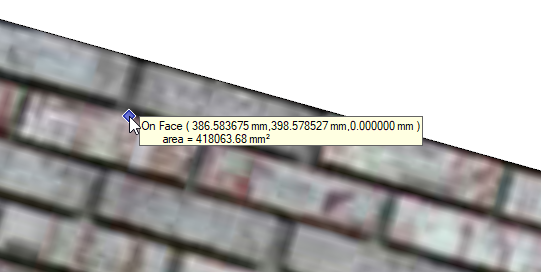
                                            I suspect you mean the Query tool which creates something that looks like this:
                                            Screenshot - 3_25_2019 , 10_26_40 AM.png

                                            That is part of the Utilities Tools available from the Extension Warehouse.

                                            Etaoin Shrdlu

                                            %

                                            (THERE'S NO PLACE LIKE)

                                            G28 X0.0 Y0.0 Z0.0

                                            M30

                                            %

                                            1 Reply Last reply
                                            Reply Quote 0

                                            Hello! It looks like you're interested in this conversation, but you don't have an account yet.

                                            Getting fed up of having to scroll through the same posts each visit? When you register for an account, you'll always come back to exactly where you were before, and choose to be notified of new replies (either via email, or push notification). You'll also be able to save bookmarks and upvote posts to show your appreciation to other community members.

                                            With your input, this post could be even better πŸ’—

                                            Register Login
                                            • 1
                                            • 2
                                            • 3
                                            • 4
                                            • 5
                                            • 6
                                            • 7
                                            • 8
                                            • 34
                                            • 35
                                            • 6 / 35
                                            • First post
                                              Last post
                                            Buy SketchPlus
                                            Buy SUbD
                                            Buy WrapR
                                            Buy eBook
                                            Buy Modelur
                                            Buy Vertex Tools
                                            Buy SketchCuisine
                                            Buy FormFonts

                                            Advertisement


