sketchucation logo sketchucation
    • 登入
    Oops, your profile's looking a bit empty! To help us tailor your experience, please fill in key details like your SketchUp version, skill level, operating system, and more. Update and save your info on your profile page today!
    🔌 Smart Spline | Fluid way to handle splines for furniture design and complex structures. Download

    The "Duh!" thread (aka the Doh! thread)

    已排程 已置頂 已鎖定 已移動 SketchUp Discussions
    sketchup
    696 貼文 135 Posters 316.4k 瀏覽 135 Watching
    正在載入更多貼文
    • 從舊到新
    • 從新到舊
    • 最多點贊
    回覆
    • 在新貼文中回覆
    登入後回覆
    此主題已被刪除。只有擁有主題管理權限的使用者可以查看。
    • E 離線
      Ecuadorian
      最後由 編輯

      Hey, everyone! I just downloaded the book. Thank you for the good memories! 😃

      -Miguel Lescano
      Subscribe to my house plans YouTube channel! (30K+ subs)

      1 條回覆 最後回覆 回覆 引用 0
      • GarethG 離線
        Gareth
        最後由 編輯

        Great book....love it....!!

        Well done.

        1 條回覆 最後回覆 回覆 引用 0
        • genki.ttG 離線
          genki.tt
          最後由 編輯

          I found a small miss type on The D'oh! Book P61(ver.1.0) P63(ver.1.1)

          [20mm, 10mm, 30mm] absolute move -> <20mm, 10mm, 30mm> relative move

          By the way I could find Doh about Array Command, we can change operation 'x' to '/' with using 'x1' , or we can change '/' to 'x' with using '/1'.

          copy(move + 'alt') some object and type VCB
          <1000,,>
          x4
          10000
          x1
          /4
          20000
          /1
          <1000, 1000, 1000>
          x10
          .... we can continue 'x', '/', distance value, relative vertics, absolute vertics.
          'x1' or '/1' is important.

          Thank you for GREAT BOOK!!

          1 條回覆 最後回覆 回覆 引用 0
          • pilouP 離線
            pilou
            最後由 編輯

            Doh of the day! Surely trivial but never remarked! 💚
            Saving a file with objects who are not Components and Groups
            New File
            Import this file : it's converted in a Component! 😮

            Frenchy Pilou
            Is beautiful that please without concept!
            My Little site :)

            1 條回覆 最後回覆 回覆 引用 0
            • Dave RD 離線
              Dave R
              最後由 編輯

              @pilou said:

              Doh of the day! Surely trivial but never remarked! 💚
              Saving a file with objects who are not Components and Groups
              New File
              Import this file : it's converted in a Component! 😮

              And if you create a component and save it using File>Save as... and then import it, it'll be double wrapped.

              Etaoin Shrdlu

              %

              (THERE'S NO PLACE LIKE)

              G28 X0.0 Y0.0 Z0.0

              M30

              %

              1 條回覆 最後回覆 回覆 引用 0
              • pilouP 離線
                pilou
                最後由 編輯

                And Making a Component creates a new context menu on the Right Click Menu!
                "Save As" (+ "Reload" + "Detach")
                So more speed than the menu "File Save as" ! 😉

                Frenchy Pilou
                Is beautiful that please without concept!
                My Little site :)

                1 條回覆 最後回覆 回覆 引用 0
                • E 離線
                  Ecuadorian
                  最後由 編輯

                  I've just spent one hour asking myself why I could not copy-paste from an old SKP file to a new SKP file with a newly imported AutoCAD drawing. I run SketchUp's checkup, GPU-Z, Repaired SketchUp, reinstalled SketchUp... Nothing. Until I remembered these guys send me the AutoCAD drawings in milimeters instead of meters, but I imported it as meters... So the new drawing was gigantic and anything I copy-pasted from the old file was just too tiny to be seen.

                  -Miguel Lescano
                  Subscribe to my house plans YouTube channel! (30K+ subs)

                  1 條回覆 最後回覆 回覆 引用 0
                  • pilouP 離線
                    pilou
                    最後由 編輯

                    Why not use the "Zoom Extended" in a new file ? 😮 😄

                    Frenchy Pilou
                    Is beautiful that please without concept!
                    My Little site :)

                    1 條回覆 最後回覆 回覆 引用 0
                    • R 離線
                      rv1974
                      最後由 編輯

                      Today Penny has Dropped:
                      XnView is way better BP2 library explorer then a built-in one.
                      As well I use XnView as Component explorer for years now. Excellent with 2nd disply + drag'n'drop.

                      1 條回覆 最後回覆 回覆 引用 0
                      • S 離線
                        Sleipnir
                        最後由 編輯

                        New to this program, looking for a good extension for cabinet building and or wood working draw up.

                        Thanks
                        Odin's Favorite Eight Legged Horse'

                        1 條回覆 最後回覆 回覆 引用 0
                        • pilouP 離線
                          pilou
                          最後由 編輯

                          Super Doh of the day! Thanks Dave! 👍
                          The arc Circle "Knife"! Make a Double Click at the end of the Arc Drawing! 🤓
                          Excellent! 😎 ☀
                          Never made the Double Click! (just simple click: as it was not writed on the bottom help line! 😳
                          And I surrely missed it on the manual! 😳
                          Animation by Dave

                          https://sketchucation.com/forums/download/file.php?id=148790&mode=view/rokbox.jpg

                          Frenchy Pilou
                          Is beautiful that please without concept!
                          My Little site :)

                          1 條回覆 最後回覆 回覆 引用 0
                          • Dave RD 離線
                            Dave R
                            最後由 編輯

                            @pilou said:

                            Never made the Double Click! (just simple click: as it was not writed on the bottom help line! 😳
                            And I surrely missed it on the manual! 😳

                            You probably missed this, too. If you want to place the same radius on other corners, double click near them.
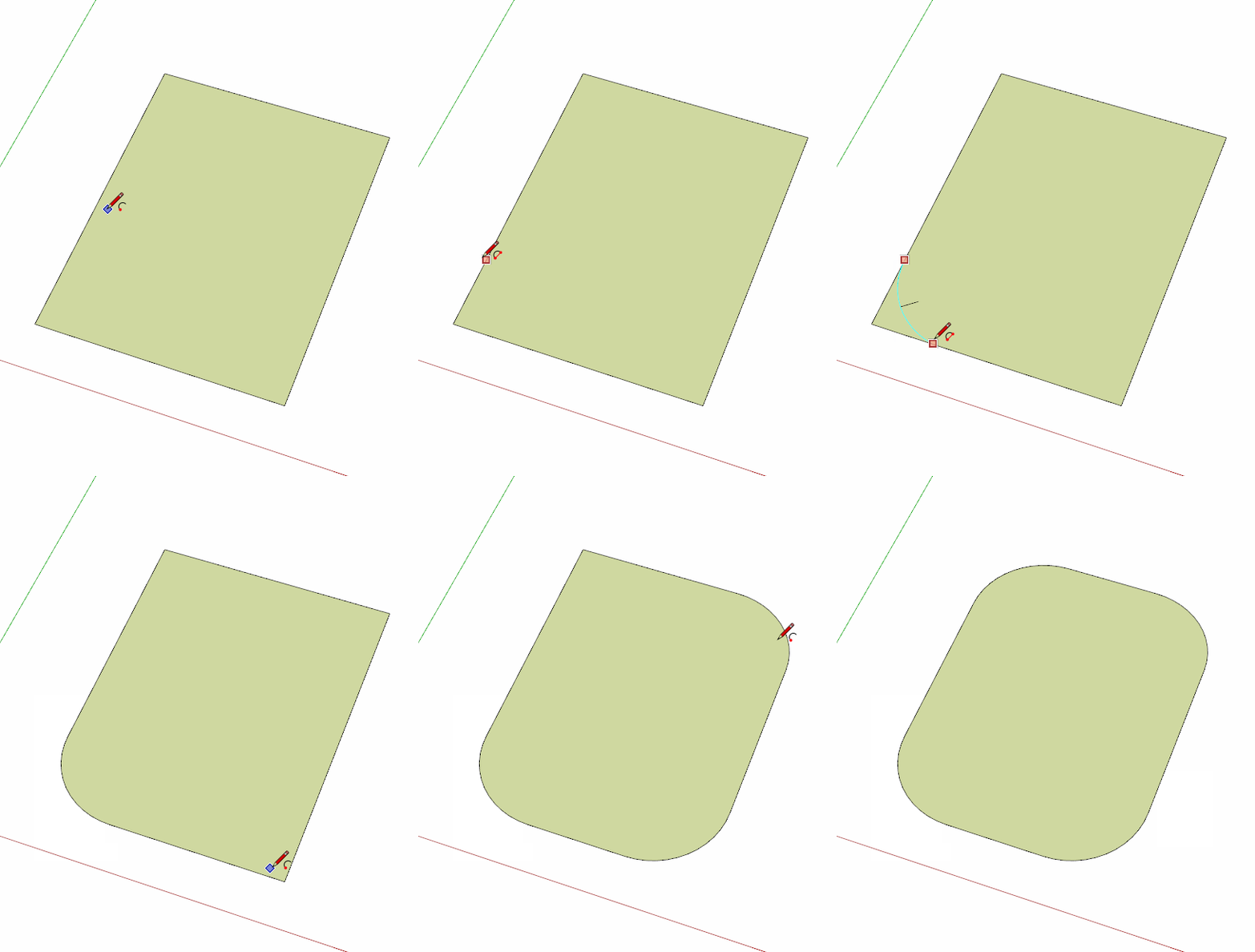
                            Click on pic if it doesn't move.

                            Etaoin Shrdlu

                            %

                            (THERE'S NO PLACE LIKE)

                            G28 X0.0 Y0.0 Z0.0

                            M30

                            %

                            1 條回覆 最後回覆 回覆 引用 0
                            • pilouP 離線
                              pilou
                              最後由 編輯

                              Very cool! ☀ 👍
                              I suppose I am not the only one! 💚

                              Frenchy Pilou
                              Is beautiful that please without concept!
                              My Little site :)

                              1 條回覆 最後回覆 回覆 引用 0
                              • K 離線
                                kaas
                                最後由 編輯

                                I don't know if this is a new feature but I was pleasantly surprised to learn about it:

                                In the 3dWarehouse, select a model, look at the statistics in the panel on the right, if you hover / click on a tag (materials/components) you can import just one of those elements instead of the whole model.
                                Great feature if you just need 1 material of 1 element from a collection.

                                1 條回覆 最後回覆 回覆 引用 0
                                • boofredlayB 離線
                                  boofredlay
                                  最後由 編輯

                                  @dave r said:

                                  You probably missed this, too. If you want to place the same radius on other corners, double click near them.

                                  https://media.giphy.com/media/EldfH1VJdbrwY/giphy.gif

                                  http://www.coroflot.com/boofredlay

                                  1 條回覆 最後回覆 回覆 引用 0
                                  • HornOxxH 離線
                                    HornOxx
                                    最後由 編輯

                                    @pilou said:

                                    ...I suppose I am not the only one! 💚
                                    😄 😄 I'm also a member of this unsuspecting club...

                                    never trust a skinny cook

                                    1 條回覆 最後回覆 回覆 引用 0
                                    • R 離線
                                      rv1974
                                      最後由 編輯

                                      At last we have a fastest\easiest tool for ramps/stairs/roads!
                                      Check s4u Stair() in Plugin Store.
                                      Absolutely worth every penny.
                                      ☀

                                      1 條回覆 最後回覆 回覆 引用 0
                                      • L 離線
                                        L i am
                                        最後由 編輯

                                        You probably missed this, too. If you want to place the same radius on other corners, double click near them.
                                        Thank you, thank you, thank you!

                                        1 條回覆 最後回覆 回覆 引用 0
                                        • david_hD 離線
                                          david_h
                                          最後由 編輯

                                          I know I should know this (being a top sketchukator and all--- 💚 Yeah, I am having a hard time containing my laughter too. . .)but as I said. .I know I should know this but I don't:

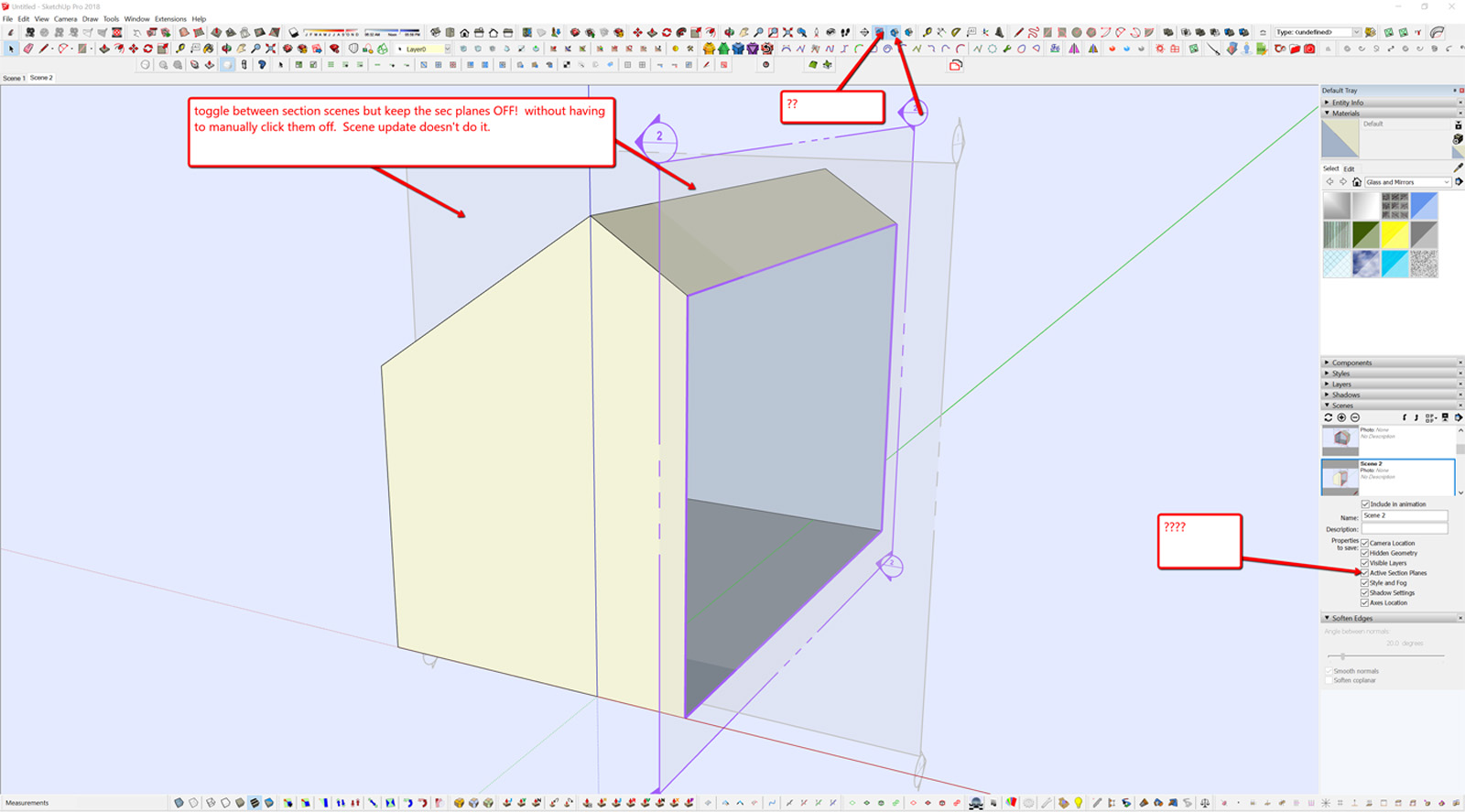
                                          as I go between scenes with sections how can I toggle between them and keep the section plane window off so I dont have to manually turn them off each time? I have always found the scene menu in SU very confusing and conveluted and I can't seem to get this to work as I want. Help please? Thanks.

                                          David_H
                                          scene_1.jpg

                                          If I make it look easy...It is probably easy

                                          1 條回覆 最後回覆 回覆 引用 0
                                          • Dave RD 離線
                                            Dave R
                                            最後由 編輯

                                            David, you can access them in the Outliner. Right click on the desired section cut in Outliner and activate it or deactivate as needed.

                                            Etaoin Shrdlu

                                            %

                                            (THERE'S NO PLACE LIKE)

                                            G28 X0.0 Y0.0 Z0.0

                                            M30

                                            %

                                            1 條回覆 最後回覆 回覆 引用 0
                                            • 1
                                            • 2
                                            • 3
                                            • 4
                                            • 5
                                            • 34
                                            • 35
                                            • 2 / 35
                                            • 第一個貼文
                                              最後的貼文
                                            Buy SketchPlus
                                            Buy SUbD
                                            Buy WrapR
                                            Buy eBook
                                            Buy Modelur
                                            Buy Vertex Tools
                                            Buy SketchCuisine
                                            Buy FormFonts

                                            Advertisement



