The "Duh!" thread (aka the Doh! thread)
-
I'm not bringing them. But they could be there.
-
You're not coming?
-
I like to place section planes at specific locations. So, when I learned that if I hold down CTRL before clicking to locate section plane, it will stick to the face it is near. Then I move the plane using the move tool relative to that face. Duh or D'oh, I don't know, but I like it.
-
Hey, everyone! I just downloaded the book. Thank you for the good memories!

-
Great book....love it....!!
Well done.
-
I found a small miss type on The D'oh! Book P61(ver.1.0) P63(ver.1.1)
[20mm, 10mm, 30mm] absolute move -> <20mm, 10mm, 30mm> relative move
By the way I could find Doh about Array Command, we can change operation 'x' to '/'
with using 'x1' , or we can change '/' to 'x' with using '/1'.copy(move + 'alt') some object and type VCB
<1000,,>
x4
10000
x1
/4
20000
/1
<1000, 1000, 1000>
x10
.... we can continue 'x', '/', distance value, relative vertics, absolute vertics.
'x1' or '/1' is important.Thank you for GREAT BOOK!!
-
Doh of the day! Surely trivial but never remarked!

Saving a file with objects who are not Components and Groups
New File
Import this file : it's converted in a Component!
-
@pilou said:
Doh of the day! Surely trivial but never remarked!
Saving a file with objects who are not Components and Groups
New File
Import this file : it's converted in a Component!And if you create a component and save it using File>Save as... and then import it, it'll be double wrapped.
-
And Making a Component creates a new context menu on the Right Click Menu!
"Save As" (+ "Reload" + "Detach")
So more speed than the menu "File Save as" !
-
I've just spent one hour asking myself why I could not copy-paste from an old SKP file to a new SKP file with a newly imported AutoCAD drawing. I run SketchUp's checkup, GPU-Z, Repaired SketchUp, reinstalled SketchUp... Nothing. Until I remembered these guys send me the AutoCAD drawings in milimeters instead of meters, but I imported it as meters... So the new drawing was gigantic and anything I copy-pasted from the old file was just too tiny to be seen.
-
Why not use the "Zoom Extended" in a new file ?

-
Today Penny has Dropped:
XnView is way better BP2 library explorer then a built-in one.
As well I use XnView as Component explorer for years now. Excellent with 2nd disply + drag'n'drop. -
New to this program, looking for a good extension for cabinet building and or wood working draw up.
Thanks
Odin's Favorite Eight Legged Horse' -
Super Doh of the day! Thanks Dave!

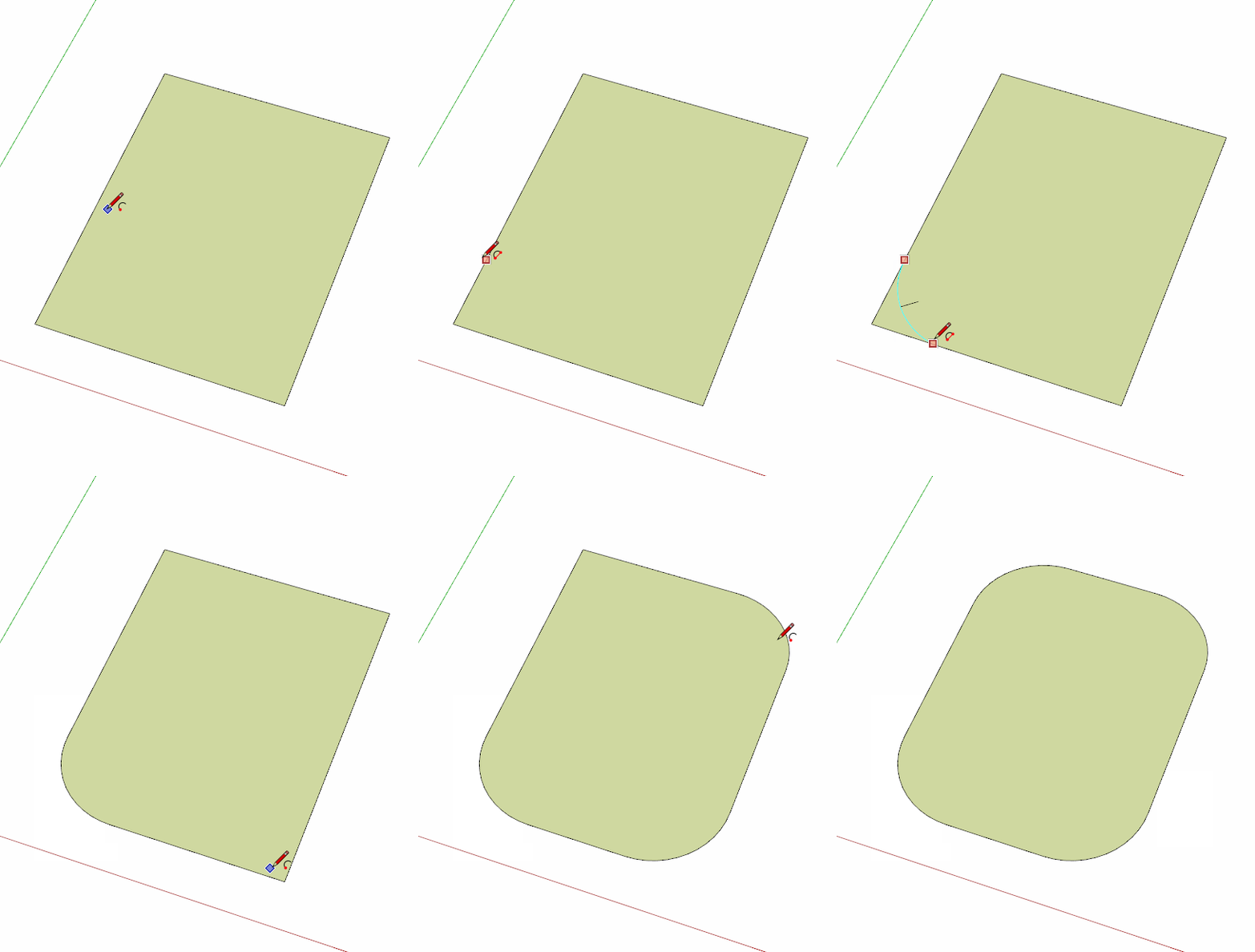
The arc Circle "Knife"! Make a Double Click at the end of the Arc Drawing!
Excellent!

Never made the Double Click! (just simple click: as it was not writed on the bottom help line!
And I surrely missed it on the manual!
Animation by Dave
-
@pilou said:
Never made the Double Click! (just simple click: as it was not writed on the bottom help line!
And I surrely missed it on the manual!You probably missed this, too. If you want to place the same radius on other corners, double click near them.
-
Very cool!
I suppose I am not the only one! -
I don't know if this is a new feature but I was pleasantly surprised to learn about it:
In the 3dWarehouse, select a model, look at the statistics in the panel on the right, if you hover / click on a tag (materials/components) you can import just one of those elements instead of the whole model.
Great feature if you just need 1 material of 1 element from a collection. -
@dave r said:
You probably missed this, too. If you want to place the same radius on other corners, double click near them.

-
@pilou said:
...I suppose I am not the only one!
I'm also a member of this unsuspecting club... -
At last we have a fastest\easiest tool for ramps/stairs/roads!
Check s4u Stair() in Plugin Store.
Absolutely worth every penny.








Hello! It looks like you're interested in this conversation, but you don't have an account yet.
Getting fed up of having to scroll through the same posts each visit? When you register for an account, you'll always come back to exactly where you were before, and choose to be notified of new replies (either via email, or push notification). You'll also be able to save bookmarks and upvote posts to show your appreciation to other community members.
With your input, this post could be even better 💗
Register Login


Advertisement