sketchucation logo sketchucation
    • 登入
    Oops, your profile's looking a bit empty! To help us tailor your experience, please fill in key details like your SketchUp version, skill level, operating system, and more. Update and save your info on your profile page today!
    🔌 Smart Spline | Fluid way to handle splines for furniture design and complex structures. Download

    The "Duh!" thread (aka the Doh! thread)

    已排程 已置頂 已鎖定 已移動 SketchUp Discussions
    sketchup
    696 貼文 135 Posters 316.9k 瀏覽 135 Watching
    正在載入更多貼文
    • 從舊到新
    • 從新到舊
    • 最多點贊
    回覆
    • 在新貼文中回覆
    登入後回覆
    此主題已被刪除。只有擁有主題管理權限的使用者可以查看。
    • pilouP 離線
      pilou
      最後由 編輯

      Mine of the day 💚 (thx Regis)
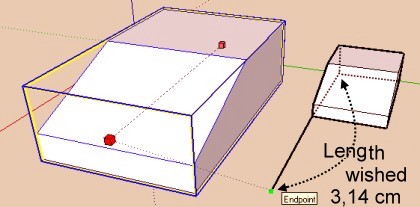
      I have found that was a good idea 💭
      Draw first the line then use
      echelle1.jpg
      but... 💚
      you can also with only just enter in the VCB
      (whatever unities in activity)
      3.14cm
      31.4mm
      0.0314m
      ... (i am not very familiar with inch 💚
      😒

      Frenchy Pilou
      Is beautiful that please without concept!
      My Little site :)

      1 條回覆 最後回覆 回覆 引用 0
      • pilouP 離線
        pilou
        最後由 編輯

        Add to the previous thread 😄
        I reread the doc (that was written in small that you can enter measure in VCB with the Scale tool! 😳

        And also a cool one (in the same doc)! 💚
        You can Press in the SAME TIME SHIFT AND CTRL with the Scale tool ! 😮 😳 😳
        For have a super scaling result! 💚

        Frenchy Pilou
        Is beautiful that please without concept!
        My Little site :)

        1 條回覆 最後回覆 回覆 引用 0
        • ToboboT 離線
          Tobobo
          最後由 編輯

          One this week was more of a remembering than a Duh moment.

          Using the Entity Ifon box you can increase the length of a line and No. of sides of a circle.

          Toby

          Philippians 4:13

          I can do everything through him who gives me strength.

          1 條回覆 最後回覆 回覆 引用 0
          • GaieusG 離線
            Gaieus
            最後由 編輯

            @tobobo said:

            ...No. of sides of a circle.

            And a polygon and an arc...

            Gai...

            1 條回覆 最後回覆 回覆 引用 0
            • pilouP 離線
              pilou
              最後由 編輯

              @unknownuser said:

              Using the Entity Ifon box you can increase the length of a line

              In what side? Good or false? 😄

              Frenchy Pilou
              Is beautiful that please without concept!
              My Little site :)

              1 條回覆 最後回覆 回覆 引用 0
              • spenceS 離線
                spence
                最後由 編輯

                One of my many many "Duh" moments came when I found out that while using the Paint Bucket Tool you could hold down Shift to paint all that match or hold Ctrl to paint all connected. I use this often.

                Boy I have learned a lot of new stuff from this thread 😄

                Spence

                1 條回覆 最後回覆 回覆 引用 0
                • ToboboT 離線
                  Tobobo
                  最後由 編輯

                  @unknownuser said:

                  @unknownuser said:

                  Using the Entity Ifon box you can increase the length of a line

                  In what side? Good or false? 😄

                  The changes its length in the same direction it has been drawn. it has to be unattached at one end, and that is the end the lengthens or shortens.

                  Toby

                  Philippians 4:13

                  I can do everything through him who gives me strength.

                  1 條回覆 最後回覆 回覆 引用 0
                  • J 離線
                    Jim
                    最後由 編輯

                    Has any one here also thought of compiling/organizing this thread into a more readable format? Wiki? Print?

                    Hi

                    1 條回覆 最後回覆 回覆 引用 0
                    • pyrolunaP 離線
                      pyroluna
                      最後由 編輯

                      well... there's a sketchup-wiki in Dutch... so... yay! for Dutch people

                      1 條回覆 最後回覆 回覆 引用 0
                      • J 離線
                        Jim
                        最後由 編輯

                        Today I learned you can use the arrow keys to precisely move the selection in Paint.NET. (Holding Ctrl moves it by 10 pixels.)

                        Hi

                        1 條回覆 最後回覆 回覆 引用 0
                        • GaieusG 離線
                          Gaieus
                          最後由 編輯

                          I just realised it the other day myself, too. 😄

                          Gai...

                          1 條回覆 最後回覆 回覆 引用 0
                          • david_hD 離線
                            david_h
                            最後由 編輯

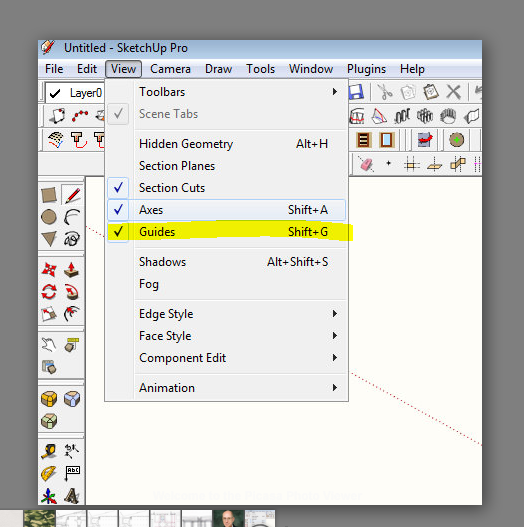
                            I've been taken to task just now on this one. . . I asked for a plugin to toggle the Construction lines on and off. . .turns out it's in the view menu. . .

                            WHICH I NEVER USE BY THE WAY!!!!

                            Hide Construction lines

                            This is so humiliating. . .. 😳 💚

                            I'm okay now. . .


                            Why I am an idiot.PNG

                            If I make it look easy...It is probably easy

                            1 條回覆 最後回覆 回覆 引用 0
                            • J 離線
                              Jim
                              最後由 編輯

                              I just learned that Edit > Delete Guides is context-sensitive - it deletes guides all guides starting from the current editing context and deeper, but not from "higher" level contexts. I had always thought it always deleted all guides, everywhere.

                              Hi

                              1 條回覆 最後回覆 回覆 引用 0
                              • thomthomT 離線
                                thomthom
                                最後由 編輯

                                @jim said:

                                I just learned that Edit > Delete Guides is context-sensitive - it deletes guides all guides starting from the current editing context and deeper, but not from "higher" level contexts. I had always thought it always deleted all guides, everywhere.

                                I had that same realization a couple of weeks ago. 😄

                                Thomas Thomassen — SketchUp Monkey & Coding addict
                                List of my plugins and link to the CookieWare fund

                                1 條回覆 最後回覆 回覆 引用 0
                                • thomthomT 離線
                                  thomthom
                                  最後由 編輯

                                  @rv1974 said:

                                  If Thom is already here..
                                  Only last week I discovered know that double clicking on blue balloons (edge tools-inspect gaps) actually close the gaps.
                                  Great tool!

                                  Ah, yea it's not that obvious - I had further plans for the UI. (also for CleanUp), but they've been down-prioritized.
                                  btw, no need to doubleclick - single click is enough.

                                  Thomas Thomassen — SketchUp Monkey & Coding addict
                                  List of my plugins and link to the CookieWare fund

                                  1 條回覆 最後回覆 回覆 引用 0
                                  • R 離線
                                    rv1974
                                    最後由 編輯

                                    If Thom is already here..
                                    Only last week I discovered that double clicking on blue balloons (edge tools-inspect gaps) actually close the gaps.
                                    Great tool!

                                    1 條回覆 最後回覆 回覆 引用 0
                                    • GaieusG 離線
                                      Gaieus
                                      最後由 編輯

                                      @jim said:

                                      I just learned that Edit > Delete Guides is context-sensitive - it deletes guides all guides starting from the current editing context and deeper, but not from "higher" level contexts. I had always thought it always deleted all guides, everywhere.

                                      Doh. 😲

                                      @rv1974 said:

                                      Only last week I discovered that double clicking on blue balloons (edge tools-inspect gaps) actually close the gaps.

                                      What???!!! 🎉

                                      Gai...

                                      1 條回覆 最後回覆 回覆 引用 0
                                      • pilouP 離線
                                        pilou
                                        最後由 編輯

                                        @unknownuser said:

                                        Being able to select only a few edges from a face and offset them instead of the whole face.

                                        Yes but edges must be selected without discontinuity! 😳 😳 😳

                                        Frenchy Pilou
                                        Is beautiful that please without concept!
                                        My Little site :)

                                        1 條回覆 最後回覆 回覆 引用 0
                                        • boofredlayB 離線
                                          boofredlay
                                          最後由 編輯

                                          Something I just learned a couple days ago while studying the Google Earth Modeling videos.
                                          D'oh, never knew that you could make a unique texture from a portion of another!

                                          [flash=853,505:84crs2i3]http://www.youtube.com/v/18r2sCMUSBU&fs=1[/flash:84crs2i3]

                                          http://www.coroflot.com/boofredlay

                                          1 條回覆 最後回覆 回覆 引用 0
                                          • DanielD 離線
                                            Daniel
                                            最後由 編輯

                                            I've always known about hiding geometry by holding the shift key with the eraser, but last week I just noticed the "hidden" check box on the entity info window. 😳

                                            My avatar is an anachronism.

                                            1 條回覆 最後回覆 回覆 引用 0
                                            • 1
                                            • 2
                                            • 10
                                            • 11
                                            • 12
                                            • 13
                                            • 14
                                            • 34
                                            • 35
                                            • 12 / 35
                                            • 第一個貼文
                                              最後的貼文
                                            Buy SketchPlus
                                            Buy SUbD
                                            Buy WrapR
                                            Buy eBook
                                            Buy Modelur
                                            Buy Vertex Tools
                                            Buy SketchCuisine
                                            Buy FormFonts

                                            Advertisement