[Plugin] SliceModeler v1.3 released!
-
I've had the opportunity to play around with this plugin a little. It works quite well, but I found that very often I want my center slice to cut through the center point of the model, thus creating two slices that intersect along the center line of each other. (The plugin creates four intersecting slices at the center of the model, equidistant from the center).
Maybe I missed a way to shift the slices along the model?
Carol
Extreme Cards and Papercrafting -
asteronimo - Is there any support for the new version. I've got a bit of a problem...
Just in case anyone can help -
I'm trying to slice an object made up of two different pieces - they are grouped so they do look like one. The object is a available to form the the Sketchup 3d Warehouse. It's a mushroom - "Mushroom Pilz' by moom.
The problem is that the slicer always seems to see the model as two separate entities - which, technically speaking it is. Is there a way to join faces in Sketchup?
If someone with more of an understanding of what's going on can get this to work properly, can you let me know.
Cheers
Paolo
p.s. It doesn't always ask if I want to output the flat images. This plugin clearly needs work if it's not a freebie!! WASTE OF TIME

-
very nice. i've had this for a while but never tried it out till now. its very cool.
i do however have a file that it won't complete on, instead of discribing the problem i'll just post the file. could you please take a look at it to verify?
-
Before using the slicemodeler, try getting rid of the internal faces. Make the whole model a single solid.
-
thanks for the script.

and thanks for the tip.

-
Anybody using SliceModeler v1.4?
-
-
oh i see. from the web site. no not i.
i wonder if TIG is getting a cut of the sales since its based on his script. TIG how bout it?
-
I am strictly 'non-profit-making'... Though if you want to send me a sack full of cash please PM me for the address...
-
well i would send it to you like i did with Fredo6, but i certainly won't sent to the guy that ripped it off without sharing!
-
-
Hi everyone!
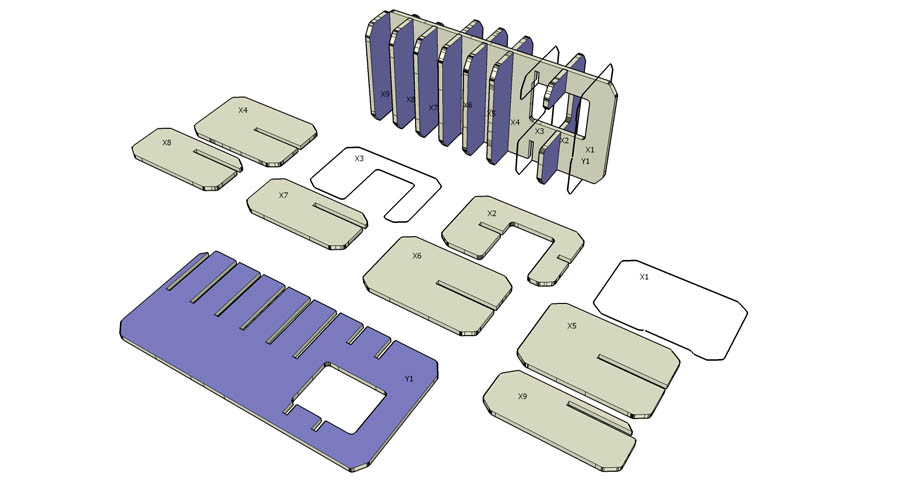
Has anyone had issues with random sections not being completed on complex models? I have tried with some success to cut a complex shape with slicemodeler, and I get sections that have the perimeter defined, but the thickness and assembly slots are left out.
Here is a screen cap of what I am talking about:
-
@dcoop58 said:
Hi everyone!
Has anyone had issues with random sections not being completed on complex models? I have tried with some success to cut a complex shape with slicemodeler, and I get sections that have the perimeter defined, but the thickness and assembly slots are left out.
Here is a screen cap of what I am talking about:
I have been using slicer modeller almost on a daily basis for the last two months and yes it simply happens all the time - especially with complex models. The calculations just seem to be buggy. I am very tempted to hear what 1.4 is like - i really should have just paid for it by now..
A quick tip for your case however is that the intersections are crossing over at specifically difficult areas. (like at the junction of the side of the window you have made) - If you alter your spacing so that the intersections fall at simpler junctions then you should be ok.
-
Hello there. I have a question about SliceModeler. I am fairly new to SU and SliceModeler and have yet to find a way to do this. What I am looking to do is export a slice to an image so I can print and make small scale models.
I have an object designed. It is sliced into 10 slices on the X and the Y. These slices are 1.5' x 3' on average. I am looking to print each slice up on cardstock or a similar medium to actually get to hold a scaled model of the final to save on costs. Each slice needing to be selected, then sent to the printer so I can then cutout using a cheaper material before going into 'full production' so to speak.
If anyone could help me out I would be greatly appreciated.
I have done a search on the forums and the net but just cant seem to find anything. -
@rru96 said:
Hello there. I have a question about SliceModeler. I am fairly new to SU and SliceModeler and have yet to find a way to do this. What I am looking to do is export a slice to an image so I can print and make small scale models.
I have an object designed. It is sliced into 10 slices on the X and the Y. These slices are 1.5' x 3' on average. I am looking to print each slice up on cardstock or a similar medium to actually get to hold a scaled model of the final to save on costs. Each slice needing to be selected, then sent to the printer so I can then cutout using a cheaper material before going into 'full production' so to speak.
If anyone could help me out I would be greatly appreciated.
I have done a search on the forums and the net but just cant seem to find anything.After you have created the slices, they are grouped by axis. You can select the group and then right-click and "explode" the group to get individual sections. By using standard camera views, and placing the camera in "parallel projection" you can get a straight on view of your slices. You can then export a 2D graphic of each slice into a .jpg or other format that can then be printed. My concern for you is that your slices are big "1.5' x 3' on average", as you state. I hope you have a big plotter or you will be taping smaller pieces together. If you have Adobe Illustrator, this process is much easier. You can import the group and use AI to scale the slice forms down to fit on standard printer paper.
I hope this helps.
-
@princedragoncok said:
@dcoop58 said:
Hi everyone!
Has anyone had issues with random sections not being completed on complex models? I have tried with some success to cut a complex shape with slicemodeler, and I get sections that have the perimeter defined, but the thickness and assembly slots are left out.
Here is a screen cap of what I am talking about:
I have been using slicer modeller almost on a daily basis for the last two months and yes it simply happens all the time - especially with complex models. The calculations just seem to be buggy. I am very tempted to hear what 1.4 is like - i really should have just paid for it by now..
A quick tip for your case however is that the intersections are crossing over at specifically difficult areas. (like at the junction of the side of the window you have made) - If you alter your spacing so that the intersections fall at simpler junctions then you should be ok.
Thanks for the tip. BTW, I am using SM V1.4 with the results you see above. I thing the main thing is that it is faster than V1.3 and fixes some bugs.
-
Thanks for the response. That is what I was doing. Top down view zoomed in. It worked okay. It just took time to scoot to each piece to print. I just was looking for a simplar way. I was able to get it doing the same method you stated, just time consuming.
Now if only I could find a CNC shop!
-
TIG, have you considered updating your script to work like the commercial one so this guy will have a hard time selling it?
it pisses me off everytime i see this!
P.S check this out http://www.ideablob.com/ideas/4237-Sliceform-models-rock-
-
Well I don't want to play the police here when TIG himself doesn't, but...
I was doing some research prior to writing a post about TIG's Slicer in Visual Index of Ruby Scripts, and then I naturally came to realize the existence of this script.
One thing really bothered me about this script is not the fact that asteronimo is trying to make money out of it (ok, he is not selling the script, but he is asking donations for his tweaks I understand), but the fact he erased TIG's copyright from the script and replaced with his own name.
Don't really know what his intentions are, but I just have to let you guys know something very fishy is taking place here. -
'SliceModeler' isn't the same as my 'Slicer'. It is heavily based on it, but it makes 'slots' too etc to assemble the model. I even helped him recode parts of it so that it'd work !
Whilst it would be nice have my original input recognised we can't do much about it... I certainly don't want to kick up a fuss. However, if some of you want to write to the author and suggest a little more 'politeness' in his header then please do so... If I 'borrow' code I try and add something like (c) TIG... Parts of the code based on XXXX by YYYY.



Advertisement