sketchucation logo sketchucation
    • 登入
    Oops, your profile's looking a bit empty! To help us tailor your experience, please fill in key details like your SketchUp version, skill level, operating system, and more. Update and save your info on your profile page today!
    🔌 Smart Spline | Fluid way to handle splines for furniture design and complex structures. Download

    [Plugin] BoolTools just released!

    已排程 已置頂 已鎖定 已移動 Plugins
    84 貼文 38 Posters 70.5k 瀏覽 38 Watching
    正在載入更多貼文
    • 從舊到新
    • 從新到舊
    • 最多點贊
    回覆
    • 在新貼文中回覆
    登入後回覆
    此主題已被刪除。只有擁有主題管理權限的使用者可以查看。
    • JClementsJ 離線
      JClements
      最後由 編輯

      Wonderful script. Thank you.

      @rickw said:

      [
      I use the same shortcut! Good thinking! 😄

      Me three. I adopted this key-combo from Xara which implemented a paste-in-place quite a while ago (their paste, ctrl-v, pastes in the center of the screen).

      John | Illustrator | Beaverton, Oregon

      1 條回覆 最後回覆 回覆 引用 0
      • david_hD 離線
        david_h
        最後由 編輯

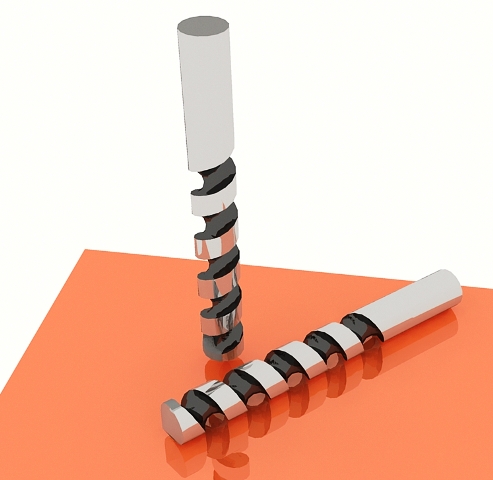
        I am trying to do the Drill bit thing and when I try to do the difference tool it just hangs. I have set the no. of Facets for each at 24. What is the problem? I can't view the Tuts cuz I don't have 7 yet. I am using the drawhelix.rb and the follow me tool to create my helix. Is this a good way?

        D

        EDIT: I got it to work, but I had to simplify the model considerably. 12 facets for the helix and the cylinder. Looks Okay I guess. Could I have done it a different way? That is . . .If I ever need to draw a drill bit in a real design situation. 💚20081229092101_1m44s.jpg

        If I make it look easy...It is probably easy

        1 條回覆 最後回覆 回覆 引用 0
        • Gus RG 離線
          Gus R
          最後由 編輯

          David,

          Here's the tutorial in Version 6.

          drill bit tutorial v6.skp

          I recommend using drawhelix13.rb for the helix and lines2tubes.rb for the tube. Follow me will distort the tube too much in this case -- even though it will still work.

          Your 12 segment drill bit looks pretty good. As far as SU hanging consider that it might take some time depending on your CPU capacity. It might take 5 minutes. In my case, certain complicated functions will lead to the appearance of SU locking up when in fact it hasn't. This will happen even when I'm rendering. Sometimes I have to let SU work and not touch a thing or move the mouse away from the SU screen otherwise it will cause SU to crash. Try it again with 24 segments only this time give it a good solid 5 minutes or more without doing any other computer tasks.

          Gus

          www.instagram.com/gusrobatto/

          www.facebook.com/gusrobatto

          www.flickr.com/photos/gusrobatto

          1 條回覆 最後回覆 回覆 引用 0
          • david_hD 離線
            david_h
            最後由 編輯

            Thanks for the TUT. it was the DH13 rb that I did use. I think I have the L2Tube rb as well, although I didn't use that one.

            Thx,

            D

            If I make it look easy...It is probably easy

            1 條回覆 最後回覆 回覆 引用 0
            • david_hD 離線
              david_h
              最後由 編輯

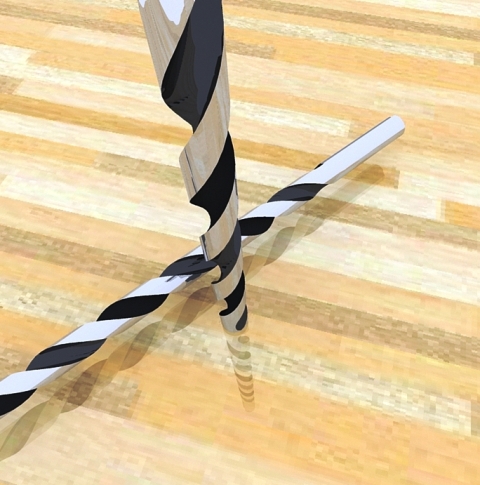
              As per your Tut. Thanks much.

              David


              20081229132647_57s.jpg

              If I make it look easy...It is probably easy

              1 條回覆 最後回覆 回覆 引用 0
              • C 離線
                Click Draw
                最後由 編輯

                I'm not sure why, but I still get some missing faces when I try to do a drill bit. I match the segments in the helix and the cylinder. I build it large so I can scale down....same result. Very frustrating. Could there be any issues with other rubies effecting the ones I use for this process? The gray hair just keeps coming as I keep trying to figure it out. HELPPPPPP!

                Frustrated, Jeff

                Have I mentioned how much of a laugh I get out of some of the Signatures on here!

                1 條回覆 最後回覆 回覆 引用 0
                • Gus RG 離線
                  Gus R
                  最後由 編輯

                  Jeff,

                  I've had the same situation occur as well. So far it seems as though you have to try these at random at a larger scale. Anytime you get an intersetion that is around 1/16 inch or 1 mm it will corrupt the subtraction. At the same time, if you scale it too much it will corrupt the subtraction. I tried it once at 1,000,000X and the corruption was even worse.

                  So far my computer has survived the trip out the window and down 6 floors. It's been almost 7 years now. I have been tempted. 😮

                  Gus

                  www.instagram.com/gusrobatto/

                  www.facebook.com/gusrobatto

                  www.flickr.com/photos/gusrobatto

                  1 條回覆 最後回覆 回覆 引用 0
                  • W 離線
                    Whaat
                    最後由 編輯

                    @gus r said:

                    Jeff,

                    I've had the same situation occur as well. So far it seems as though you have to try these at random at a larger scale. Anytime you get an intersetion that is around 1/16 inch or 1 mm it will corrupt the subtraction. At the same time, if you scale it too much it will corrupt the subtraction. I tried it once at 1,000,000X and the corruption was even worse.

                    So far my computer has survived the trip out the window and down 6 floors. It's been almost 7 years now. I have been tempted. 😮

                    Gus

                    BoolTools uses the intersection method from the SketchUp API which is the exact same function as the 'intersect' context click function that can be accessed from the UI. Sometimes, the intersect method fails (likely due to precision errors). For complex operations (such as a helical subtraction, the chances of these precision errors are greater. If the intersection method fails to execute properly, you will get strange results with BoolTools.

                    ClickDraw: If you could post your SKP file, I can take a look just to make sure that your problems are not being caused by some other issue.

                    Dale

                    SketchUp Plugins for Professionals

                    1 條回覆 最後回覆 回覆 引用 0
                    • plot-parisP 離線
                      plot-paris
                      最後由 編輯

                      using a modifier key to keep the difference-object is a great idea. so we will see that in the next version? (along with nested grouping support 😉 )

                      ps: I use 'Ctrl + Shift + V' for 'Paste in place' as too. soon Google will integrate it as a default shortcut... 😄

                      1 條回覆 最後回覆 回覆 引用 0
                      • S 離線
                        sjtunba
                        最後由 編輯

                        why i can't see it

                        1 條回覆 最後回覆 回覆 引用 0
                        • X 離線
                          xrok1
                          最後由 編輯

                          @plot-paris said:

                          using a modifier key to keep the difference-object is a great idea. so we will see that in the next version? (along with nested grouping support 😉 )

                          ps: I use 'Ctrl + Shift + V' for 'Paste in place' as too. soon Google will integrate it as a default shortcut... 😄

                          just bought it 😄 awesome ,but +1 on this option.

                          “There are three classes of people: those who see. Those who see when they are shown. Those who do not see.”

                          http://www.Twilightrender.com try it!

                          1 條回覆 最後回覆 回覆 引用 0
                          • N 離線
                            NewOne
                            最後由 編輯

                            @whaat said:

                            @unknownuser said:

                            1. A request. When performing a Cut - it is sometimes desirable to KEEP the geometry that is acting as the edge for the cut. eg Trimming Steel Beams 1 and 2 with Wall 1.
                              Sometimes I'd like to keep Wall 1 after the operation.
                              Could this be built in - eg with an option dialog ??? Would be very handy.

                            I anticipated this request and tried hard to get this to work for this version but it was too buggy. My idea was that you could hold down the CNTL modifier key while selecting if you want to keep the cutting geometry. Hopefully, I can get it to work for the next version. There is a fairly easy workaround though:

                            1. Select the 'cutting' group and press CNTL+C to copy. You can actually select the group by hovering your mouse over the cutting group while you have the 'Difference' tool active.
                            2. Perform the cut with BoolTools
                            3. Choose 'paste-in-place' to get the cutting group back. (a shortcut-key would come in handy here...)

                            Hope this helps!

                            Can you make that just the intersection to be deleted when cutting? Just the part of steel beam/or wall that is common to be deleted ?In AutoCAD the substracted object is deleted. It lets behind a gap in the other one. This tool can be better 😄

                            1 條回覆 最後回覆 回覆 引用 0
                            • C 離線
                              Coronel
                              最後由 編輯

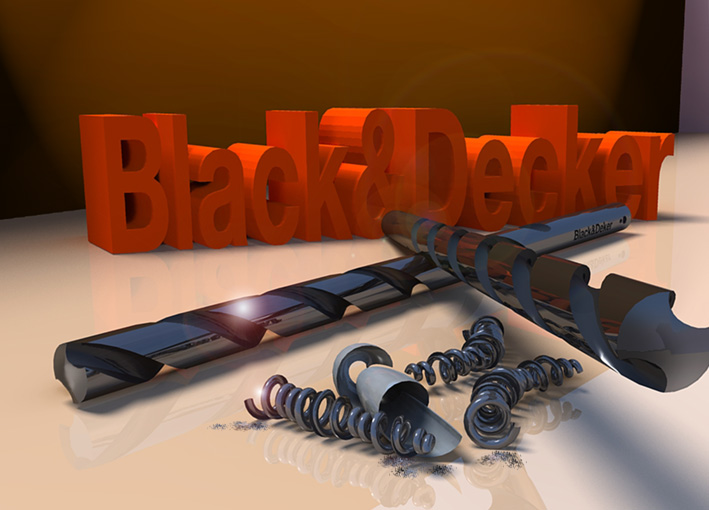
                              Great tutorial, thanks
                              drillsB&D.jpg

                              1 條回覆 最後回覆 回覆 引用 0
                              • B 離線
                                blah238
                                最後由 編輯

                                Does this work in SketchUp 8?

                                1 條回覆 最後回覆 回覆 引用 0
                                • GaieusG 離線
                                  Gaieus
                                  最後由 編輯

                                  @blah238 said:

                                  Does this work in SketchUp 8?

                                  Yes, although for SU 8 Pro, with the introduction of Solid tools, it has become sort of obsolete.
                                  Yet for those with SU Free, it is still cheaper than buying Pro of course.

                                  Gai...

                                  1 條回覆 最後回覆 回覆 引用 0
                                  • T 離線
                                    tfdesign
                                    最後由 編輯

                                    If you can get it to work that is. I couldn't get mine to work. 😞

                                    My book "Let's SketchUp!" Download from here

                                    1 條回覆 最後回覆 回覆 引用 0
                                    • thomthomT 離線
                                      thomthom
                                      最後由 編輯

                                      This plugin or SU8?

                                      Thomas Thomassen — SketchUp Monkey & Coding addict
                                      List of my plugins and link to the CookieWare fund

                                      1 條回覆 最後回覆 回覆 引用 0
                                      • GaieusG 離線
                                        Gaieus
                                        最後由 編輯

                                        Or the solid tools?

                                        Gai...

                                        1 條回覆 最後回覆 回覆 引用 0
                                        • W 離線
                                          Whaat
                                          最後由 編輯

                                          BoolTools relies on the model.raytest method which is buggy in SU8. Therefore, I would not recommend using it with SU8 until that bug is fixed.

                                          SketchUp Plugins for Professionals

                                          1 條回覆 最後回覆 回覆 引用 0
                                          • T 離線
                                            tfdesign
                                            最後由 編輯

                                            @thomthom said:

                                            This plugin or SU8?

                                            The former.

                                            My book "Let's SketchUp!" Download from here

                                            1 條回覆 最後回覆 回覆 引用 0
                                            • 1
                                            • 2
                                            • 3
                                            • 4
                                            • 5
                                            • 3 / 5
                                            • 第一個貼文
                                              最後的貼文
                                            Buy SketchPlus
                                            Buy SUbD
                                            Buy WrapR
                                            Buy eBook
                                            Buy Modelur
                                            Buy Vertex Tools
                                            Buy SketchCuisine
                                            Buy FormFonts

                                            Advertisement