sketchucation logo sketchucation
    • 登入
    Oops, your profile's looking a bit empty! To help us tailor your experience, please fill in key details like your SketchUp version, skill level, operating system, and more. Update and save your info on your profile page today!
    🔌 Smart Spline | Fluid way to handle splines for furniture design and complex structures. Download

    [Plugin] Selection Toys

    已排程 已置頂 已鎖定 已移動 Plugins
    594 貼文 121 Posters 398.0k 瀏覽 121 Watching
    正在載入更多貼文
    • 從舊到新
    • 從新到舊
    • 最多點贊
    回覆
    • 在新貼文中回覆
    登入後回覆
    此主題已被刪除。只有擁有主題管理權限的使用者可以查看。
    • thomthomT 離線
      thomthom
      最後由 編輯

      @earthmover said:

      Must be the sixth sense tingling!

      Regarding orientation for loop select....in most cases that I use it, the edges are coplanar, sharing a common axis.

      This is easier, as you can select two edges to define the plane they are co-planar to.

      Thomas Thomassen — SketchUp Monkey & Coding addict
      List of my plugins and link to the CookieWare fund

      1 條回覆 最後回覆 回覆 引用 0
      • thomthomT 離線
        thomthom
        最後由 編輯

        @pghstone83 said:

        I sent the file to the plugins folder on my C drive and extracted it there.I also took in the TTLib folder that I thought I needed for the plugin to work. But when I open the TTLib file up there's another selection toys folder in there.

        There should be no selection toys folder in the TT_Lib folder. Something has gone wrong there.

        @pghstone83 said:

        Isn't the process to send these plugins to the plugins folder in C drive and simply hit extract and enable them in sketchup?

        @pghstone83 said:

        Do I have to manually remove every file in the folder or can I just hit "extract"? Some other plugins had to be opened this way for me to get them to work. Also can I just import the "Selection Toys" download or do I also need to bring that TTLib file also?

        There things is; "just hit extract" depends on the extraction program you use. Some apps makes an extra unwanted folder - often happens on OSX it appears.

        For Selection Toys, the files and folders you want to move to your plugins folder is:
        A file named "tt_selection_toys.rb"
        A folder named "TT_Select_Toys" and it's containing sub-folders.

        For TT_Lib:
        A folder containing "TT_Lib" - this folder should contain other *.rb files and a webdialogs folder. If it doesn't contain that, but instead just got another folder named "TT_Lib" - then check out that next "TT_Lib" folder.

        Thomas Thomassen — SketchUp Monkey & Coding addict
        List of my plugins and link to the CookieWare fund

        1 條回覆 最後回覆 回覆 引用 0
        • P 離線
          Panga
          最後由 編輯

          Thanks for this update, and this great plugin !!

          1 條回覆 最後回覆 回覆 引用 0
          • pilouP 離線
            pilou
            最後由 編輯

            Maybe an image of the arborescence folder/files needing result will be an help for new plugin users? 😉

            Frenchy Pilou
            Is beautiful that please without concept!
            My Little site :)

            1 條回覆 最後回覆 回覆 引用 0
            • thomthomT 離線
              thomthom
              最後由 編輯

              Yea - I've been thinking I should include that for plugins that consists of multiple files packaged in .zip.

              Thomas Thomassen — SketchUp Monkey & Coding addict
              List of my plugins and link to the CookieWare fund

              1 條回覆 最後回覆 回覆 引用 0
              • thomthomT 離線
                thomthom
                最後由 編輯

                Outer Edges added to selection filters and Quad-Face Loop now accepts multiple start-edges in my internal build. Got a couple of other things to finish before I release it though.

                Thomas Thomassen — SketchUp Monkey & Coding addict
                List of my plugins and link to the CookieWare fund

                1 條回覆 最後回覆 回覆 引用 0
                • bagateloB 離線
                  bagatelo
                  最後由 編輯

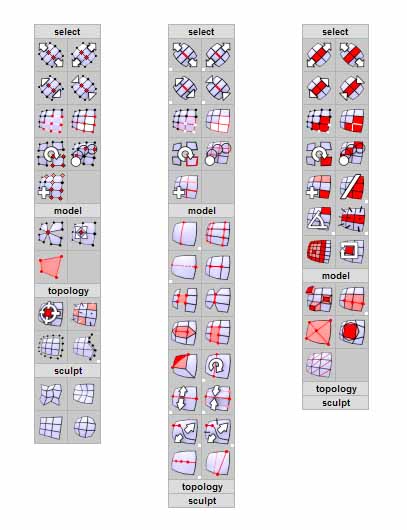
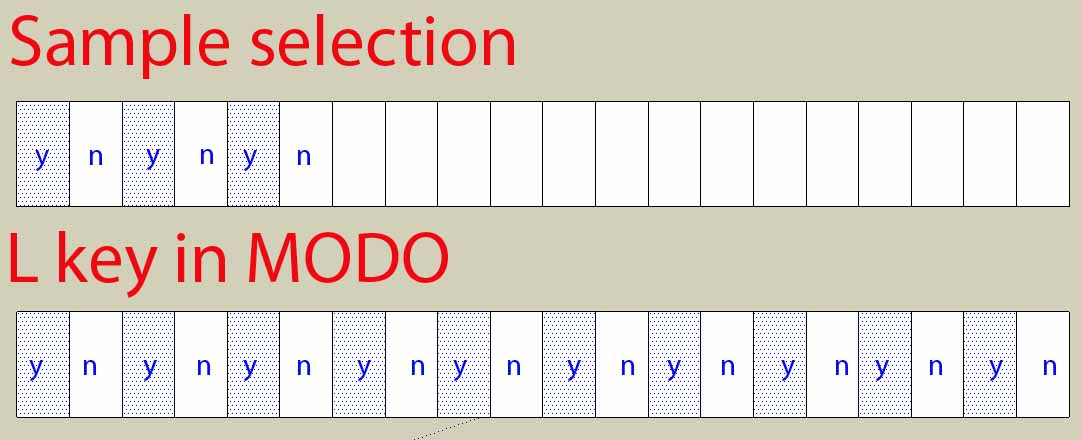
                  MODO from Luxology have good tools that make interesting selections. I remenber one very good. Is something like select polygon by yes/no/yes/no/yes/no, or by samples. Think about this, please.

                  While the cat's away, the mice will play

                  1 條回覆 最後回覆 回覆 引用 0
                  • thomthomT 離線
                    thomthom
                    最後由 編輯

                    yes/no/yes/no/yes?

                    Thomas Thomassen — SketchUp Monkey & Coding addict
                    List of my plugins and link to the CookieWare fund

                    1 條回覆 最後回覆 回覆 引用 0
                    • bagateloB 離線
                      bagatelo
                      最後由 編輯

                      @thomthom said:

                      yes/no/yes/no/yes?

                      Please see the imagem called "selection"...

                      This is plugins tools to make selections in 3dsMax, and more...:
                      http://www.polyboost.com/features_selection.htm
                      http://www.orionflame.com/

                      selection.jpg


                      orion flame.jpg

                      While the cat's away, the mice will play

                      1 條回覆 最後回覆 回覆 引用 0
                      • JClementsJ 離線
                        JClements
                        最後由 編輯

                        Hi Thom:

                        Selection Tools must be a labor of love! 😄

                        Selecting Instances on same layer (both all and active) not working? See attached.


                        Select Instance of Same Layer Not Working.skp

                        John | Illustrator | Beaverton, Oregon

                        1 條回覆 最後回覆 回覆 引用 0
                        • thomthomT 離線
                          thomthom
                          最後由 編輯

                          @jclements said:

                          Selecting Instances on same layer (both all and active) not working? See attached.

                          I will look into that.

                          (you edited you post? you mentioned about selecting from active vs all - well, I have been planning a complete new set of selection tools, where you interactively build your selection)

                          Thomas Thomassen — SketchUp Monkey & Coding addict
                          List of my plugins and link to the CookieWare fund

                          1 條回覆 最後回覆 回覆 引用 0
                          • thomthomT 離線
                            thomthom
                            最後由 編輯

                            @jclements said:

                            Another Bug; Select Edge Loops?

                            If after an edge loop is selected, then using the Layers Toolbar dropdown list to move the edge to a new layer does not work. Interestly though, using Entity Info to move the selected edge to a new layer does.

                            hm.. will have to look at that. I never use that toolbar. PC or OSX?

                            @jclements said:

                            Select Default Front and Default Back not working?

                            Might be a bug there. Thought I'd fixed it earlier, but maybe it slipped through... 😕

                            Thomas Thomassen — SketchUp Monkey & Coding addict
                            List of my plugins and link to the CookieWare fund

                            1 條回覆 最後回覆 回覆 引用 0
                            • JClementsJ 離線
                              JClements
                              最後由 編輯

                              Yeh, I edited my post because part of it didn't make sense. 😲

                              =======================

                              Another Bug; Select Edge Loops?

                              If after an edge loop is selected, then using the Layers Toolbar (PC) dropdown list to move the edge to a new layer does not work. Interestly though, using Entity Info to move the selected edge to a new layer does.
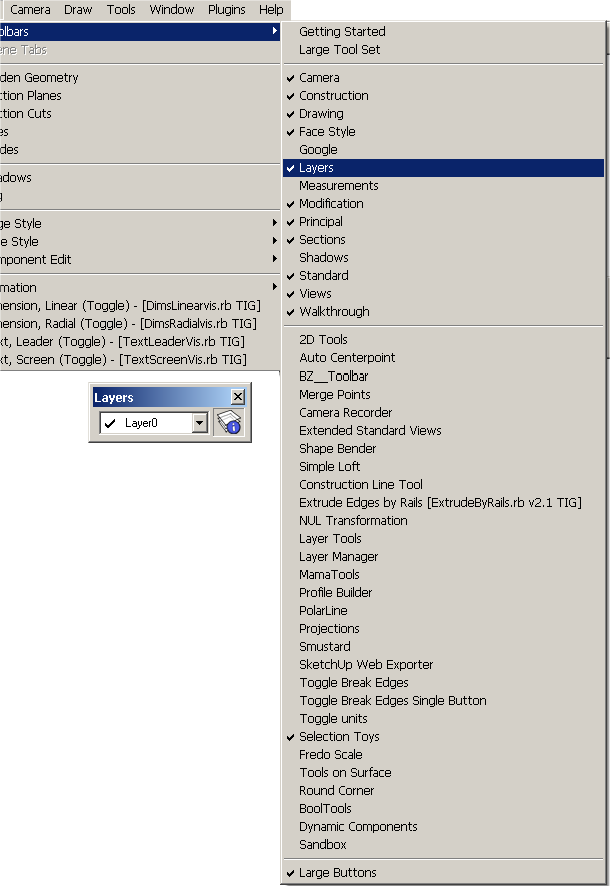
                              Layers Toolbar, PC.png

                              [Edit]
                              Select Default Front and Default Back not working?

                              John | Illustrator | Beaverton, Oregon

                              1 條回覆 最後回覆 回覆 引用 0
                              • thomthomT 離線
                                thomthom
                                最後由 編輯

                                @jclements said:

                                Hi Thom:

                                Selection Tools must be a labor of love! 😄

                                Selecting Instances on same layer (both all and active) not working? See attached.

                                Confirmed and fixed internally.

                                Thanks for reporting.

                                Thomas Thomassen — SketchUp Monkey & Coding addict
                                List of my plugins and link to the CookieWare fund

                                1 條回覆 最後回覆 回覆 引用 0
                                • thomthomT 離線
                                  thomthom
                                  最後由 編輯

                                  @jclements said:

                                  Select Default Front and Default Back not working?

                                  Can't reproduce.

                                  Thomas Thomassen — SketchUp Monkey & Coding addict
                                  List of my plugins and link to the CookieWare fund

                                  1 條回覆 最後回覆 回覆 引用 0
                                  • thomthomT 離線
                                    thomthom
                                    最後由 編輯

                                    @thomthom said:

                                    @jclements said:

                                    Select Default Front and Default Back not working?

                                    Can't reproduce.

                                    Saying that, as it works now, the edges also needs to have the same material for the Select Connected by Material to select the neighbouring face... Might have to revise this function. ...and I wonder why I haven't added one that doesn't select connected....

                                    Thomas Thomassen — SketchUp Monkey & Coding addict
                                    List of my plugins and link to the CookieWare fund

                                    1 條回覆 最後回覆 回覆 引用 0
                                    • thomthomT 離線
                                      thomthom
                                      最後由 編輯

                                      @jclements said:

                                      Another Bug; Select Edge Loops?

                                      If after an edge loop is selected, then using the Layers Toolbar (PC) dropdown list to move the edge to a new layer does not work. Interestly though, using Entity Info to move the selected edge to a new layer does.
                                      [attachment=0:137w7llf]<!-- ia0 -->Layers Toolbar, PC.png<!-- ia0 -->[/attachment:137w7llf]

                                      This is very odd. But it seems to be a Sketchup bug. I can't see anything in my code that'd do this. And as you say, the Entitiy Info works. I'll try to forward this to Google.

                                      Thomas Thomassen — SketchUp Monkey & Coding addict
                                      List of my plugins and link to the CookieWare fund

                                      1 條回覆 最後回覆 回覆 引用 0
                                      • R 離線
                                        rv1974
                                        最後由 編輯

                                        Hi!
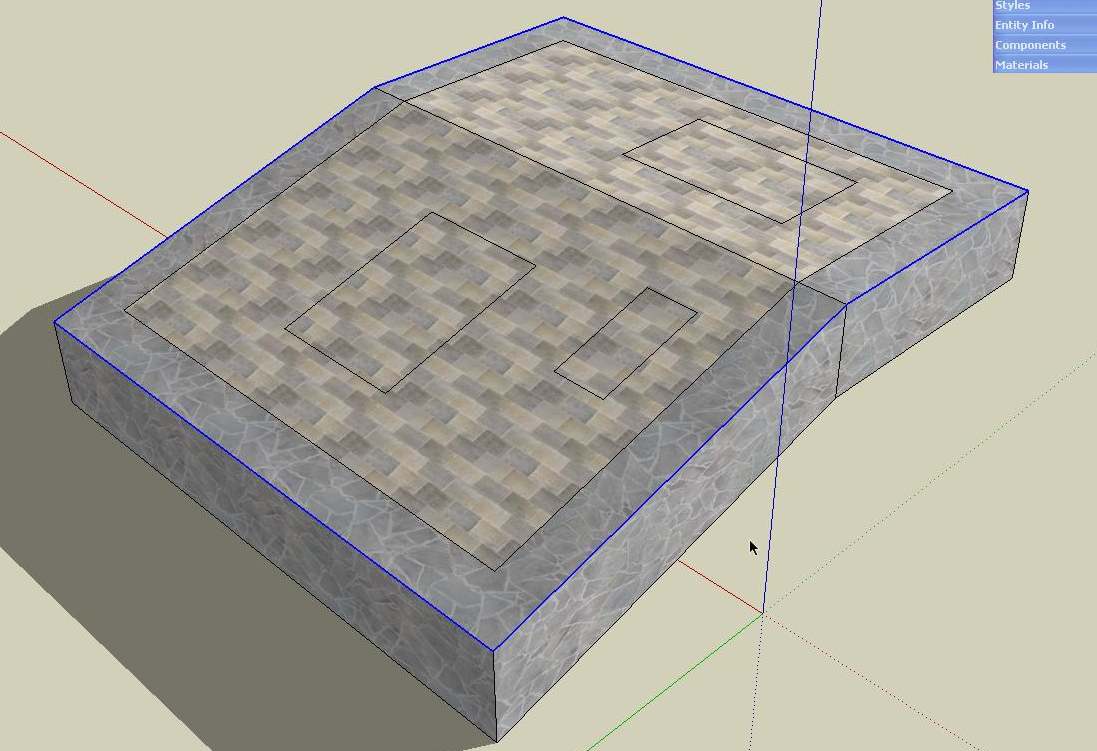
                                        What I really missinng is option to select all edges bitween "90 degrees faces" (the exact degree number should be ajustable)

                                        ScreenShot098.jpg

                                        1 條回覆 最後回覆 回覆 引用 0
                                        • thomthomT 離線
                                          thomthom
                                          最後由 編輯

                                          Ah - took me a little while to understand this one, but being able to select edges where the angle between connected faces are larger than a given angle?
                                          This would be something that filters an existing selection? Or make a new selection in the active space?

                                          Thomas Thomassen — SketchUp Monkey & Coding addict
                                          List of my plugins and link to the CookieWare fund

                                          1 條回覆 最後回覆 回覆 引用 0
                                          • R 離線
                                            rv1974
                                            最後由 編輯

                                            ...being able to select edges where the angle between connected faces are larger than a given angle?..
                                            -yes
                                            ...filters an existing selection?
                                            -yes

                                            1 條回覆 最後回覆 回覆 引用 0
                                            • 1
                                            • 2
                                            • 3
                                            • 4
                                            • 5
                                            • 6
                                            • 7
                                            • 29
                                            • 30
                                            • 5 / 30
                                            • 第一個貼文
                                              最後的貼文
                                            Buy SketchPlus
                                            Buy SUbD
                                            Buy WrapR
                                            Buy eBook
                                            Buy Modelur
                                            Buy Vertex Tools
                                            Buy SketchCuisine
                                            Buy FormFonts

                                            Advertisement