sketchucation logo sketchucation
    • 登入
    Oops, your profile's looking a bit empty! To help us tailor your experience, please fill in key details like your SketchUp version, skill level, operating system, and more. Update and save your info on your profile page today!
    🔌 Easy Offset | Offset selected faces in SketchUp in positive and negative offsets. Download

    [Plugin] Selection Toys

    已排程 已置頂 已鎖定 已移動 Plugins
    594 貼文 121 Posters 380.8k 瀏覽 121 Watching
    正在載入更多貼文
    • 從舊到新
    • 從新到舊
    • 最多點贊
    回覆
    • 在新貼文中回覆
    登入後回覆
    此主題已被刪除。只有擁有主題管理權限的使用者可以查看。
    • Dave RD 離線
      Dave R
      最後由 編輯

      @tt_su said:

      The menu name is misleading - it's Same Direction instead of truly coplanar.

      So there's no bug. Just a naming confusion. it would appear that "Coplanar Faces" should read something like "Parallel Faces with Normals Facing the Same Direction". Select>Parallel Faces selects Parallel Faces regardless of the normal orientation.

      Etaoin Shrdlu

      %

      (THERE'S NO PLACE LIKE)

      G28 X0.0 Y0.0 Z0.0

      M30

      %

      1 條回覆 最後回覆 回覆 引用 0
      • TIGT 離線
        TIG Moderator
        最後由 編輯

        Perhaps 'CoNormal', rather than 'CoPlanar' ?

        TIG

        1 條回覆 最後回覆 回覆 引用 0
        • E 離線
          Esense3d
          最後由 編輯

          Hello
          Tomtom
          Can i Translate this somehow?
          Please Help

          Roland F.

          1 條回覆 最後回覆 回覆 引用 0
          • A 離線
            acheilman
            最後由 編輯

            This is by far the plugin I use the most. Does anyone know if there is a way to make hot commands similar to 3dmax or softimage for the selection toys. I know you can right click and get to the tool from there when you have a selection, but I do not see an option for a hot key in my preferences. I find myself wanting to press the 2 or E keys frequently.

            1 條回覆 最後回覆 回覆 引用 0
            • TIGT 離線
              TIG Moderator
              最後由 編輯

              You can set up a shortcut to any native or plugin generated menu/context-menu command.
              But for that command to appear in the filtered list, then that command must be available when you open Preferences > Shortcuts dialog.
              So for example, if you want to shortcut 'Reverse Face' you must have a face preselected before opening the dialog, otherwise there will be no matching entry in the list.
              Pressing a shortcut key when the command is not available just does nothing.
              Remember you can assign the F-keys too, and keys in conjunction with modifiers like Shift/Ctrl/Alt
              Do not shortcut plain .,;[]<>/*- x s, TAB, plain-numerals, or the arrow-keys - as these are used by SketchUp and/or several plugins...

              TIG

              1 條回覆 最後回覆 回覆 引用 0
              • A 離線
                acheilman
                最後由 編輯

                The methods above did not seem to work. "reverse face" is in the dialouge box already as an option to apply a shortcut, but selection toys only has options to create shortcuts for the UI Settings, Edge Loops, And Cheat Sheet. Apologies if I am missing something

                1 條回覆 最後回覆 回覆 引用 0
                • J 離線
                  JGA
                  最後由 編輯

                  Works for me, did you have a face selected before opening your preferences?

                  Regards,
                  JGA

                  1 條回覆 最後回覆 回覆 引用 0
                  • A 離線
                    AcesHigh
                    最後由 編輯

                    Is Selection Toys working with Sketchup 2015 for you guys?

                    At Preferences, it shows there as loaded.

                    But I get no toolbar, no right-click context options, no submenu either at Extensions nor Tools...

                    1 條回覆 最後回覆 回覆 引用 0
                    • thomthomT 離線
                      thomthom
                      最後由 編輯

                      What version do you have installed?
                      (Yes - it works in SU2015)

                      Thomas Thomassen — SketchUp Monkey & Coding addict
                      List of my plugins and link to the CookieWare fund

                      1 條回覆 最後回覆 回覆 引用 0
                      • A 離線
                        AcesHigh
                        最後由 編輯

                        @thomthom said:

                        What version do you have installed?
                        (Yes - it works in SU2015)

                        funny, I could swear I had written a post regarding a topic somewhere else where a guy had a problem with Selection Toys and you answered him, and the problem seemed to be his username had a Unicode character.

                        and yes, my username has a Unicode Character. (the username is AcesHigh, but for some reason, the windows path is user/usuário instead of user/aceshigh

                        And I have no idea how to change the user path without breaking Windows into an unusable mess.

                        1 條回覆 最後回覆 回覆 引用 0
                        • thomthomT 離線
                          thomthom
                          最後由 編輯

                          Ah! Damn! That thing... achk. Yea, renaming your windows username is not ideal. hmm... This might be fixable. But I won't have time until next week to look at this.

                          EDIT: Just checked my latest changes to this extension - the latest one (2.3.9) was specifically to address unicode issues. Can you please confirm which version you have installed?

                          Thomas Thomassen — SketchUp Monkey & Coding addict
                          List of my plugins and link to the CookieWare fund

                          1 條回覆 最後回覆 回覆 引用 0
                          • thomthomT 離線
                            thomthom
                            最後由 編輯

                            Doh! You got it from PluginStore, right?
                            I just realized I'd forgotten to hit Publish when I was updating the extension - so it was still version 2.3.8 that was available in the PluginStore.

                            Just updated it - try that one.

                            Thomas Thomassen — SketchUp Monkey & Coding addict
                            List of my plugins and link to the CookieWare fund

                            1 條回覆 最後回覆 回覆 引用 0
                            • A 離線
                              AcesHigh
                              最後由 編輯

                              yes, it was 2.3.8 😄

                              thanks ThomThom. Anyway, there are a few other plugins that are giving me errors too since Sketchup moved its plugin folders to appdata.

                              so I will try to change my username profile path following this tutorial
                              http://www.ghacks.net/2011/03/28/how-to-change-a-windows-account-name-and-user-profile-folder-name/

                              1 條回覆 最後回覆 回覆 引用 0
                              • gonashviliG 離線
                                gonashvili
                                最後由 編輯

                                @thomthom said:

                                http://www.sketchucation.com/forums/scf/download/file.php?id=17957&mode=view

                                [attachment=4:q89dnyc9]<!-- ia4 -->loop_sphere.png<!-- ia4 -->[/attachment:q89dnyc9]

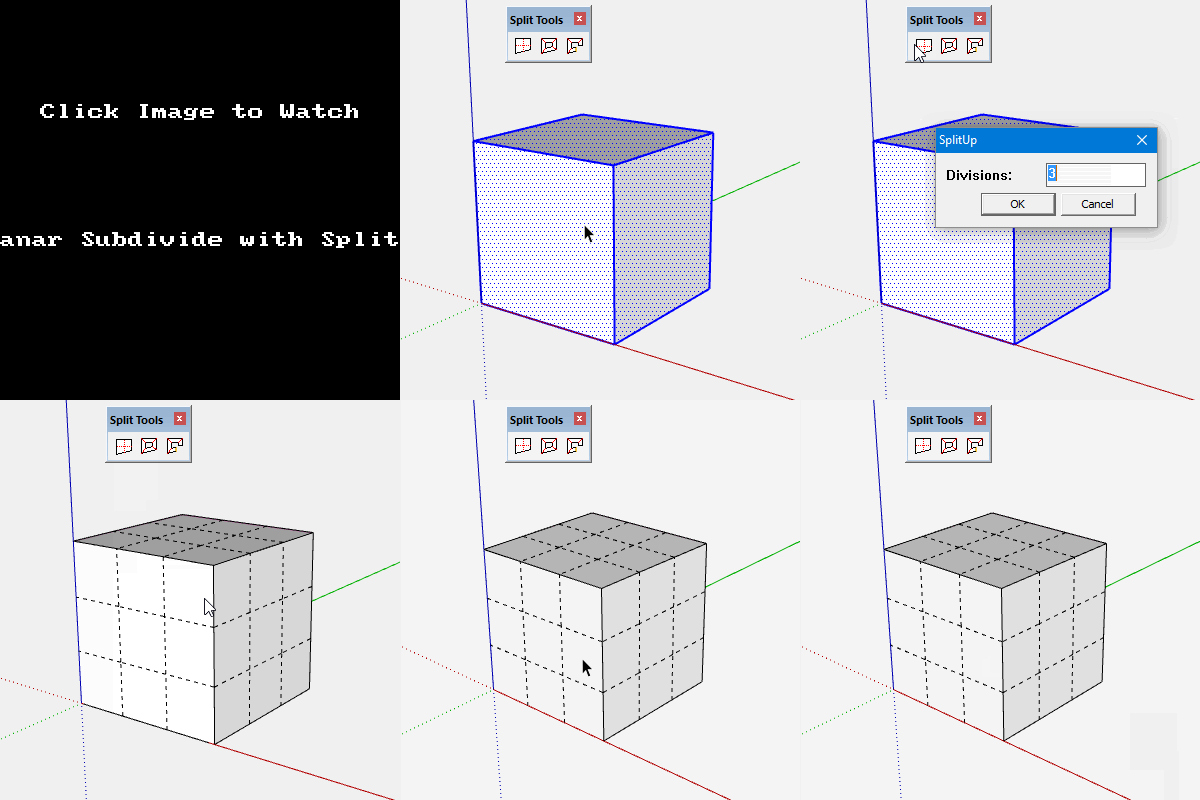
                                Hey there sir Thom, this is highly off-topic, but whats the plugin that divides a box into segments like here on this pic?
                                Well, I take it you didn't do it by 'hand', manually..

                                Thanks!

                                1 條回覆 最後回覆 回覆 引用 0
                                • thomthomT 離線
                                  thomthom
                                  最後由 編輯

                                  No plugin for that - I just copied and pasted.

                                  Thomas Thomassen — SketchUp Monkey & Coding addict
                                  List of my plugins and link to the CookieWare fund

                                  1 條回覆 最後回覆 回覆 引用 0
                                  • Rich O BrienR 離線
                                    Rich O Brien Moderator
                                    最後由 編輯

                                    SplitUp to the rescue.... 😳

                                    split-up.gif

                                    Download the free D'oh Book for SketchUp 📖

                                    1 條回覆 最後回覆 回覆 引用 0
                                    • pilouP 離線
                                      pilou
                                      最後由 編輯

                                      or maybe this last one! 😉
                                      Minute 3.23

                                      Frenchy Pilou
                                      Is beautiful that please without concept!
                                      My Little site :)

                                      1 條回覆 最後回覆 回覆 引用 0
                                      • B 離線
                                        bsfranza
                                        最後由 編輯

                                        hi there together...

                                        i have a suggestion for a real good addition to this plugin 😃

                                        SELECT EDGES WHICH ARE PARALLEL

                                        why would one need that?! after importing a cad drawing where the hatch is exploded and oall of the lines happen to be on one layer 😕

                                        could be really handsome 😃

                                        thanks for your consideration on adding this option

                                        EDIT
                                        jim has answered my request here with a simple one liner 😄

                                        http://sketchucation.com/forums/viewtopic.php?f=323%26amp;t=64523%26amp;p=591916#p591916

                                        1 條回覆 最後回覆 回覆 引用 0
                                        • romboutR 離線
                                          rombout
                                          最後由 編輯

                                          Im on mac and nothing happens when i use the selection methods, i dont see any ouput in the ruby console or a error.
                                          Im using latest version 2.2.2 on SU215 osx 10.11.5

                                          1 條回覆 最後回覆 回覆 引用 0
                                          • Dan RathbunD 離線
                                            Dan Rathbun
                                            最後由 編輯

                                            @rombout said:

                                            Im using latest version 2.2.2

                                            No you're not. Latest (as of this reply) is 2.3.9.

                                            http://sketchucation.com/pluginstore?pln=tt_selection_toys
                                            or
                                            http://extensions.sketchup.com/en/content/selection-toys
                                            or
                                            https://github.com/thomthom/SelectionTools/releases

                                            I'm not here much anymore.

                                            1 條回覆 最後回覆 回覆 引用 0
                                            • 1
                                            • 2
                                            • 25
                                            • 26
                                            • 27
                                            • 28
                                            • 29
                                            • 30
                                            • 27 / 30
                                            • 第一個貼文
                                              最後的貼文
                                            Buy SketchPlus
                                            Buy SUbD
                                            Buy WrapR
                                            Buy eBook
                                            Buy Modelur
                                            Buy Vertex Tools
                                            Buy SketchCuisine
                                            Buy FormFonts

                                            Advertisement