sketchucation logo sketchucation
    • 登入
    Oops, your profile's looking a bit empty! To help us tailor your experience, please fill in key details like your SketchUp version, skill level, operating system, and more. Update and save your info on your profile page today!
    🔌 Smart Spline | Fluid way to handle splines for furniture design and complex structures. Download

    [Plugin] GreyscaleMode

    已排程 已置頂 已鎖定 已移動 Plugins
    133 貼文 56 Posters 153.6k 瀏覽 56 Watching
    正在載入更多貼文
    • 從舊到新
    • 從新到舊
    • 最多點贊
    回覆
    • 在新貼文中回覆
    登入後回覆
    此主題已被刪除。只有擁有主題管理權限的使用者可以查看。
    • EdsonE 離線
      Edson
      最後由 編輯

      @sepo said:

      Nice ...It renders black and white in Podium but keeps the colour of the sky ( i presume ground as well)
      It would be nice to be able to choose say one colour which could stay as colour ...
      Thanks Jim ....

      @dave r said:

      Sepo, after making the model all grey, right click on a face containing the color you wish to show. Choose Revert color from the menu. 😉

      this applies to a situation when you want to revert the color of all the faces of an element. should you wish to change the color of a single face do not choose Revert Color, just paint the face the color you want.

      edson mahfuz, architect| porto alegre • brasil
      http://www.mahfuz.arq.br

      1 條回覆 最後回覆 回覆 引用 0
      • utilerU 離線
        utiler
        最後由 編輯

        Just posted a thread on an alternative use of this great script...

        301 Moved Permanently

        favicon

        (www.sketchucation.com)

        hope you like...

        Just Curious...

        1 條回覆 最後回覆 回覆 引用 0
        • J 離線
          Jim
          最後由 編輯

          @bellwells said:

          Just discovered this script. What a gem, Jim! Thank you.

          Y'er welcome, but I just wrote it down. Thank Dave R - it was his idea.

          Hi

          1 條回覆 最後回覆 回覆 引用 0
          • P 離線
            Phil Rader AIA
            最後由 編輯

            Jim and Dave here is an analogy

            Having an idea is like lighting a match unless you do something with that lit match it will burn out.

            Dave's idea was wonderful and credit for having the idea is well deserved. I'm just glad he had the foresight to do something with that idea IE: pass it on to you and allow the flames of a good idea to grow into a completed project.

            http://www.philrader.com

            1 條回覆 最後回覆 回覆 引用 0
            • plot-parisP 離線
              plot-paris
              最後由 編輯

              beautyful image, Phil!
              (somehow it realy "matches" 😄

              1 條回覆 最後回覆 回覆 引用 0
              • B 離線
                bellwells
                最後由 編輯

                Just discovered this script. What a gem, Jim! Thank you.

                Edit: And thank you to Dave R for suggesting this script.
                Edit: I showed this in the Gallery forums also, not sure of the appropriate venue. This is a great script. This is a house I'm working on and the image reminds me of a night shot with a full moon (ignore the blue sky!) I like the ability to use just a little color.
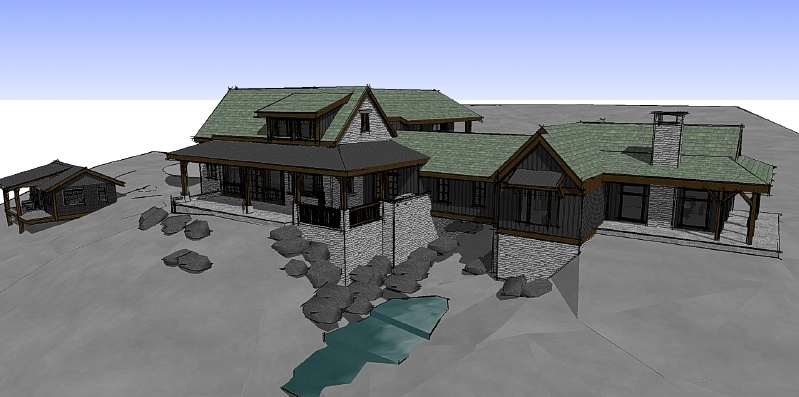
                10-4-08 ImageA.jpg

                Ron

                1 條回覆 最後回覆 回覆 引用 0
                • P 離線
                  pix_zaaaaa
                  最後由 編輯

                  good

                  1 條回覆 最後回覆 回覆 引用 0
                  • P 離線
                    pix_zaaaaa
                    最後由 編輯

                    thank you

                    1 條回覆 最後回覆 回覆 引用 0
                    • M 離線
                      Matt666
                      最後由 編輯

                      Thanks again jim for this awesome script ! I use it on each drawing ! Fantastic ! 😍 😍

                      Frenglish at its best !
                      My scripts

                      1 條回覆 最後回覆 回覆 引用 0
                      • S 離線
                        shoreline99
                        最後由 編輯

                        Thanks so much for this!

                        1 條回覆 最後回覆 回覆 引用 0
                        • G 離線
                          goutham
                          最後由 編輯

                          great bro.....

                          1 條回覆 最後回覆 回覆 引用 0
                          • D 離線
                            doy
                            最後由 編輯

                            thank you..this is cool

                            1 條回覆 最後回覆 回覆 引用 0
                            • thomthomT 離線
                              thomthom
                              最後由 編輯

                              @jim said:

                              The plugin goes through all in-model materials and changes them to a grey value. The default face color is completely ignored as it does not appear in the in-model materials list, and this is when the material is nil.

                              So the question is, should the plugin also change the default face color to a grey value?

                              Does anyone have a preference for how the greyscale value is calculated? If not, I will try the method suggested by Didier.

                              Thanks, Didier for taking the time to help.

                              A bit late reply, but I'd prefer Pixero's formula:

                              @pixero said:

                              Jim: I see you use the average of r, g and b to get the greyscale color. http://forums.sketchucation.com/viewtopic.php?t=12368#p88865
                              A often used and more visually correct way is to use this formula:

                              Greyscale = (r * 0.3) + (g * 0.59) + (b * 0.11);
                              

                              Thomas Thomassen — SketchUp Monkey & Coding addict
                              List of my plugins and link to the CookieWare fund

                              1 條回覆 最後回覆 回覆 引用 0
                              • utilerU 離線
                                utiler
                                最後由 編輯

                                Is anyone having trouble with this script of late? It doesn't seem to be showing up in the menu.... 😕

                                Just Curious...

                                1 條回覆 最後回覆 回覆 引用 0
                                • Dave RD 離線
                                  Dave R
                                  最後由 編輯

                                  I used it yesterday with no problem. It shows in my Plugins menu as "Greyscale"

                                  Etaoin Shrdlu

                                  %

                                  (THERE'S NO PLACE LIKE)

                                  G28 X0.0 Y0.0 Z0.0

                                  M30

                                  %

                                  1 條回覆 最後回覆 回覆 引用 0
                                  • utilerU 離線
                                    utiler
                                    最後由 編輯

                                    thanks Dave, still no go. see my screenshot..; nothing showing.

                                    I'm wondering if another plugin is tampering with it....
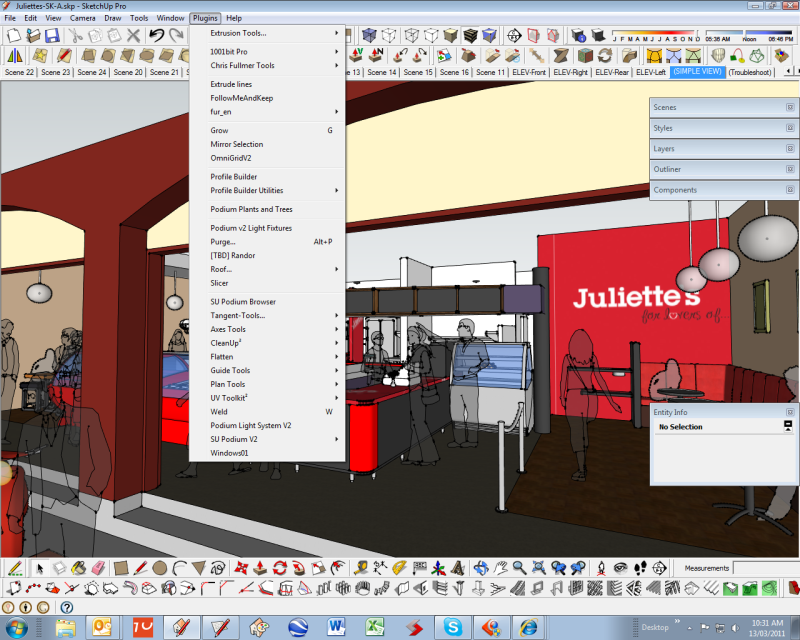

                                    greyscaleIssue.png

                                    Just Curious...

                                    1 條回覆 最後回覆 回覆 引用 0
                                    • D 離線
                                      designerstuart
                                      最後由 編輯

                                      @jim said:

                                      I made 2 small updates:
                                      Download it from the first post of this thread.

                                      dammit i'm 2 years too late! now you gotta pay for this, right?

                                      1 條回覆 最後回覆 回覆 引用 0
                                      • GaieusG 離線
                                        Gaieus
                                        最後由 編輯

                                        Well, the pay version has a lot more functions as far as I know (and since this is Jim's only commercial plugin, I do not envy a little income as he has shared so many cool and free plugins already).

                                        Yet of course I understand your point...
                                        😄

                                        Gai...

                                        1 條回覆 最後回覆 回覆 引用 0
                                        • Dave RD 離線
                                          Dave R
                                          最後由 編輯

                                          It is a very useful plugin and worth every cent.

                                          Etaoin Shrdlu

                                          %

                                          (THERE'S NO PLACE LIKE)

                                          G28 X0.0 Y0.0 Z0.0

                                          M30

                                          %

                                          1 條回覆 最後回覆 回覆 引用 0
                                          • D 離線
                                            designerstuart
                                            最後由 編輯

                                            Gaius you say the pay version - i could not find a free version - is there one?
                                            (sorry i have posted on the sketchup forum http://www.google.com/support/forum/p/sketchup/thread?tid=622cedaca19034d7&hl=en too just to confuse you)
                                            i only want basic functionality. i understand it's worth the money dave, it looks great.

                                            1 條回覆 最後回覆 回覆 引用 0
                                            • 1
                                            • 2
                                            • 3
                                            • 4
                                            • 5
                                            • 6
                                            • 7
                                            • 4 / 7
                                            • 第一個貼文
                                              最後的貼文
                                            Buy SketchPlus
                                            Buy SUbD
                                            Buy WrapR
                                            Buy eBook
                                            Buy Modelur
                                            Buy Vertex Tools
                                            Buy SketchCuisine
                                            Buy FormFonts

                                            Advertisement



