sketchucation logo sketchucation
    • 登入
    Oops, your profile's looking a bit empty! To help us tailor your experience, please fill in key details like your SketchUp version, skill level, operating system, and more. Update and save your info on your profile page today!
    🔌 Smart Spline | Fluid way to handle splines for furniture design and complex structures. Download

    [Plugin] GreyscaleMode

    已排程 已置頂 已鎖定 已移動 Plugins
    133 貼文 56 Posters 153.6k 瀏覽 56 Watching
    正在載入更多貼文
    • 從舊到新
    • 從新到舊
    • 最多點贊
    回覆
    • 在新貼文中回覆
    登入後回覆
    此主題已被刪除。只有擁有主題管理權限的使用者可以查看。
    • J 離線
      Jim
      最後由 編輯

      The plugin switches the in-model material colors to grey scale, and back again. The grey color is calculated as an average of the RGB values.

      The model can be saved in Grey mode, and the original colors will be preserved upon opening the model again. Color changes made in Grey mode will be kept.

      While in Grey mode, right-clicking a face will revert the face's material back to its original color.

      GreyScale is available on the SketchUcation Extenions store.

      Hi

      1 條回覆 最後回覆 回覆 引用 0
      • R 離線
        remus
        最後由 編輯

        Cheers jim, works like a charm.

        http://remusrendering.wordpress.com/

        1 條回覆 最後回覆 回覆 引用 0
        • soloS 離線
          solo
          最後由 編輯

          Cool, not sure I will need it but I collect ruby's and this one works great.


          http://img204.imageshack.us/img204/6492/rubricscubebustxy2.jpg

          http://www.solos-art.com

          If you see a toilet in your dreams do not use it.

          1 條回覆 最後回覆 回覆 引用 0
          • soloS 離線
            solo
            最後由 編輯

            Even beter, it renders in grey scale too.


            http://img520.imageshack.us/img520/9343/200809011241463m26ssa7.jpg


            http://img159.imageshack.us/img159/7994/2008090115564548m18sgu9.jpg

            http://www.solos-art.com

            If you see a toilet in your dreams do not use it.

            1 條回覆 最後回覆 回覆 引用 0
            • FrederikF 離線
              Frederik
              最後由 編輯

              Cool..!! 👍
              Thanks..!! 😄

              Cheers
              Kim Frederik

              1 條回覆 最後回覆 回覆 引用 0
              • Dave RD 離線
                Dave R
                最後由 編輯

                Here's my public thank you to Jim, too.
                THANKYOU!

                Once I get permission to release them, I'll show some images I used it for.

                Etaoin Shrdlu

                %

                (THERE'S NO PLACE LIKE)

                G28 X0.0 Y0.0 Z0.0

                M30

                %

                1 條回覆 最後回覆 回覆 引用 0
                • M 離線
                  mateo soletic
                  最後由 編輯

                  Jim, thanks , great one. 👍

                  Concept Illustrations

                  1 條回覆 最後回覆 回覆 引用 0
                  • J 離線
                    JuanV.Soler
                    最後由 編輯

                    thats is a great plugin Jim.
                    i would make it in voice too for a better and quicker understanding.
                    i think.
                    and thankyou 😄)

                    ,))),

                    1 條回覆 最後回覆 回覆 引用 0
                    • urgenU 離線
                      urgen
                      最後由 編輯

                      ...thanks! 👍 👍 👍

                      --pupil forever...------

                      1 條回覆 最後回覆 回覆 引用 0
                      • utilerU 離線
                        utiler
                        最後由 編輯

                        First of all I'll echo Dave_R's comments. Jim, you are a generous fella...

                        For those of you who didn't see how this evolved, see http://www.sketchucation.com/forums/scf/viewtopic.php?f=40&t=12226&p=88778#p88778

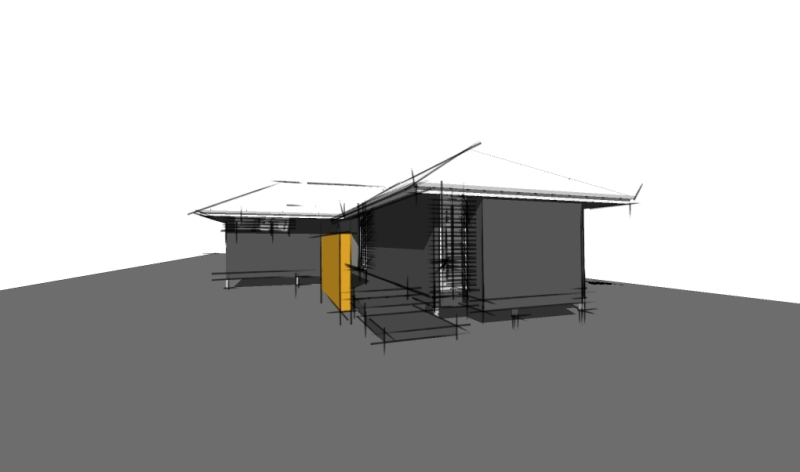
                        Sometime, a schematic presentations seem to be best a little less 'in your face' in grey scale...

                        I tried it out on a little modular house I designed...

                        The only problem with it is that it doesn't act like 'face styles' in that changing from one scene to another it doesn't save with styles....

                        Not complaining though!!! Would love to see it included in SU7.0 face styles...
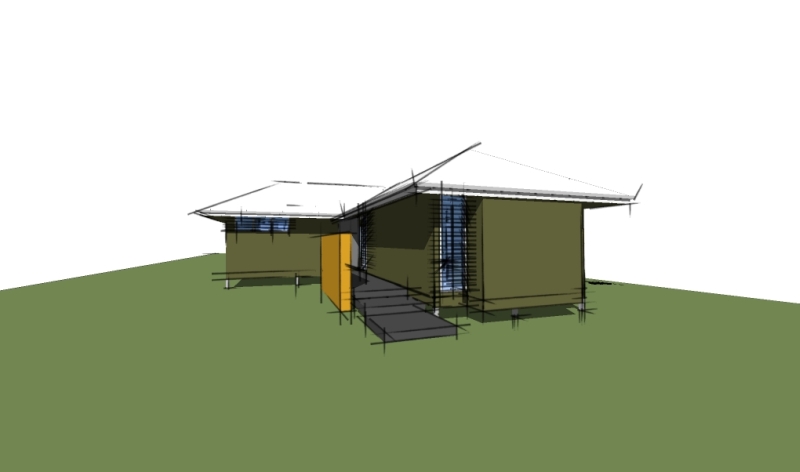

                        GreyRuby-color.jpg


                        GreyRuby-grey.jpg

                        Just Curious...

                        1 條回覆 最後回覆 回覆 引用 0
                        • jujuJ 離線
                          juju
                          最後由 編輯

                          Thanks Jim.

                          Save the Earth, it's the only planet with chocolate.

                          1 條回覆 最後回覆 回覆 引用 0
                          • plot-parisP 離線
                            plot-paris
                            最後由 編輯

                            thanks a lot Jim! this ruby is a nice enhancement for producing stylised output with SketchUp
                            utiler, you did a perfect example what the script can be used for. 👍

                            @Remus (completely off topic): I really like the reincarnation of your avatar-image. its a bit like Gandalf the Grey / Gandalf the White - I had to look twice, but I did recognice you in your new guise. 😄

                            1 條回覆 最後回覆 回覆 引用 0
                            • PixeroP 離線
                              Pixero
                              最後由 編輯

                              Jim: I see you use the average of r, g and b to get the greyscale color.
                              A often used and more visually correct way is to use this formula:

                              Greyscale = (r * 0.3) + (g * 0.59) + (b * 0.11);
                              
                              1 條回覆 最後回覆 回覆 引用 0
                              • D 離線
                                Daniel S
                                最後由 編輯

                                Great!!! 😍
                                Thank you Jim!!!

                                Daniel S

                                1 條回覆 最後回覆 回覆 引用 0
                                • Dave RD 離線
                                  Dave R
                                  最後由 編輯

                                  Coen, I couldn't find a way to do this with existing style settings. I'd be happy to learn it though.

                                  Etaoin Shrdlu

                                  %

                                  (THERE'S NO PLACE LIKE)

                                  G28 X0.0 Y0.0 Z0.0

                                  M30

                                  %

                                  1 條回覆 最後回覆 回覆 引用 0
                                  • O 離線
                                    otb designworks
                                    最後由 編輯

                                    Thanks Jim!

                                    Cheers, Chuck

                                    OTB Designworks is on Youtube

                                    6 core nMP, 32 gig RAM, (2) D700 GPU's, dual monitors

                                    1 條回覆 最後回覆 回覆 引用 0
                                    • D 離線
                                      drewpoeppel
                                      最後由 編輯

                                      Thanks a ton this is VERY helpful.

                                      1 條回覆 最後回覆 回覆 引用 0
                                      • G 離線
                                        gaucho
                                        最後由 編輯

                                        Good stuff Jim, thanks!

                                        "eat well, stay fit, die anyway..."

                                        1 條回覆 最後回覆 回覆 引用 0
                                        • S 離線
                                          sepo
                                          最後由 編輯

                                          Nice ...It renders black and white in Podium but keeps the colour of the sky ( i presume ground as well)
                                          It would be nice to be able to choose say one colour which could stay as colour ...
                                          Thanks Jim ....

                                          1 條回覆 最後回覆 回覆 引用 0
                                          • Dave RD 離線
                                            Dave R
                                            最後由 編輯

                                            Sepo, after making the model all grey, right click on a face containing the color you wish to show. Choose Revert color from the menu. 😉

                                            Etaoin Shrdlu

                                            %

                                            (THERE'S NO PLACE LIKE)

                                            G28 X0.0 Y0.0 Z0.0

                                            M30

                                            %

                                            1 條回覆 最後回覆 回覆 引用 0
                                            • 1
                                            • 2
                                            • 3
                                            • 4
                                            • 5
                                            • 6
                                            • 7
                                            • 1 / 7
                                            • 第一個貼文
                                              最後的貼文
                                            Buy SketchPlus
                                            Buy SUbD
                                            Buy WrapR
                                            Buy eBook
                                            Buy Modelur
                                            Buy Vertex Tools
                                            Buy SketchCuisine
                                            Buy FormFonts

                                            Advertisement