sketchucation logo sketchucation
    • 登入
    Oops, your profile's looking a bit empty! To help us tailor your experience, please fill in key details like your SketchUp version, skill level, operating system, and more. Update and save your info on your profile page today!
    🔌 Smart Spline | Fluid way to handle splines for furniture design and complex structures. Download

    [Plugin] GreyscaleMode

    已排程 已置頂 已鎖定 已移動 Plugins
    133 貼文 56 Posters 153.6k 瀏覽 56 Watching
    正在載入更多貼文
    • 從舊到新
    • 從新到舊
    • 最多點贊
    回覆
    • 在新貼文中回覆
    登入後回覆
    此主題已被刪除。只有擁有主題管理權限的使用者可以查看。
    • S 離線
      sepo
      最後由 編輯

      Aha...cheers Dave did not pick that up...Cool. Any chance to actually have more than 10 shades of grey. That would make renders nicer.

      1 條回覆 最後回覆 回覆 引用 0
      • Dave RD 離線
        Dave R
        最後由 編輯

        As I understand it, Jim's method of creating the gray values is to average the RGB values and apply that number to all of the RGB settings. I don't think we're limited to 10 steps as was discussed in the other thread.

        Etaoin Shrdlu

        %

        (THERE'S NO PLACE LIKE)

        G28 X0.0 Y0.0 Z0.0

        M30

        %

        1 條回覆 最後回覆 回覆 引用 0
        • S 離線
          sepo
          最後由 編輯

          Actually I think you are correct ... discard the last bit 😉

          1 條回覆 最後回覆 回覆 引用 0
          • utilerU 離線
            utiler
            最後由 編輯

            @unknownuser said:

            I like it and thanks, but can't this be done using a Style?

            I agree, Coen. A face style. That way we could save it to styles and scenes.....

            It wound allow us to 'revert color' in a style / scene though I wouldn't think..... Jim?

            Just Curious...

            1 條回覆 最後回覆 回覆 引用 0
            • Z 離線
              zed252000
              最後由 編輯

              TY " You're Good !!"

              Whatever we IMAGINE....

              1 條回覆 最後回覆 回覆 引用 0
              • J 離線
                Jim
                最後由 編輯

                @utiler said:

                @unknownuser said:

                I like it and thanks, but can't this be done using a Style?

                I agree, Coen. A face style. That way we could save it to styles and scenes.....

                It wound allow us to 'revert color' in a style / scene though I wouldn't think..... Jim?

                Thanks and you're welcome, everyone.

                Having it work as a Face Style would be nice. Face Styles can be selected in Ruby by setting an option called the RenderMode. There is just not a way to create a new Face Style that I can see.

                Like Dave said, I don't think a Style is an option either. There is no control over individual colors in a Style.

                The idea of saving material changes between Scenes is a completely separate plugin...

                Hi

                1 條回覆 最後回覆 回覆 引用 0
                • utilerU 離線
                  utiler
                  最後由 編輯

                  You're right Jim, that's the only thing that restricts it from being a 'face style' option. It would be nice to be able to "update scene" individually rather than a ruby that effects the model period....but that takes away from the "reverse color" option....

                  I guess if this was a face style and we wanted to 'spot color' an element, we could set up diferent components and scenes then import into Layout and overlay scenes.....a round about way of doing things though and getting into another topic, 'more than one style in a drawing / file'.

                  Five Star, Jim.

                  Just Curious...

                  1 條回覆 最後回覆 回覆 引用 0
                  • Z 離線
                    zed252000
                    最後由 編輯

                    👊
                    this is just Awesomely Good.
                    Thanks!

                    Whatever we IMAGINE....

                    1 條回覆 最後回覆 回覆 引用 0
                    • J 離線
                      Jim
                      最後由 編輯

                      Hi Guys,

                      A word of caution; utiler has reported he was not able to get the right-click "revert" color option using this plugin. I'm not sure why, but it may mean that the script could "forget" your original material colors. I'm looking into it.

                      EDIT: There is no danger of loosing the original colors. The error was caused because the default color returns nil when asked for its material.

                      Hi

                      1 條回覆 最後回覆 回覆 引用 0
                      • Dave RD 離線
                        Dave R
                        最後由 編輯

                        Jim,

                        Thanks for the warning. I haven't seen that problem but I'll keep my eyes open and let you know.

                        Dave

                        Etaoin Shrdlu

                        %

                        (THERE'S NO PLACE LIKE)

                        G28 X0.0 Y0.0 Z0.0

                        M30

                        %

                        1 條回覆 最後回覆 回覆 引用 0
                        • Didier BurD 離線
                          Didier Bur
                          最後由 編輯

                          Hi,
                          This happens when the face has default material, here is the error message:
                          Error: #<NoMethodError: undefined method `get_attribute' for nil:NilClass>

                          because in the code, line 16:
                          material = sel.material -> equals nil when no material on face
                          then line 18:
                          rgb = material.get_attribute("GreyScaleColors", 'rgb')
                          get_attribute method can be used on nil 😉 and then no context menu.
                          This would be better:

                          
                          if sel.typename == "Face" and sel.material
                              material = sel.material
                              ...
                          

                          @unknownuser said:

                          it may mean that the script could "forget" your original material colors

                          This is impossible IMHO... Attributes on non-geometric objects such as layers and materials, once set, cannot be accessed by the user, lost, erased, or forgotten, unless the script itself does erase them.

                          Last note: I've been told that (red+green+blue)/3 does not give an exact gray value. What Gimp or PS do to desaturate an image for instance is:

                          gray_value=([red,green,blue].max + [red,green,blue].min)/2.0

                          Sketchup::Color.new( gray_value, gray_value, gray_value )

                          My 2 cts (of Euros 😄 )

                          DB

                          1 條回覆 最後回覆 回覆 引用 0
                          • J 離線
                            Jim
                            最後由 編輯

                            The plugin goes through all in-model materials and changes them to a grey value. The default face color is completely ignored as it does not appear in the in-model materials list, and this is when the material is nil.

                            So the question is, should the plugin also change the default face color to a grey value?

                            Does anyone have a preference for how the greyscale value is calculated? If not, I will try the method suggested by Didier.

                            Thanks, Didier for taking the time to help.

                            Hi

                            1 條回覆 最後回覆 回覆 引用 0
                            • utilerU 離線
                              utiler
                              最後由 編輯

                              I never export images, etc from SU with the default face color. In fact if we did this in grey scale without adding additional color to the scene then grey scale would be a constant....

                              Here is another nice example of grey scale output. [not mine]
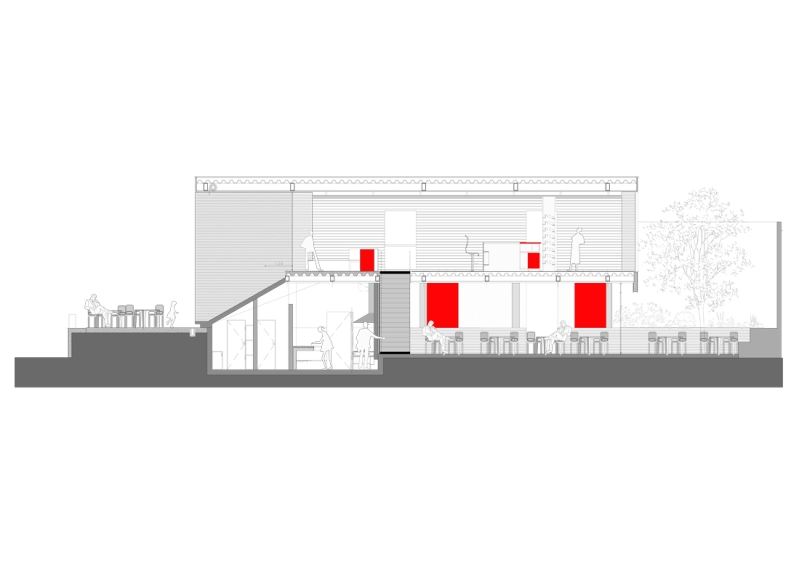

                              2045982887_section-aa.jpg

                              Just Curious...

                              1 條回覆 最後回覆 回覆 引用 0
                              • Dave RD 離線
                                Dave R
                                最後由 編輯

                                I guess I'm not too picky about how the grays are determined. At this point the average of the RGB values seems to work fine but if there's another option, I'm willing to go that way. As far as the default material being turned to a gray, perhaps it could be left alone? THis would make it easier to identify faces that haven't been given a material.

                                Etaoin Shrdlu

                                %

                                (THERE'S NO PLACE LIKE)

                                G28 X0.0 Y0.0 Z0.0

                                M30

                                %

                                1 條回覆 最後回覆 回覆 引用 0
                                • utilerU 離線
                                  utiler
                                  最後由 編輯

                                  True Dave, the default color can go it alone....

                                  As for grey scale variation, If we didn't have variation i think it would shade quite bland IMHO...

                                  Just Curious...

                                  1 條回覆 最後回覆 回覆 引用 0
                                  • Dave RD 離線
                                    Dave R
                                    最後由 編輯

                                    Andrew, you have a point about the potential for blandness. (I think I just made up a word.)

                                    I'm sure it would add to the complexity of the plugin but suppose one could choose some sort of filter factor. Suppose that you want to simulate a 25 Red filter. You might choose Red from a list of filters which would give green colors lower values (make them darker) while reds would tend to be higher values. This would give you the ability to tune the grays to prevent some colors from being too close together on the gray scale.

                                    Etaoin Shrdlu

                                    %

                                    (THERE'S NO PLACE LIKE)

                                    G28 X0.0 Y0.0 Z0.0

                                    M30

                                    %

                                    1 條回覆 最後回覆 回覆 引用 0
                                    • Dave RD 離線
                                      Dave R
                                      最後由 編輯

                                      Here's another example of using the Grayscale Plugin. This is raw SU output.

                                      http://img.photobucket.com/albums/v506/weekender410/RBT.jpg

                                      Etaoin Shrdlu

                                      %

                                      (THERE'S NO PLACE LIKE)

                                      G28 X0.0 Y0.0 Z0.0

                                      M30

                                      %

                                      1 條回覆 最後回覆 回覆 引用 0
                                      • utilerU 離線
                                        utiler
                                        最後由 編輯

                                        Awesome Dave!!!

                                        Just Curious...

                                        1 條回覆 最後回覆 回覆 引用 0
                                        • Dave RD 離線
                                          Dave R
                                          最後由 編輯

                                          Thank you Andrew. There's not much color in this model anyway but I like the effect with the grey scale option. I like that the wood grain still shows this way, too.

                                          Etaoin Shrdlu

                                          %

                                          (THERE'S NO PLACE LIKE)

                                          G28 X0.0 Y0.0 Z0.0

                                          M30

                                          %

                                          1 條回覆 最後回覆 回覆 引用 0
                                          • plot-parisP 離線
                                            plot-paris
                                            最後由 編輯

                                            @dave r said:

                                            ...but suppose one could choose some sort of filter factor. Suppose that you want to simulate a 25 Red filter. You might choose Red from a list of filters which would give green colors lower values (make them darker) while reds would tend to be higher values.

                                            do I understand it correctly that with this method you could even create a sepia effect (with some colours standing out of course 😉 ). that would be such a cool thing!

                                            1 條回覆 最後回覆 回覆 引用 0
                                            • 1
                                            • 2
                                            • 3
                                            • 4
                                            • 5
                                            • 6
                                            • 7
                                            • 2 / 7
                                            • 第一個貼文
                                              最後的貼文
                                            Buy SketchPlus
                                            Buy SUbD
                                            Buy WrapR
                                            Buy eBook
                                            Buy Modelur
                                            Buy Vertex Tools
                                            Buy SketchCuisine
                                            Buy FormFonts

                                            Advertisement

