sketchucation logo sketchucation
    • 登入
    Oops, your profile's looking a bit empty! To help us tailor your experience, please fill in key details like your SketchUp version, skill level, operating system, and more. Update and save your info on your profile page today!
    🔌 Smart Spline | Fluid way to handle splines for furniture design and complex structures. Download

    [Plugin] Scaling to_cm (UPDATED 15/02/2016)

    已排程 已置頂 已鎖定 已移動 Plugins
    27 貼文 17 Posters 29.4k 瀏覽 17 Watching
    正在載入更多貼文
    • 從舊到新
    • 從新到舊
    • 最多點贊
    回覆
    • 在新貼文中回覆
    登入後回覆
    此主題已被刪除。只有擁有主題管理權限的使用者可以查看。
    • S 離線
      sahi
      最後由 sahi 編輯

      Changes in the size of the selection or groups or components

      Dom_12.jpg
      Changes in the size of the groups or components

      1 條回覆 最後回覆 回覆 引用 0
      • P 離線
        pav_3j
        最後由 編輯

        sorry i'm confused, is this a scaling ruby?

        pav

        Just won the 'Who is Least Competitive Championships' where trying to win will make you lose. Trying to lose makes you win which makes you lose. Not trying at all makes you lose which makes you win which makes you lose.

        1 條回覆 最後回覆 回覆 引用 0
        • S 離線
          sahi
          最後由 編輯

          changes a model size.

          1 條回覆 最後回覆 回覆 引用 0
          • P 離線
            pav_3j
            最後由 編輯

            ah i see! i shall have a tinkle and see how i get on.

            pav

            Just won the 'Who is Least Competitive Championships' where trying to win will make you lose. Trying to lose makes you win which makes you lose. Not trying at all makes you lose which makes you win which makes you lose.

            1 條回覆 最後回覆 回覆 引用 0
            • urgenU 離線
              urgen
              最後由 編輯

              ...it is "resize tool" more.. by axis... Useful idea,SAHI! 😄

              http://img98.imageshack.us/img98/7785/55555aaoz1.jpg

              --pupil forever...------

              1 條回覆 最後回覆 回覆 引用 0
              • S 離線
                stanmarsh
                最後由 編輯

                hi sahi thanks for this ruby! 😍

                is there anyway to change it to meters?

                1 條回覆 最後回覆 回覆 引用 0
                • S 離線
                  sahi
                  最後由 編輯

                  @stanmarsh said:

                  is there anyway to change it to meters?

                  meters
                  mashtab.zip

                  1 條回覆 最後回覆 回覆 引用 0
                  • Didier BurD 離線
                    Didier Bur
                    最後由 編輯

                    Hi,
                    This doesn't work here: it gives weird results, out of range, entities are moved elsewhere. If entities are not grouped at start, there are grouped at the end.
                    Am I missing something ???

                    Before/After a scale of 2:scale.jpg

                    DB

                    1 條回覆 最後回覆 回覆 引用 0
                    • N 離線
                      N Lindenthal
                      最後由 編輯

                      On Mac I did not see the scaling tool palette. Is it Menu > Plugins > Scale?

                      1 條回覆 最後回覆 回覆 引用 0
                      • S 離線
                        sahi
                        最後由 編輯

                        changed the names in a script
                        Menu > Plugins > Resizer

                        Dom_15.jpg


                        mashtab_1.zip

                        1 條回覆 最後回覆 回覆 引用 0
                        • Didier BurD 離線
                          Didier Bur
                          最後由 編輯

                          Hi,
                          Dialog is ambiguous: "on all of axes" is not a target size but adds entered size to actual size. The final size would be better IMHO ?
                          Why choosing the bounds center as the center of transformation ?
                          I suggest not to use "to_cm" or "to_m" in the code, but to use only Length type variables. Thus you will suit everyone's unit, no matter what it is.
                          Useful script, though.

                          DB

                          1 條回覆 最後回覆 回覆 引用 0
                          • S 離線
                            sahi
                            最後由 編輯

                            @didier bur said:

                            Hi,
                            Dialog is ambiguous: "on all of axes" is not a target size but adds entered size to actual size. The final size would be better IMHO ?
                            Why choosing the bounds center as the center of transformation ?
                            I suggest not to use "to_cm" or "to_m" in the code, but to use only Length type variables. Thus you will suit everyone's unit, no matter what it is.

                            "on all of axes" ---How to name???
                            corrected all of other as you specified


                            mashtab_2.zip

                            1 條回覆 最後回覆 回覆 引用 0
                            • Didier BurD 離線
                              Didier Bur
                              最後由 編輯

                              Correct me if I'm wrong, but the resize operation works only for faces in XY,XZ and YZ planes (red,green,blue) ?
                              "On all of axes" -> "In every direction" ? English speaking people please help !
                              Another enhancement is to encapsulate in an operation for one step undo:

                              
                              def mashtabirovanie_create
                              Sketchup.active_model.start_operation "Resize"
                              ss=Sketchup.active_model.selection
                              ...
                              ...
                              Sketchup.active_model.select_tool(nil)
                              Sketchup.active_model.commit_operation
                              end
                              

                              DB

                              1 條回覆 最後回覆 回覆 引用 0
                              • S 離線
                                sahi
                                最後由 編輯

                                @didier bur said:

                                
                                > def mashtabirovanie_create
                                > Sketchup.active_model.start_operation "Resize"
                                > ss=Sketchup.active_model.selection
                                > ...
                                > ...
                                > Sketchup.active_model.select_tool(nil)
                                > Sketchup.active_model.commit_operation
                                > end
                                

                                Thank you! Corrected a code.
                                Added an icon.
                                mashtab_3.zip

                                1 條回覆 最後回覆 回覆 引用 0
                                • CadFatherC 離線
                                  CadFather
                                  最後由 編輯

                                  ..growing into a nice little ruby.

                                  1 條回覆 最後回覆 回覆 引用 0
                                  • M 離線
                                    marcosrodrigues
                                    最後由 編輯

                                    Simple and very useful. Thank you!

                                    | menos é mais

                                    1 條回覆 最後回覆 回覆 引用 0
                                    • I 離線
                                      ilay7k
                                      最後由 編輯

                                      @unknownuser said:

                                      Correct me if I'm wrong, but the resize operation works only for faces in XY,XZ and YZ planes (red,green,blue) ?
                                      "On all of axes" -> "In every direction" ? English speaking people please help !

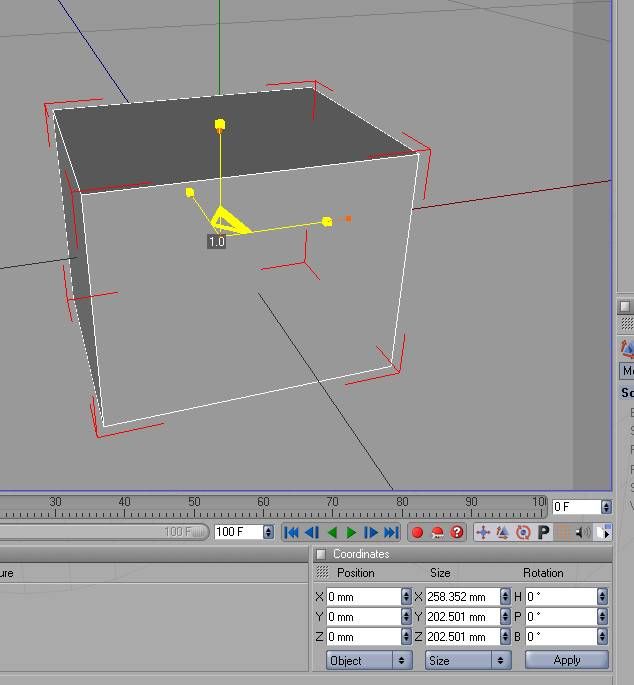
                                      Equal "In every direction" is global settings for object of selection(world scaling system in most graphic packages...in attached pic, like cinema4d)
                                      or about directions of red,green,blue, Didier, you are right/something like object system/

                                      as.jpg

                                      1 條回覆 最後回覆 回覆 引用 0
                                      • F 離線
                                        Fletch
                                        最後由 編輯

                                        I would replace the "on all of axes" line with a checkbox called 'lock aspect ratio' as shown in attached. or just change the name to 'uniform scale'.
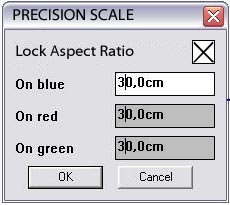

                                        lockaspectratio.jpg

                                        Fletch
                                        Twilight Render Cross-platform Plugin for SketchUp on PC or Mac

                                        1 條回覆 最後回覆 回覆 引用 0
                                        • S 離線
                                          sahi
                                          最後由 編輯

                                          @fletch said:

                                          I would replace the "on all of axes" line with a checkbox called 'lock aspect ratio' as shown in attached. or just change the name to 'uniform scale'.

                                          dom_3.jpg
                                          mashtab_4.zip

                                          1 條回覆 最後回覆 回覆 引用 0
                                          • unclebimU 離線
                                            unclebim
                                            最後由 編輯

                                            I don't get what should I input in the Lock aspect ratio box in order to get the selection scaled proportionally to exact dimension input in one axis?
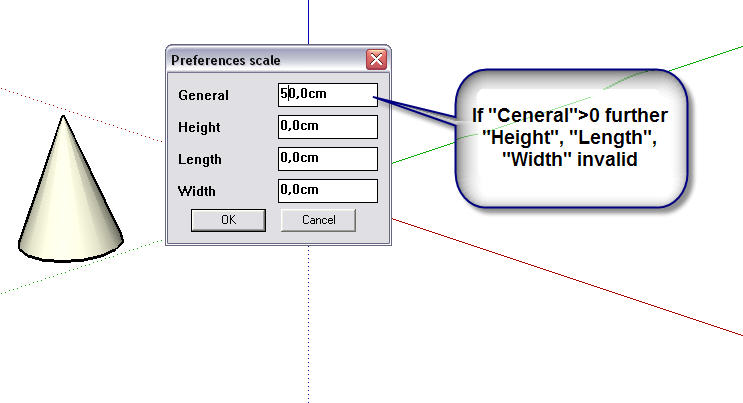

                                            1 條回覆 最後回覆 回覆 引用 0
                                            • 1
                                            • 2
                                            • 1 / 2
                                            • 第一個貼文
                                              最後的貼文
                                            Buy SketchPlus
                                            Buy SUbD
                                            Buy WrapR
                                            Buy eBook
                                            Buy Modelur
                                            Buy Vertex Tools
                                            Buy SketchCuisine
                                            Buy FormFonts

                                            Advertisement