sketchucation logo sketchucation
    • Login
    Oops, your profile's looking a bit empty! To help us tailor your experience, please fill in key details like your SketchUp version, skill level, operating system, and more. Update and save your info on your profile page today!
    Mac User? | Join the Rayscaper Beta for Mac Learn More

    [Plugin] Scaling to_cm (UPDATED 15/02/2016)

    Scheduled Pinned Locked Moved Plugins
    27 Posts 17 Posters 34.8k Views 17 Watching
    Loading More Posts
    • Oldest to Newest
    • Newest to Oldest
    • Most Votes
    Reply
    • Reply as topic
    Log in to reply
    This topic has been deleted. Only users with topic management privileges can see it.
    • S
      sahi
      last edited by

      changed the names in a script
      Menu > Plugins > Resizer

      Dom_15.jpg


      mashtab_1.zip

      1 Reply Last reply
      Reply Quote 0
      • Didier BurD
        Didier Bur
        last edited by

        Hi,
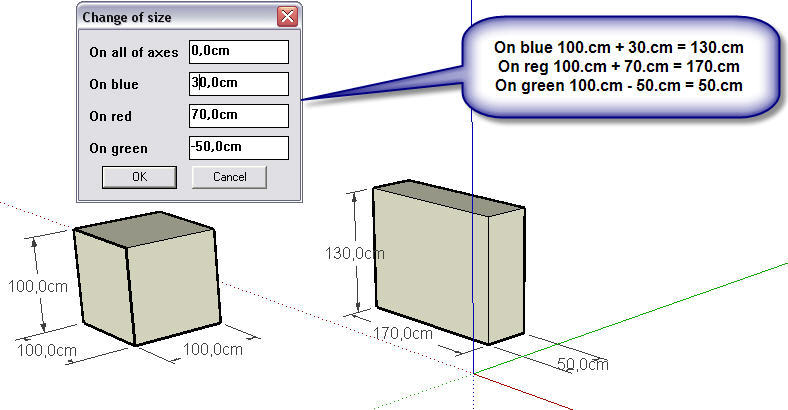
        Dialog is ambiguous: "on all of axes" is not a target size but adds entered size to actual size. The final size would be better IMHO ?
        Why choosing the bounds center as the center of transformation ?
        I suggest not to use "to_cm" or "to_m" in the code, but to use only Length type variables. Thus you will suit everyone's unit, no matter what it is.
        Useful script, though.

        DB

        1 Reply Last reply
        Reply Quote 0
        • S
          sahi
          last edited by

          @didier bur said:

          Hi,
          Dialog is ambiguous: "on all of axes" is not a target size but adds entered size to actual size. The final size would be better IMHO ?
          Why choosing the bounds center as the center of transformation ?
          I suggest not to use "to_cm" or "to_m" in the code, but to use only Length type variables. Thus you will suit everyone's unit, no matter what it is.

          "on all of axes" ---How to name???
          corrected all of other as you specified


          mashtab_2.zip

          1 Reply Last reply
          Reply Quote 0
          • Didier BurD
            Didier Bur
            last edited by

            Correct me if I'm wrong, but the resize operation works only for faces in XY,XZ and YZ planes (red,green,blue) ?
            "On all of axes" -> "In every direction" ? English speaking people please help !
            Another enhancement is to encapsulate in an operation for one step undo:

            
            def mashtabirovanie_create
            Sketchup.active_model.start_operation "Resize"
            ss=Sketchup.active_model.selection
            ...
            ...
            Sketchup.active_model.select_tool(nil)
            Sketchup.active_model.commit_operation
            end
            

            DB

            1 Reply Last reply
            Reply Quote 0
            • S
              sahi
              last edited by

              @didier bur said:

              
              > def mashtabirovanie_create
              > Sketchup.active_model.start_operation "Resize"
              > ss=Sketchup.active_model.selection
              > ...
              > ...
              > Sketchup.active_model.select_tool(nil)
              > Sketchup.active_model.commit_operation
              > end
              

              Thank you! Corrected a code.
              Added an icon.
              mashtab_3.zip

              1 Reply Last reply
              Reply Quote 0
              • CadFatherC
                CadFather
                last edited by

                ..growing into a nice little ruby.

                1 Reply Last reply
                Reply Quote 0
                • M
                  marcosrodrigues
                  last edited by

                  Simple and very useful. Thank you!

                  | menos é mais

                  1 Reply Last reply
                  Reply Quote 0
                  • I
                    ilay7k
                    last edited by

                    @unknownuser said:

                    Correct me if I'm wrong, but the resize operation works only for faces in XY,XZ and YZ planes (red,green,blue) ?
                    "On all of axes" -> "In every direction" ? English speaking people please help !

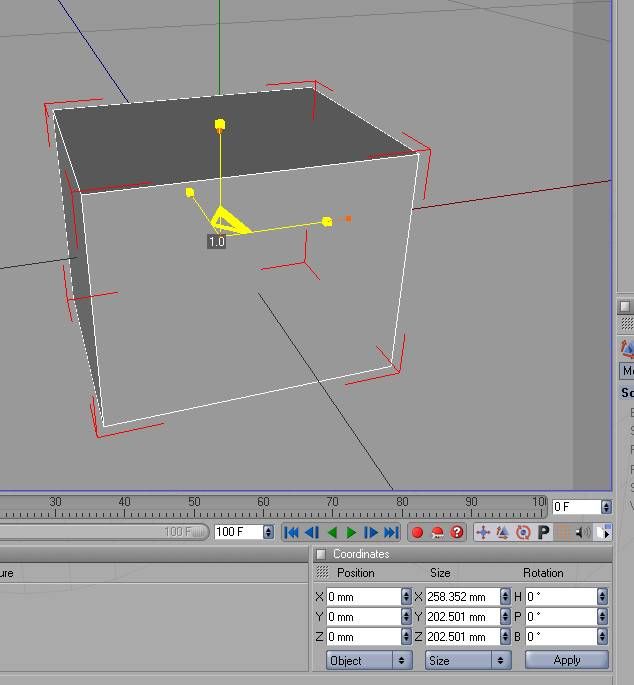
                    Equal "In every direction" is global settings for object of selection(world scaling system in most graphic packages...in attached pic, like cinema4d)
                    or about directions of red,green,blue, Didier, you are right/something like object system/

                    as.jpg

                    1 Reply Last reply
                    Reply Quote 0
                    • FletchF
                      Fletch
                      last edited by

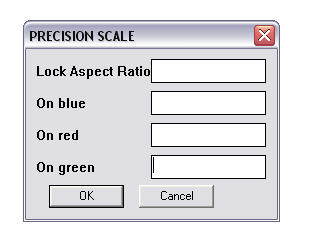
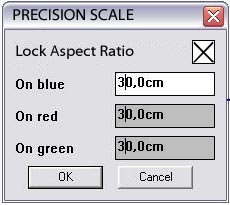
                      I would replace the "on all of axes" line with a checkbox called 'lock aspect ratio' as shown in attached. or just change the name to 'uniform scale'.

                      lockaspectratio.jpg

                      Fletch
                      3D Modeling addict. Former owner/developer of Twilight Render. sleepinggiantvisual.com

                      1 Reply Last reply
                      Reply Quote 0
                      • S
                        sahi
                        last edited by

                        @fletch said:

                        I would replace the "on all of axes" line with a checkbox called 'lock aspect ratio' as shown in attached. or just change the name to 'uniform scale'.

                        dom_3.jpg
                        mashtab_4.zip

                        1 Reply Last reply
                        Reply Quote 0
                        • unclebimU
                          unclebim
                          last edited by

                          I don't get what should I input in the Lock aspect ratio box in order to get the selection scaled proportionally to exact dimension input in one axis?

                          1 Reply Last reply
                          Reply Quote 0
                          • Z
                            Zacchia
                            last edited by

                            I like it. Thanks!

                            1 Reply Last reply
                            Reply Quote 0
                            • chialiang168C
                              chialiang168
                              last edited by

                              尺寸不正確
                              Size is not correct

                              https://dl.dropboxusercontent.com/u/108539326/星野築網頁/004-應用教室/002-sketchup教室/插件應用/線組轉組件/問題插件.png

                              1 Reply Last reply
                              Reply Quote 0
                              • cottyC
                                cotty
                                last edited by

                                Perhaps your bounding box has a different orientation than the box itself?

                                my SketchUp gallery

                                1 Reply Last reply
                                Reply Quote 0
                                • jujuJ
                                  juju
                                  last edited by

                                  @cotty said:

                                  Perhaps your bounding box has a different orientation than the box itself?

                                  that would no sense if the plugin measures the bounding box instead of the geometry

                                  Save the Earth, it's the only planet with chocolate.

                                  1 Reply Last reply
                                  Reply Quote 0
                                  • S
                                    sahi
                                    last edited by

                                    Updated the plug-in in the first message

                                    1 Reply Last reply
                                    Reply Quote 0
                                    • designerbursaD
                                      designerbursa
                                      last edited by

                                      alternative svg icon


                                      resize.zip

                                      1 Reply Last reply
                                      Reply Quote 0
                                      • T
                                        TeamCVZ
                                        last edited by

                                        Should it work with SU19 ?

                                        1 Reply Last reply
                                        Reply Quote 0

                                        Hello! It looks like you're interested in this conversation, but you don't have an account yet.

                                        Getting fed up of having to scroll through the same posts each visit? When you register for an account, you'll always come back to exactly where you were before, and choose to be notified of new replies (either via email, or push notification). You'll also be able to save bookmarks and upvote posts to show your appreciation to other community members.

                                        With your input, this post could be even better 💗

                                        Register Login
                                        • 1
                                        • 2
                                        • 1 / 2
                                        • First post
                                          Last post
                                        Buy SketchPlus
                                        Buy SUbD
                                        Buy WrapR
                                        Buy eBook
                                        Buy Modelur
                                        Buy Vertex Tools
                                        Buy SketchCuisine
                                        Buy FormFonts

                                        Advertisement