sketchucation logo sketchucation
    • Login
    Oops, your profile's looking a bit empty! To help us tailor your experience, please fill in key details like your SketchUp version, skill level, operating system, and more. Update and save your info on your profile page today!
    โš ๏ธ Update | Sketchucation Tools 5.0.8 released with licensing improvements and bugfixes Download

    [Plugin][$] Tools On Surface - v2.6a - 01 Apr 24


    Scheduled Pinned Locked Moved Plugins
    638 Posts 203 Posters 1.8m Views 202 Watching
    Loading More Posts
    • Oldest to Newest
    • Newest to Oldest
    • Most Votes
    Reply
    • Reply as topic
    Log in to reply
    This topic has been deleted. Only users with topic management privileges can see it.
    • TIGT
      TIG Moderator
      last edited by

      I'm sure that Fredo will respond with more details...
      However, the error message you posted is incomplete - in fact it omits the vital parts.
      Can you re-post the FULL message [including your ../users/user_name/ etc]...

      Also please confirm that you have the latest LibFredo RBZ installed...

      TIG

      1 Reply Last reply
      Reply Quote 0
      • fredo6F
        fredo6
        last edited by

        Thanks, TIG, for your invaluable help.

        I already answer in the other thread where the problem was also posted.

        1 Reply Last reply
        Reply Quote 0
        • R
          rv1974
          last edited by

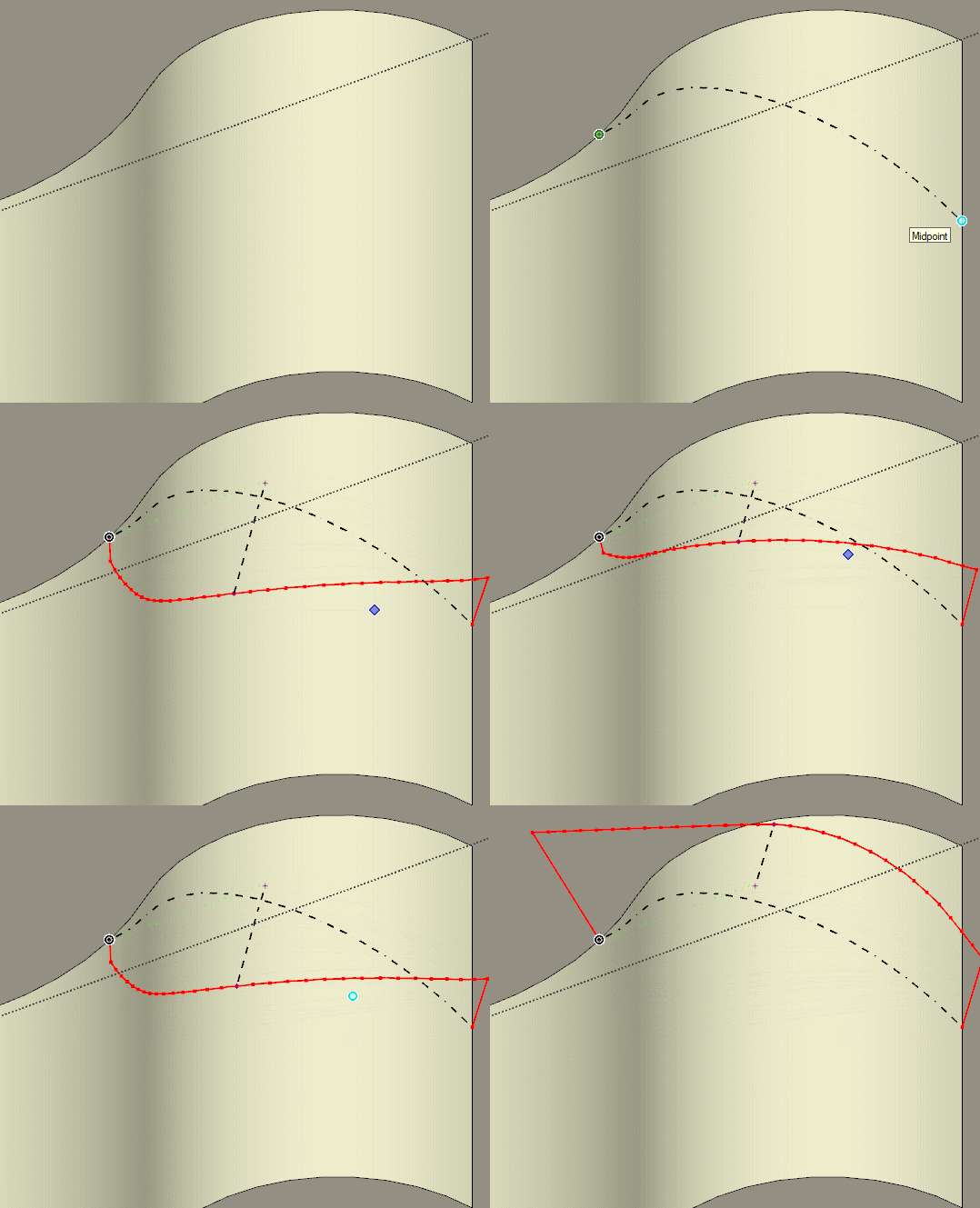
          Fredo could erroneous Arc behavior be fixed please?

          GIF.gif


          GIF.gif1.gif

          1 Reply Last reply
          Reply Quote 0
          • jgbJ
            jgb
            last edited by

            I get that a lot too. Mentioned it numerous times in the past 8+ years and no improvement. Sometimes it works correctly, but I cannot define what works and what doesn't.


            jgb

            1 Reply Last reply
            Reply Quote 0
            • R
              rv1974
              last edited by

              Yep it's present from day 1. The 'workaround' is not to start/end from the outer edges. Just a microscopic offset, then manually extend the arc Kinda helps in many (but not 100%) cases

              1 Reply Last reply
              Reply Quote 0
              • fredo6F
                fredo6
                last edited by

                This is a fundamental flaw in the algorithm when you start from sharp borders.

                So, not something simple to correct, versus revisiting seriously the algorithm itself.

                1 Reply Last reply
                Reply Quote 0
                • jgbJ
                  jgb
                  last edited by

                  What do you mean "sharp borders"?


                  jgb

                  1 Reply Last reply
                  Reply Quote 0
                  • fredo6F
                    fredo6
                    last edited by

                    @jgb said:

                    What do you mean "sharp borders"?

                    Usual cases where you TOS algorithm has problem are those where the surface is a close shape and when you start from an edge which has a sharp angle.

                    1 Reply Last reply
                    Reply Quote 0
                    • M
                      mrswissmaster
                      last edited by

                      Is it possible to place image on curved surface?

                      1 Reply Last reply
                      Reply Quote 0
                      • Dave RD
                        Dave R
                        last edited by

                        Native tools can do that or you could look at Fredo's Thru Paint.

                        Etaoin Shrdlu

                        %

                        (THERE'S NO PLACE LIKE)

                        G28 X0.0 Y0.0 Z0.0

                        M30

                        %

                        1 Reply Last reply
                        Reply Quote 0
                        • K
                          keitheseymour
                          last edited by

                          I'm running Sketchup 2015, and have installed Fredo6: Tools On Surface v2.4a. I can see it installed in my extensions list, but it doesn't show up in the menus to use. Any ideas? Thanks in advance.

                          1 Reply Last reply
                          Reply Quote 0
                          • BoxB
                            Box
                            last edited by

                            Did you install the Fredo Library that is required.

                            1 Reply Last reply
                            Reply Quote 0
                            • TIGT
                              TIG Moderator
                              last edited by

                              Fredo's tools appear under the Tools menu, did you look there ?

                              TIG

                              1 Reply Last reply
                              Reply Quote 0
                              • S
                                stebbins
                                last edited by

                                Hello, how may I avoid these diagonal lines that are produced when offsetting rectangles?

                                Thanks in advance,
                                Chris
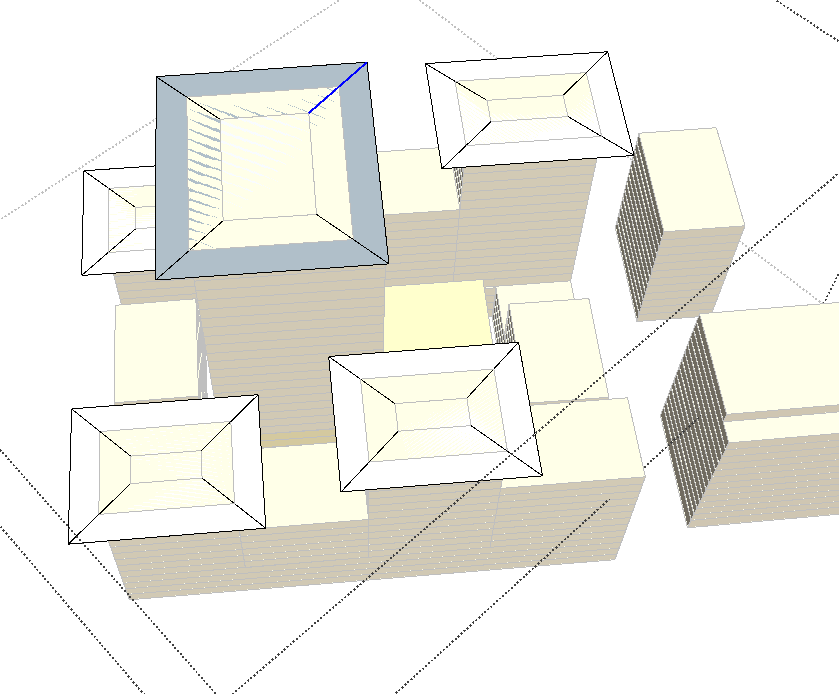

                                showing diagonal lines.

                                1 Reply Last reply
                                Reply Quote 0
                                • fredo6F
                                  fredo6
                                  last edited by

                                  @stebbins said:

                                  Hello, how may I avoid these diagonal lines that are produced when offsetting rectangles?

                                  I would need to have the model, and also to understand how you used the OffsetOnSurface tool.

                                  1 Reply Last reply
                                  Reply Quote 0
                                  • jgbJ
                                    jgb
                                    last edited by

                                    I take it that those roofs have the center raised a bit. The diagonal lines are the "hip" bends. Quite normal. You need to make then "soft" or hidden.

                                    Three ways, either select the line and change its attribute in Entity Attributes; or

                                    with the erase tool, press and hold "CTRL" and sweep over the line.

                                    The third way is to create a layer and move those lines into it. Make that layer visible or invisible as needed.


                                    jgb

                                    1 Reply Last reply
                                    Reply Quote 0
                                    • J
                                      j40
                                      last edited by

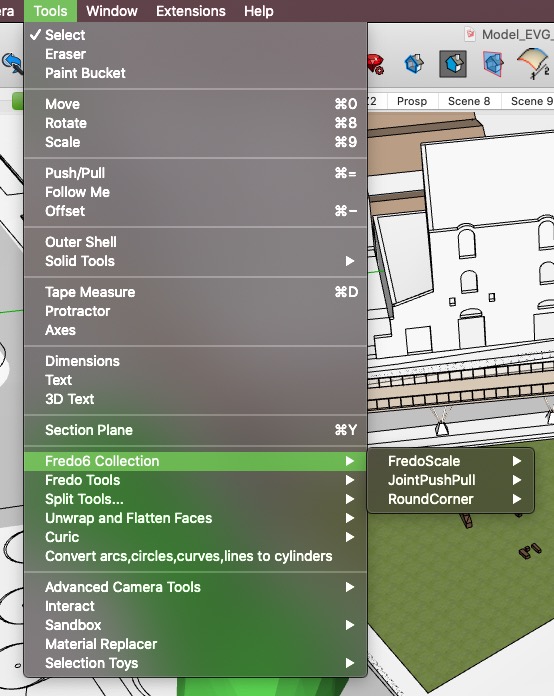
                                      Hi, great plugin! ๐Ÿ‘ I have an issue on SketchUp 2020 version (Mac), it's not appearing in none of menus.
                                      on SU 2018 it's working perfectly though.
                                      Any idea why it happens?
                                      best regards

                                      Schermata 2020-05-03 alle 8.35.19 PM.jpg

                                      Top3D Studio

                                      1 Reply Last reply
                                      Reply Quote 0
                                      • Dave RD
                                        Dave R
                                        last edited by

                                        It will show in Tools>Fredo6 Collection in SketchUp 2020. Have you restarted SketchUp after installing it?
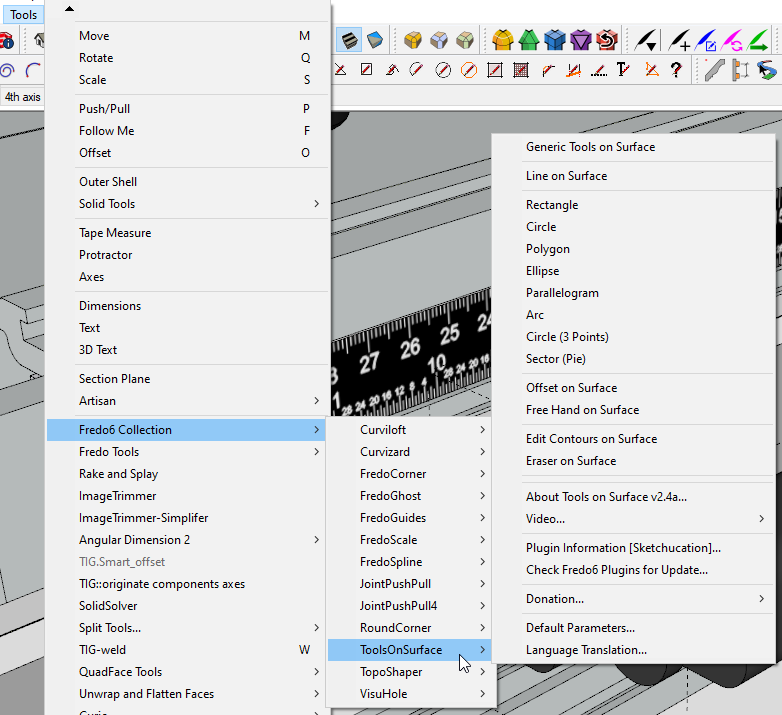
                                        Screenshot - 5_3_2020 , 1_52_06 PM.png

                                        Etaoin Shrdlu

                                        %

                                        (THERE'S NO PLACE LIKE)

                                        G28 X0.0 Y0.0 Z0.0

                                        M30

                                        %

                                        1 Reply Last reply
                                        Reply Quote 0
                                        • J
                                          j40
                                          last edited by

                                          @dave r said:

                                          It will show in Tools>Fredo6 Collection in SketchUp 2020. Have you restarted SketchUp after installing it?
                                          [attachment=0:880xdl1k]<!-- ia0 -->Screenshot - 5_3_2020 , 1_52_06 PM.png<!-- ia0 -->[/attachment:880xdl1k]

                                          Yes, I have. No luck. As if nothing was added/installed. Very odd.

                                          Top3D Studio

                                          1 Reply Last reply
                                          Reply Quote 0
                                          • Dave RD
                                            Dave R
                                            last edited by

                                            How did you install it?

                                            Etaoin Shrdlu

                                            %

                                            (THERE'S NO PLACE LIKE)

                                            G28 X0.0 Y0.0 Z0.0

                                            M30

                                            %

                                            1 Reply Last reply
                                            Reply Quote 0

                                            Hello! It looks like you're interested in this conversation, but you don't have an account yet.

                                            Getting fed up of having to scroll through the same posts each visit? When you register for an account, you'll always come back to exactly where you were before, and choose to be notified of new replies (either via email, or push notification). You'll also be able to save bookmarks and upvote posts to show your appreciation to other community members.

                                            With your input, this post could be even better ๐Ÿ’—

                                            Register Login
                                            • 1
                                            • 2
                                            • 3
                                            • 4
                                            • 5
                                            • 31
                                            • 32
                                            • 3 / 32
                                            • First post
                                              Last post
                                            Buy SketchPlus
                                            Buy SUbD
                                            Buy WrapR
                                            Buy eBook
                                            Buy Modelur
                                            Buy Vertex Tools
                                            Buy SketchCuisine
                                            Buy FormFonts

                                            Advertisement