sketchucation logo sketchucation
    • 登入
    Oops, your profile's looking a bit empty! To help us tailor your experience, please fill in key details like your SketchUp version, skill level, operating system, and more. Update and save your info on your profile page today!
    🔌 Smart Spline | Fluid way to handle splines for furniture design and complex structures. Download

    [Plugin][$] Tools On Surface - v2.6a - 01 Apr 24


    已排程 已置頂 已鎖定 已移動 Plugins
    638 貼文 203 Posters 1.6m 瀏覽 202 Watching
    正在載入更多貼文
    • 從舊到新
    • 從新到舊
    • 最多點贊
    回覆
    • 在新貼文中回覆
    登入後回覆
    此主題已被刪除。只有擁有主題管理權限的使用者可以查看。
    • cottyC 離線
      cotty
      最後由 編輯

      @tig said:

      but try renaming skindigo.rb to skindigo.rb! and restarting SketchUp; see if TOS appears then... Sometimes uncommon scripts have unexpected results on 3rd party tools...

      I don't think that Skindigo by Whaat have to do with this, I use both without any problems ...

      my SketchUp gallery

      1 條回覆 最後回覆 回覆 引用 0
      • TIGT 離線
        TIG Moderator
        最後由 編輯

        @cotty said:

        ...I don't think that Skindigo by Whaat have to do with this, I use both without any problems ...
        I agree that it's probably completely innocent, it was a last ditch attempt to see if there was some unexpected clash...

        TIG

        1 條回覆 最後回覆 回覆 引用 0
        • G 離線
          galinette
          最後由 編輯

          Damned...
          Could it be incompatibility with the newer version of LibFredo (4.6)?
          By the way, I just upgraded Sketchup to 8.0.15158

          Etienne

          1 條回覆 最後回覆 回覆 引用 0
          • TIGT 離線
            TIG Moderator
            最後由 編輯

            No known issues with the latest Lib - indeed it fixed an issue...

            Let's backtrack...
            TOS is an Extension.
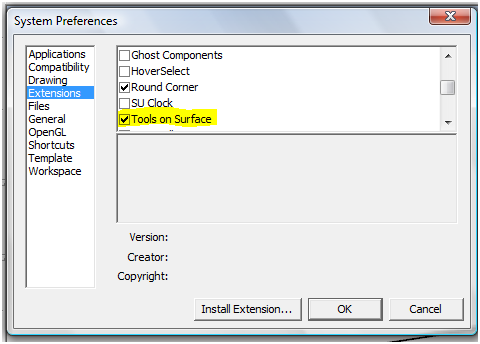
            Have you treble checked that it is not listed under Preferences > Extensions
            called 'Tools On Surface'.
            If it is then activate it by 'ticking' it.
            Once it's activated then you might also have to activate its toolbar from the View > Toolbars menu - called 'Tools On Surface'

            Capture.PNG

            TIG

            1 條回覆 最後回覆 回覆 引用 0
            • G 離線
              galinette
              最後由 編輯

              Nothing like Tools on Surface in extensions. I just noticed that roundcorners is not listed as well.

              I used RoundCorners by the past with sketchup 7, with no issues. Recently, I reinstalled to Sketchup 8, added LibFredo, JoinPushPull, RoundCorners and Tools on Surface. Only JoinPushPull is listed and works.

              And of course I looked in the toolbars menu! I use plugins from quite a while, but this time it is a mess...

              I will try on another computer with a fresh sketchup install just in case.

              1 條回覆 最後回覆 回覆 引用 0
              • G 離線
                galinette
                最後由 編輯

                Well, I deleted all plugins, re-downloaded all, everything works...

                Sorry for the mess

                Etienne

                1 條回覆 最後回覆 回覆 引用 0
                • TIGT 離線
                  TIG Moderator
                  最後由 編輯

                  Weird! 😲
                  But at least it's fixed.
                  Although we don't know how exactly... 😕

                  TIG

                  1 條回覆 最後回覆 回覆 引用 0
                  • Dave RD 離線
                    Dave R
                    最後由 編輯

                    Perhaps the problem has to do with the order of events? I've assisted several users who have Win7 and had problems getting plugins to work. They tried installing the plugin prior to setting the admin privileges for the Plugins folder correctly. Removing the .rb file from the folder and installing it anew allowed it to work.

                    Etaoin Shrdlu

                    %

                    (THERE'S NO PLACE LIKE)

                    G28 X0.0 Y0.0 Z0.0

                    M30

                    %

                    1 條回覆 最後回覆 回覆 引用 0
                    • sicksickisckS 離線
                      sicksickisck
                      最後由 編輯

                      great plugin 😍 but I need more shapes maybe shape editor [in commercial version ]

                      1 條回覆 最後回覆 回覆 引用 0
                      • thomthomT 離線
                        thomthom
                        最後由 編輯

                        @sicksickisck said:

                        great plugin 😍 but I need more shapes maybe shape editor [in commercial version ]

                        Drape or intersect?

                        Thomas Thomassen — SketchUp Monkey & Coding addict
                        List of my plugins and link to the CookieWare fund

                        1 條回覆 最後回覆 回覆 引用 0
                        • Dave RD 離線
                          Dave R
                          最後由 編輯

                          No. Intersect isn't difficult and it is a fundamental thing to know how to use in SketchUp.

                          Etaoin Shrdlu

                          %

                          (THERE'S NO PLACE LIKE)

                          G28 X0.0 Y0.0 Z0.0

                          M30

                          %

                          1 條回覆 最後回覆 回覆 引用 0
                          • sicksickisckS 離線
                            sicksickisck
                            最後由 編輯

                            Intersect 😎 [difficult ?].

                            edit : ...or both... I like how "tools on surface" works 😉

                            1 條回覆 最後回覆 回覆 引用 0
                            • M 離線
                              metagamer
                              最後由 編輯

                              I've been playing around with this tool for a day, and I really like its potential. But I'm having a really hard time getting the shapes I draw to turn into surfaces to use with the Joint Push Pull tool. For example, I extrude a simple cylinder (using built-in tools), and then draw a rect, a circle and a hexagon on the side using ToS. Sometimes it creates a face that I can use with JPP, sometimes it doesn't, and I can't figure out why. Any clues?

                              1 條回覆 最後回覆 回覆 引用 0
                              • Dave RD 離線
                                Dave R
                                最後由 編輯

                                JPP.png

                                It works for me. How large is the cylinder?
                                JPP2.png

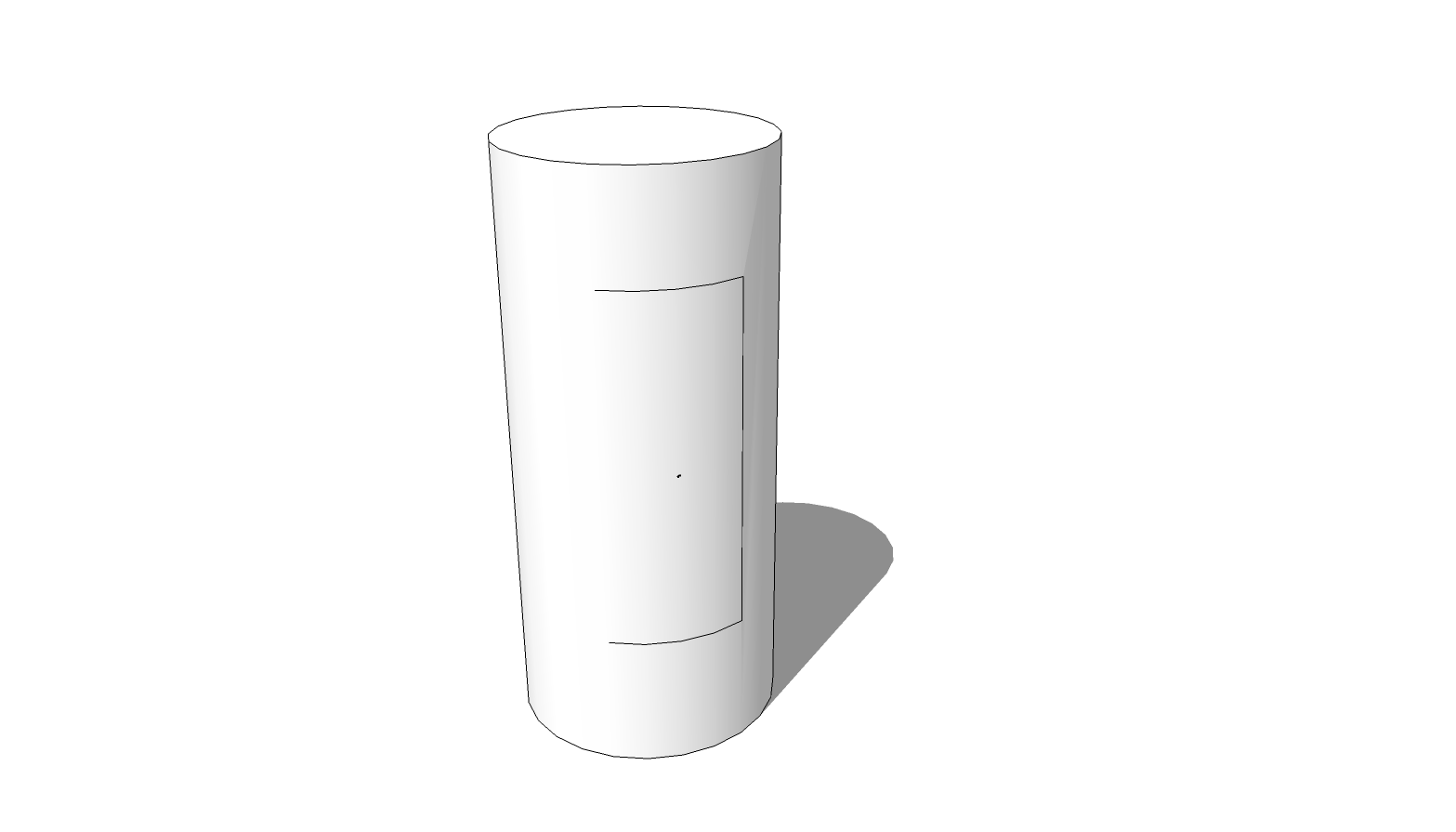
                                Or are you getting a result something like this?

                                In this case the left edge of the rectangle falls on one of the natural softened edges of the cylinder. You can see that edge if you turn on Hidden Geometry under the View menu. You'll have to unsoften that edge to separate the rectangle from the rest of the surface. You can do that with the native Line tool or the Line tool in ToS and just connect the ends of the adjacent edges of the rectangle. Or you can display Hidden Geometry, select that edge and unsoften it.

                                Etaoin Shrdlu

                                %

                                (THERE'S NO PLACE LIKE)

                                G28 X0.0 Y0.0 Z0.0

                                M30

                                %

                                1 條回覆 最後回覆 回覆 引用 0
                                • jgbJ 離線
                                  jgb
                                  最後由 編輯

                                  @dave r said:

                                  You'll have to unsoften that edge to separate the rectangle from the rest of the surface. You can do that with the native Line tool or the Line tool in ToS and just connect the ends of the adjacent edges of the rectangle. Or you can display Hidden Geometry, select that edge and unsoften it.

                                  Faster; easier ..... Shift+Ctrl Erase (tool) Just click on the soft "missing" line segment.


                                  jgb

                                  1 條回覆 最後回覆 回覆 引用 0
                                  • D 離線
                                    dakenyon27
                                    最後由 編輯

                                    Hi,

                                    I can't seem to get this fantastic plugin working on sketchup 2013. Can anyone help?

                                    David.

                                    1 條回覆 最後回覆 回覆 引用 0
                                    • Dave RD 離線
                                      Dave R
                                      最後由 編輯

                                      Sure. But we need some useful information. What do you mean you can't get it working? What happens when you start SketchUp? Do you get an error message related to the plugin?

                                      Did you install the required LibFredo6 files as spelled out in the first post in the thread? How did you install the files? Do you have Administrative privileges for the Plugins folder?

                                      Etaoin Shrdlu

                                      %

                                      (THERE'S NO PLACE LIKE)

                                      G28 X0.0 Y0.0 Z0.0

                                      M30

                                      %

                                      1 條回覆 最後回覆 回覆 引用 0
                                      • thomthomT 離線
                                        thomthom
                                        最後由 編輯

                                        @dakenyon27 said:

                                        I can't seem to get this fantastic plugin working on sketchup 2013. Can anyone help?

                                        Can you please describe the problem?
                                        Installation problems? Operation problems? Errors?

                                        Thomas Thomassen — SketchUp Monkey & Coding addict
                                        List of my plugins and link to the CookieWare fund

                                        1 條回覆 最後回覆 回覆 引用 0
                                        • M 離線
                                          martosurf
                                          最後由 編輯

                                          FRedo thanks a lot for all good plugins
                                          You a great thanks a lot

                                          1 條回覆 最後回覆 回覆 引用 0
                                          • A 離線
                                            alek_mc
                                            最後由 編輯

                                            hi... I have a problem with this plugin... I installed the sketchup pro 2013 and when I started the program, one message said that the plugin can't been uploaded... what can I do?


                                            1 條回覆 最後回覆 回覆 引用 0
                                            • 1
                                            • 2
                                            • 6
                                            • 7
                                            • 8
                                            • 9
                                            • 10
                                            • 31
                                            • 32
                                            • 8 / 32
                                            • 第一個貼文
                                              最後的貼文
                                            Buy SketchPlus
                                            Buy SUbD
                                            Buy WrapR
                                            Buy eBook
                                            Buy Modelur
                                            Buy Vertex Tools
                                            Buy SketchCuisine
                                            Buy FormFonts

                                            Advertisement