sketchucation logo sketchucation
    • 登入
    Oops, your profile's looking a bit empty! To help us tailor your experience, please fill in key details like your SketchUp version, skill level, operating system, and more. Update and save your info on your profile page today!
    🔌 Smart Spline | Fluid way to handle splines for furniture design and complex structures. Download

    [Plugin][$] Tools On Surface - v2.6a - 01 Apr 24


    已排程 已置頂 已鎖定 已移動 Plugins
    638 貼文 203 Posters 1.6m 瀏覽 202 Watching
    正在載入更多貼文
    • 從舊到新
    • 從新到舊
    • 最多點贊
    回覆
    • 在新貼文中回覆
    登入後回覆
    此主題已被刪除。只有擁有主題管理權限的使用者可以查看。
    • R 離線
      Ruturaj
      最後由 編輯

      Thank you ,..... 😄

      Thanks,
      RuturaJ

      1 條回覆 最後回覆 回覆 引用 0
      • thomthomT 離線
        thomthom
        最後由 編輯

        You can assume that most plugins work in SU8 if they worked in earlier versions. Just install and try.

        Thomas Thomassen — SketchUp Monkey & Coding addict
        List of my plugins and link to the CookieWare fund

        1 條回覆 最後回覆 回覆 引用 0
        • D 離線
          davidheim1
          最後由 編輯

          Does Tools on Surface run on SU 8? I've tried to download and install it just as you described, but I can't seem to get it to appear in either the Tools menu or the Plug Ins menu, even after I restart my computer. I have the Dir 35 running on my computer. Any suggestions?
          As always, many thanks

          1 條回覆 最後回覆 回覆 引用 0
          • thomthomT 離線
            thomthom
            最後由 編輯

            It works on SU8, yes.
            Exactly what location did you install it to? can you post a print screen of where you files are?

            Thomas Thomassen — SketchUp Monkey & Coding addict
            List of my plugins and link to the CookieWare fund

            1 條回覆 最後回覆 回覆 引用 0
            • D 離線
              davidheim1
              最後由 編輯

              @thomthom said:

              It works on SU8, yes.
              Exactly what location did you install it to? can you post a print screen of where you files are?

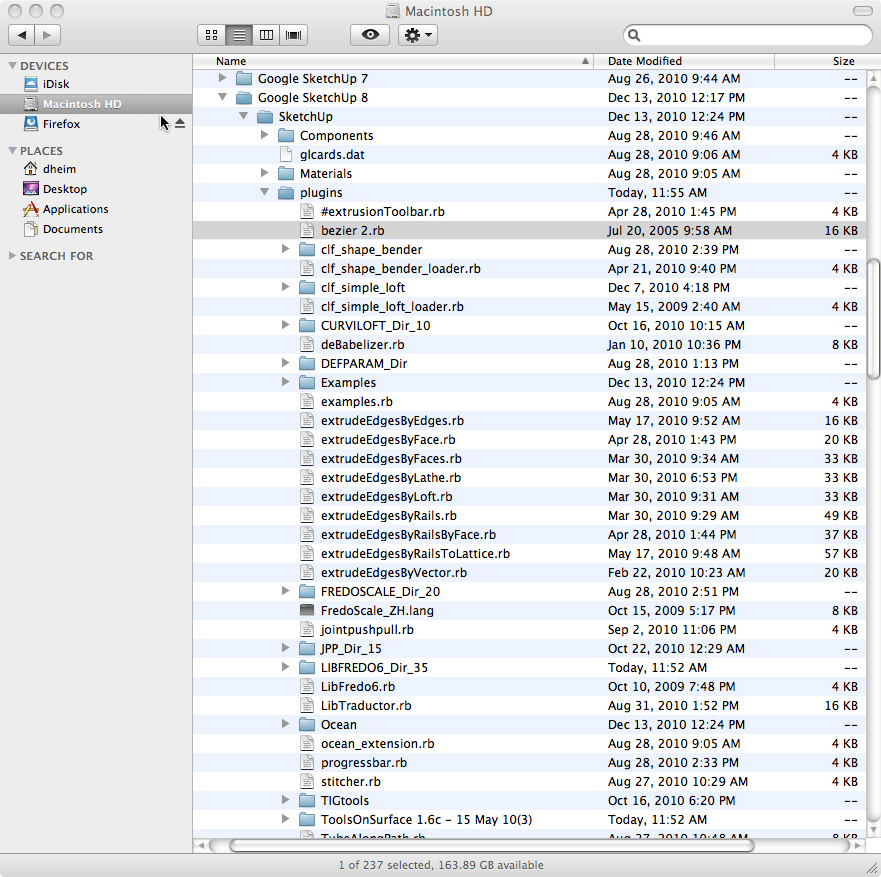
              It's in the Macintosh HD/Library/Application Support/SU8/Plug-Ins. Here's a screen shot:

              fredo6 capture.jpg

              1 條回覆 最後回覆 回覆 引用 0
              • jeff hammondJ 離線
                jeff hammond
                最後由 編輯

                i'm not quite sure how you ended up with a folder called 'ToolsOnSurface 1.6c - 15 May 10(3)' but it's not correct..

                the simplest way for you to install would be to download the installer here:
                http://web.me.com/jeffhammond/su/TOS.zip

                (this was made for someone else a little while ago.. su8 osx only)

                you'll probably want to trash the ToolsOnSurface 1.6c - 15 May 10(3) folder

                dotdotdot

                1 條回覆 最後回覆 回覆 引用 0
                • thomthomT 離線
                  thomthom
                  最後由 編輯

                  It's it the content of 'ToolsOnSurface 1.6c - 15 May 10(3)' that should be in the plugins folder?

                  Thomas Thomassen — SketchUp Monkey & Coding addict
                  List of my plugins and link to the CookieWare fund

                  1 條回覆 最後回覆 回覆 引用 0
                  • jeff hammondJ 離線
                    jeff hammond
                    最後由 編輯

                    @thomthom said:

                    It's it the content of 'ToolsOnSurface 1.6c - 15 May 10(3)' that should be in the plugins folder?

                    that's what i was thinking as well.
                    though when i unzip the download, i'm left with a folder called ToolsOnSurface%201 which then needs to be opened to find the goodies.

                    dotdotdot

                    1 條回覆 最後回覆 回覆 引用 0
                    • D 離線
                      davidheim1
                      最後由 編輯

                      @unknownuser said:

                      i'm not quite sure how you ended up with a folder called 'ToolsOnSurface 1.6c - 15 May 10(3)' but it's not correct..

                      the simplest way for you to install would be to download the installer here:
                      http://web.me.com/jeffhammond/su/TOS.zip

                      (this was made for someone else a little while ago.. su8 osx only)

                      you'll probably want to trash the ToolsOnSurface 1.6c - 15 May 10(3) folder

                      I trashed the ToolsOnSurface folder and used your installer to reinstall the program. Still no luck. Can't find the plug-in even when I restart SU 8. Does it matter that I'm using SU Pro?
                      Many thanks for your help.
                      dh

                      1 條回覆 最後回覆 回覆 引用 0
                      • jeff hammondJ 離線
                        jeff hammond
                        最後由 編輯

                        you might have to enable the plugin

                        go sketchup-> preferences-> extensions
                        and check tools on surface

                        pro doesn't matter

                        dotdotdot

                        1 條回覆 最後回覆 回覆 引用 0
                        • D 離線
                          davidheim1
                          最後由 編輯

                          @unknownuser said:

                          you might have to enable the plugin

                          go sketchup-> preferences-> extensions
                          and check tools on surface

                          pro doesn't matter

                          Tools on Surface is enabled. But the plug-in still doesn't appear. I really don't know what to do. These fredo6 plug-ins always give me fits.

                          1 條回覆 最後回覆 回覆 引用 0
                          • mitcorbM 離線
                            mitcorb
                            最後由 編輯

                            Do you have the current LibFredo file in place, or does that matter here?

                            I take the slow, deliberate approach in my aimless wandering.

                            1 條回覆 最後回覆 回覆 引用 0
                            • D 離線
                              davidheim1
                              最後由 編輯

                              @mitcorb said:

                              Do you have the current LibFredo file in place, or does that matter here?

                              Yes. Current LibFredo file is in place. I even downloaded LibFredo Dir_34, even though I have Dir_35 installed. Arrgh!

                              1 條回覆 最後回覆 回覆 引用 0
                              • D 離線
                                davidheim1
                                最後由 編輯

                                Finally got it! The ZLoader_Onsurface.rb file needed to be pulled from the TOS folder.
                                Thanks for all your help.
                                dh

                                1 條回覆 最後回覆 回覆 引用 0
                                • fredo6F 離線
                                  fredo6
                                  最後由 編輯

                                  @davidheim1 said:

                                  Tools on Surface is enabled. But the plug-in still doesn't appear. I really don't know what to do. These fredo6 plug-ins always give me fits.

                                  David,

                                  Your unzip operation does not work properly and that's why you have problems.

                                  For Tools on Surface, you should have only 4 elements in the Plugins directory:

                                  • folder LIBFREDO6_Dir_35
                                  • file LibFredo6.rb
                                  • folder TOS_Dir_16 (and not Tools on Surface....)
                                  • File ZLoader__ToolsOnSurface.rb

                                  I suggest you remove all other files.

                                  Fredo

                                  1 條回覆 最後回覆 回覆 引用 0
                                  • fredo6F 離線
                                    fredo6
                                    最後由 編輯

                                    NEW RELEASE: Tools on Surface 1.8a- 12 Jan 11

                                    This is mostly a new release in relation with the migration to LibFredo6 3.6 and to small SU8 issues.
                                    There is no functional evolution, but it is advised to upgrade when you can in order to get a better support with up-to-date code. You will also get the two-phase loading in this version.

                                    You will need to migrate to LibFredo6 3.6 or higher

                                    Please see main post for download

                                    Fredo

                                    1 條回覆 最後回覆 回覆 引用 0
                                    • D 離線
                                      DIEGO-RODRIGUEZ
                                      最後由 編輯

                                      Hi Fred.
                                      These days I've been using your plugins for drawing and detect some problems.

                                      be possible to fix these problems?

                                      Greetings, and thank you very much for all his contributions

                                      [flash=800,600:3ftgvrq6]http://www.youtube.com/v/sE-FrqpMwfc&hd=1&fs=1[/flash:3ftgvrq6]

                                      1 條回覆 最後回覆 回覆 引用 0
                                      • H 離線
                                        Hexmeister
                                        最後由 編輯

                                        Life saving stuFF!!! ☀

                                        1 條回覆 最後回覆 回覆 引用 0
                                        • D 離線
                                          d12dozr
                                          最後由 編輯

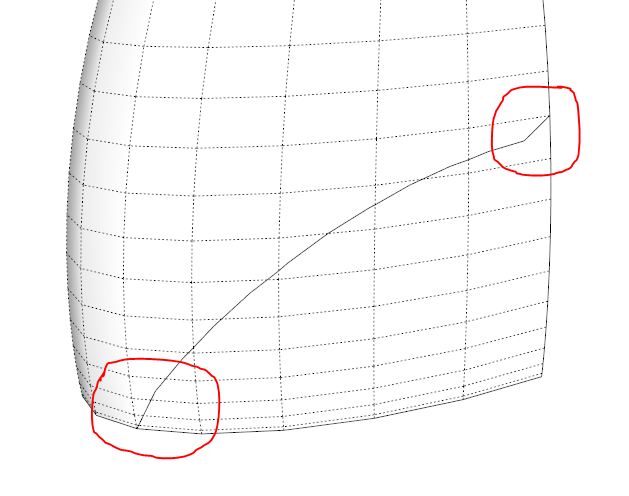
                                          I'm having trouble with the arc tool, the arc has some kinks in it, please see attached picture and SU file. Am I doing something wrong?

                                          Capture.JPG


                                          TOS question.skp

                                          3D Printing with SketchUp Book
                                          http://goo.gl/f7ooYh

                                          1 條回覆 最後回覆 回覆 引用 0
                                          • Dave RD 離線
                                            Dave R
                                            最後由 編輯

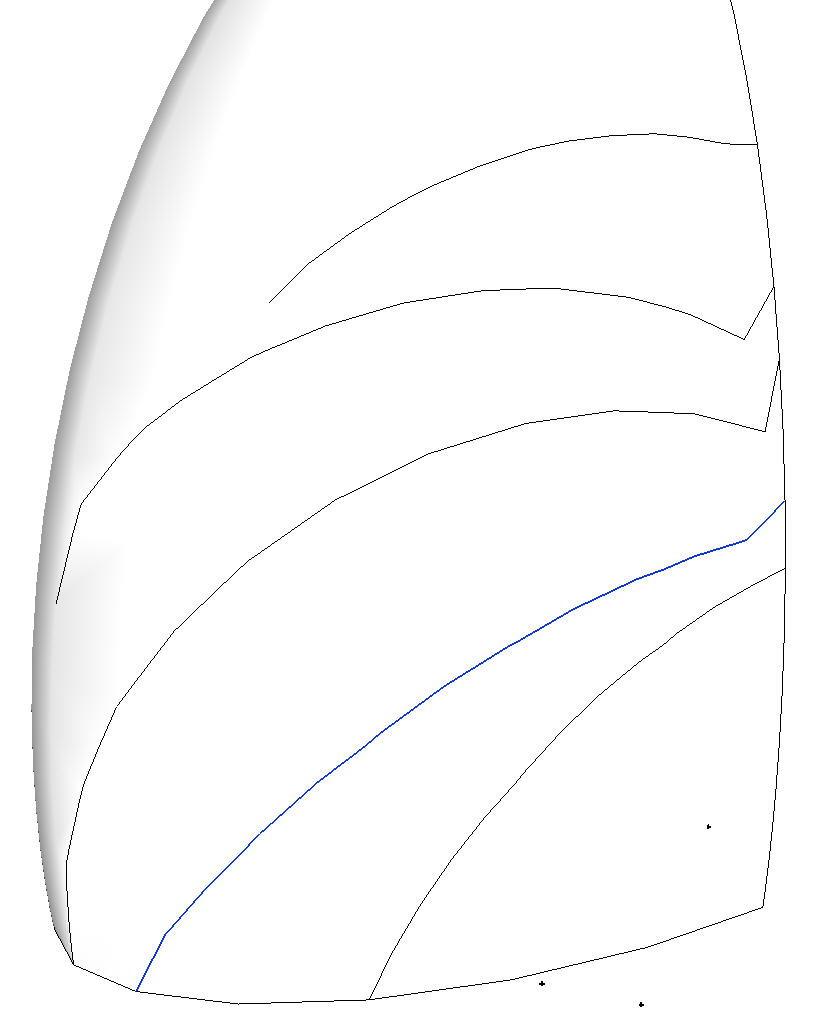
                                            I don't think it is you. I get it, too. Yours is selected. The ones above it show the problem to varying degrees. The one below it doesn't seem to have a problem, though. strange.


                                            TOS Arc.jpg

                                            Etaoin Shrdlu

                                            %

                                            (THERE'S NO PLACE LIKE)

                                            G28 X0.0 Y0.0 Z0.0

                                            M30

                                            %

                                            1 條回覆 最後回覆 回覆 引用 0
                                            • 1
                                            • 2
                                            • 13
                                            • 14
                                            • 15
                                            • 16
                                            • 17
                                            • 31
                                            • 32
                                            • 15 / 32
                                            • 第一個貼文
                                              最後的貼文
                                            Buy SketchPlus
                                            Buy SUbD
                                            Buy WrapR
                                            Buy eBook
                                            Buy Modelur
                                            Buy Vertex Tools
                                            Buy SketchCuisine
                                            Buy FormFonts

                                            Advertisement