sketchucation logo sketchucation
    • Login
    Oops, your profile's looking a bit empty! To help us tailor your experience, please fill in key details like your SketchUp version, skill level, operating system, and more. Update and save your info on your profile page today!
    ⚠️ Update | Sketchucation Tools 5.0.8 released with licensing improvements and bugfixes Download

    [Plugin][$] Tools On Surface - v2.6a - 01 Apr 24


    Scheduled Pinned Locked Moved Plugins
    638 Posts 203 Posters 1.8m Views 202 Watching
    Loading More Posts
    • Oldest to Newest
    • Newest to Oldest
    • Most Votes
    Reply
    • Reply as topic
    Log in to reply
    This topic has been deleted. Only users with topic management privileges can see it.
    • R
      Ruturaj
      last edited by

      Thank you ,..... 😄

      Thanks,
      RuturaJ

      1 Reply Last reply
      Reply Quote 0
      • thomthomT
        thomthom
        last edited by

        You can assume that most plugins work in SU8 if they worked in earlier versions. Just install and try.

        Thomas Thomassen — SketchUp Monkey & Coding addict
        List of my plugins and link to the CookieWare fund

        1 Reply Last reply
        Reply Quote 0
        • D
          davidheim1
          last edited by

          Does Tools on Surface run on SU 8? I've tried to download and install it just as you described, but I can't seem to get it to appear in either the Tools menu or the Plug Ins menu, even after I restart my computer. I have the Dir 35 running on my computer. Any suggestions?
          As always, many thanks

          1 Reply Last reply
          Reply Quote 0
          • thomthomT
            thomthom
            last edited by

            It works on SU8, yes.
            Exactly what location did you install it to? can you post a print screen of where you files are?

            Thomas Thomassen — SketchUp Monkey & Coding addict
            List of my plugins and link to the CookieWare fund

            1 Reply Last reply
            Reply Quote 0
            • D
              davidheim1
              last edited by

              @thomthom said:

              It works on SU8, yes.
              Exactly what location did you install it to? can you post a print screen of where you files are?

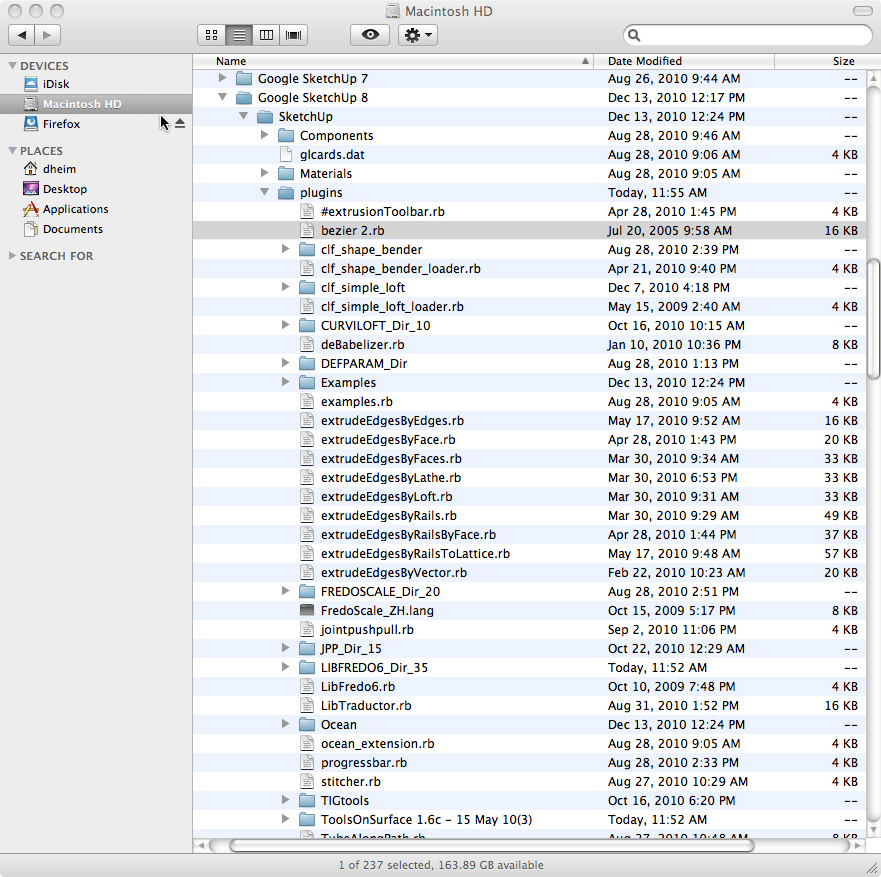
              It's in the Macintosh HD/Library/Application Support/SU8/Plug-Ins. Here's a screen shot:

              fredo6 capture.jpg

              1 Reply Last reply
              Reply Quote 0
              • jeff hammondJ
                jeff hammond
                last edited by

                i'm not quite sure how you ended up with a folder called 'ToolsOnSurface 1.6c - 15 May 10(3)' but it's not correct..

                the simplest way for you to install would be to download the installer here:
                http://web.me.com/jeffhammond/su/TOS.zip

                (this was made for someone else a little while ago.. su8 osx only)

                you'll probably want to trash the ToolsOnSurface 1.6c - 15 May 10(3) folder

                dotdotdot

                1 Reply Last reply
                Reply Quote 0
                • thomthomT
                  thomthom
                  last edited by

                  It's it the content of 'ToolsOnSurface 1.6c - 15 May 10(3)' that should be in the plugins folder?

                  Thomas Thomassen — SketchUp Monkey & Coding addict
                  List of my plugins and link to the CookieWare fund

                  1 Reply Last reply
                  Reply Quote 0
                  • jeff hammondJ
                    jeff hammond
                    last edited by

                    @thomthom said:

                    It's it the content of 'ToolsOnSurface 1.6c - 15 May 10(3)' that should be in the plugins folder?

                    that's what i was thinking as well.
                    though when i unzip the download, i'm left with a folder called ToolsOnSurface%201 which then needs to be opened to find the goodies.

                    dotdotdot

                    1 Reply Last reply
                    Reply Quote 0
                    • D
                      davidheim1
                      last edited by

                      @unknownuser said:

                      i'm not quite sure how you ended up with a folder called 'ToolsOnSurface 1.6c - 15 May 10(3)' but it's not correct..

                      the simplest way for you to install would be to download the installer here:
                      http://web.me.com/jeffhammond/su/TOS.zip

                      (this was made for someone else a little while ago.. su8 osx only)

                      you'll probably want to trash the ToolsOnSurface 1.6c - 15 May 10(3) folder

                      I trashed the ToolsOnSurface folder and used your installer to reinstall the program. Still no luck. Can't find the plug-in even when I restart SU 8. Does it matter that I'm using SU Pro?
                      Many thanks for your help.
                      dh

                      1 Reply Last reply
                      Reply Quote 0
                      • jeff hammondJ
                        jeff hammond
                        last edited by

                        you might have to enable the plugin

                        go sketchup-> preferences-> extensions
                        and check tools on surface

                        pro doesn't matter

                        dotdotdot

                        1 Reply Last reply
                        Reply Quote 0
                        • D
                          davidheim1
                          last edited by

                          @unknownuser said:

                          you might have to enable the plugin

                          go sketchup-> preferences-> extensions
                          and check tools on surface

                          pro doesn't matter

                          Tools on Surface is enabled. But the plug-in still doesn't appear. I really don't know what to do. These fredo6 plug-ins always give me fits.

                          1 Reply Last reply
                          Reply Quote 0
                          • mitcorbM
                            mitcorb
                            last edited by

                            Do you have the current LibFredo file in place, or does that matter here?

                            I take the slow, deliberate approach in my aimless wandering.

                            1 Reply Last reply
                            Reply Quote 0
                            • D
                              davidheim1
                              last edited by

                              @mitcorb said:

                              Do you have the current LibFredo file in place, or does that matter here?

                              Yes. Current LibFredo file is in place. I even downloaded LibFredo Dir_34, even though I have Dir_35 installed. Arrgh!

                              1 Reply Last reply
                              Reply Quote 0
                              • D
                                davidheim1
                                last edited by

                                Finally got it! The ZLoader_Onsurface.rb file needed to be pulled from the TOS folder.
                                Thanks for all your help.
                                dh

                                1 Reply Last reply
                                Reply Quote 0
                                • fredo6F
                                  fredo6
                                  last edited by

                                  @davidheim1 said:

                                  Tools on Surface is enabled. But the plug-in still doesn't appear. I really don't know what to do. These fredo6 plug-ins always give me fits.

                                  David,

                                  Your unzip operation does not work properly and that's why you have problems.

                                  For Tools on Surface, you should have only 4 elements in the Plugins directory:

                                  • folder LIBFREDO6_Dir_35
                                  • file LibFredo6.rb
                                  • folder TOS_Dir_16 (and not Tools on Surface....)
                                  • File ZLoader__ToolsOnSurface.rb

                                  I suggest you remove all other files.

                                  Fredo

                                  1 Reply Last reply
                                  Reply Quote 0
                                  • fredo6F
                                    fredo6
                                    last edited by

                                    NEW RELEASE: Tools on Surface 1.8a- 12 Jan 11

                                    This is mostly a new release in relation with the migration to LibFredo6 3.6 and to small SU8 issues.
                                    There is no functional evolution, but it is advised to upgrade when you can in order to get a better support with up-to-date code. You will also get the two-phase loading in this version.

                                    You will need to migrate to LibFredo6 3.6 or higher

                                    Please see main post for download

                                    Fredo

                                    1 Reply Last reply
                                    Reply Quote 0
                                    • D
                                      DIEGO-RODRIGUEZ
                                      last edited by

                                      Hi Fred.
                                      These days I've been using your plugins for drawing and detect some problems.

                                      be possible to fix these problems?

                                      Greetings, and thank you very much for all his contributions

                                      [flash=800,600:3ftgvrq6]http://www.youtube.com/v/sE-FrqpMwfc&hd=1&fs=1[/flash:3ftgvrq6]

                                      1 Reply Last reply
                                      Reply Quote 0
                                      • H
                                        Hexmeister
                                        last edited by

                                        Life saving stuFF!!! ☀

                                        1 Reply Last reply
                                        Reply Quote 0
                                        • D
                                          d12dozr
                                          last edited by

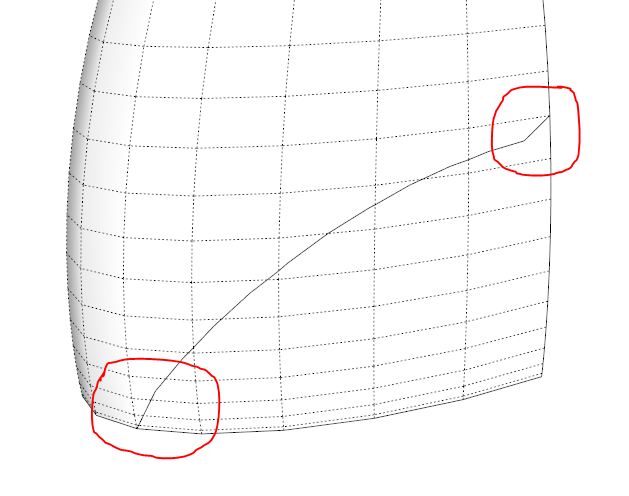
                                          I'm having trouble with the arc tool, the arc has some kinks in it, please see attached picture and SU file. Am I doing something wrong?

                                          Capture.JPG


                                          TOS question.skp

                                          3D Printing with SketchUp Book
                                          http://goo.gl/f7ooYh

                                          1 Reply Last reply
                                          Reply Quote 0
                                          • Dave RD
                                            Dave R
                                            last edited by

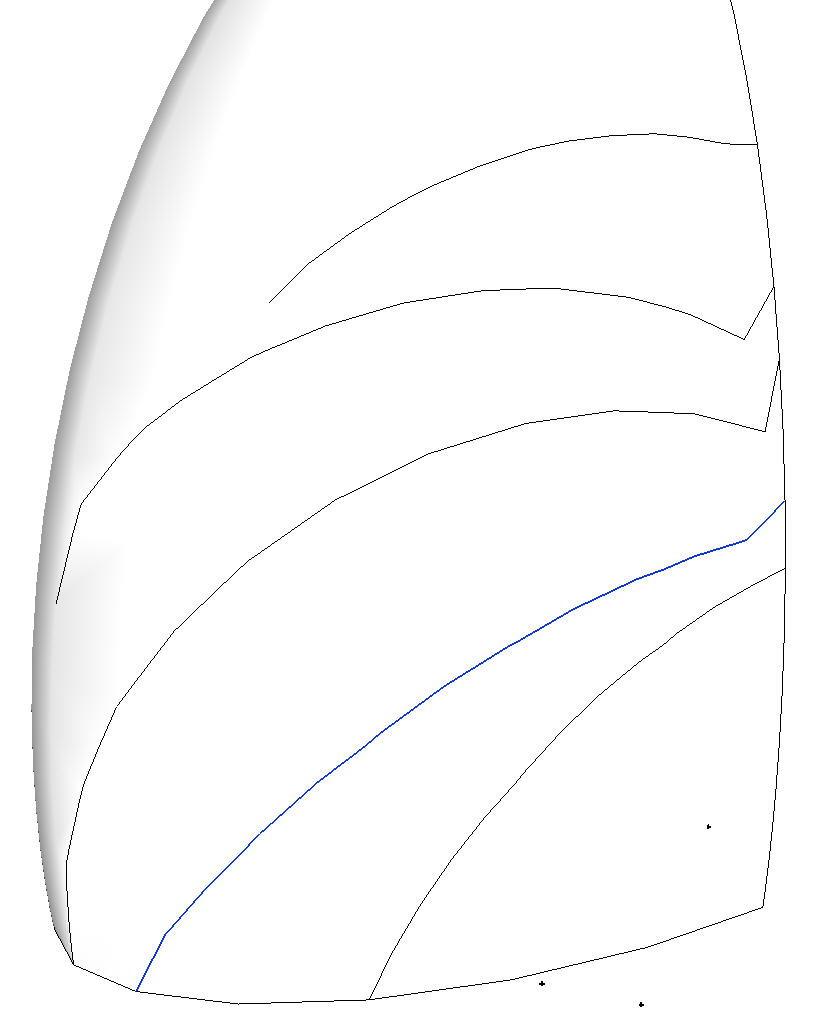
                                            I don't think it is you. I get it, too. Yours is selected. The ones above it show the problem to varying degrees. The one below it doesn't seem to have a problem, though. strange.


                                            TOS Arc.jpg

                                            Etaoin Shrdlu

                                            %

                                            (THERE'S NO PLACE LIKE)

                                            G28 X0.0 Y0.0 Z0.0

                                            M30

                                            %

                                            1 Reply Last reply
                                            Reply Quote 0

                                            Hello! It looks like you're interested in this conversation, but you don't have an account yet.

                                            Getting fed up of having to scroll through the same posts each visit? When you register for an account, you'll always come back to exactly where you were before, and choose to be notified of new replies (either via email, or push notification). You'll also be able to save bookmarks and upvote posts to show your appreciation to other community members.

                                            With your input, this post could be even better 💗

                                            Register Login
                                            • 1
                                            • 2
                                            • 15
                                            • 16
                                            • 17
                                            • 18
                                            • 19
                                            • 31
                                            • 32
                                            • 17 / 32
                                            • First post
                                              Last post
                                            Buy SketchPlus
                                            Buy SUbD
                                            Buy WrapR
                                            Buy eBook
                                            Buy Modelur
                                            Buy Vertex Tools
                                            Buy SketchCuisine
                                            Buy FormFonts

                                            Advertisement