sketchucation logo sketchucation
    • Login
    Oops, your profile's looking a bit empty! To help us tailor your experience, please fill in key details like your SketchUp version, skill level, operating system, and more. Update and save your info on your profile page today!
    ⚠️ Update | Sketchucation Tools 5.0.8 released with licensing improvements and bugfixes Download

    [Plugin][$] Tools On Surface - v2.6a - 01 Apr 24


    Scheduled Pinned Locked Moved Plugins
    638 Posts 203 Posters 1.8m Views 202 Watching
    Loading More Posts
    • Oldest to Newest
    • Newest to Oldest
    • Most Votes
    Reply
    • Reply as topic
    Log in to reply
    This topic has been deleted. Only users with topic management privileges can see it.
    • fredo6F
      fredo6
      last edited by

      @red_shift said:

      I have still not been able to get the plugin to work on my Mac...can someone please give me some help?

      On Mac, the plugin files should be copied to Macintosh HD/Library/Application Support/Google SketchUp 7/SketchUp/plugins
      Please make sure that your unzipping operation leads to the same footprint as indicated in page 2 of the PDF documentation, that is:
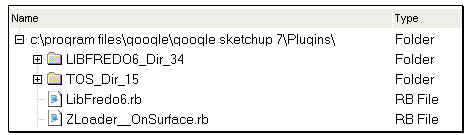
      Footprint TOS.jpg

      The 2 folders, LIBFREDO6_Dir_34 and TOS_Dir_15 must contains several files (.rb, .lang, ...) and a subfolder IMAGES_STANDARD (make sure that you do not have another LIBFREDO6_Dir_34 or TOS_Dir_15 embedded).

      If needed, unzip in a separate place, check the files and directories and then copy them in the Sketchup Plugin folder:

      Fred

      PS: if it still does not work, then I must call the Mac user community to help.

      1 Reply Last reply
      Reply Quote 0
      • T
        tlerak
        last edited by

        where can i find tools on surface 1.5? thanks

        1 Reply Last reply
        Reply Quote 0
        • thomthomT
          thomthom
          last edited by

          @tlerak said:

          where can i find tools on surface 1.5? thanks

          First post on the first page of this thread.

          Thomas Thomassen — SketchUp Monkey & Coding addict
          List of my plugins and link to the CookieWare fund

          1 Reply Last reply
          Reply Quote 0
          • H
            haynesc
            last edited by

            how would i draw a diagonal curved line from plain to plain ... ? top right corner to bottom left corner ?


            http://f.imagehost.org/t/0905/Untitled-1_3.jpg

            1 Reply Last reply
            Reply Quote 0
            • D
              Daniel S
              last edited by

              @haynesc said:

              how would i draw a diagonal curved line from plain to plain ... ? top right corner to bottom left corner ?


              http://f.imagehost.org/t/0905/Untitled-1_3.jpg

              Alternative solution:
              I see that you have Whaat´s "subdivide and smooth". Use the knife tool (a.k.a. zorro) in parallel projection. Also you can group the faces you don´t want to divide:
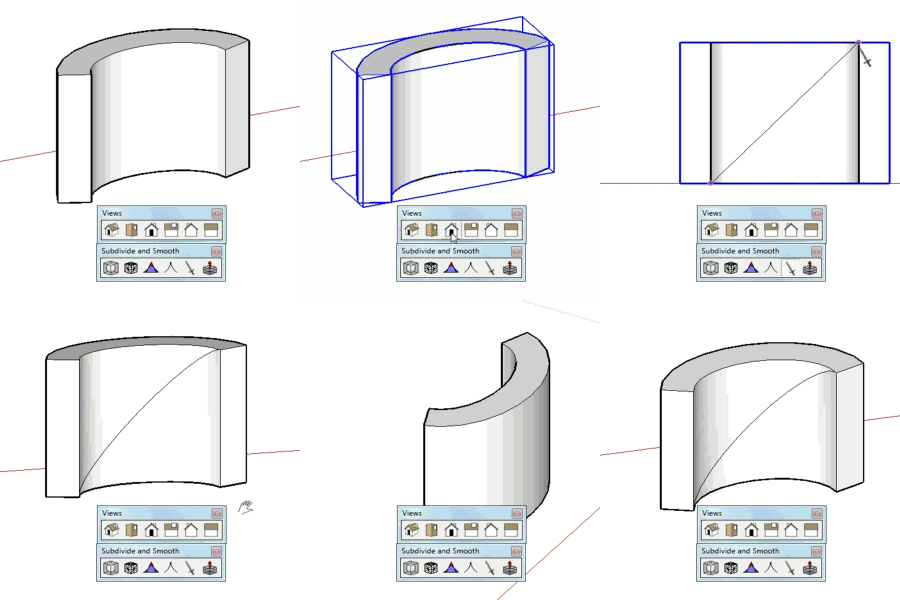
              subsmooth.gif
              Daniel S

              1 Reply Last reply
              Reply Quote 0
              • T
                Toucan
                last edited by

                Where do I find this script?

                1 Reply Last reply
                Reply Quote 0
                • Chris FullmerC
                  Chris Fullmer
                  last edited by

                  Hi Toucan, the script is located in the first post of this thread. Go back to page one and look for a download link there. Have fun!

                  Chris

                  Lately you've been tan, suspicious for the winter.
                  All my Plugins I've written

                  1 Reply Last reply
                  Reply Quote 0
                  • thomthomT
                    thomthom
                    last edited by

                    TOS_oddness.png

                    I occasionally get this happening while using TOS. What's causing it?
                    I wanted to draw an arc between the two points - going across the two faces.

                    Thomas Thomassen — SketchUp Monkey & Coding addict
                    List of my plugins and link to the CookieWare fund

                    1 Reply Last reply
                    Reply Quote 0
                    • fredo6F
                      fredo6
                      last edited by

                      @thomthom said:

                      [attachment=0:h62psy7e]<!-- ia0 -->TOS_oddness.png<!-- ia0 -->[/attachment:h62psy7e]

                      I occasionally get this happening while using TOS. What's causing it?
                      I wanted to draw an arc between the two points - going across the two faces.

                      The algorithm has many flaws, espcially on shape volumes that are closed.
                      I am thinking of a serious refresh to resolve these problems (and some others).

                      Fredo

                      1 Reply Last reply
                      Reply Quote 0
                      • W
                        whippie
                        last edited by

                        What a brilliant tool thanks thanks thanks 😄

                        1 Reply Last reply
                        Reply Quote 0
                        • B
                          balloon
                          last edited by

                          ☀ Thanks Fredo6 😍

                          1 Reply Last reply
                          Reply Quote 0
                          • K
                            Khai
                            last edited by

                            may I request an additional feature?

                            adding rounded corners to a shape?

                            1 Reply Last reply
                            Reply Quote 0
                            • thomthomT
                              thomthom
                              last edited by

                              @unknownuser said:

                              espcially on shape volumes that are closed.

                              So it some times picks the wrong distance/direction between the two points? A workaround would be to break the volume somehow?

                              Thomas Thomassen — SketchUp Monkey & Coding addict
                              List of my plugins and link to the CookieWare fund

                              1 Reply Last reply
                              Reply Quote 0
                              • fredo6F
                                fredo6
                                last edited by

                                @thomthom said:

                                @unknownuser said:

                                espcially on shape volumes that are closed.

                                So it some times picks the wrong distance/direction between the two points? A workaround would be to break the volume somehow?

                                Somehow, it works much better when the surface is open.
                                But I know how to fix the problem. No easy, but I need some time, as I have to revisit the whole algorithm.

                                Fredo

                                1 Reply Last reply
                                Reply Quote 0
                                • N
                                  nilblo
                                  last edited by

                                  Rightclick menues issue..
                                  After having installed Fredo6 Tools on surface + FredoScale I´m having the darnest stupid problem:
                                  Most contextual menues are greyed out, like Intersect with model, Flip along Groups Red, and so on..
                                  I can create shortcuts to these commands and they work as expected, but I rely heavily on shortcuts in my work and list of shortcuts is getting more and more crowded. Have I done something wrong here and this is normal behavior? I have been searching the forum but so far havent found a description af this "problem".
                                  I have most definetely missed out on something here and the fault is obviously mine (as it usually is) but I really would appreciate an input to help me solve this matter.

                                  Vista 64- Sketchup Pro 7.1.6860
                                  Plugins: Fredo6 ToolsOnSurface v1.5f LIBFREDO6_Dir_34 (109 mS seems OK?
                                  Total time to load plugin = 187 mS) FredoScale v2.0g (Total time to load plugin =124 mS)
                                  SketchyPhysics verson3 Kerkythea SU2KT version 3.0 model exporter

                                  1 Reply Last reply
                                  Reply Quote 0
                                  • S
                                    sus4
                                    last edited by

                                    too Dont Work Ver7.1.6087
                                    error massage ZLoader__OnSurface.rb File loading error
                                    No such file to load -- LibFredo6.rb

                                    1 Reply Last reply
                                    Reply Quote 0
                                    • fredo6F
                                      fredo6
                                      last edited by

                                      @nilblo said:

                                      Rightclick menues issue..
                                      After having installed Fredo6 Tools on surface + FredoScale I´m having the darnest stupid problem:
                                      Most contextual menues are greyed out, like Intersect with model, Flip along Groups Red, and so on

                                      I have heard that this problem is related to SU itself, though it may be 'helped' by some plugins.
                                      I got it occasionally, even not using any plugins.

                                      Fredo

                                      1 Reply Last reply
                                      Reply Quote 0
                                      • S
                                        sketchyup2010
                                        last edited by

                                        Great tool bro. Nice work!!!!

                                        1 Reply Last reply
                                        Reply Quote 0
                                        • D
                                          dylan
                                          last edited by

                                          A minor issue and not sure if this is Mac related.

                                          I can only get the default icons to show.
                                          If I go into Default Parameters and choose IMAGES_DanielS then save changes, it does nothing. I can open the default parameters again and the box is un-ticked.
                                          I have the latest version installed.

                                          http://dmdarchitecture.co.uk/

                                          1 Reply Last reply
                                          Reply Quote 0
                                          • T
                                            theark
                                            last edited by

                                            Thanks a lot.Good plug-in

                                            1 Reply Last reply
                                            Reply Quote 0

                                            Hello! It looks like you're interested in this conversation, but you don't have an account yet.

                                            Getting fed up of having to scroll through the same posts each visit? When you register for an account, you'll always come back to exactly where you were before, and choose to be notified of new replies (either via email, or push notification). You'll also be able to save bookmarks and upvote posts to show your appreciation to other community members.

                                            With your input, this post could be even better 💗

                                            Register Login
                                            • 1
                                            • 2
                                            • 13
                                            • 14
                                            • 15
                                            • 16
                                            • 17
                                            • 31
                                            • 32
                                            • 15 / 32
                                            • First post
                                              Last post
                                            Buy SketchPlus
                                            Buy SUbD
                                            Buy WrapR
                                            Buy eBook
                                            Buy Modelur
                                            Buy Vertex Tools
                                            Buy SketchCuisine
                                            Buy FormFonts

                                            Advertisement