sketchucation logo sketchucation
    • Login
    Oops, your profile's looking a bit empty! To help us tailor your experience, please fill in key details like your SketchUp version, skill level, operating system, and more. Update and save your info on your profile page today!
    ⚠️ Update | Sketchucation Tools 5.0.8 released with licensing improvements and bugfixes Download

    [Plugin][$] Tools On Surface - v2.6a - 01 Apr 24


    Scheduled Pinned Locked Moved Plugins
    638 Posts 203 Posters 1.8m Views 202 Watching
    Loading More Posts
    • Oldest to Newest
    • Newest to Oldest
    • Most Votes
    Reply
    • Reply as topic
    Log in to reply
    This topic has been deleted. Only users with topic management privileges can see it.
    • J
      j_forrester
      last edited by

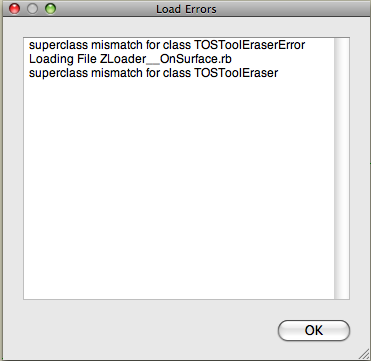
      Had a look and cant see anyone with similar problem. On startup I get the below dialogue box. Any ideas? Installed Fredo 3.4c and run Mac Pro.

      Many thanks.
      Picture 1.png

      1 Reply Last reply
      Reply Quote 0
      • D
        dylan
        last edited by

        Thanks, really nice improvement 👍

        Can't get Daniels icons to show. If I choose them from Default Parameters and ok it, nothing happens. If I open again, the tick in the box is gone.

        http://dmdarchitecture.co.uk/

        1 Reply Last reply
        Reply Quote 0
        • fredo6F
          fredo6
          last edited by

          @thomthom said:

          Can the TOS_Dir_13 folder be removed?

          YES, I forgot to say it.
          Anyway, the folder is passive, as no loader is pointing at it.

          Fredo

          1 Reply Last reply
          Reply Quote 0
          • FrederikF
            Frederik
            last edited by

            Thanks for this, Fredo...! 😄

            Cheers
            Kim Frederik

            1 Reply Last reply
            Reply Quote 0
            • D
              Dan
              last edited by

              @unknownuser said:

              Can't get Daniels icons to show. If I choose them from Default Parameters and ok it, nothing happens. If I open again, the tick in the box is gone.

              I replaced the icons in "IMAGES_Standard" subfolder with the icons set of choice and all went ok.

              1 Reply Last reply
              Reply Quote 0
              • D
                Dan
                last edited by

                I don't remember if I gave thanks to you, Fredo, but if I did, I repeat them: THANK YOU VERY MUCH for your life saving, incredible tools! 😍

                A wish, though: can you make the additional TOS palette to remember its position on screen from a SU session to another?

                1 Reply Last reply
                Reply Quote 0
                • takesh hT
                  takesh h
                  last edited by

                  @dan said:

                  I replaced the icons in "IMAGES_Standard" subfolder with the icons set of choice and all went ok.

                  Yes the trick did the job, thanks Dan. 👍

                  1 Reply Last reply
                  Reply Quote 0
                  • D
                    dylan
                    last edited by

                    Thanks Dan, perfect!
                    I was trying to replace them in images DanielS.

                    http://dmdarchitecture.co.uk/

                    1 Reply Last reply
                    Reply Quote 0
                    • olisheaO
                      olishea
                      last edited by

                      I love this tool, I use it all the time.

                      Endless thanks 😍 😍 😍

                      oli

                      1 Reply Last reply
                      Reply Quote 0
                      • fredo6F
                        fredo6
                        last edited by

                        @dan said:

                        A wish, though: can you make the additional TOS palette to remember its position on screen from a SU session to another?

                        You can specify the default position in the SeTtings dialog box of LibFredo6 (so in the Windows > LibFredo6 Settings menu).

                        Fredo

                        1 Reply Last reply
                        Reply Quote 0
                        • fredo6F
                          fredo6
                          last edited by

                          @unknownuser said:

                          Can't get Daniels icons to show. If I choose them from Default Parameters and ok it, nothing happens. If I open again, the tick in the box is gone.

                          It seems there is a problem with that, but only on Mac.
                          I am checking this issue.

                          Fredo

                          1 Reply Last reply
                          Reply Quote 0
                          • MALAISEM
                            MALAISE
                            last edited by

                            Merci Fredo, I watched the video, that gives us new horizons.... 👍

                            MALAISE

                            La Connaissance n'a de valeur que partagée

                            1 Reply Last reply
                            Reply Quote 0
                            • D
                              Dan
                              last edited by

                              @unknownuser said:

                              You can specify the default position in the SeTtings dialog box of LibFredo6 (so in the Windows > LibFredo6 Settings menu).

                              Thanks a lot, Fredo!
                              I completely forgot I can use it to change the default parameters... 😳
                              This is one of the most complete plugins I see.
                              Thanks again!

                              1 Reply Last reply
                              Reply Quote 0
                              • L
                                lorca
                                last edited by

                                @dan said:

                                @unknownuser said:

                                Can't get Daniels icons to show. If I choose them from Default Parameters and ok it, nothing happens. If I open again, the tick in the box is gone.

                                I replaced the icons in "IMAGES_Standard" subfolder with the icons set of choice and all went ok.

                                That did the trick:)------> Thanks.

                                1 Reply Last reply
                                Reply Quote 0
                                • fredo6F
                                  fredo6
                                  last edited by

                                  @dan said:

                                  @unknownuser said:

                                  Can't get Daniels icons to show. If I choose them from Default Parameters and ok it, nothing happens. If I open again, the tick in the box is gone.

                                  I replaced the icons in "IMAGES_Standard" subfolder with the icons set of choice and all went ok.

                                  Dan and Dylan (and any others having the problem of non-persistence of the choice of Icons)

                                  I have a few questions:

                                  1. does it happen on Mac only?

                                  2. Are all other parameters shown in the Button palettes saved across Sketchup sessions (i.e. nb of segments, options, etc...) ?

                                  3. Could someone send me by PM the file ToolsOnSurface.def in the subfolder DEFPARAM_Dir.

                                  Thanks

                                  Fredo

                                  1 Reply Last reply
                                  Reply Quote 0
                                  • G
                                    gaonirico
                                    last edited by

                                    Hi Fredo. Grandiose plugins that have created. But I have a problem, after that installed the new version of ToolsOnSurface 1.5. In SketchUp the option to translate the tools with LibFredo6 appears blank, as also the option to translate ToolsOnSurface. The remainder of the tools to translate function very well, as those of GhostComponent or RoundCorner. In spite of the inconvinient of can translate all tools function perfect they...Oh, I am sorry if not very clear for my poor speak english. 😳

                                    1 Reply Last reply
                                    Reply Quote 0
                                    • fredo6F
                                      fredo6
                                      last edited by

                                      @gaonirico said:

                                      :sketchstatic: Hi Fredo. Grandiose plugins that have created. But I have a problem, after that installed the new version of ToolsOnSurface 1.5. In SketchUp the option to translate the tools with LibFredo6 appears blank, as also the option to translate ToolsOnSurface.

                                      I noticed the problem which seems to be only in SU6 and only the very first time you open the translation dialog box. I am going to investigate.
                                      In between, if you slightly resize the dialog box or close and re-open it, you'll get the content. This is not specific to ToolsOnSurface.

                                      Are you going to translate into Spanish? Any language...., thank you in advance

                                      Fredo

                                      1 Reply Last reply
                                      Reply Quote 0
                                      • G
                                        gaonirico
                                        last edited by

                                        @unknownuser said:

                                        @gaonirico said:

                                        :sketchstatic: Hi Fredo. Grandiose plugins that have created. But I have a problem, after that installed the new version of ToolsOnSurface 1.5. In SketchUp the option to translate the tools with LibFredo6 appears blank, as also the option to translate ToolsOnSurface.

                                        I noticed the problem which seems to be only in SU6 and only the very first time you open the translation dialog box. I am going to investigate.
                                        In between, if you slightly resize the dialog box or close and re-open it, you'll get the content. This is not specific to ToolsOnSurface.

                                        Are you going to translate into Spanish? Any language...., thank you in advance

                                        Fredo

                                        Thanks for your answer. The problem proved to be that I must erase the ToolsOnSurface 1.2 TOS_Dir_13 folder. Now it works well. When I am finishes make the corresponding translation to the Spanish will give you the corresponding LANG file.

                                        1 Reply Last reply
                                        Reply Quote 0
                                        • C
                                          cyan.archnet
                                          last edited by

                                          will definitely give this a try!, A BIG THANK YOU!! for this awesome plugin!!

                                          1 Reply Last reply
                                          Reply Quote 0
                                          • boofredlayB
                                            boofredlay
                                            last edited by

                                            @unknownuser said:

                                            @unknownuser said:

                                            Can't get Daniels icons to show. If I choose them from Default Parameters and ok it, nothing happens. If I open again, the tick in the box is gone.

                                            It seems there is a problem with that, but only on Mac.
                                            I am checking this issue.

                                            Fredo

                                            I just installed the update and I don't even have the option to choose an icon set in the Default Parameters. I am on a PC with XP.
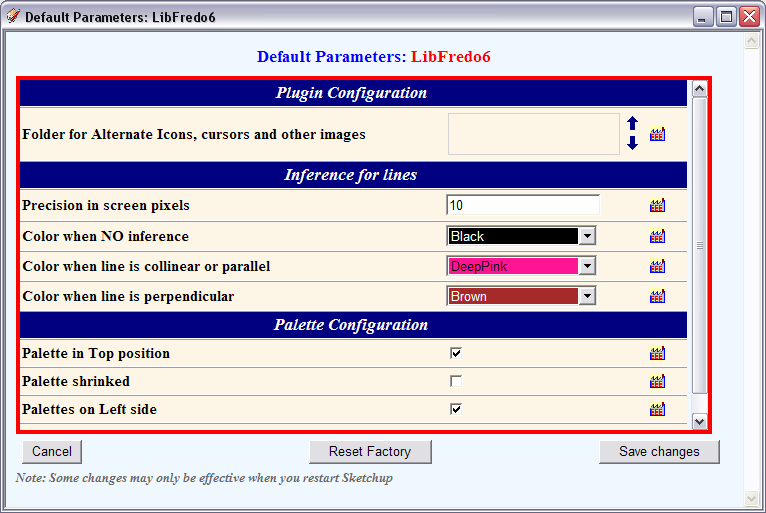
                                            DP.jpgAlso, I noticed that when I deleted the old LIBFREDO6_Dir_32 and TOS_Dir_13 folders my TOS toolbar disappeared. It reappeared after restoring those folders.
                                            Any ideas?

                                            Thanks.

                                            http://www.coroflot.com/boofredlay

                                            1 Reply Last reply
                                            Reply Quote 0

                                            Hello! It looks like you're interested in this conversation, but you don't have an account yet.

                                            Getting fed up of having to scroll through the same posts each visit? When you register for an account, you'll always come back to exactly where you were before, and choose to be notified of new replies (either via email, or push notification). You'll also be able to save bookmarks and upvote posts to show your appreciation to other community members.

                                            With your input, this post could be even better 💗

                                            Register Login
                                            • 1
                                            • 2
                                            • 3
                                            • 4
                                            • 5
                                            • 31
                                            • 32
                                            • 3 / 32
                                            • First post
                                              Last post
                                            Buy SketchPlus
                                            Buy SUbD
                                            Buy WrapR
                                            Buy eBook
                                            Buy Modelur
                                            Buy Vertex Tools
                                            Buy SketchCuisine
                                            Buy FormFonts

                                            Advertisement