sketchucation logo sketchucation
    • 登入
    Oops, your profile's looking a bit empty! To help us tailor your experience, please fill in key details like your SketchUp version, skill level, operating system, and more. Update and save your info on your profile page today!
    🔌 Smart Spline | Fluid way to handle splines for furniture design and complex structures. Download

    [Plugin][$] Tools On Surface - v2.6a - 01 Apr 24


    已排程 已置頂 已鎖定 已移動 Plugins
    638 貼文 203 Posters 1.6m 瀏覽 202 Watching
    正在載入更多貼文
    • 從舊到新
    • 從新到舊
    • 最多點贊
    回覆
    • 在新貼文中回覆
    登入後回覆
    此主題已被刪除。只有擁有主題管理權限的使用者可以查看。
    • CadFatherC 離線
      CadFather
      最後由 編輯

      ..it would be great to have _16, _24 naming convention like TOS - but all in your own time of course 😉

      1 條回覆 最後回覆 回覆 引用 0
      • fredo6F 離線
        fredo6
        最後由 編輯

        CadFather,

        For easier access to your set of icons and cursors, I edited the first message of this thread and attached the archive file.
        http://www.sketchucation.com/forums/scf/viewtopic.php?f=180&t=11212&st=0&sk=t&sd=a#p76625

        Fred

        1 條回覆 最後回覆 回覆 引用 0
        • F 離線
          FkY
          最後由 編輯

          Hello all, it's my first message here...

          Thanks to Fredo6 for this awesome plugin, it's very useful.

          I've just seen a little bug in the arc display. When you move an arc created with this plugin, the center point (displayed by a cross) doesn't move.

          It would be nice to have the tangent constraint when you create an arc after an other or a line to have a continuity.

          FkY_

          PS : sorry for my "garbage english", I do my best but...

          1 條回覆 最後回覆 回覆 引用 0
          • fredo6F 離線
            fredo6
            最後由 編輯

            @fky said:

            I've just seen a little bug in the arc display. When you move an arc created with this plugin, the center point (displayed by a cross) doesn't move.

            Not really a bug actually. the script just create a construction point for the arc center for convenience (as it should maybe in native Sketchup!). But the construction point is not really part of the arc and does not keep any connection with it afterward.

            @fky said:

            It would be nice to have the tangent constraint when you create an arc after an other or a line to have a continuity.

            Yes, that would be nice. On a Surface, it is however a little bit tricky, though probably feasible.

            1 條回覆 最後回覆 回覆 引用 0
            • CadFatherC 離線
              CadFather
              最後由 編輯

              @unknownuser said:

              CadFather,

              For easier access to your set of icons and cursors, I edited the first message of this thread and attached the archive file.
              http://www.sketchucation.com/forums/scf/viewtopic.php?f=180&t=11212&st=0&sk=t&sd=a#p76625

              Fred

              oh..i'm honoured to have my name next to it! 😄

              1 條回覆 最後回覆 回覆 引用 0
              • Z 離線
                zhuangsuph
                最後由 編輯

                Thank youThank youThank you

                1 條回覆 最後回覆 回覆 引用 0
                • T 離線
                  theolwakachangchang
                  最後由 編輯

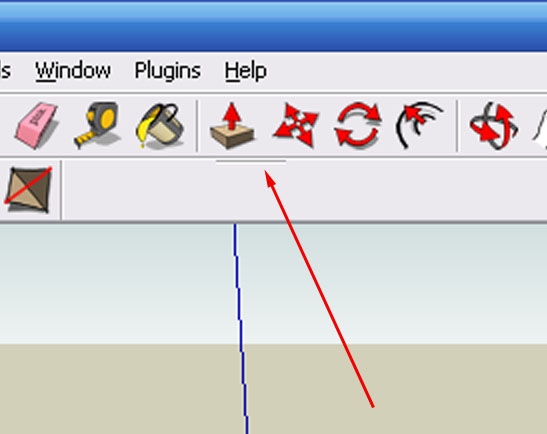
                  for some reason i cannot get the toolbar to show up???

                  i only get this:
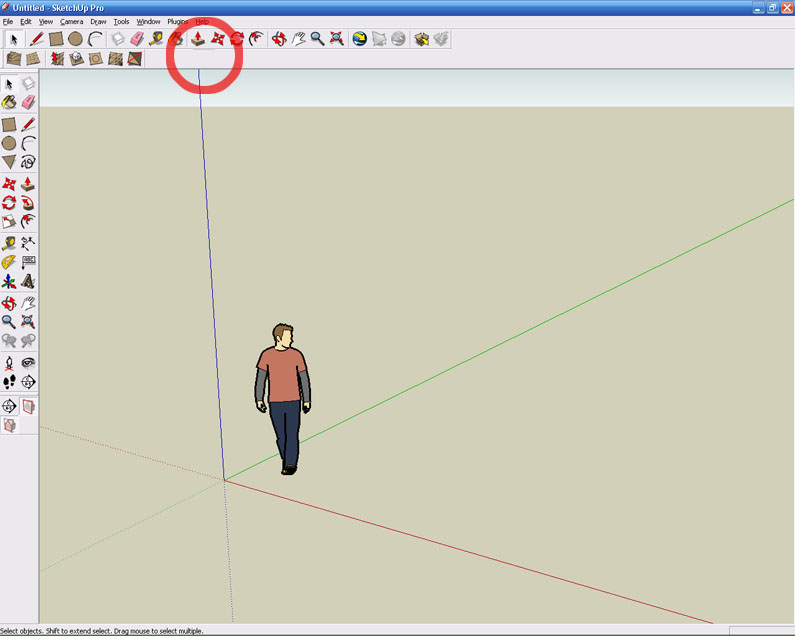

                  toolbarerror.jpg


                  toolbarerror2.jpg

                  1 條回覆 最後回覆 回覆 引用 0
                  • CadFatherC 離線
                    CadFather
                    最後由 編輯

                    make sure you have al the files in 'plugins'

                    ZLoader__OnSurface.rb
                    and the folder TOS_Dir_13 which contains the scripts and the toolbar icons

                    1 條回覆 最後回覆 回覆 引用 0
                    • FrederikF 離線
                      Frederik
                      最後由 編輯

                      Isn't this because the script needs to be activated from the Extensions..?? 😕

                      From the menu-bar click Window > Preferences, which will open the System Preferences window...
                      Select Extensions and make sure the Tools on Surface is ticked... 😉

                      Now you shold be able to see the toolbar - that is if you've extracted the zip-file to the correct folder... 😉

                      Cheers
                      Kim Frederik

                      1 條回覆 最後回覆 回覆 引用 0
                      • CadFatherC 離線
                        CadFather
                        最後由 編輯

                        oh yes indeed that is the first thing 😛

                        1 條回覆 最後回覆 回覆 引用 0
                        • T 離線
                          theolwakachangchang
                          最後由 編輯

                          I believe I have all the necessary files. I have the ZLoader__OnSurface.rb and then in the TOS_Dir_13 folder I have 73 *.png files, 9 *.rb files, 1 *.def file and 2 manuals.... I have activated the script from extensions. I get all the options from the Tools on Surface section in the Tools pulldown, its just a pain not having a toolbar

                          Pretty sure I have installed and followed all the instructions correctly?

                          1 條回覆 最後回覆 回覆 引用 0
                          • fredo6F 離線
                            fredo6
                            最後由 編輯

                            By chance, can you check in the menu View>Toolbar if you have a toolbar named "Surface Operations" and if it is checked.

                            Fredo

                            1 條回覆 最後回覆 回覆 引用 0
                            • T 離線
                              theolwakachangchang
                              最後由 編輯

                              Yep, I have that checked.. that little 'dash thing' that shows up (as shown earlier in the image with the arrow) is what shows up when I have 'Surface Operations' checked

                              1 條回覆 最後回覆 回覆 引用 0
                              • CadFatherC 離線
                                CadFather
                                最後由 編輯

                                in these cases i move all the plugins to another folder and keep only the troubling one.

                                give it a try if you still have a problem, redownload the plugin and re-try. if still no good you can try re-installing SU - wouldn't kow what else..

                                1 條回覆 最後回覆 回覆 引用 0
                                • T 離線
                                  theolwakachangchang
                                  最後由 編輯

                                  😆 😆

                                  hmmmm turns out I found the problem... For some reason I had extracted the files into the tools directory instead of the plugins directory

                                  1 條回覆 最後回覆 回覆 引用 0
                                  • CadFatherC 離線
                                    CadFather
                                    最後由 編輯

                                    😒 😉

                                    1 條回覆 最後回覆 回覆 引用 0
                                    • R 離線
                                      renyiandhan
                                      最後由 編輯

                                      Amazing!!! Thanks!!!

                                      1 條回覆 最後回覆 回覆 引用 0
                                      • A 離線
                                        agrazdi
                                        最後由 編輯

                                        Fredo

                                        Any news about the double line you mentioned for V1.4 ?

                                        Thanks
                                        agrazdi

                                        1 條回覆 最後回覆 回覆 引用 0
                                        • fredo6F 離線
                                          fredo6
                                          最後由 編輯

                                          This will come, but not before end of Sep (actually, it should do more than double, and on any contour). I did not spend a lot of time recently on Rubys, but should try to resume soon, with some work on Web dialogs as well.
                                          I also solved the question of generating faces when drawing lines on surfaces.

                                          Fredo

                                          1 條回覆 最後回覆 回覆 引用 0
                                          • B 離線
                                            BorgMan
                                            最後由 編輯

                                            Well that's strange, I'm using the tool right now to offset from a shape on a curved face. However, for some reason it thinks that the object is part of the face too, and thus is offsetting over that face. That's (obviously) not what I want...
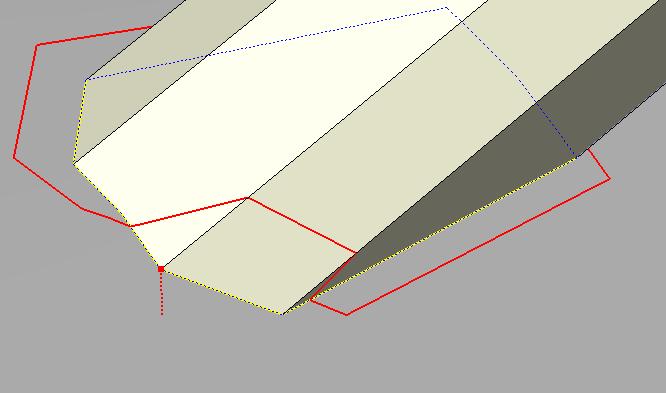


                                            que.JPG

                                            More varied than the Borg, more powerful than the living dead, and better shots than Imperial Stormtroopers.

                                            You've gotta love Slivers.

                                            1 條回覆 最後回覆 回覆 引用 0
                                            • 1
                                            • 2
                                            • 27
                                            • 28
                                            • 29
                                            • 30
                                            • 31
                                            • 32
                                            • 29 / 32
                                            • 第一個貼文
                                              最後的貼文
                                            Buy SketchPlus
                                            Buy SUbD
                                            Buy WrapR
                                            Buy eBook
                                            Buy Modelur
                                            Buy Vertex Tools
                                            Buy SketchCuisine
                                            Buy FormFonts

                                            Advertisement