sketchucation logo sketchucation
    • 登入
    Oops, your profile's looking a bit empty! To help us tailor your experience, please fill in key details like your SketchUp version, skill level, operating system, and more. Update and save your info on your profile page today!
    🔌 Smart Spline | Fluid way to handle splines for furniture design and complex structures. Download

    [Obsolete] Tools On Surface - v1.1

    已排程 已置頂 已鎖定 已移動 Plugins
    92 貼文 49 Posters 30.1k 瀏覽 49 Watching
    正在載入更多貼文
    • 從舊到新
    • 從新到舊
    • 最多點贊
    回覆
    • 在新貼文中回覆
    登入後回覆
    此主題已被刪除。只有擁有主題管理權限的使用者可以查看。
    • MALAISEM 離線
      MALAISE
      最後由 編輯

      😍 Ausgezeichnet, excellent, great what y've done.

      MALAISE

      La Connaissance n'a de valeur que partagée

      1 條回覆 最後回覆 回覆 引用 0
      • fredo6F 離線
        fredo6
        最後由 編輯

        @solo said:

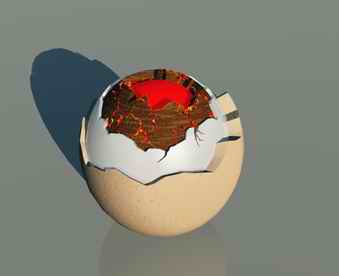
        Just gave me another toy, I mean tool. 👍

        3 minutes to make.
        crackedupyc4.jpg

        Solo,

        very nice illustration of what you can do by combining JPP and the Tools on Surface.
        Would you mind if I take the picture and put it in the documentation?

        Fredo

        1 條回覆 最後回覆 回覆 引用 0
        • M 離線
          Macs
          最後由 編輯

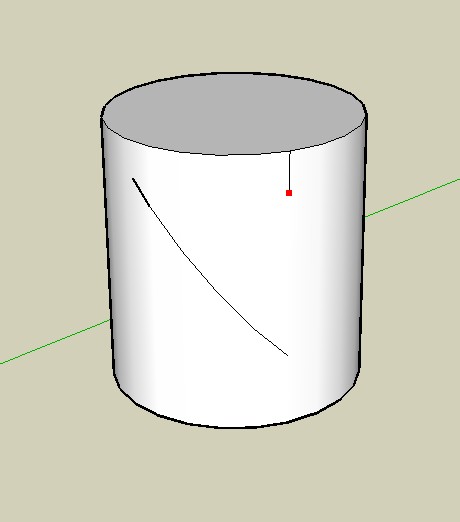
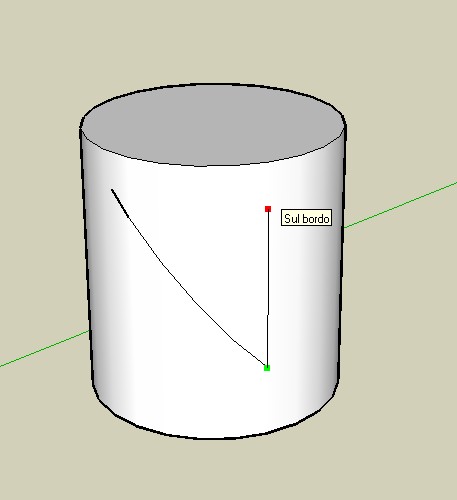
          Here 2 images of what I'm tring

          first one select plane tool and tring to draw a verical line, before mouse click
          second one is what i get after the mouse click

          before click.jpg


          after click.jpg

          1 條回覆 最後回覆 回覆 引用 0
          • fredo6F 離線
            fredo6
            最後由 編輯

            Macs,

            I understand. This is due to a problem in Sketchup when you create a curve made of edges on an existing edge (you can check this is the case when you generate in a group and then explode). I'll try to fix it.
            By default, the script generates curves for each line drawn. If you deactivate this option (key F9), it works correctly.

            1 條回覆 最後回覆 回覆 引用 0
            • soloS 離線
              solo
              最後由 編輯

              Absolutely fred.

              http://www.solos-art.com

              If you see a toilet in your dreams do not use it.

              1 條回覆 最後回覆 回覆 引用 0
              • M 離線
                mateo soletic
                最後由 編輯

                Fred, Thanks a lot, great tool.👍

                Concept Illustrations

                1 條回覆 最後回覆 回覆 引用 0
                • MarianM 離線
                  Marian
                  最後由 編輯

                  😍 REALLY COOOL TOOL

                  http://marian87.deviantart.com/

                  1 條回覆 最後回覆 回覆 引用 0
                  • boofredlayB 離線
                    boofredlay
                    最後由 編輯

                    Dang, I am having a hard time keeping up with all the new toys.

                    Coolness 🤓

                    http://www.coroflot.com/boofredlay

                    1 條回覆 最後回覆 回覆 引用 0
                    • G 離線
                      glenn
                      最後由 編輯

                      Thank you!!!!!
                      Glenn

                      1 條回覆 最後回覆 回覆 引用 0
                      • D 離線
                        Daniel S
                        最後由 編輯

                        Hi fredo...

                        About the offset on surface the external offset deletes the original surface... is there a way to keep the original surface like in the previous version? In the image I put in "1" the external offset, in "2" the actual result and in "3" what i´m trying to get.

                        About the icons and cursors i tried to make them.. but i can´t do the ones with Cline. The ones i can don´t look very good... but i post them here.

                        Daniel S
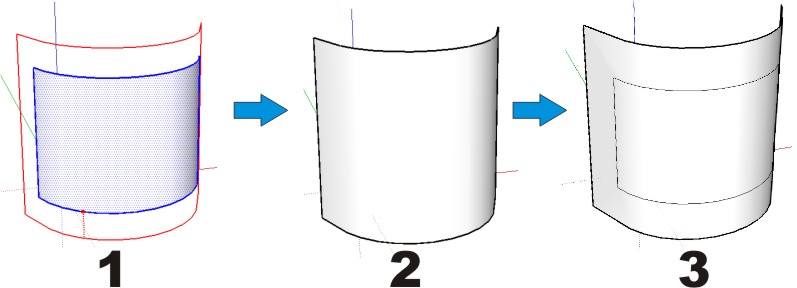

                        External offset.jpg


                        Icons tools on surface.zip

                        1 條回覆 最後回覆 回覆 引用 0
                        • majidM 離線
                          majid
                          最後由 編輯

                          a new crazy world of su is reachinG!!!!
                          ThAnKs Fredo!!!!!!!!!! and wwwwwwwwwwooooooooowwwwwwjust for FuNnN
                          My inspiring A, B, Sketches book: https://sketchucation.com/shop/books/intermediate/2612-alphabet-inspired-sketches--inspiring-drills-for-architects--3d-artists-and-designers-

                          1 條回覆 最後回覆 回覆 引用 0
                          • B 離線
                            bubbalove
                            最後由 編輯

                            It says the attachment doesn't exist anymore!?!

                            "Success consists of going from failure to failure without loss of enthusiasm." - Churchill

                            1 條回覆 最後回覆 回覆 引用 0
                            • fredo6F 離線
                              fredo6
                              最後由 編輯

                              @daniel s said:

                              Hi fredo...

                              About the offset on surface the external offset deletes the original surface... is there a way to keep the original surface like in the previous version? In the image I put in "1" the external offset, in "2" the actual result and in "3" what i´m trying to get.

                              About the icons and cursors i tried to make them.. but i can´t do the ones with Cline. The ones i can don´t look very good... but i post them here.

                              Daniel S

                              Daniel (and all)

                              Sorry for this. I fixed the bug and reloaded on the first message of this thread.
                              (Bubbalove: try again, as you wanted to download when I was replacing the file. Sorry)

                              1 條回覆 最後回覆 回覆 引用 0
                              • D 離線
                                dylan
                                最後由 編輯

                                Thanks once again fredo. Another fantastic addition to SU 👍

                                http://dmdarchitecture.co.uk/

                                1 條回覆 最後回覆 回覆 引用 0
                                • J 離線
                                  Julius
                                  最後由 編輯

                                  great! this is very useful on not-curved-surfaces because you don't have to worry about intersecting with other lines!

                                  1 條回覆 最後回覆 回覆 引用 0
                                  • soloS 離線
                                    solo
                                    最後由 編輯

                                    This tool also is much better at making .png cut-outs than the regular SU tool.

                                    http://www.solos-art.com

                                    If you see a toilet in your dreams do not use it.

                                    1 條回覆 最後回覆 回覆 引用 0
                                    • R 離線
                                      remus
                                      最後由 編輯

                                      In what ways that solo?

                                      http://remusrendering.wordpress.com/

                                      1 條回覆 最後回覆 回覆 引用 0
                                      • soloS 離線
                                        solo
                                        最後由 編輯

                                        Have you ever tried to draw around a complex shape and the line occasionally changes axis thus not closing?, well this hugs the surface and those issues are a thing of the past.

                                        http://www.solos-art.com

                                        If you see a toilet in your dreams do not use it.

                                        1 條回覆 最後回覆 回覆 引用 0
                                        • R 離線
                                          remus
                                          最後由 編輯

                                          Fair enough, i'll admit i havent done a lot of cutting out with .pngs, but when i did do it i didnt find the freehand tool to bad. Obviously need to do more 2d components 👍

                                          http://remusrendering.wordpress.com/

                                          1 條回覆 最後回覆 回覆 引用 0
                                          • CadFatherC 離線
                                            CadFather
                                            最後由 編輯

                                            Fredo, here's some icons - see if you like them...

                                            i noticed that the draw line cursor is the same as the draw line icon on the toolbar.

                                            this is not good because the sizes differ (toolbars are 24x24 - cursors 32x32)
                                            so i created a cursor called 'ofs_draw_Dline.png' - you just need to tweak the script to fit this update and then the tip of the pencil will fall right on the line as you draw.

                                            cheers


                                            OFS_Dir.zip

                                            1 條回覆 最後回覆 回覆 引用 0
                                            • 1
                                            • 2
                                            • 3
                                            • 4
                                            • 5
                                            • 1 / 5
                                            • 第一個貼文
                                              最後的貼文
                                            Buy SketchPlus
                                            Buy SUbD
                                            Buy WrapR
                                            Buy eBook
                                            Buy Modelur
                                            Buy Vertex Tools
                                            Buy SketchCuisine
                                            Buy FormFonts

                                            Advertisement