sketchucation logo sketchucation
    • Login
    Oops, your profile's looking a bit empty! To help us tailor your experience, please fill in key details like your SketchUp version, skill level, operating system, and more. Update and save your info on your profile page today!
    Mac User? | Join the Rayscaper Beta for Mac Learn More

    [Plugin] SketchyBevel 0.1(Updated May 11)

    Scheduled Pinned Locked Moved Plugins
    143 Posts 85 Posters 150.1k Views 85 Watching
    Loading More Posts
    • Oldest to Newest
    • Newest to Oldest
    • Most Votes
    Reply
    • Reply as topic
    Log in to reply
    This topic has been deleted. Only users with topic management privileges can see it.
    • J
      Jon
      last edited by

      @cphillips said:

      Oh, That. Yeah Ill fix.

      Thanks a lot 😍 😍

      Jon
      KT Team member

      1 Reply Last reply
      Reply Quote 0
      • C
        CPhillips
        last edited by

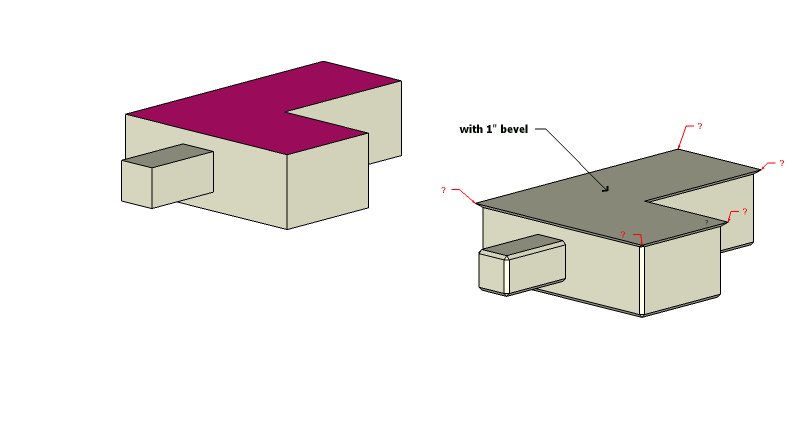
        May 11 update.
        -Fixed hang bug if input box canceled.
        -Beveling now works inside of groups and components.
        -Bevel amount should now be in the set unit format (meters, cm, feet, etc)
        -Somewhat better capping of holes. Still far from perfect. Sometimes it still leaves holes so there is a "Cap Holes" right click option.

        404 Not Found

        favicon

        (www.sketchucation.com)

        1 Reply Last reply
        Reply Quote 0
        • R
          remus
          last edited by

          Cheers chris, good to see cotinued development πŸ˜„

          http://remusrendering.wordpress.com/

          1 Reply Last reply
          Reply Quote 0
          • utilerU
            utiler
            last edited by

            champion, Chris!!!

            Just Curious...

            1 Reply Last reply
            Reply Quote 0
            • erikBE
              erikB
              last edited by

              Thanks very much for the input in metric. !!
              erikB

              1 Reply Last reply
              Reply Quote 0
              • M
                mike d
                last edited by

                thanks chris

                The grass is always GREENER on the roof.

                1 Reply Last reply
                Reply Quote 0
                • CadFatherC
                  CadFather
                  last edited by

                  fantastic, i used to get some persistent error message at times - end task being the only way out - i'll report if any.. Thank You

                  now i bevel just about anything.. πŸ€“

                  1 Reply Last reply
                  Reply Quote 0
                  • B
                    bubbalove
                    last edited by

                    This may be a dumb question but when I try to download the file I keep getting it in text format... do I just the delete the .txt from the end of it or just put it in the script folder and it knows what to do? Ohh.. and I am using Safari as my internet browser.

                    "Success consists of going from failure to failure without loss of enthusiasm." - Churchill

                    1 Reply Last reply
                    Reply Quote 0
                    • R
                      remus
                      last edited by

                      You'll need to change the file extension to .rb for it to work. Not sure why its downloading it as a .txt though πŸ˜‰ perhaps some of the more apple savy have an answer?

                      http://remusrendering.wordpress.com/

                      1 Reply Last reply
                      Reply Quote 0
                      • B
                        bubbalove
                        last edited by

                        Figured it out... for some reason Safari downloads it as a txt file for some reason. Worked like a charm in IE even though I don't like using IE. Thanks Remus!

                        "Success consists of going from failure to failure without loss of enthusiasm." - Churchill

                        1 Reply Last reply
                        Reply Quote 0
                        • soloS
                          solo
                          last edited by

                          I use safari on my Mac and .rb's save normally, must be a setting.

                          http://www.solos-art.com

                          If you see a toilet in your dreams do not use it.

                          1 Reply Last reply
                          Reply Quote 0
                          • B
                            bubbalove
                            last edited by

                            I looked at my preferences... everything is the way it is supposed to be. Maybe it is because I'm using Safari on Windows or something. Do they automatically save to your desktop or does it give you an option on where you want to save it?

                            "Success consists of going from failure to failure without loss of enthusiasm." - Churchill

                            1 Reply Last reply
                            Reply Quote 0
                            • soloS
                              solo
                              last edited by

                              Yup to the desktop unfortunately, I hardly use the Mac so it's no big deal really. every now and again I have to clean it all up as I run out of space on desktop.

                              http://www.solos-art.com

                              If you see a toilet in your dreams do not use it.

                              1 Reply Last reply
                              Reply Quote 0
                              • R
                                REGIS
                                last edited by

                                Hi
                                with safari 2 it saves on the desktop but with safari 3 and 10.5 it saves where you want and you can check this in safari's preferences
                                Never tried safari 3 with 10.4

                                1 Reply Last reply
                                Reply Quote 0
                                • R
                                  rzadwg
                                  last edited by

                                  woah, awesome, cheers for this one. its gunna save me a lot of time!

                                  1 Reply Last reply
                                  Reply Quote 0
                                  • JClementsJ
                                    JClements
                                    last edited by

                                    The bevel to the top surface (red) should be "concave" shouldn't it?PNG image


                                    Sketchy Bevel with v0-1.skp

                                    John | Illustrator | Beaverton, Oregon

                                    1 Reply Last reply
                                    Reply Quote 0
                                    • C
                                      CPhillips
                                      last edited by

                                      Its a known bug. I haven't figured out how to detect those faces yet. You can fix it by erasing the face and redrawing it using a clockwise line.

                                      1 Reply Last reply
                                      Reply Quote 0
                                      • W
                                        Whaat
                                        last edited by

                                        @cphillips said:

                                        Its a known bug. I haven't figured out how to detect those faces yet. You can fix it by erasing the face and redrawing it using a clockwise line.

                                        As I was playing around with my own beveling script, I found this method to be useful:

                                        edge.reversed_in?(face) 
                                        

                                        The EdgeUse class also has some useful methods that may help fix this bug.

                                        Great script, BTW

                                        SketchUp Plugins for Professionals

                                        1 Reply Last reply
                                        Reply Quote 0
                                        • C
                                          CPhillips
                                          last edited by

                                          I'll try that. Thanks Whaat!

                                          BTW. I understand you lost your bevel script in a HD crash. SketchyBevel was almost doomed as well. My Ruby editor crashed (the only time in years of use) taking the only version of the almost finished plugin with it. Nothing was left. I was despondent. But I manage to pull a half digested version of the Ruby code out of a Sketchup core dump. Whew! I would have never had the strength to redo the code without that.

                                          1 Reply Last reply
                                          Reply Quote 0
                                          • Y
                                            Yup_done
                                            last edited by

                                            @cphillips said:

                                            I'll try that. Thanks Whaat!

                                            DELETED FOR BREVITY

                                            But I manage to pull a half digested version of the Ruby code out of a Sketchup core dump. Whew! I would have never had the strength to redo the code without that.

                                            We're all in your debt for that heroic effort.
                                            Has NBC heard of you yet? Maybe a spinoff of
                                            heroes...

                                            Heroes... The CAD team?
                                            Saving the world, one bezel at a time!? 🀣

                                            Your efforts are appreciated by all who don't dare put words to paper...
                                            errr.. make that:

                                            font to blog 😲

                                            1 Reply Last reply
                                            Reply Quote 0

                                            Hello! It looks like you're interested in this conversation, but you don't have an account yet.

                                            Getting fed up of having to scroll through the same posts each visit? When you register for an account, you'll always come back to exactly where you were before, and choose to be notified of new replies (either via email, or push notification). You'll also be able to save bookmarks and upvote posts to show your appreciation to other community members.

                                            With your input, this post could be even better πŸ’—

                                            Register Login
                                            • 1
                                            • 2
                                            • 3
                                            • 4
                                            • 5
                                            • 6
                                            • 7
                                            • 8
                                            • 7 / 8
                                            • First post
                                              Last post
                                            Buy SketchPlus
                                            Buy SUbD
                                            Buy WrapR
                                            Buy eBook
                                            Buy Modelur
                                            Buy Vertex Tools
                                            Buy SketchCuisine
                                            Buy FormFonts

                                            Advertisement