sketchucation logo sketchucation
    • 登入
    Oops, your profile's looking a bit empty! To help us tailor your experience, please fill in key details like your SketchUp version, skill level, operating system, and more. Update and save your info on your profile page today!
    🔌 Smart Spline | Fluid way to handle splines for furniture design and complex structures. Download

    [Plugin] SketchyFFD (Classic)

    已排程 已置頂 已鎖定 已移動 Plugins
    412 貼文 153 Posters 451.8k 瀏覽 153 Watching
    正在載入更多貼文
    • 從舊到新
    • 從新到舊
    • 最多點贊
    回覆
    • 在新貼文中回覆
    登入後回覆
    此主題已被刪除。只有擁有主題管理權限的使用者可以查看。
    • ToboboT 離線
      Tobobo
      最後由 編輯

      Thanks REGIS

      I'll have to think of another way to deform the netting.

      Toby

      Philippians 4:13

      I can do everything through him who gives me strength.

      1 條回覆 最後回覆 回覆 引用 0
      • R 離線
        REGIS
        最後由 編輯

        Perhaps ypu can subdvide it using subdivide=true when you create your FFD control box.

        Cheers

        1 條回覆 最後回覆 回覆 引用 0
        • S 離線
          SKELL
          最後由 編輯

          I am trying to take a simple rectangular solid and deform it. i have to sub divide the surface? how can i go about this?

          Thanks,

          -Tony

          1 條回覆 最後回覆 回覆 引用 0
          • pilouP 離線
            pilou
            最後由 編輯

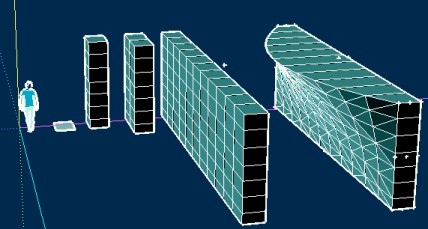
            One possibility
            Draw a rectangle
            Pull it with Ctrl any time you want
            Select all (triple click)
            Move it one time + CTRL = Copy
            Type "10*" (or more) = Multiple
            Select all (triple click)
            Group it
            Select group Right Click / FFD
            Edit the goup "FFD"
            Move points
            Et voilà 😉

            rec.jpg


            rec.skp

            Frenchy Pilou
            Is beautiful that please without concept!
            My Little site :)

            1 條回覆 最後回覆 回覆 引用 0
            • M 離線
              michaelland
              最後由 編輯

              Hi Chris, I've to say your work for this amazing RB is really great help for me! Thanks for your great job and sharing with us!!

              Michael Xie

              1 條回覆 最後回覆 回覆 引用 0
              • B 離線
                BTM
                最後由 編輯

                @skell said:

                I am trying to take a simple rectangular solid and deform it. i have to sub divide the surface? how can i go about this?

                Thanks,

                -Tony

                There's a subdivide feature in the script.right click> FFD> NxN> set subdivide to true.

                1 條回覆 最後回覆 回覆 引用 0
                • pilouP 離線
                  pilou
                  最後由 編輯

                  @unknownuser said:

                  FFD> NxN> set subdivide to true.

                  Yes but will be any effect on the subdivide of a simple rectangle!!!
                  Nothing will arrive when you will move a point of the FFD!

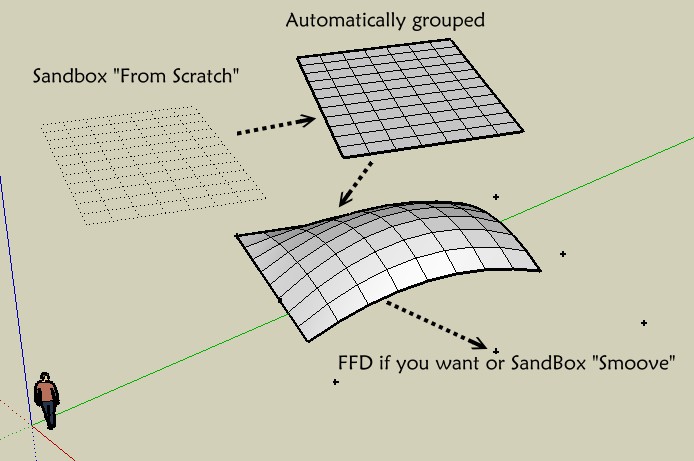
                  Seems the only easy methode is draw a rectangle with the Sandbox 😄
                  rect.jpg

                  Frenchy Pilou
                  Is beautiful that please without concept!
                  My Little site :)

                  1 條回覆 最後回覆 回覆 引用 0
                  • J 離線
                    jonorman
                    最後由 編輯

                    Hi..

                    I think there might be a problem with FFD an ASGVIS V-ray for scetchup.. FFD did not work while i had V-ray installed but now that i have uninstalled V-ray FFD works fine again.. Same problem as with subdivide and smooth script..
                    can anyone else confirm this ?? Btw, FFD is a brilliant script. 👍

                    1 條回覆 最後回覆 回覆 引用 0
                    • G 離線
                      GJV
                      最後由 編輯

                      woooaaaa

                      amazing plugin
                      just what I needed

                      thanx a lot 😄 !!!!

                      1 條回覆 最後回覆 回覆 引用 0
                      • D 離線
                        Dee256
                        最後由 編輯

                        Works nice! But "transformations reset" needs sometimes before FFD starts.

                        1 條回覆 最後回覆 回覆 引用 0
                        • I 離線
                          ideas_arte
                          最後由 編輯

                          .. thanks a million!

                          really useful too 👍

                          1 條回覆 最後回覆 回覆 引用 0
                          • N 離線
                            niarfe
                            最後由 編輯

                            this looks like a wonderful ruby!!!

                            too bad it's not working for me, it doesn't do anything, and when I try undoing it beaks my geometry apart!

                            would have loved to use it 😞

                            1 條回覆 最後回覆 回覆 引用 0
                            • Chris FullmerC 離線
                              Chris Fullmer
                              最後由 編輯

                              Its not over yet. If its not working, then its installed wrong or your using it wrong. Or you have version 4 of SU 😄

                              Could you provide a better description of what its doing wrong? Perhaps screenshots, maybe a video. Just give us some more detail and we'll get it working for you.

                              Chris

                              Lately you've been tan, suspicious for the winter.
                              All my Plugins I've written

                              1 條回覆 最後回覆 回覆 引用 0
                              • S 離線
                                sprezzaturon
                                最後由 編輯

                                I'm running Sketchup 7 and just added your FFD tool. I can move points but there is no 'update FFD' option when I'm finished. Is FFD not compatible with Sketchup 7?

                                Thanks!

                                1 條回覆 最後回覆 回覆 引用 0
                                • R 離線
                                  remus
                                  最後由 編輯

                                  The shape should update automatically, you might have to give it a bit of time, though.

                                  If that doesnt work delete the control points, explode the group, regroup and try again.

                                  http://remusrendering.wordpress.com/

                                  1 條回覆 最後回覆 回覆 引用 0
                                  • S 離線
                                    sprezzaturon
                                    最後由 編輯

                                    After waiting on a 2.4 GHz dual core XP system, nothing changed. I've just installed FFD on my computer (2.1 GHz dual core) and created a circle so I could elongate one point. Nothing. This is disappointing.

                                    1 條回覆 最後回覆 回覆 引用 0
                                    • R 離線
                                      remus
                                      最後由 編輯

                                      Have you tried it on 3d geometry? i think it can work on 2d things, but ive never gotten the hang of it.

                                      http://remusrendering.wordpress.com/

                                      1 條回覆 最後回覆 回覆 引用 0
                                      • H 離線
                                        hasan
                                        最後由 編輯

                                        @cphillips said:

                                        @unknownuser said:

                                        I can't get this script to work. Nothing happens.
                                        I create a sphere, group it, right-click and do 3x3 FFD, enter the new group with Construction Points, move some to another position, exit the group, right-click the sphere group and choose Update FFD. Nothing happens.

                                        Can you open the ruby console and see if it is printing any errors?

                                        Chris

                                        1 條回覆 最後回覆 回覆 引用 0
                                        • S 離線
                                          steven-arts
                                          最後由 編輯

                                          Hi Chriss,

                                          it really makes fun to work with FFD! I looked at your code and found the factorial function where you mentioned to encrease performance by adding a table for factorials. I made it dynamic and it boosts your code! Just replace the section with:

                                          
                                          #used by calcBernstein. could be replaced by a table since in 
                                          #this application n is never more than 3 (number of control points).
                                          $fTable = []
                                          def factorial(n)
                                              sum = $fTable.rassoc(n)
                                              if sum
                                              	return sum[0]
                                              else
                                          	sum = 1
                                          	sum.upto(n) { |i| sum *= i }
                                          	$fTable << [sum, n]
                                          	return sum
                                              end
                                          end
                                          

                                          Ciao, Stefan

                                          1 條回覆 最後回覆 回覆 引用 0
                                          • C 離線
                                            CPhillips
                                            最後由 編輯

                                            Thanks Stefan! Its a nice idea. I updated the plugin with an adaption of the code and applied it to the Bernstein Polynomial as well. It sped up the initial weighting of a big model from 75 seconds to 15 seconds.

                                            I also figured out a way (in theory) to speed up the actual deformation by like 50x. The only problem is I would have to handle moving the control points without using any of Sketchups tools like select, move and rotate. Ugh!

                                            1 條回覆 最後回覆 回覆 引用 0
                                            • 1
                                            • 2
                                            • 16
                                            • 17
                                            • 18
                                            • 19
                                            • 20
                                            • 21
                                            • 18 / 21
                                            • 第一個貼文
                                              最後的貼文
                                            Buy SketchPlus
                                            Buy SUbD
                                            Buy WrapR
                                            Buy eBook
                                            Buy Modelur
                                            Buy Vertex Tools
                                            Buy SketchCuisine
                                            Buy FormFonts

                                            Advertisement