sketchucation logo sketchucation
    • Login
    Oops, your profile's looking a bit empty! To help us tailor your experience, please fill in key details like your SketchUp version, skill level, operating system, and more. Update and save your info on your profile page today!
    ⚠️ Important | Libfredo 15.6b introduces important bugfixes for Fredo's Extensions Update

    Fredo6 Toposhaper Error

    Scheduled Pinned Locked Moved Solved Extensions & Applications Discussions
    15 Posts 5 Posters 425 Views 5 Watching
    Loading More Posts
    • Oldest to Newest
    • Newest to Oldest
    • Most Votes
    Reply
    • Reply as topic
    Log in to reply
    This topic has been deleted. Only users with topic management privileges can see it.
    • C Offline
      Chip_Cookie @Rich O Brien
      last edited by

      @Rich-O-Brien said in Fredo6 Toposhaper Error:

      If you want to share a file you could try a cloud hosting

      Maybe this works:

      Dropbox

      favicon

      (www.dropbox.com)

      Dave RD fredo6F 2 Replies Last reply Reply Quote 0
      • Dave RD Offline
        Dave R @Chip_Cookie
        last edited by Dave R

        @Chip_Cookie I ran TopoShaper on your contours and got this.
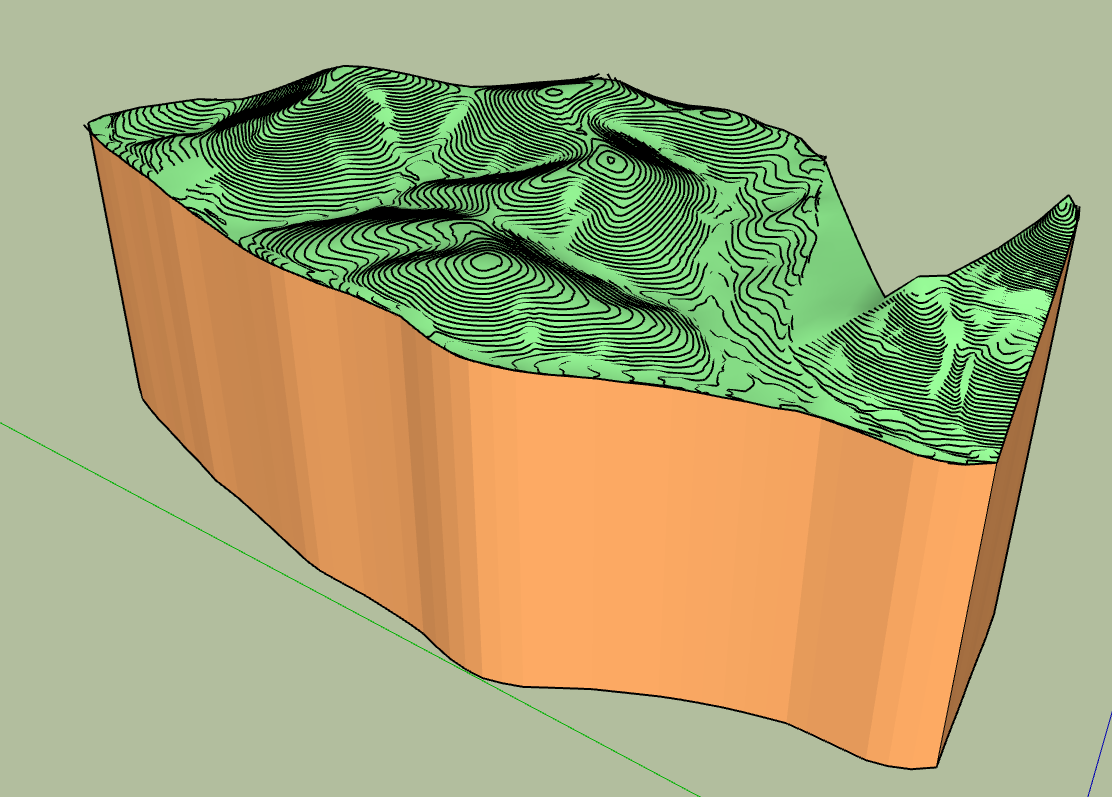
        Screenshot - 7_4_2024 , 1_14_48 PM.png

        It's in SU2024. What steps did you take when you ran it?

        149 Big Hill from DWG Contours Scaled topo.skp

        Etaoin Shrdlu

        %

        (THERE'S NO PLACE LIKE)

        G28 X0.0 Y0.0 Z0.0

        M30

        %

        1 Reply Last reply Reply Quote 0
        • C Offline
          Chip_Cookie
          last edited by

          One more thing, the native Sandbox tool 'from contours' works fine.

          1 Reply Last reply Reply Quote 0
          • fredo6F Offline
            fredo6 @Chip_Cookie
            last edited by

            @Chip_Cookie
            Use Toposhaper from outside the group not inside.

            C 1 Reply Last reply Reply Quote 2
            • C Offline
              Chip_Cookie @fredo6
              last edited by Chip_Cookie

              @fredo6 @Dave-R ,

              My mistake was not having the contour group as the outermost container. I had two groups, Contours group and Plat group, inside another group I called Survey. If I select (but don't enter) the Contour group within Survey and try to apply TopoShaper it fails. If I explode Survey, then select Contour, it works great.

              Thank you both for your help.

              1 Reply Last reply Reply Quote 0
              • Rich O BrienR Rich O Brien marked this topic as a question on
              • Rich O BrienR Rich O Brien has marked this topic as solved on
              • F Offline
                frankpondesign
                last edited by

                Dear Fredo, I have been trying for 2 days now to get Toposhaper to work in Sketchup and keep getting the the same error messsage "cannot hide layer that is a part of the active path". You have said a few times in various forums that you have to use Toposhaper from outside the group not inside, but I do not understand what you exactly mean with this.

                I import contour lines from autocad cilvil 3d to sketchup as a dwg file. (these contour work fine in Sandbox). I then put the contours in a seperate group. Then I select the contours in that group and start Toposhaper, it then works for a while and then I get the mentioned error message.

                Toposhaper has worked on 2-3 occissions, but it never was clear to me why it worked in tose cases. I could never replicate it afterwards.

                fredo6F 1 Reply Last reply Reply Quote 1
                • fredo6F Offline
                  fredo6 @frankpondesign
                  last edited by

                  @frankpondesign

                  You might be inside the group.

                  Go outside, select the group and call TopoShaper. This should work.

                  1 Reply Last reply Reply Quote 0
                  • F Offline
                    frankpondesign
                    last edited by

                    Sorry for being ignorant but I do not understand what you mean by being in the group?

                    I have created a group with only the contour lines in it. How do I selct that group without being in it?

                    1 Reply Last reply Reply Quote 1
                    • F Offline
                      frankpondesign
                      last edited by

                      Dropbox

                      favicon

                      (www.dropbox.com)

                      This is a videao of what I am doing, maybe that helps....

                      1 Reply Last reply Reply Quote 1
                      • fredo6F Offline
                        fredo6
                        last edited by

                        Just click on the group. Toposhaper will pick what is inside.

                        1 Reply Last reply Reply Quote 0
                        • F Offline
                          frankpondesign
                          last edited by

                          It does, but then I get the error message, see the video......

                          1 Reply Last reply Reply Quote 0
                          • 1 / 1
                          • First post
                            Last post
                          Buy SketchPlus
                          Buy SUbD
                          Buy WrapR
                          Buy eBook
                          Buy Modelur
                          Buy Vertex Tools
                          Buy SketchCuisine
                          Buy FormFonts

                          Advertisement


