sketchucation logo sketchucation
    • Login
    Oops, your profile's looking a bit empty! To help us tailor your experience, please fill in key details like your SketchUp version, skill level, operating system, and more. Update and save your info on your profile page today!
    πŸ”Œ Smart Spline | Fluid way to handle splines for furniture design and complex structures. Download

    [Plugin] 2D Tools

    Scheduled Pinned Locked Moved Plugins
    791 Posts 178 Posters 503.6k Views 177 Watching
    Loading More Posts
    • Oldest to Newest
    • Newest to Oldest
    • Most Votes
    Reply
    • Reply as topic
    Log in to reply
    This topic has been deleted. Only users with topic management privileges can see it.
    • S Offline
      sketchydog
      last edited by sketchydog

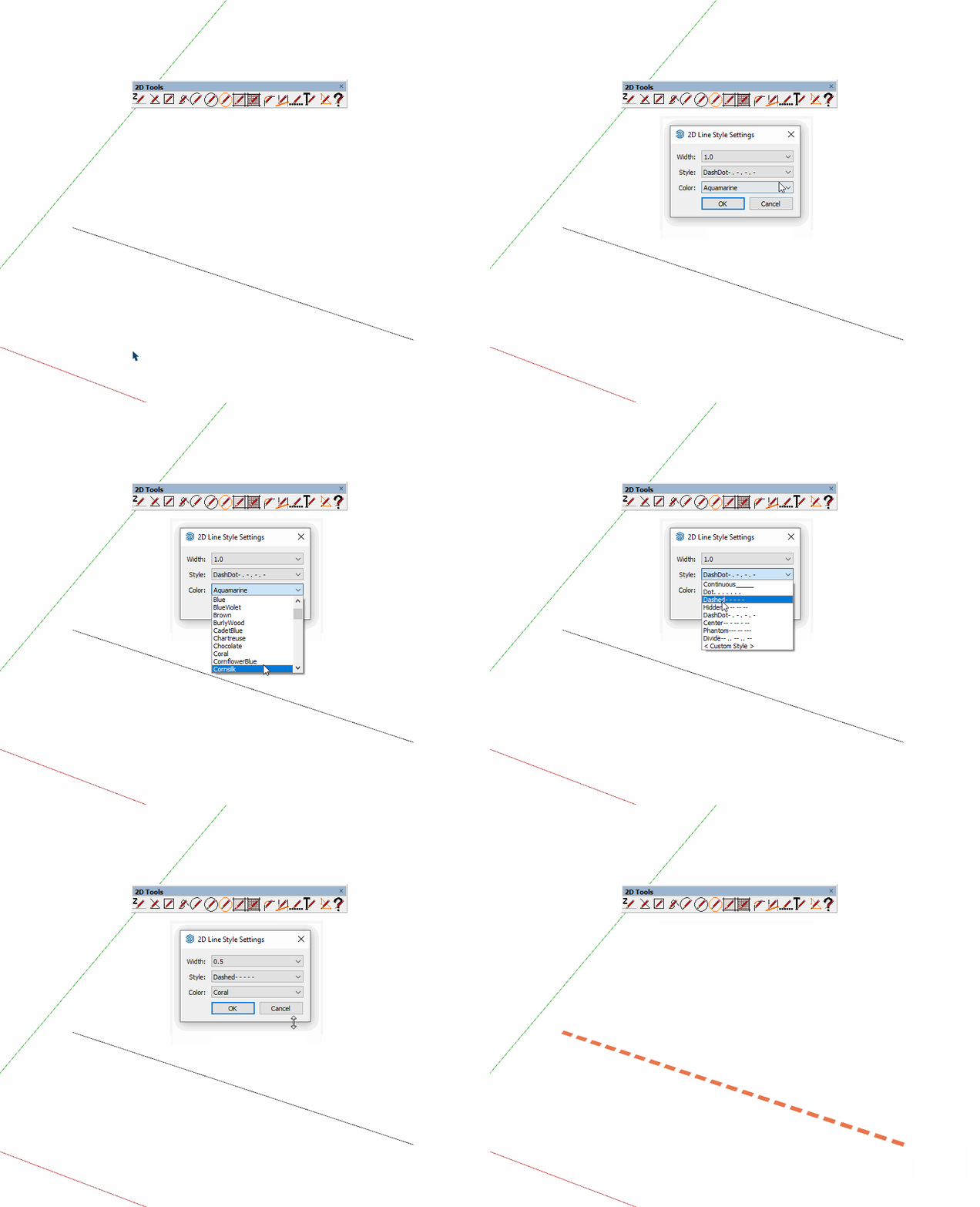
      I've enjoyed using 2D tools for years, especially LINE STYLE.
      Recently my Line Style tool doesnt work correctly. All it does is hide lines.
      In the past, you would right-click out in space beyond the model, and you'd get a context menu. (width, color, etc) That doesn't happen anymore. There's no menu.
      Other tools in the set seem to work OK. Any ideas? Anyone else having this issue?

      1 Reply Last reply Reply Quote 0
      • S Offline
        sketchydog
        last edited by

        Down on the status bar, I see:

        2D Line Style: 1.0 Continuous_____Black. Right-Click(empty space)= Settings-Dialog. ,Enter>/Double-Click=End.

        But when I right click in empty space, there's no menu that pops up.

        1 Reply Last reply Reply Quote 0
        • Dave RD Offline
          Dave R
          last edited by Dave R

          @sketchydog said:

          Recently my Line Style tool doesnt work correctly.

          What version of SketchUp?

          I just tested it in SketchUp 2023 and it works fine.
          Click on the picture

          Etaoin Shrdlu

          %

          (THERE'S NO PLACE LIKE)

          G28 X0.0 Y0.0 Z0.0

          M30

          %

          1 Reply Last reply Reply Quote 0
          • TIGT Offline
            TIG Moderator
            last edited by

            I starting to rewrite it to be compatible with newer SketchUps...
            It was never published,
            In the newer version - tTry the tapping the TAB key instead of right-clicking in open-space.
            Changes to SketchUp messed with right-clicking !
            Try the latest version from the PluginStore...
            But I've PM'd my v8 RBZ to you and Dave R for your info...

            TIG

            1 Reply Last reply Reply Quote 0
            • S Offline
              sketchydog
              last edited by

              @dave r said:

              @sketchydog said:

              Recently my Line Style tool doesnt work correctly.

              What version of SketchUp?

              I just tested it in SketchUp 2023 and it works fine.
              [attachment=0:3jtn2osm]<!-- ia0 -->2dt.gif<!-- ia0 -->[/attachment:3jtn2osm]

              Dave- I'm on 2022.0.354 64 bit on PC

              1 Reply Last reply Reply Quote 0
              • S Offline
                sketchydog
                last edited by

                @tig said:

                I starting to rewrite it to be compatible with newer SketchUps...
                It was never published,
                In the newer version - tTry the tapping the TAB key instead of right-clicking in open-space.
                Changes to SketchUp messed with right-clicking !
                Try the latest version from the PluginStore...
                But I've PM'd my v8 RBZ to you and Dave R for your info...

                TIG
                Tab doesn't do anything.
                What I get when right clicking in empty space (with nothing selected) is a context menu that has:

                Invert Selection
                Make Component
                Make Group

                1 Reply Last reply Reply Quote 0
                • Dave RD Offline
                  Dave R
                  last edited by

                  @sketchydog said:

                  I'm on 2022.0.354 64 bit on PC

                  Please update your forum profile.

                  Etaoin Shrdlu

                  %

                  (THERE'S NO PLACE LIKE)

                  G28 X0.0 Y0.0 Z0.0

                  M30

                  %

                  1 Reply Last reply Reply Quote 0
                  • S Offline
                    sketchydog
                    last edited by

                    @sketchydog said:

                    @tig said:

                    I starting to rewrite it to be compatible with newer SketchUps...
                    It was never published,
                    In the newer version - tTry the tapping the TAB key instead of right-clicking in open-space.
                    Changes to SketchUp messed with right-clicking !
                    Try the latest version from the PluginStore...
                    But I've PM'd my v8 RBZ to you and Dave R for your info...

                    TIG
                    I just downloaded that RBZ. I'll let you know in a second.

                    1 Reply Last reply Reply Quote 0
                    • S Offline
                      sketchydog
                      last edited by

                      @tig said:

                      I starting to rewrite it to be compatible with newer SketchUps...
                      It was never published,
                      In the newer version - tTry the tapping the TAB key instead of right-clicking in open-space.
                      Changes to SketchUp messed with right-clicking !
                      Try the latest version from the PluginStore...
                      But I've PM'd my v8 RBZ to you and Dave R for your info...

                      TIG
                      YES! Now TAB works for the menu!
                      Right click gives me the three items listed previously.
                      THANK YOU FOR THIS AND FOR YOUR AWESOME SERVICE TO OUR COMMUNITY!

                      1 Reply Last reply Reply Quote 0
                      • R Offline
                        rv1974
                        last edited by

                        @TIG
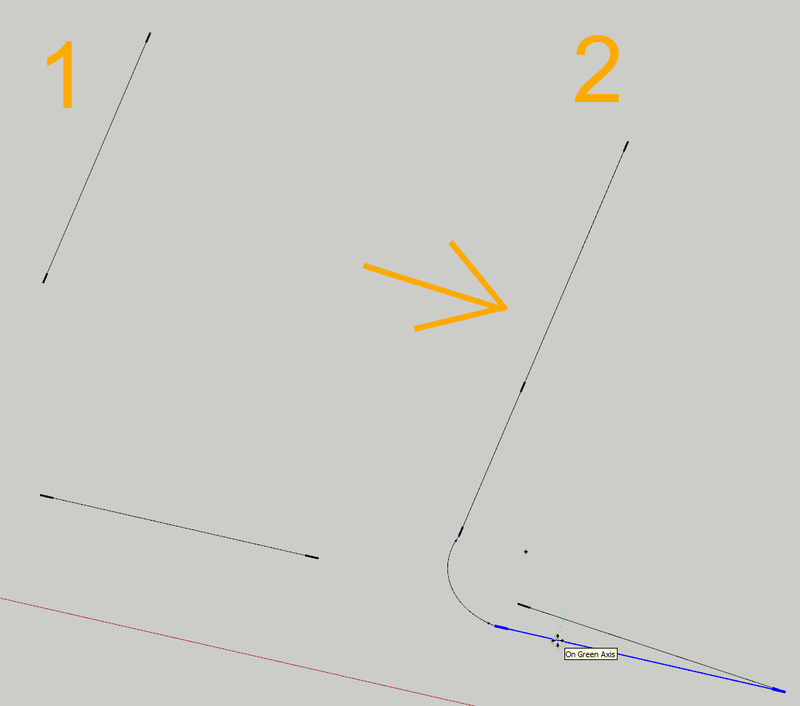
                        There's an annoying bug in fillet tool:
                        When the tool has to extend existing edges it creates new colinear overlapping
                        ones above existing. Ideally ONE not broken edge is expected. Any chance to fix it please?
                        Also, is it possible to grant an option to NOT create Cpoints at fillet centers at all?
                        P.S. Hereby is skp file. try to fillet the edges on the left with radius of 10.
                        Thanks

                        kkkk.skp


                        SketchUp_YZ3z7DNGfh.png

                        1 Reply Last reply Reply Quote 0
                        • A Offline
                          alskaro
                          last edited by

                          Hello ! Thank you very much for this really promising plugin and for all the others !
                          I'm on an 2019 i7 mbp and only the line is working with 7.7 version, rectangle and others make the wheel spins forever and I must force quit... Am I doing something wrong? Do you have any idea ?
                          Thank you sir,
                          have a nice day

                          TIGT 1 Reply Last reply Reply Quote 0
                          • TIGT Offline
                            TIG Moderator @alskaro
                            last edited by

                            @alskaro
                            What is your actual OS ?
                            Is there any output in the Ruby Console ?
                            There are some issues with some of the tools in newer MAC OSs.
                            A fix has not yet been published.

                            TIG

                            1 Reply Last reply Reply Quote 0
                            • R Offline
                              rv1974
                              last edited by

                              @TIG any possibility to fix the overlapping lines bug please (described on 7 Dec 23, 3 posts above)? Or at least any comment? Thank you in advance

                              R 1 Reply Last reply Reply Quote 0
                              • R Offline
                                rv1974 @rv1974
                                last edited by rv1974

                                @rv1974 17b9ef9a-2149-4f90-9899-898cedd08453-SketchUp_TcrN0WVpCS.gif
                                The plugin creates new (extended) edges without deleting the old (shorter) ones.
                                Some additional extra steps (Edge inspector) are needed every time the fillet tool was used which is ridiculous. Its important because it creates overlapping profiles if this faulty linework will serve as paths in Profile Builder.

                                TIGT 1 Reply Last reply Reply Quote 0
                                • R rv1974 referenced this topic on
                                • TIGT Offline
                                  TIG Moderator @rv1974
                                  last edited by

                                  @rv1974

                                  There's several things wrong with the 2Dtoolset in the latest SketchUp versions, but I've attached a corrected RB file, which you should substitute in the 2Dtools subfolder and restart SketchUp to sync.
                                  It will break the 'signing' but provided your Extension Manager's Loading Policy is set to 'Unrestricted' it will load OK...
                                  It fixes the duplicated lines issue you've reported...
                                  2DfilletTool.rb

                                  TIG

                                  R 1 Reply Last reply Reply Quote 0
                                  • R Offline
                                    rv1974 @TIG
                                    last edited by

                                    thank you very much

                                    1 Reply Last reply Reply Quote 0
                                    • D Offline
                                      DragonSonic @TIG
                                      last edited by

                                      You can add chamfer tool same auto cad

                                      1 Reply Last reply Reply Quote 0
                                      • ntxdaveN Offline
                                        ntxdave
                                        last edited by

                                        With my current version of the 2D Tools, if I try to create 2D Text, it always add "2D Text" far to the left of the text I entered. The only way I can modify it is to post the text, right click on it, got to the drop-down tool bar and then edit the text.

                                        Am I doing something wrong or is the way the current version of the tool works?

                                        Press F1...thank me later

                                        1 Reply Last reply Reply Quote 0
                                        • TIGT Offline
                                          TIG Moderator
                                          last edited by

                                          Double-click on the "2D Text" in the dialog, so it is all selected, including any spaces off to the right of it.
                                          Then delete that and type in the new text you want - read the full usage Help on the tool - e.g. how to add carriage-returns by inserting \n

                                          TIG

                                          1 Reply Last reply Reply Quote 0
                                          • ntxdaveN Offline
                                            ntxdave
                                            last edited by ntxdave

                                            Just wanted to give you an idea of what I am getting with I use the tool.
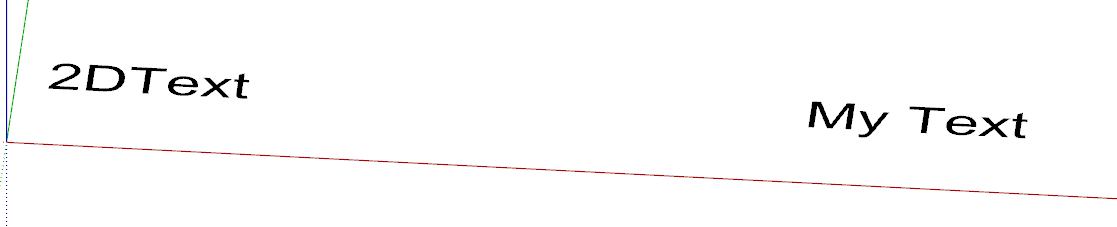
                                            image.png

                                            Also, Here is what I read in the Help documentation

                                            e5da42d2-48dd-403c-95ae-1fa2bb9977cf-image.png

                                            Here is an example where I tried to edit the text twice. I have not been able to delete the "added" text and blank spaces.


                                            db301b85-09c8-4e71-80da-1ec55630d9ca-image.png

                                            Press F1...thank me later

                                            1 Reply Last reply Reply Quote 0
                                            • 1
                                            • 2
                                            • 36
                                            • 37
                                            • 38
                                            • 39
                                            • 40
                                            • 39 / 40
                                            • First post
                                              Last post
                                            Buy SketchPlus
                                            Buy SUbD
                                            Buy WrapR
                                            Buy eBook
                                            Buy Modelur
                                            Buy Vertex Tools
                                            Buy SketchCuisine
                                            Buy FormFonts

                                            Advertisement