Some advice please
-
I am sometimes pretty thick when it comes to getting things to work in Animator, so I come for advice.
I have an airplane with 4 props.
I cannot for the life of me get each individual prop to spin.
I haven't been able to find a tutorial that fits this particular problem.
Can anyone offer advice?
Thanks -
Have you tried selecting all 4 props and applying the same animation to all of them at the same time? I do not have access to my computer to try it for you.
-
Yes, but when I do this all 4 props rotate in a large arc.
I don't have it Animator in front of me right now, but I have also tried the button next to the rotate button, which if my memory is correct, is for "rotating individual objects", but when I go from one prop to the next it seems to forget that the first prop was animated.
I'm quite sure it's me, not the software, but nothing I do seems to work. -
Can you send rotate one, then copy and paste the animation details to each of the other three props.
Sorry, I do note have access to my computer but I think I posted something similar on YouTube some time ago.
-
I didn't know how to do what you suggested, so I went in to try and find out. In the process I ended up figuring it out.
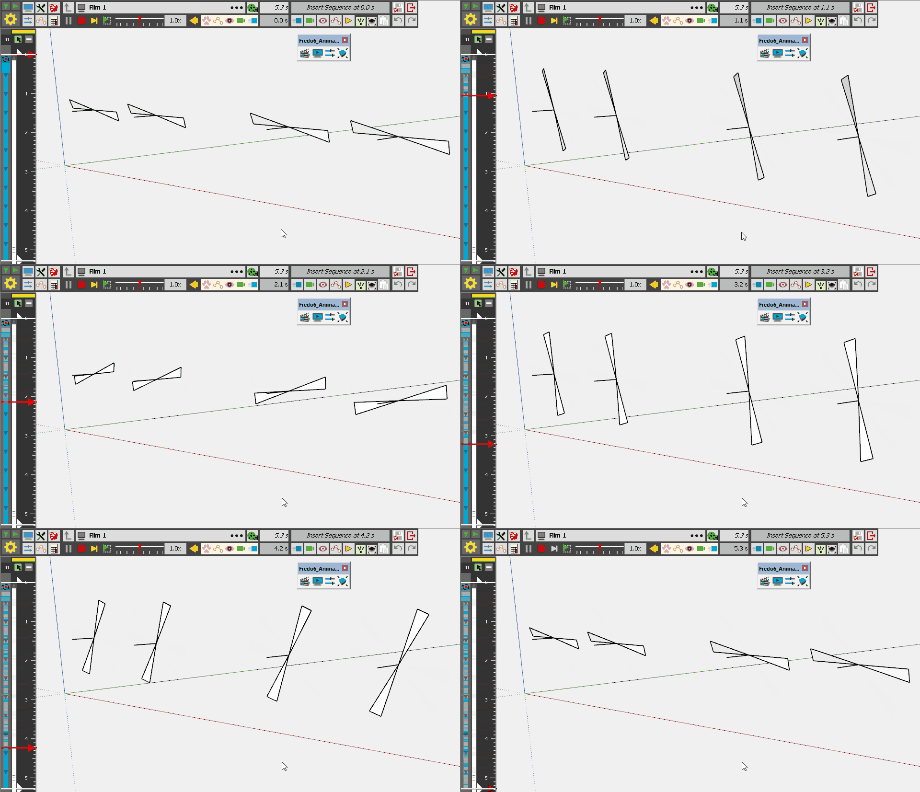
When I used the "Spin"- Individual rotation of each selected object, I was selecting one prop, then performing the rotation, then move on to select the next prop.
However this time I selected all the props first, then performed the Individual rotation, and it worked.
Really logical when I finally figure it out, just takes me a while sometimes.
Thanks so much for your support on this ntxdave.
Cheers -
hi Dale - as I am also dealing with this issue I found a way through trial and error

@ntxdave said:
... then copy and paste the animation details to each of the other three props...
Hi Dave
 I just can't figure out how this copy-paste procedure works - I find and can click the copy button of any movement but after that I have no idea what and how I have to do next to paste this movement to any other object(s)...
 -
Spin and use CTRL to multi pick objects...


Then the rest is up to preference for speed etc....
-
Thanks for the post Rich. My laptop has died so I was kind of going by memory which obviously is not that good. You showed him what I really was trying to say earlier but did not explain correctly.

-
Thanks Rich.
This is pretty much how I ended up solving it. I think the term individual had me thinking I had to do each prop individually, rather than selecting them all .




Hello! It looks like you're interested in this conversation, but you don't have an account yet.
Getting fed up of having to scroll through the same posts each visit? When you register for an account, you'll always come back to exactly where you were before, and choose to be notified of new replies (either via email, or push notification). You'll also be able to save bookmarks and upvote posts to show your appreciation to other community members.
With your input, this post could be even better 💗
Register Login


Advertisement