Vray load error
-
Dear all,
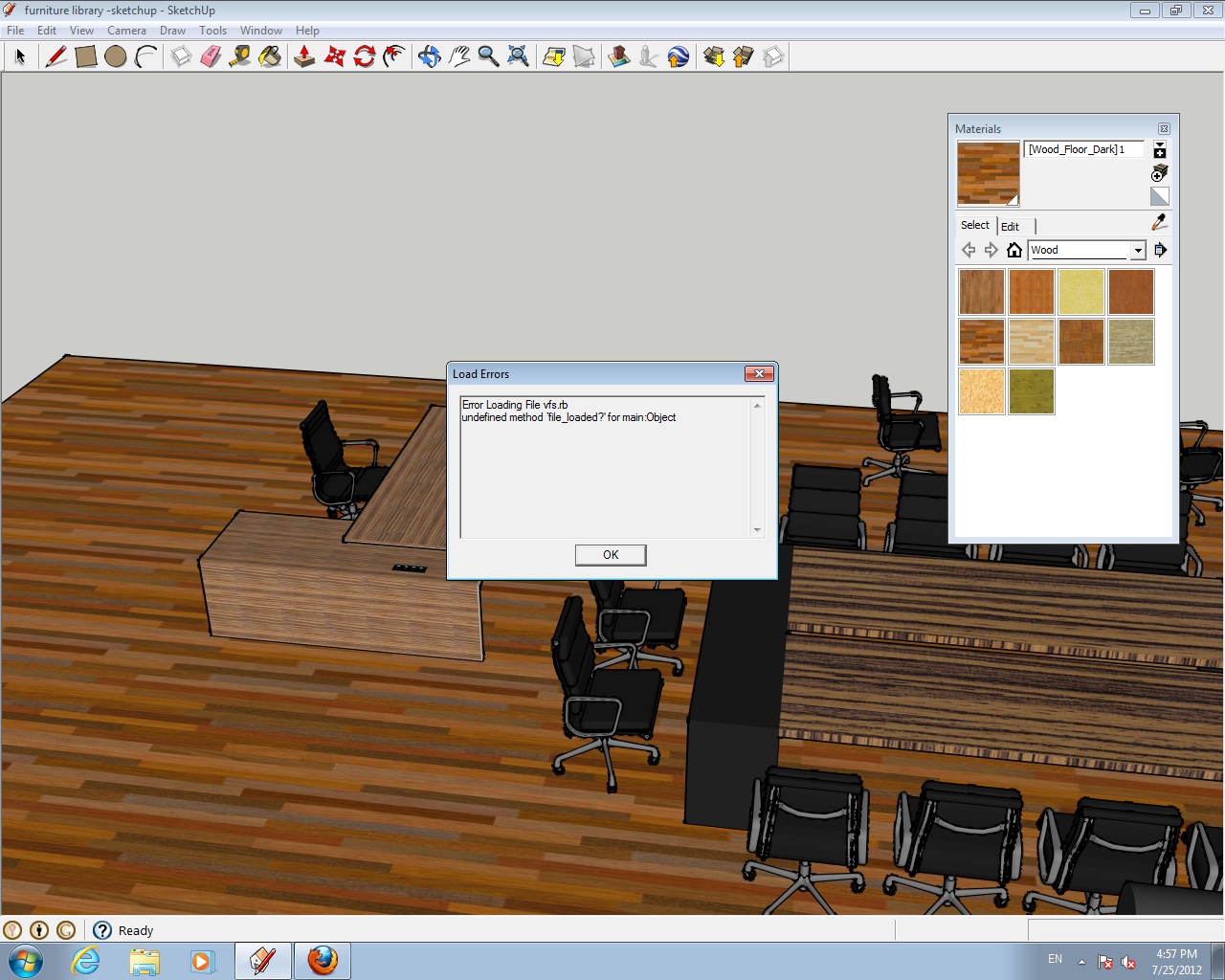
I got this message when i open my vray for sketchup
Load Errors
Error Loading file vfs.rb
undifined method 'file_loaded?' for main bject
bject
Please helpThanks
ADEEB
-
Did you try contacting Chaos Group customer support?
-
Did you use the installer? You could try uninstalling and then reinstalling
-
i already contact chaos group technical team and still waiting for the reply i. i already reinstall for couple of time and the error still come out. Is there any solution?thanks
-
It's due to a silly but - they forgot to add
require 'sketchup.rb'. Add that to the top of thevfs.rbfile.
Few people experience this because most people who use V-Ray for SketchUp uses other plugins as well. I assume you have no other plugins installed. -
Thanks its work!!
 .. but now i have another problem.. when i click render nothing happen.. even i just create simple box and i hit render nothing happen.
 -
@adeeb88 said:
Thanks its work!!
.. but now i have another problem.. when i click render nothing happen.. even i just create simple box and i hit render nothing happen.Open the Ruby Console (Window > Ruby Console) and see if you are getting any errors.
-
soo, I am having same problem. I hit render and nothing apears. The ruby console generates this problem :
Done processing compdefs - Elapsed time: 21.6650002002716
Scene processed in 30.3639998435974 seconds
undefined methodentities' for #<Sketchup::ComponentInstance:0x31b1f338> + C:\ProgramData/ASGVIS/VfS/Ruby/VfSExport.rb:475:inlight_to_xml'C:\ProgramData/ASGVIS/VfS/Ruby/VfSExport.rb:687:ininstance_node_to_xml'C:\ProgramData/ASGVIS/VfS/Ruby/VfSExport.rb:685:ineach'C:\ProgramData/ASGVIS/VfS/Ruby/VfSExport.rb:685:ininstance_node_to_xml'C:\ProgramData/ASGVIS/VfS/Ruby/VfSExport.rb:606:innode_to_xml'C:\ProgramData/ASGVIS/VfS/Ruby/VfSExport.rb:1816:inwrite_to_xml'C:\ProgramData/ASGVIS/VfS/Ruby/VfSExport.rb:1815:ineach'C:\ProgramData/ASGVIS/VfS/Ruby/VfSExport.rb:1815:inwrite_to_xml'C:\ProgramData/ASGVIS/VfS/Ruby/VfSExport.rb:1937:inrender'C:\ProgramData/ASGVIS/VfS/Ruby/R2PToolbar.rb:32Is there any chance I solve it out? I have reached the point I'm not able to do anything else for the project, which is almost ready. File is 63MB quite big, but not huge yet.
Anyone?
-
You want to contact support for that.
-
I have run into the same exact error. I do not know what you mean by adding "require sketchup infront of the rb file"
very confused! any suggestions would helpthanks!
-
If you edit the VFS.RB file with a text editor and put: require 'sketchup.rb' on the first line.
-
Hi.
Im facing an issue with my Vray renderer.It keeps showing me this message that i have attached as a scheenshot.
Opened Ruby Console in the Windows menu and it showed me the following message :
C:/Program Files/Chaos Group/V-Ray/V-Ray for SketchUp/extension/ruby/live_scene/live_scene:267:inlaunch_render' C:/Program Files/Chaos Group/V-Ray/V-Ray for SketchUp/extension/ruby/gui/commands:52:inblock in module:GUI'
C:/Program Files/Chaos Group/V-Ray/V-Ray for SketchUp/extension/ruby/gui/commands:13:incall' C:/Program Files/Chaos Group/V-Ray/V-Ray for SketchUp/extension/ruby/gui/commands:13:inblock in generate_command'
SketchUp:1:in `call'However, I'm unable to understand what is wrong.
Kindly advice



Hello! It looks like you're interested in this conversation, but you don't have an account yet.
Getting fed up of having to scroll through the same posts each visit? When you register for an account, you'll always come back to exactly where you were before, and choose to be notified of new replies (either via email, or push notification). You'll also be able to save bookmarks and upvote posts to show your appreciation to other community members.
With your input, this post could be even better 💗
Register Login


Advertisement